
Kratos PhaaS Targets Microsoft 365 Users Across the US and Europe


 8 min. read
  Published on
A phishing-as-a-service platform called Kratos is targeting Microsoft 365 users across the United States, Europe and other regions. The operation uses fake document alerts, invoices and file-sharing messages to direct employees to convincing Microsoft login pages that steal their credentials.
Researchers at ANY.RUN identified 1,628 sandbox sessions involving the two main Kratos generations. Only 156 had previously carried a Kratos label, leaving 1,484 sessions hidden among more general phishing detections. Researchers found another nine sessions tied to an early version.

Access content across the globe at the highest speed rate.
🔥 Save 81% + 2 bonus months! 🔥
70% of our readers choose Private Internet Access
70% of our readers choose ExpressVPN
2
Browse the web from multiple devices with industry-standard security protocols.
🔥 Save 73%! 🔥

Faster dedicated servers for specific actions (currently at summer discounts)
🔥 Save 69%! 🔥
The campaign has affected organizations in more than 20 countries. ANY.RUN identified 148 suspected victim organizations, with notable activity in the United States, Spain and Southern Europe.
What is the Kratos phishing service?
Kratos is a subscription-based phishing kit designed to make Microsoft 365 credential theft easier for criminal affiliates. The service provides the phishing pages, management tools and deployment features needed to run campaigns without building the infrastructure from scratch.
The Kratos operator panel appears to have been active since September 2025, while related activity first appeared in ANY.RUN’s sandbox in January 2026.
Its administration panel reportedly lets affiliates deploy phishing domains, restrict campaigns by country and send stolen information through Telegram or email. Operators can also choose between Cloudflare Turnstile, reCAPTCHA and hCaptcha to filter visitors and obstruct automated analysis.
- Microsoft 365 is the main impersonated brand.
- Observed victims include small businesses, law firms, schools and industrial organizations.
- The operation uses both disposable domains and compromised legitimate websites.
- Multiple affiliates may run campaigns through the same phishing platform.
How a Kratos phishing attack works
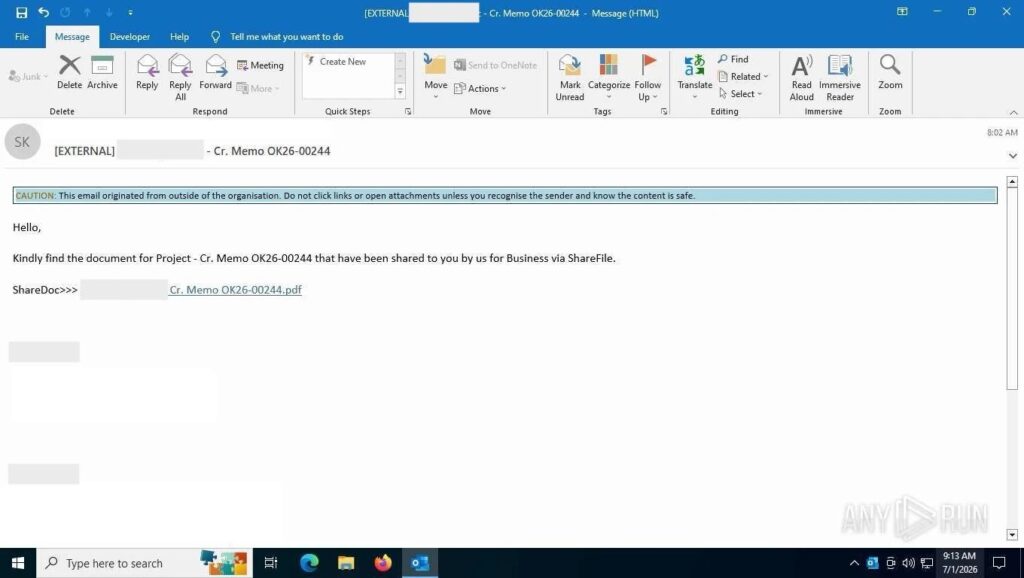
The attack normally begins with an email claiming that someone shared a document, sent an invoice or requested a DocuSign signature. These familiar business messages aim to persuade the recipient to follow a link without closely checking its destination.
In 114 analyzed sessions, the phishing message had already passed through a corporate email filter or secure email gateway before researchers submitted it to the sandbox. This shows that an email security verdict alone may not stop every Kratos message.
The initial link often points to a legitimate online service. SharePoint and OneDrive represented the main delivery route and appeared in 351 observed tasks. Attackers also used Microsoft Forms, Canva, Tilda, systeme.io and file-sharing platforms as intermediary pages.
- The victim receives a document, invoice or signature notification.
- The email link opens a trusted cloud or file-sharing service.
- An intermediary page redirects the browser to a Kratos-controlled site.
- A CAPTCHA or Cloudflare Turnstile check filters automated visitors.
- A fake Microsoft sign-in page requests the victim’s email address and password.
- The page submits the captured information to a PHP collection endpoint.
The fake Microsoft login page
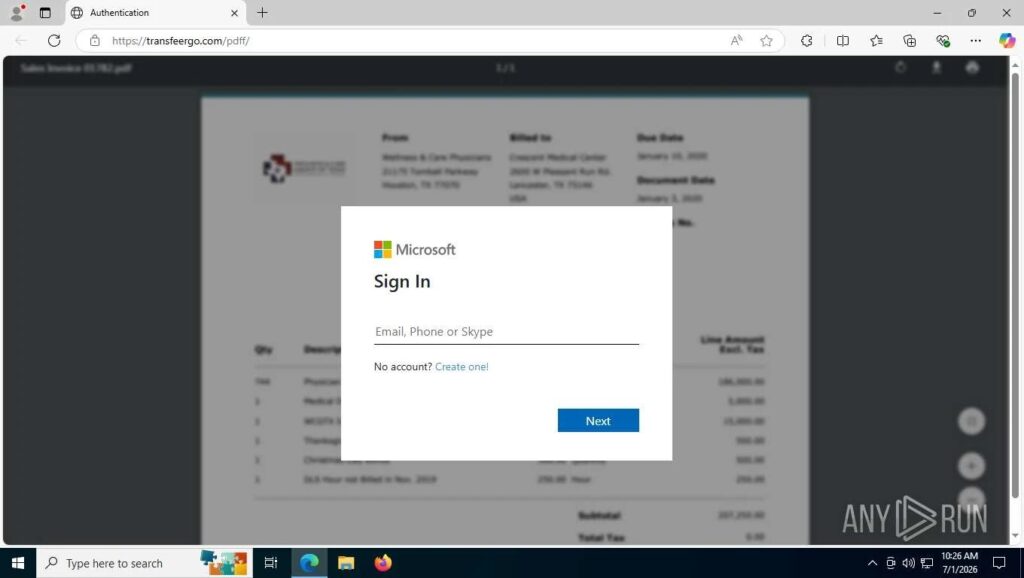
Before displaying the login form, Kratos commonly shows an animated envelope over a blurred document or invoice. The page displays “Loading in progress…” and usually gives the browser tab the title “Authentication.”
The login screen then imitates Microsoft’s sign-in interface. Kratos V1 sends submitted information to next.php or a related endpoint, while V2 commonly uses save.php. The early V0 version sent data to /PTT/SOft/mini.php.
Victims generally receive three opportunities to enter a password. Afterward, the V1 kit may redirect them to Office.com, while other versions can display an incorrect password message. These actions help the fake page appear more believable and reduce the chance that the victim immediately recognizes the theft.
Some sessions also opened a WebSocket connection. Researchers said this behavior could indicate live credential relaying or adversary-in-the-middle activity. However, a WebSocket connection by itself does not prove that Kratos captured a session token.
Three generations of Kratos phishing pages
Researchers identified three versions of the phishing kit. Each generation uses different page assets and collection code, but shared files and infrastructure connect them to the wider Kratos operation.
| Generation | Main characteristics | Collection method | Observed sessions |
|---|---|---|---|
| V0 | “Secure File Access” page and /PTT/SOft/ path | mini.php | 9 |
| V1 | Microsoft sign-in copy using barr.svg, lg.svg and ani.gif | next.php and related variants | 1,397 |
| V2 | Updated assets including dsa.svg, sid.gif and imag.jpg | save.php | 231 |
V1 remained the dominant version in the researchers’ data. Its activity increased from 93 sessions in January to 393 in June 2026, although sandbox submissions do not provide a complete count of attacks occurring in the wild.
Kratos detection fingerprints
The combination of barr.svg and lg.svg is the strongest reported fingerprint for Kratos V1. According to the Kratos technical analysis, this pairing produced 90% recall and a false-positive rate close to zero during negative-control testing.
Security teams should correlate file requests, page behavior, content hashes, collection endpoints and delivery paths. Attackers can replace domains quickly, but reused kit assets may remain visible across separate campaigns.
A shared IP address or hosting provider does not prove that two phishing campaigns have the same operator. Kratos shares some infrastructure with other phishing kits, including Tycoon, Flowerstorm, Sneaky2FA and EvilProxy, so defenders should require the Kratos asset pattern before assigning the family name.
| Type | Indicator | Description |
|---|---|---|
| V1 assets | /assets/img/barr.svg and /assets/img/lg.svg | Primary Kratos V1 fingerprint when both appear in one session |
| V2 assets | dsa.svg, sid.gif and imag.jpg | Combined fingerprint for Kratos V2 |
| V0 endpoint | /PTT/SOft/mini.php | Credential collection path used by the early version |
| V1 endpoints | next.php, nex.php, n3xt.php, officers*eur.php | Observed V1 collection scripts and variants |
| V2 endpoint | save.php | Credential collection script used by V2 |
| Early domain | dwbud[.]vilaribit[.]com | Domain connected to the V0 branch |
| Operator IP | 41.128.0.142 | Operator infrastructure address geolocated to Egypt |
| SHA-256 | c447e75f1029ed7a5882add16bcd13ad44be3bd47c93c830ff39185e23d25ebb | Hash for a shared styles.css file linking V1 and V2 activity |
How organizations should respond
Organizations should block confirmed disposable attack domains but review shared hosting domains before applying broad restrictions. Some Kratos deployments use compromised legitimate websites, while others sit behind Cloudflare or large cloud providers that also serve legitimate customers.
If a victim entered only a password, responders should disable or secure the account, reset its password and review its multifactor authentication methods. Microsoft’s compromised account response guidance recommends disabling the affected account during an investigation whenever possible.
Administrators should also revoke active sessions, remove unrecognized MFA methods, review consented applications and inspect administrative roles. The same Microsoft 365 recovery procedure advises checking mailbox forwarding and hidden inbox rules that an attacker could use to maintain access or monitor financial conversations.
- Disable or temporarily block the affected account.
- Reset the password using a separate trusted communication channel.
- Revoke active sign-in sessions and refresh tokens.
- Remove unfamiliar authentication methods and registered devices.
- Review inbox rules, hidden rules and external forwarding settings.
- Check recent sign-ins, IP addresses, applications and user agents.
- Inspect SharePoint, OneDrive and mailbox activity for data access.
- Review payment requests and messages sent from the compromised account.
Why a password reset may not be enough
If attackers capture a valid session or refresh token through an AiTM attack, they may retain access after the user changes the password. Responders should revoke sessions and investigate whether the attacker accessed email, files or administrative tools.
Phishing-resistant authentication provides stronger protection than passwords and basic approval prompts. Microsoft’s Token Protection guidance explains how device-bound sign-in tokens can reduce replay attacks on supported devices and applications.
Token Protection currently supports native applications rather than browser-based applications. Supported cloud resources include Exchange Online, SharePoint Online and Microsoft Teams, so organizations should combine it with Conditional Access, managed-device requirements and phishing-resistant MFA.
Kratos shows how phishing operators can combine trusted services, anti-bot systems and reusable templates to bypass basic controls. Defenders need behavioral detections and a clear account-compromise playbook alongside email filtering.
Organizations considering Microsoft Entra Token Protection should begin with a pilot group and report-only Conditional Access policies. They should also monitor interactive and non-interactive sign-in logs before wider enforcement.
FAQ
Kratos is a subscription-based phishing platform that helps criminals create and manage campaigns designed to steal Microsoft 365 credentials.
Kratos activity has affected organizations in more than 20 countries. Researchers observed notable concentrations in the United States, Spain and Southern Europe.
Kratos sends victims through trusted cloud or file-sharing services before redirecting them to a fake Microsoft sign-in page. The page submits entered credentials to an attacker-controlled PHP endpoint.
The strongest reported V1 fingerprint is a request for both barr.svg and lg.svg during the same session. V2 can be identified through the combined presence of dsa.svg, sid.gif and imag.jpg.
Not always. If an attacker obtained a valid session or refresh token, administrators should also revoke active sessions, review MFA methods, inspect mailbox rules and investigate recent account activity.


Read our disclosure page to find out how can you help VPNCentral sustain the editorial team Read more


Improve this guide




User forum
0 messages