
LG Monitor App Installer Is Automatically Appearing on Windows PCs and Showing McAfee Ads


 8 min. read
  Published on
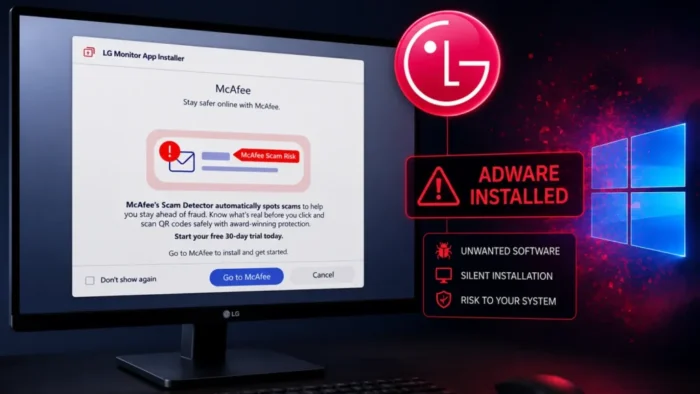
Certain LG monitors can trigger the automatic installation of LG Monitor App Installer when connected to a Windows PC. The installation can happen in the background without a separate consent prompt, after which the app may launch at startup and display advertisements for McAfee and other LG software.
A Gamers Nexus investigation reproduced the behavior with an LG UltraGear 34GX900A-B connected to a Windows 11 computer. Windows retrieved LG device packages and installed the companion app through Microsoft’s device-app delivery system.

Access content across the globe at the highest speed rate.
🔥 Save 81% + 2 bonus months! 🔥
70% of our readers choose Private Internet Access
70% of our readers choose ExpressVPN
2
Browse the web from multiple devices with industry-standard security protocols.
🔥 Save 73%! 🔥

Faster dedicated servers for specific actions (currently at summer discounts)
🔥 Save 69%! 🔥
The findings do not show that LG monitors contain malware or executable advertising code in their firmware. Instead, the monitor’s device identity prompts Windows to retrieve an associated app from the Microsoft Store. Independent reporting about the LG monitor app confirmed that the resulting notifications promoted a McAfee trial.
What the LG Monitor App Installer Does
LG Monitor App Installer is an official LG Electronics application distributed through the Microsoft Store. It acts as a hub for software associated with supported LG monitors rather than providing all monitor controls itself.
The Microsoft Store listing for LG Monitor App Installer identifies software such as OnScreen Control, LG Switch, Dual Controller, LG Calibration Studio and other utilities. These programs can provide window management, display configuration and calibration features on compatible models.
McAfee also appears among the applications promoted by the installer. The reported pop-up directs users toward a trial offer, but the available testing does not establish that the full McAfee product is installed automatically without another user action.
How a Monitor Can Trigger an Automatic App Installation
The installation is enabled by a Windows feature for hardware support apps. A device manufacturer can associate a Microsoft Store application with metadata identifying a monitor, printer, camera or another peripheral.
When the device is connected, Windows checks its metadata and identifies the associated application. Microsoft’s documentation for automatic UWP device-app installation says Windows can then download and install the app without displaying an installation notification.
The mechanism is a documented Windows capability rather than an exploit. Microsoft says automatic installation generally requires the computer to be online, the user to be signed in to the Microsoft Store and recommended settings to have been enabled during Windows setup.
| Stage | What happens | User interaction |
|---|---|---|
| Device detection | Windows identifies the connected LG monitor | No separate action may be required |
| Metadata lookup | Windows retrieves information linked to the monitor model | Usually happens in the background |
| Driver delivery | Any required device packages are obtained through Windows Update | May appear in update history |
| App installation | The associated Microsoft Store app is installed | A dedicated consent prompt may not appear |
| App startup | LG Monitor App Installer may run and show software recommendations | The user may first notice a pop-up |
Why the App Is Being Described as Adware
Adware commonly refers to software that displays advertisements or promotes commercial products. The term does not automatically mean that an application is malicious, steals information or compromises a computer.
In this case, the criticism concerns the combination of automatic installation, startup behavior and repeated promotional notifications. The app arrives through a trusted Windows channel, but users may not knowingly request it before seeing an advertisement.
During the Gamers Nexus reproduction test, the McAfee promotion appeared after 31 of 32 system boots. The Verge’s report also noted earlier user complaints about LG Monitor App Installer appearing automatically and showing large promotional notifications.
Which LG Monitors May Be Affected?
The behavior has been reproduced with the LG UltraGear 34GX900A-B. User reports have also named the UltraGear 27GP83B and 27GN800, but reports from individual systems do not establish a complete list of affected models.
Several conditions can influence whether the app appears, including Windows configuration, Microsoft Store status, internet access and the device metadata associated with a particular monitor. Connecting an LG display does not guarantee that every Windows computer will install the app.
Users can determine whether the software is present by searching the Start menu or opening Settings, selecting Apps and then Installed apps. The relevant entry is named LG Monitor App Installer.
Is LG Monitor App Installer Malware?
No evidence currently shows that LG Monitor App Installer is malware. It is an official LG application distributed through Microsoft’s Store infrastructure and uses a documented Windows installation process.
However, legitimate software can still be unwanted. An application that installs without a clear prompt, starts automatically and displays frequent third-party promotions may reasonably be classified as bloatware or adware-like software.
The application’s Microsoft Store page lists permissions that include internet access and access to system resources. Those permission labels describe the capabilities granted to the app, but they do not prove that it steals passwords, records browsing activity or performs other malicious actions.
- The app is published through the Microsoft Store.
- The installation uses an intended Windows hardware-app feature.
- The app promotes a McAfee trial and LG monitor utilities.
- The McAfee advertisement is not evidence that McAfee was fully installed.
- No confirmed malware infection has been linked to the tested monitor.
- The lack of an explicit installation prompt creates a legitimate consent concern.
How to Remove the LG Monitor App Installer
Users who do not need the companion software can uninstall it without disconnecting the monitor. A standard external monitor should continue providing basic display functions through Windows and the installed display driver.
- Open Windows Settings.
- Select Apps and then Installed apps.
- Search for LG Monitor App Installer.
- Select the menu beside the app and choose Uninstall.
- Check the Startup apps page for any remaining LG monitor utility.
- Remove McAfee separately only if the security product was installed.
- Restart the computer and confirm that the promotion no longer appears.
Users can also open Task Manager, select Startup apps and disable LG Monitor App Installer. This prevents the program from launching at sign-in but leaves it installed.
Uninstalling the Store app does not necessarily remove the monitor driver or device metadata. Microsoft explains in its device-app installation guidance that drivers, metadata and Microsoft Store applications are managed separately.
How Organizations Can Reduce Unwanted Device Apps
Businesses should manage peripheral software through approved application lists rather than allowing every hardware companion utility by default. Most monitors can provide normal video output without optional vendor management applications.
Windows administrators can review the Group Policy setting named Prevent automatic download of applications associated with device metadata. It is located under Computer Configuration, Administrative Templates, System and Device Installation on supported Windows editions.
Blocking the setting can also prevent useful companion apps for printers, cameras and other devices. Organizations should test the policy before deploying it widely and provide an approved method for installing peripheral software when business functions require it.
| Recommended check | Purpose |
|---|---|
| Inventory LG monitor applications | Find computers where the installer is already present |
| Review startup entries | Identify utilities that launch automatically |
| Check Windows update history | Confirm when the LG package was delivered |
| Assess device metadata policy | Decide whether automatic hardware apps should be permitted |
| Allow only required utilities | Reduce unnecessary software and promotional notifications |
| Monitor app permissions | Track changes to approved peripheral software |
A Transparency and Consent Problem
The central issue is not a monitor secretly carrying malware. It is a software delivery system that can place a promotional application on a computer before the user is clearly told what will be installed.
Microsoft’s own documentation warns developers that automatic installation without a notification may confuse users. The LG case shows why the distinction between a necessary device driver and an optional advertising or software-recommendation app needs to be clear.
LG and Microsoft could address the concern by requiring a visible consent screen, separating drivers from promotional utilities and making startup notifications optional. Until then, Windows users and administrators should review newly installed applications after adding peripheral hardware.
FAQ
No confirmed evidence shows that the monitors contain or install malware. Certain models can trigger Windows to install the official LG Monitor App Installer, which displays software recommendations and McAfee promotions.
Available testing shows that the LG app displays an advertisement for a McAfee trial. It does not establish that the full McAfee product is installed unless the user accepts the offer.
Windows supports automatic installation of Microsoft Store hardware apps linked to device metadata. When a compatible monitor is detected, Windows can retrieve the associated app without showing a separate installation notification.
Users who do not need LG’s optional monitor utilities can uninstall the app through Windows Settings. Basic monitor operation should continue through the normal display and monitor drivers.
Administrators can evaluate the Windows Group Policy setting called Prevent automatic download of applications associated with device metadata. The policy should be tested because it can also block useful companion apps for other hardware.


Read our disclosure page to find out how can you help VPNCentral sustain the editorial team Read more


Improve this guide




User forum
0 messages