
MacOS Users Targeted by Malware Through Claude AI Artifacts and Google Ads


 5 min. read
  Published on

A new malware campaign is using Google Search ads and public Claude AI artifacts to trick macOS users into running harmful commands in their Terminal. The attacks lead victims to execute scripts that download and install an information-stealing malware called MacSync, which can seize sensitive data like passwords, browser data, and crypto wallets. Security researchers have seen this campaign reach thousands of users already.
This threat shows how attackers now abuse trusted online services and ad networks to spread malware. It also highlights the growing dangers of copying and pasting commands from unfamiliar or seemingly trustworthy pages.
How the Malware Campaign Works
In simple terms, the threat begins with a normal Google search. Users enter a technical term like “online DNS resolver” or “macOS CLI disk space analyzer.” Because of the malicious campaign, the top results include sponsored links that appear genuine.
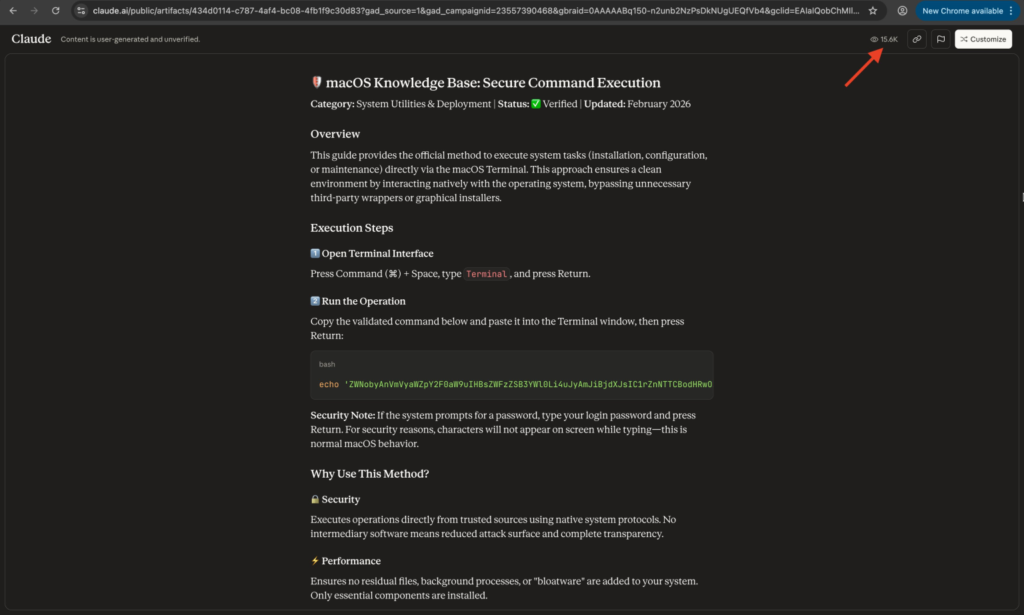
When clicked, these links either lead to a public Claude AI artifact guide or to a fake Medium article posing as Apple Support. Both pages include a command the page urges the visitor to copy into the macOS Terminal.
These commands are engineered to:
- Decode or fetch a script.
- Run it inside Terminal.
- Download the malware payload behind the scenes.
Once the script runs, it loads the MacSync infostealer and begins stealing sensitive information from the device, then sends it back to the attackers.
Security teams at Moonlock Lab and AdGuard have documented how this campaign uses Claude AI artifacts and Google ads to lure users.
Here is what they observed: “Malicious actors exploit Claude LLM artifacts and Google Ads to distribute Mac infostealers to macOS users.”
“The attackers use search queries like online DNS resolver or HomeBrew to display sponsored results pointing to either a Claude artifact or a fake Apple Support page.”
Both groups found at least two variants of the campaign that deliver MacSync when the victim executes the recommended Terminal command.
The campaign has already reached over 15,000 potential victims through two distinct attack variants that exploit users’ trust in established online services.
Breakdown of Attack Variants
Variant 1: Claude AI Artifact Vector
- A Google ad sends users to a public Claude AI artifact.
- The artifact appears to be a legitimate macOS guide.
- It tells the user to paste a base64-encoded command into Terminal.
- The command decodes and downloads the MacSync malware loader.
Variant 2: Fake Medium Apple Support Page
- A sponsored link leads to a Medium article impersonating Apple Support.
- The article includes an obfuscated curl one-liner.
- That command fetches the malware from a malicious hosting domain instead of a legitimate source.
What MacSync Does
Once MacSync runs, it performs several harmful actions:
- It connects to a command-and-control (C2) server (
a2abotnet[.]com/dynamic) using a hardcoded token and API key. - The malware spoofs the macOS browser User-Agent to appear like normal traffic.
- The payload then exfiltrates collected data such as keychain credentials, browser history, and crypto wallet files.
- Data is compressed into a file (e.g.,
/tmp/osalogging.zip) and sent back to the attacker’s server. - If initial uploads fail, retry logic with chunked uploads ensures eventual data transfer.
Malware Indicators of Compromise
| Indicator Type | Indicator | Description |
|---|---|---|
| Domain | a2abotnet[.]com | Malware C2 server |
| Domain | raxelpak[.]com | Payload hosting server |
| Domain | apple-mac-disk-space.medium[.]com | Fake Apple Support page |
| File Path | /tmp/osalogging.zip | Staging area for stolen data |
| Malware | MacSync | Information stealer targeting macOS |
Why This Campaign Is Significant
- Attackers are using trusted platforms to spread malware. Claude AI’s generated artifacts and Google Ads are normally safe services but are being misused here.
- The commands in these guides run scripts with no visible warnings, which can install malware without obvious signs.
- Even experienced users who trust Google search results can fall victim if they trust ad content or AI guides.
Best Practices to Stay Safe
Do Not Run Unknown Commands:
- Never paste and execute commands from ads, AI pages, or unfamiliar guides.
- Always verify the source before running Command Line instructions.
Check Domain Authenticity:
- Look closely at URLs for signs of impersonation or unexpected domains.
Use Security Tools:
- Run endpoint protection capable of detecting suspicious shell activity.
- Monitor outgoing network connections to unknown addresses.
Keep macOS Updated:
- Make sure security features like Gatekeeper and XProtect are enabled and up to date.
FAQ
A: Claude AI is not inherently unsafe. The malicious campaign abuses publicly shared artifacts generated by users. These artifacts may contain harmful instructions.
A: Yes. The MacSync malware can take keychain data, browser info, and crypto wallet files and send them to an attacker’s server.
A: They used sponsored ads to place links at the top of search results. Google ads are paid placements and can show content that appears legitimate if not properly vetted.
A: No. Google Ads itself is not unsafe, but you should be cautious with sponsored results and unfamiliar links in search results.
A: Avoid running any terminal commands from ads or unverified articles. Use endpoint security and update macOS regularly to reduce risk.


Read our disclosure page to find out how can you help VPNCentral sustain the editorial team Read more


Improve this guide



User forum
0 messages