
Massive Password Spray Attack Targets Microsoft Azure CLI Accounts


 9 min. read
  Published on
A large automated password spray campaign is targeting Microsoft Azure CLI sign-ins and has already led to confirmed Microsoft account compromises, according to a new Huntress report.
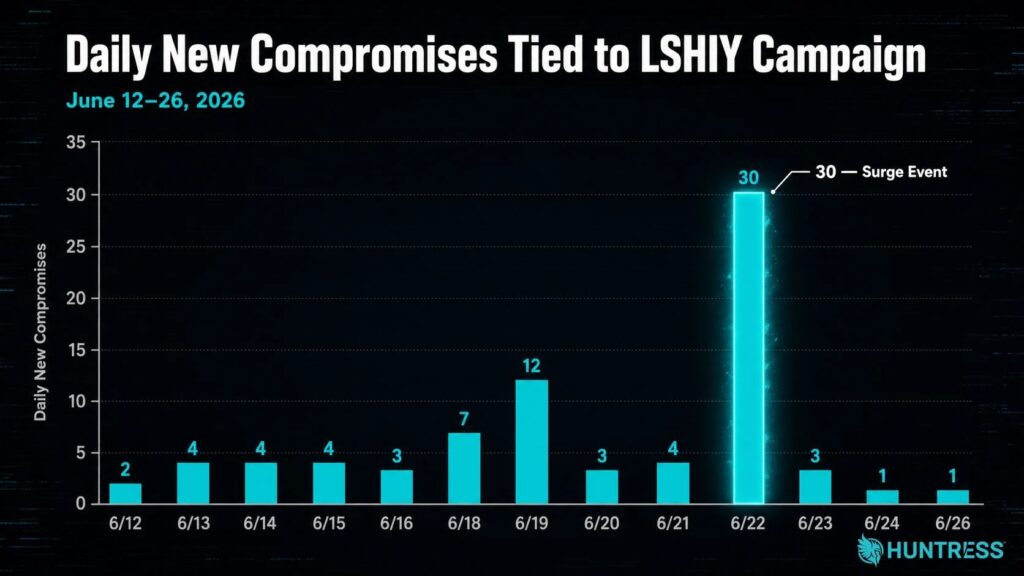
Huntress said the attacker made more than 81 million login attempts against its customer accounts between June 12 and June 26, 2026. The campaign compromised at least 78 Microsoft accounts across 64 organizations during that period.

Access content across the globe at the highest speed rate.
🔥 Save 81% + 2 bonus months! 🔥
70% of our readers choose Private Internet Access
70% of our readers choose ExpressVPN
2
Browse the web from multiple devices with industry-standard security protocols.
🔥 Save 73%! 🔥

Faster dedicated servers for specific actions (currently at summer discounts)
🔥 Save 69%! 🔥
The attack matters because some victims already had multi-factor authentication and Conditional Access policies in place. The problem was not MFA itself, but weak coverage, report-only policies, trusted-location gaps, and use of the Resource Owner Password Credentials flow.
What Happened In The Azure CLI Password Spray Campaign
Password spraying is a login attack where an actor tries common or previously leaked passwords across many accounts. This avoids some account lockout protections because each account may see only a small number of attempts at a time.
In this campaign, the actor targeted Microsoft 365 and Azure-related logins through Azure CLI paths. Huntress said confirmed compromises were initially low, often two to four accounts per day, before a major spike on June 22 affected 30 identities across 23 businesses.
The attacker appeared to use old username and password pairs that had already appeared in breach data but had not been rotated. That makes the campaign opportunistic, since the attacker seems to care more about credential reuse than specific industries.
| Detail | Reported finding |
|---|---|
| Observed window | June 12 to June 26, 2026 |
| Login attempts | More than 81 million against Huntress customer accounts |
| Confirmed compromises | At least 78 Microsoft accounts |
| Affected organizations | 64 organizations |
| Major spike | 30 identities across 23 businesses on June 22 |
| Main technique | Password and token spraying through Azure CLI and ROPC-related paths |
Why Azure CLI Became A Useful Target
Azure CLI is a legitimate Microsoft tool used by developers, administrators, and IT teams to manage Azure resources. That also makes it attractive to attackers because successful authentication can lead to useful tokens and cloud access.
Microsoft’s Conditional Access documentation says Azure CLI appears under the Admin Portals grouping, but it also warns that policies apply to resources rather than public client applications. In some cases, admins must target All resources to cover services that do not appear clearly in the app picker.
That distinction matters for this campaign. Some tenants enforced MFA only for selected cloud apps, such as admin portals, and did not fully cover Azure CLI sign-ins used by the attacker.
How The ROPC Flow Helped The Attack
The campaign used the Resource Owner Password Credentials flow, often shortened to ROPC. Microsoft says ROPC allows an application to sign in a user by directly handling the user’s password.
That design creates security tradeoffs. Microsoft recommends against using ROPC when better options exist because it requires a high degree of trust in the app and does not fit modern interactive authentication patterns.
Microsoft also states that the username and password flow has been deprecated due to security risks and is not compatible with Conditional Access and MFA. If an attacker has valid credentials and a tenant has gaps in policy coverage, the token request can succeed without the MFA prompt defenders expected.
- The attacker tests old username and password pairs from breach data.
- The login attempt targets Azure CLI-related authentication paths.
- The ROPC flow sends credentials directly to the token endpoint.
- Misconfigured Conditional Access policies may not enforce MFA for that path.
- A valid password can produce access even when the tenant appears protected on paper.
Why MFA Did Not Stop Every Compromise
The campaign does not prove that MFA is useless. It shows that MFA can fail when organizations scope policies too narrowly or leave important flows uncovered.
According to the Huntress analysis, 15 of the 23 businesses hit during the June 22 spike had MFA implemented and enforced through Conditional Access. However, those controls did not trigger for several reasons.
Some policies applied only to specific apps, while others covered only administrator groups. Several tenants required MFA only from non-trusted locations, and geolocation inconsistencies caused some attacker IPs to appear as U.S.-based even when other telemetry placed them in China.
| Misconfiguration | Why it helped the attacker | Defensive fix |
|---|---|---|
| MFA scoped to selected apps | Azure CLI sign-ins were not always covered | Target all required resources rather than only obvious portals |
| MFA scoped only to admins | Sprayed non-admin users remained exposed | Apply MFA to all users, with limited emergency exclusions |
| Trusted location exceptions | Bad geolocation data let some attempts look trusted | Review named locations and avoid relying only on geography |
| Report-only policies | Policies logged events but did not block or prompt | Move tested policies to enforced mode |
| ROPC left reachable | Token requests could avoid interactive MFA paths | Block or restrict high-risk authentication flows where possible |
Where The Traffic Came From
Huntress traced much of the activity to IPv6 range 2a0a:d683::/32, associated with LSHIY LLC and AS32167. The company said LSHIY also operates AS955, with third-party telemetry linking related IPv6 ranges to China.
Some IP geolocation data conflicted during the investigation. One telemetry source placed many IPs in China, while another placed some in Nebraska, which may have helped the attacker slip through location-based trust rules.
Huntress also said LSHIY has listed business addresses in Hong Kong, Wuhan, and a shared office space in New York. The company reported the activity through LSHIY’s abuse mechanism, but said it had not received a response when its report was published.
What Microsoft Says About Risky Authentication Flows
Microsoft’s documentation warns that some authentication flows create more risk than others. Its Conditional Access guidance says administrators can control certain authentication flows and recommends blocking device code flow wherever possible when organizations do not need it.
Microsoft’s guide to blocking authentication flows recommends including all users where possible, excluding only necessary emergency access accounts, and targeting all resources when building certain high-risk flow policies.
For ROPC specifically, Microsoft says accounts that require MFA will be blocked because the flow does not support the required interactive challenge. The risk appears when organizations believe they have full MFA coverage, but their Conditional Access scoping does not cover the actual sign-in path being abused.
What Admins Should Do Now
Administrators should first check whether their organization sees failed or successful sign-ins involving Azure CLI, unusual IPv6 addresses, ROPC-style token activity, or repeated attempts against many accounts.
They should also review Conditional Access scope. Microsoft’s target resources guidance explains how policies apply to resources and why some applications require broader targeting through All resources.
Security teams should not rely only on the number of failed attempts. Huntress warned that the most heavily sprayed tenants may not be the most compromised, so defenders should prioritize valid credential use, successful token issuance, and suspicious account behavior.
- Require MFA for all users, not only administrators or privileged groups.
- Review policies scoped to selected apps and move critical coverage to All resources where appropriate.
- Turn report-only Conditional Access policies into enforced policies after testing.
- Review trusted locations and do not depend only on IP geolocation.
- Restrict Azure CLI access to users who genuinely need it.
- Rotate credentials found in breach data or reused across services.
- Look for successful token grants after repeated failed sign-in attempts.
- Monitor IPv6 traffic linked to suspicious autonomous systems and hosting providers.
How To Reduce ROPC And Password-Based Risk
Organizations should reduce dependence on password-based flows wherever possible. Microsoft’s desktop app token guidance points developers toward safer authentication approaches instead of username and password flows.
Admins should also identify apps, scripts, and automation jobs that still depend on raw username and password authentication. Replacing those workflows can take planning, but leaving them active creates a path attackers can abuse when passwords leak.
Where possible, teams should enforce strong authentication at the client authentication level, block legacy or high-risk flows, and test Conditional Access behavior with real sign-in scenarios before assuming a policy works.
Why This Campaign Matters
The campaign shows that identity security failures often come from policy gaps rather than missing security products. A tenant can have MFA, Conditional Access, and monitoring, yet still expose accounts when controls do not cover every relevant authentication path.
It also highlights a growing problem for Microsoft 365 and Azure environments. Attackers do not need to exploit a software vulnerability when old credentials, permissive flows, and incomplete policy coverage can give them a valid token.
Microsoft’s ROPC documentation makes clear that the flow carries risks that safer authentication methods avoid. Huntress’ findings now show how those risks can surface during a large-scale password spraying campaign.
FAQ
It is a large automated campaign in which attackers tried old or leaked username and password pairs against Microsoft Azure CLI-related sign-ins. Huntress observed more than 81 million login attempts against its customer accounts between June 12 and June 26, 2026.
No. The campaign succeeded where MFA or Conditional Access policies had gaps, such as policies scoped only to selected apps, selected groups, trusted locations, or report-only mode. MFA still helps when it is enforced correctly across relevant users, resources, and flows.
ROPC stands for Resource Owner Password Credentials. It is an OAuth flow that lets an application exchange a username and password directly for tokens. Microsoft recommends avoiding it when safer authentication flows are available.
Azure CLI is a legitimate administrative tool that can request tokens for Azure and Microsoft resources. If attackers validate a leaked password through a weakly protected authentication path, they may gain access without triggering the expected MFA prompt.
Organizations should enforce MFA for all users, review Conditional Access scope, restrict Azure CLI access, move report-only policies to enforced mode after testing, rotate leaked credentials, reduce ROPC use, and monitor successful token grants after repeated failed login attempts.


Read our disclosure page to find out how can you help VPNCentral sustain the editorial team Read more


Improve this guide




User forum
0 messages