
Miasma Backdoor Compromises AsyncAPI npm Packages and Developer Machines


 8 min. read
  Published on
Four trusted AsyncAPI npm packages were compromised to deliver Miasma v3, a persistent Node.js backdoor capable of running remote shell commands on developer machines and CI systems. The attack affected five package versions published on July 14, 2026.
The malware did not run during package installation. It activated when an application, documentation tool, generator, or build process loaded an affected module. Systems that only downloaded or cached the packages may not have executed the payload.

Access content across the globe at the highest speed rate.
🔥 Save 81% + 2 bonus months! 🔥
70% of our readers choose Private Internet Access
70% of our readers choose ExpressVPN
2
Browse the web from multiple devices with industry-standard security protocols.
🔥 Save 73%! 🔥

Faster dedicated servers for specific actions (currently at summer discounts)
🔥 Save 69%! 🔥
According to JFrog Security Research, the active Miasma configuration enabled persistence, encrypted command-and-control communication, arbitrary shell execution, and remote payload replacement. Any developer workstation or CI runner that loaded an affected module should be investigated as potentially compromised.
Which AsyncAPI npm Packages Were Compromised?
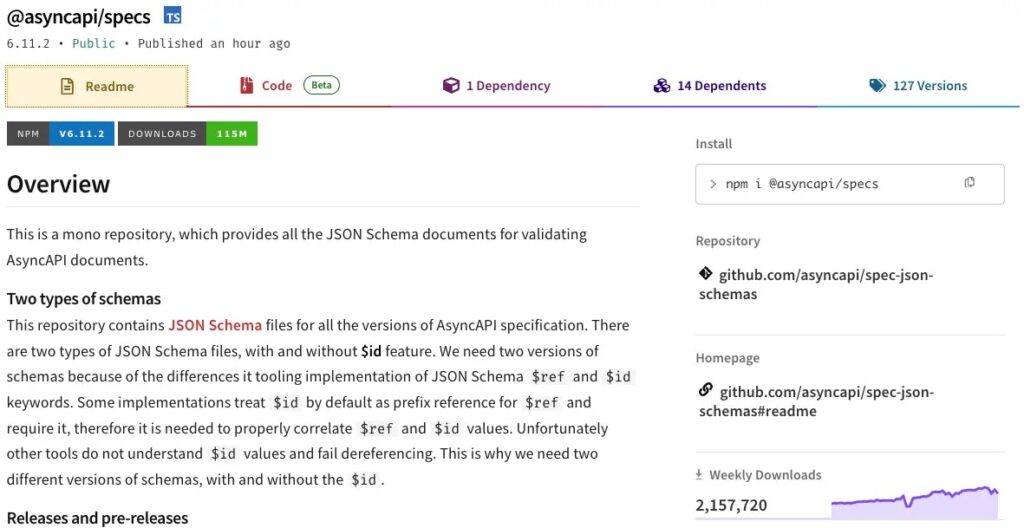
The incident affected four package names and five releases. The @asyncapi/specs package had both a stable and an alpha release containing the malicious code.
The affected releases have since been removed from the npm registry. However, they may remain in lockfiles, package caches, internal registries, container images, development environments, and previously completed CI jobs.
The following versions and replacement guidance come from the StepSecurity incident analysis.
| Package | Malicious version | Known clean replacement |
|---|---|---|
@asyncapi/generator | 3.3.1 | 3.3.0 |
@asyncapi/generator-helpers | 1.1.1 | 1.1.0 |
@asyncapi/generator-components | 0.7.1 | 0.7.0 or another verified clean release |
@asyncapi/specs | 6.11.2 | 6.11.1 |
@asyncapi/specs | 6.11.2-alpha.1 | 6.11.1 |
Miasma Runs When an Application Loads the Package
The compromised packages did not contain malicious preinstall, install, or postinstall scripts. Instead, the attacker inserted an obfuscated JavaScript block into ordinary runtime files.
Node.js evaluated the code when a vulnerable module was loaded through CommonJS. The legitimate function containing the altered file did not need to be called. This means a package could remain inactive after installation and execute later when a developer ran the generator or a CI pipeline imported the module.
The injected block launched a detached Node.js process. It also ignored the child process output, allowing the expected development or build task to continue without obvious interruption. On Windows, the launcher suppressed the console window.
How the Three-Stage Miasma Infection Works
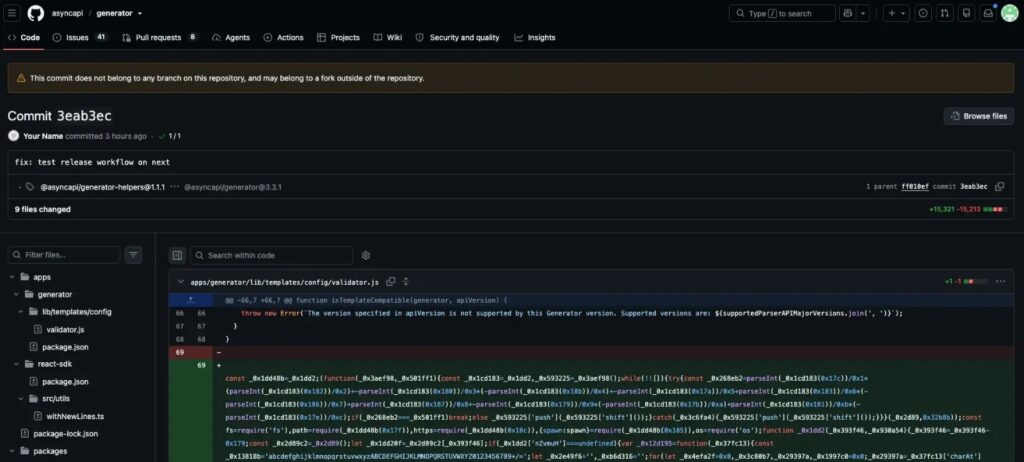
The first stage consisted of about 7.7 KB of obfuscated JavaScript inserted at module scope. In some files, the attacker added hundreds of leading spaces to push the code far to the right in conventional diff views.
The launcher then downloaded a file named sync.js from an IPFS gateway. It saved the file in a user-writable NodeJS directory and started it as another detached background process.
The downloaded file contained an encrypted wrapper. After decryption, researchers recovered a bundled Node.js application identifying itself as Miasma v3 and using the campaign name miasma-train-p1.
| Stage | Activity | Security impact |
|---|---|---|
| Stage 1 | Obfuscated code runs when Node.js loads the package | Triggers without an npm installation script |
| Stage 2 | Downloads and launches sync.js from IPFS | Creates a detached background process |
| Stage 3 | Decrypts and runs Miasma v3 | Provides persistence, remote shell access, and payload updates |
Miasma v3 Operated as a Persistent Remote Access Trojan
Miasma belongs to a broader malware framework that contains credential theft, package propagation, repository poisoning, AI-tool poisoning, and mutation features. Researchers found those automatic modules disabled in the AsyncAPI deployment.
The observed configuration still gave attackers significant control. JFrog’s Miasma v3 analysis found that the active command handler could execute arbitrary shell commands, return command output, download replacement payloads, and change its callback interval.
An operator could therefore search for files, access credentials available to the compromised user, or install additional tools. On developer machines and CI runners, exposed information could include source code, GitHub credentials, npm access, cloud identities, deployment secrets, SSH keys, and signing material.
| Capability | Status in the observed deployment |
|---|---|
| Persistence | Enabled |
| Command-and-control communication | Enabled |
| Arbitrary shell execution | Enabled |
| Remote payload replacement | Enabled |
| Automatic credential harvesting | Disabled |
| Automatic package propagation | Disabled |
| AI-tool poisoning | Disabled |
| Metamorphic mutation | Disabled |
Valid npm Provenance Did Not Make the Releases Safe
The malicious releases carried valid provenance because AsyncAPI’s legitimate GitHub Actions workflows published them through npm’s OIDC trusted-publisher integration. Researchers found no evidence that the attacker stole an npm publishing token.
The attacker instead pushed unauthorized commits to release-triggering branches in two AsyncAPI repositories. The projects’ real workflows then built and published the altered code. The StepSecurity investigation linked the packages to direct commits using the placeholder identity Your Name <[email protected]>.
As explained in the npm provenance documentation, provenance connects a package to its source repository and build environment. It does not prove that maintainers reviewed or authorized every source change included in that build.
Cross-Platform Miasma Persistence and Host Indicators
Miasma attempted user-level persistence on Linux, macOS, and Windows. Some persistence commands contained implementation errors and may not survive a logout or restart. Those errors do not prevent the first payload execution or an active command-and-control session.
The malware also created a lock file to prevent duplicate processes and stored a unique victim identity in a path designed to resemble legitimate operating-system or application data.
Incident responders should preserve these files before removing them when an investigation or legal requirement calls for forensic evidence.
| Platform | Payload path | Persistence or identity indicator |
|---|---|---|
| Linux | ~/.local/share/NodeJS/sync.js | ~/.config/systemd/user/miasma-monitor.service |
| Linux | Victim identity | ~/.cache/mesa_shader_cache/gl_cache.bin |
| macOS | ~/Library/Application Support/NodeJS/sync.js | Shell startup block marked ### Node Auto-Update Script ### |
| macOS | Victim identity | ~/Library/Application Support/com.apple.spotlight/index-v2.cache |
| Windows | %LOCALAPPDATA%\NodeJS\sync.js | HKCU\Software\Microsoft\Windows\CurrentVersion\Run\miasma-monitor |
| Windows | Victim identity | %USERPROFILE%\AppData\Roaming\Microsoft\CryptnetUrlCache\Content\msrt.dat |
| All supported systems | Singleton lock | ~/.config/.miasma/run/node.lock |
Network and Protocol Indicators
The backdoor contacted an HTTP server at 85.137.53[.]71. Port 8080 handled primary command traffic, while ports 8081 and 8091 supported uploads and proxy management.
Miasma also contained several fallback or update mechanisms, including IPFS, Nostr relays, BitTorrent DHT, mDNS, libp2p, and an Ethereum contract. Defenders should correlate these indicators with Node.js activity and affected package execution rather than treating every connection to a shared service as malicious.
The IPFS gateway itself is a legitimate public service. Security teams should block or detect the exact malicious content identifier instead of blocking the entire gateway unless their organization’s policy already prohibits IPFS.
| Type | Indicator |
|---|---|
| IPFS CID | QmQobZSp1wRPrpSEQ56qnyq7ecZh5Bg5k1fnjt4SUwwHb9 |
| Primary C2 | 85.137.53[.]71:8080 |
| Upload service | 85.137.53[.]71:8081 |
| Proxy management | 85.137.53[.]71:8091 |
| Campaign identifier | miasma-train-p1 |
| HTTP header | X-Miasma-Spawn-Chain |
| mDNS service | _miasma._tcp |
| Ethereum contract | 0x12c37A86a0Ed0beBe5d1d6a43E42f07860eAc710 |
How Organizations Should Respond
A vulnerable version in a dependency file does not prove that Miasma executed. Responders must determine whether a process loaded the affected module during development, documentation generation, testing, image creation, or CI execution.
Confirmed execution requires a broader response than replacing the package. The active remote shell gave attackers the same access as the affected user and allowed them to install additional payloads.
Organizations should perform the following response actions:
- Search repositories, lockfiles, package caches, internal registries, build logs, container images, and CI records for all five malicious versions.
- Determine whether an application or build process loaded the affected modules.
- Hunt for detached
node -eprocesses, thesync.jspayload, the exact IPFS CID, and connections to the listed IP address and ports. - Isolate developer systems and runners where execution occurred or cannot be excluded.
- Preserve process, filesystem, network, shell, package-manager, CI, and GitHub audit evidence before cleanup.
- Remove malicious releases, clear affected caches, and regenerate lockfiles using verified package metadata.
- Delete the payload, lock file, identity files, persistence entries, and macOS shell marker after preserving required evidence.
- Rotate npm, GitHub, cloud, SSH, deployment, signing, and CI credentials from a clean system.
- Rebuild affected machines and runners from known-clean images when stage-three execution occurred or the investigation cannot establish full scope.
- Review artifacts produced or published by affected build environments during the exposure window.
How Maintainers Can Reduce Trusted-Pipeline Risk
Repository owners should protect every branch capable of starting a release. Required pull-request reviews, signed commits, restricted direct pushes, and tightly controlled automation credentials can prevent an unauthorized source change from reaching a trusted publisher.
Teams should also limit workflow permissions, pin third-party GitHub Actions, review publishing triggers, and alert on unexpected releases. The npm trusted publishing guidance remains valuable, but provenance must work alongside source-review and branch-protection controls.
Developers should treat package provenance as evidence of where a build occurred, not as a complete security verdict. This incident shows that a legitimate repository, workflow, and attestation can still distribute malware when an attacker controls the code entering the release pipeline.
FAQ
The malicious releases were @asyncapi/generator 3.3.1, @asyncapi/generator-helpers 1.1.1, @asyncapi/generator-components 0.7.1, and @asyncapi/specs 6.11.2 and 6.11.2-alpha.1.
Not necessarily. The malicious code ran when Node.js loaded an affected module. A package found only in a lockfile or cache may not have executed, but development and build systems that imported it require investigation.
The observed Miasma v3 configuration enabled persistence, encrypted command-and-control traffic, arbitrary shell commands, and remote payload replacement. Automatic credential theft and package propagation modules were disabled, but the remote shell could still give an attacker access to credentials and files.
AsyncAPI’s legitimate GitHub Actions workflows published the altered code through npm’s OIDC trusted-publisher system. The provenance correctly identified the real repository and workflow, but it could not determine whether maintainers had authorized the commits.
They should isolate the system, preserve forensic evidence, remove malicious files and persistence, rotate accessible credentials from a clean device, review downstream build artifacts, and rebuild the machine or runner when the investigation cannot establish the full scope.


Read our disclosure page to find out how can you help VPNCentral sustain the editorial team Read more


Improve this guide




User forum
0 messages