
Microsoft 365 Backup adds file-level restore to speed up OneDrive and SharePoint recovery


 4 min. read
  Published on
Microsoft is expanding Microsoft 365 Backup with a granular restore feature that lets admins recover individual files and folders from existing backup restore points. That is a meaningful upgrade because it removes the need to roll back an entire SharePoint site or OneDrive account just to recover a small set of deleted or corrupted content.
The feature is now in preview and Microsoft’s roadmap lists it as “Perform granular file-level restore using Microsoft 365 Backup.” Microsoft says the capability applies to SharePoint and OneDrive, giving admins a way to browse, search, and selectively restore content from backup snapshots.
That should make recovery much faster in real-world incidents such as ransomware cleanup, accidental deletion, or file corruption. Microsoft’s own documentation now includes a “Selected content only” restore path for OneDrive and SharePoint, which confirms that admins can restore specific files and folders instead of always restoring the full workload.
What is changing
| Area | Before | New capability |
|---|---|---|
| OneDrive restore | Full account restore was the main path | Restore selected files and folders |
| SharePoint restore | Full site restore was the main path | Restore selected files and folders |
| Recovery workflow | Broad rollback | Browse, search, and selectively recover content |
| Availability | No granular restore | Preview available |
Microsoft’s roadmap entry says the feature entered preview in March 2026. Microsoft’s Ignite 2025 update also described folder and file restore as a public preview feature for Microsoft 365 Backup.
Why this matters
Granular restore sounds small, but it fixes a painful admin problem. If only one folder or a few files were damaged, full restores could create extra work, increase downtime, and complicate incident response. Microsoft says the new flow gives admins more precise control and reduces disruption by letting them recover only the content they need.
That matters even more in large tenants where a full SharePoint site or OneDrive restore can affect many users and many recent changes. With file-level restore, backup becomes more practical for targeted remediation instead of just large-scale disaster recovery. This is a reasonable inference from Microsoft’s restore workflow and product positioning.
Who gets it
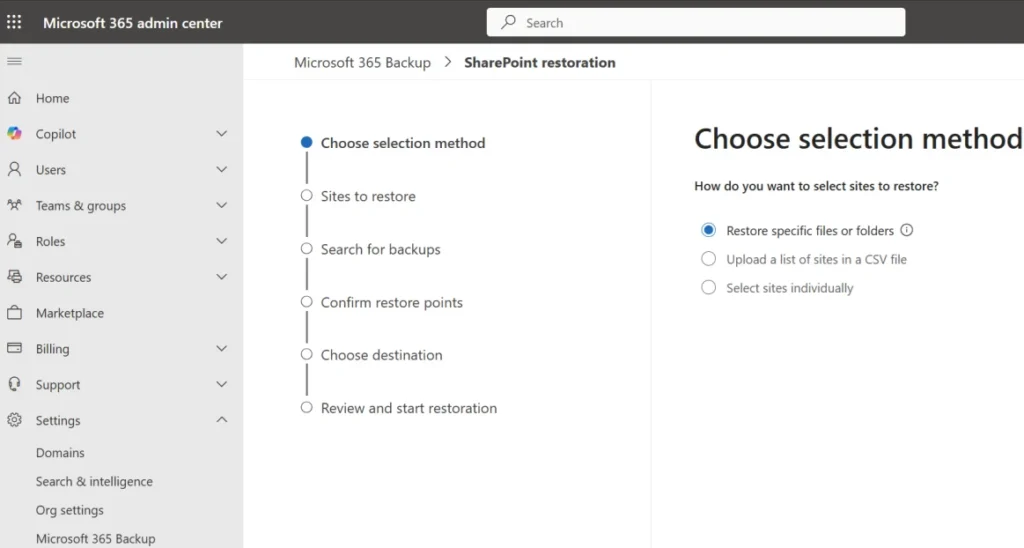
Microsoft’s product material makes clear that Microsoft 365 Backup is an admin-driven service for Microsoft 365 data protection across SharePoint, OneDrive, and Exchange. The granular restore feature applies to SharePoint and OneDrive content already protected by Microsoft 365 Backup. Microsoft’s restore docs show the feature inside the Microsoft 365 admin experience rather than as an end-user recovery tool.
The setup also depends on existing backup coverage. Microsoft’s adoption page says SharePoint and OneDrive backup and restore support full-fidelity protection today, with file-level granular restore now arriving as the next step.
How it works
Microsoft’s updated documentation and Graph changelog outline a selective restore process built around restore points:
- Create a browse session for a restore point
- Browse backed-up content
- Select files or folders to restore
Microsoft Graph’s “What’s new” page also confirms support for browsing a fastRestore endpoint and selectively restoring files and folders, which shows Microsoft is wiring the capability into its broader backup platform and APIs, not just the admin UI.
What admins should do now
- Review which SharePoint sites and OneDrive accounts are already covered by Microsoft 365 Backup.
- Test the granular restore workflow in preview before a real incident.
- Update recovery runbooks so teams know when to use full restore versus selected content restore.
- Check whether automation or internal tooling should use the new Graph restore flow.
Quick takeaways
- Microsoft 365 Backup now supports granular file and folder restore for SharePoint and OneDrive in preview.
- The feature helps admins recover specific content faster without full workload rollback.
- Microsoft lists the roadmap item as available in preview from March 2026.
- Microsoft Graph also gained selective restore support tied to backup storage and browse sessions.
FAQ
It is a new granular restore option that lets admins browse backup restore points and recover individual files or folders from SharePoint and OneDrive.
Microsoft’s roadmap says the feature is in preview as of March 2026.
Microsoft 365 Backup covers Exchange as a product, but the granular file and folder restore feature described here is specifically for SharePoint and OneDrive.
Microsoft’s documentation presents this as an admin workflow inside Microsoft 365 Backup, not a self-service end-user feature.
It reduces recovery scope, saves time, and limits disruption by restoring only the content that was lost or damaged.


Read our disclosure page to find out how can you help VPNCentral sustain the editorial team Read more


Improve this guide




User forum
0 messages