
Microsoft confirms recent Windows 11 hotpatch updates can break Reset this PC


 4 min. read
  Published on
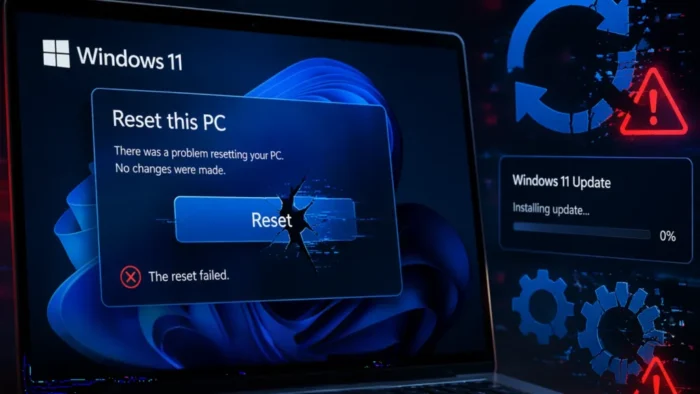
Microsoft has confirmed that some recent Windows 11 hotpatch updates can cause Push Button Reset, also known as Reset this PC, to fail on affected enterprise systems. The issue appears on Windows 11, version 24H2 and 25H2 devices that use Hotpatch in managed commercial environments.
The company added the known issue to the official KB5079420 support page on April 9, 2026. Microsoft says devices that installed the March 2026 Hotpatch security update, KB5079420, or later may fail when users try either Reset this PC option, including Keep my files and Remove everything.

Access content across the globe at the highest speed rate.
70% of our readers choose Private Internet Access
70% of our readers choose ExpressVPN

Browse the web from multiple devices with industry-standard security protocols.

Faster dedicated servers for specific actions (currently at summer discounts)
When the bug hits, the reset process does not finish. Microsoft says users may see a black boot screen during the offline phase, after which the PC returns to the desktop and shows the message: “There was a problem resetting your PC. No changes were made.”
Which systems are affected
This is not a broad Windows 11 consumer bug. Microsoft says the issue only affects Windows Autopatch-managed commercial devices that meet all three conditions: the device is managed with Windows Autopatch, Hotpatch is enabled, and monthly security updates install without a restart.
Microsoft also says the problem is limited to the Hotpatch servicing window on Hotpatch-enabled devices that install March 2026 or later updates. Retail consumer PCs, devices that do not use Hotpatch, and systems not managed with Windows Autopatch are not affected.
The affected hotpatch release that now carries the known issue is KB5079420, which Microsoft lists for Windows 11 Enterprise LTSC 2024 and ties to OS Builds 26200.7979 and 26100.7979. The same page shows the issue was added nearly a month after the update first shipped on March 10, 2026.
Microsoft has already published a workaround
Unlike the sample article, Microsoft did not leave admins without guidance. The company says IT administrators can mitigate the Reset this PC problem by installing the March Safe OS Dynamic Update KB5079471, and it notes that this fix only needs to be applied once.
KB5079471 applies to Windows 11 version 24H2 and 25H2 and specifically improves the Windows Recovery Environment, or WinRE. Microsoft also says the update is available through Windows Update and the Microsoft Update Catalog.
That makes this more of a targeted enterprise servicing issue than a general Windows recovery failure. It still matters, though, because affected organizations often rely on Reset this PC as a fast recovery path for managed endpoints.
A separate Microsoft account sign-in bug also appeared
KB5079420 also carries another known issue. Microsoft says some users may fail to sign in to apps with a Microsoft account, even when the device has a working internet connection. Affected apps can include Microsoft Teams Free and OneDrive, while Microsoft says businesses using Microsoft Entra ID for app authentication are not affected.
Microsoft addressed that sign-in bug separately in KB5085518, an out-of-band hotpatch released on March 23, 2026. That update fixes the Microsoft account login problem, but Microsoft still lists KB5079471 as the workaround for the Reset this PC issue.
For IT teams, the takeaway is straightforward. If you manage Windows 11 Autopatch devices with Hotpatch enabled, check whether KB5079471 has been deployed before relying on Reset this PC as your recovery plan.
Affected updates and fix
| Item | Details |
|---|---|
| Main update with known issue | KB5079420 |
| Release date | March 10, 2026 |
| Affected Windows versions | Windows 11 24H2 and 25H2 in Hotpatch-managed commercial environments |
| Affected builds | 26200.7979 and 26100.7979 |
| Reset symptom | Black screen during offline reset, then reboot to desktop with error |
| Reset workaround | Install KB5079471 once |
| Separate sign-in fix | KB5085518 |
What admins should do now
- Check whether affected devices use Windows Autopatch with Hotpatch enabled
- Do not assume consumer Windows 11 systems face the same issue
- Deploy KB5079471 to impacted managed devices
- Test Reset this PC after remediation before using it in production recovery workflows
- Review whether KB5085518 is also needed for Microsoft account sign-in issues
FAQ
No. Microsoft says the issue does not affect retail consumer devices or systems that do not use Hotpatch and Windows Autopatch.
Microsoft says devices that installed KB5079420 or later March 2026 Hotpatch updates may hit the issue.
Yes. Microsoft says IT admins can mitigate the problem by installing KB5079471, and it only needs to be installed once.
Microsoft says affected devices may show a black screen during reset and then display: “There was a problem resetting your PC. No changes were made.”


Read our disclosure page to find out how can you help VPNCentral sustain the editorial team Read more


Improve this guide



User forum
0 messages