
Microsoft Entra Agent ID logs can expose suspicious assistive agent activity


 8 min. read
  Published on
Microsoft Entra Agent ID logs can help security teams detect when an assistive AI agent acts on behalf of a real user and performs suspicious activity, including sending email through Microsoft Graph. A new Red Canary investigation shows how defenders can trace this activity by correlating Entra sign-in logs, Microsoft Graph activity, and Microsoft Purview Exchange logs.
The scenario focuses on assistive agents, also called interactive agents. These agents work through delegated access, which means they use a signed-in user’s context rather than operating only as a standalone service identity.

Access content across the globe at the highest speed rate.
🔥 Save 81% + 2 bonus months! 🔥
70% of our readers choose Private Internet Access
70% of our readers choose ExpressVPN
2
Browse the web from multiple devices with industry-standard security protocols.
🔥 Save 73%! 🔥

Faster dedicated servers for specific actions (currently at summer discounts)
🔥 Save 69%! 🔥
That design creates a useful productivity model, but it also creates a monitoring challenge. If an agent receives delegated permissions and then gets manipulated, compromised, or misused, its actions may look like normal user activity unless defenders know which log fields to inspect.
How assistive agents can act on behalf of users
Assistive agents perform tasks for a user, often through a chat or workflow interface. Microsoft says Microsoft Entra Agent ID APIs help organizations create, secure, and manage agent identities that operate inside a tenant.
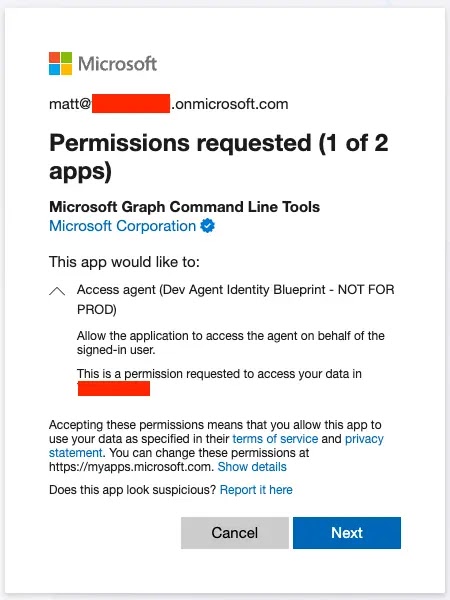
In an on-behalf-of flow, the user first grants access to an agent blueprint through the access_agent scope. After that consent, the agent can request tokens that reflect the overlap between what the agent can do and what the user is allowed to do.
This matters because permissions such as Mail.Send or Mail.ReadWrite can create real business risk. Even if the user has not manually sent a message, an authorized agent can use Microsoft Graph to perform the action in the user’s context.
| Term | Meaning |
|---|---|
| Assistive agent | An agent that performs tasks on demand for a signed-in user |
| On-behalf-of flow | A delegated access flow where the agent acts in the user’s context |
| access_agent scope | The scope a user grants so an agent can act on the user’s behalf |
| Agent blueprint | The parent definition from which agent identities are created |
| Microsoft Graph | The API layer used to access Microsoft 365 services such as mail, users, groups, and settings |
Red Canary traces a suspicious email sent by an agent
The Red Canary scenario begins with a suspicious email sent to an external recipient with the subject line “Here is your invoice.” At first glance, the message appears to come from a normal user account.
A deeper review shows that an agent identity named Agent001 sent the email through the Microsoft Graph beta API on behalf of the user. The event involved the Mail.Send scope, along with other Graph scopes such as Mail.ReadWrite, Group.Read.All, MailboxSettings.ReadWrite, User.Read, openid, profile, and email.
The investigation shows why one log source is not enough. The Purview Exchange log showed a Microsoft infrastructure IP address, while the correlated Graph activity log revealed the originating IP address used for the API call.
- The Purview Exchange log showed the email send event.
- The Microsoft Graph Activity Log showed the API call and the real source IP.
- The non-interactive user sign-in log showed the agent identity and delegated flow pattern.
- The AuditLogs table showed when the access_agent consent was granted.
The key logs defenders need to correlate
Microsoft documents how Microsoft Entra Agent ID logs capture audit and sign-in activity related to agent identities. The same guidance says agent activity appears under the base identity type from which the activity originates, so analysts must check agent-related fields instead of relying only on the event category.
For this kind of investigation, the AppAccessContext.UniqueTokenId field can help connect Purview Exchange events to Microsoft Graph activity and sign-in data. Without that correlation, analysts may mistake Microsoft infrastructure shown in one log for the true source of the request.
The agentSignIn resource type defines fields such as agentType, agentSubjectType, parentAppId, and agentSubjectParentId. Those fields help explain whether the activity came from an agent identity, an agent user, a blueprint principal, or a non-agentic user context.
| Log source | What it helps reveal |
|---|---|
| Microsoft Purview Exchange log | Shows the email operation, recipient, subject, and related Exchange activity |
| Microsoft Graph Activity Log | Shows the Graph API endpoint, source IP, scopes, app ID, and request details |
| Non-interactive user sign-in log | Shows token issuance and agent fields for delegated activity |
| AuditLogs table | Shows the Add delegated permission grant event tied to access_agent consent |
The log fields that reveal the on-behalf-of flow
In Red Canary’s investigation, the key pattern was Agent.agentType set to agenticAppInstance and Agent.agentSubjectType set to notAgentic in AADNonInteractiveUserSignInLogs. This combination indicated an assistive agent acting on behalf of a human user.
Microsoft’s agentSignIn fields also include parentAppId, which can connect the agent instance back to its parent agent blueprint. That relationship becomes important when responders need to determine where the agent came from and whether the blueprint itself needs review.
The audit trail starts even earlier. Red Canary recommends hunting for the Add delegated permission grant operation in the AuditLogs table to identify when users consent to access_agent. That can give defenders a chance to review newly granted agent access before suspicious activity appears in mail or Graph logs.
- Search for Add delegated permission grant events tied to access_agent.
- Track Agent.parentAppId to connect an agent instance to its blueprint.
- Watch for Microsoft Graph sendMail activity from agent identities.
- Compare Purview Exchange logs with Graph Activity Logs before trusting the ClientIP field alone.
- Review non-interactive sign-ins where agentType equals agenticAppInstance.
Why Microsoft Graph permissions still need close review
Microsoft says some high-risk Graph permissions are globally blocked for Entra Agent ID and cannot be granted to agent identities. The Microsoft Graph permissions overview explains that blocked delegated scopes or app roles are rejected when requested for agent identities.
Even with those controls, lower-risk permissions can still cause damage when misused. Mail.Send can support phishing or business email compromise, Mail.ReadWrite can expose sensitive mailbox content, and MailboxSettings.ReadWrite can support mailbox rule abuse.
Microsoft also provides Defender for Cloud Apps guidance for app governance detections, including suspicious OAuth apps sending numerous emails through Microsoft Graph. Those detections can help teams catch abuse patterns that involve mail permissions and unusual Graph API behavior.
| Permission or behavior | Possible risk |
|---|---|
| Mail.Send | Outbound phishing, fake invoices, or business email compromise attempts |
| Mail.ReadWrite | Mailbox access, message modification, or data theft |
| MailboxSettings.ReadWrite | Mailbox rule abuse, forwarding changes, or persistence attempts |
| Group.Read.All | Reconnaissance of group membership and internal structure |
| Unexpected Graph sendMail calls | Possible agent misuse or OAuth-based email abuse |
How security teams can respond
Administrators can use Microsoft’s agent identity management guidance to view agent identities, manage agent blueprints, inspect permissions, and review sign-in logs in the Microsoft Entra admin center. Microsoft also supports retrieving agent sign-in events through Microsoft Graph.
When suspicious activity appears, security teams should confirm which identity actually performed the action, which user context was involved, which scopes were present, and whether the agent or blueprint has a legitimate business purpose.
Teams should also apply the same governance principles used for apps and service principals. That includes owners, sponsors, access reviews, conditional access, risk monitoring, and a clear process to disable or retire agents that no longer need access.
- Inventory all agent identities and blueprints in the tenant.
- Review users who granted access_agent consent.
- Audit Graph permissions assigned to agent identities and blueprints.
- Build detections for Graph sendMail calls from unusual agent identities.
- Use OAuth app email alerts to investigate suspicious Graph-based email activity.
- Apply the Microsoft Entra admin center guidance to disable risky agent identities when needed.
- Review the Graph permission limits for agents before approving new delegated access.
The main lesson is clear: AI agent activity cannot be monitored like ordinary user activity alone. Defenders need to treat agent identities as part of the identity attack surface, correlate the right logs, and review delegated access before a helpful automation path becomes an abuse path.
FAQ
Microsoft Entra Agent ID logs are audit and sign-in records that help administrators monitor activities involving agent identities, agent users, and agent-related traffic in Microsoft Entra ID.
An assistive agent is an interactive agent that performs tasks on behalf of a signed-in user. It uses delegated access, so its actions depend on both the agent’s permissions and the user’s permissions.
A useful pattern is Agent.agentType set to agenticAppInstance and Agent.agentSubjectType set to notAgentic in AADNonInteractiveUserSignInLogs. This can indicate an agent identity acting on behalf of a human user.
Mail.Send can let an agent send emails in a user’s context. If abused, it can support phishing, fake invoices, business email compromise, or unauthorized outbound messages.
Defenders should correlate Microsoft Purview Exchange logs, Microsoft Graph Activity Logs, Entra non-interactive sign-in logs, and AuditLogs. They should also hunt for access_agent consent grants and unusual Graph sendMail activity.


Read our disclosure page to find out how can you help VPNCentral sustain the editorial team Read more


Improve this guide




User forum
0 messages