
Microsoft SharePoint Flaws Actively Exploited for RCE, Web Shells and IIS Key Theft


 10 min. read
  Published on
Attackers are actively exploiting vulnerabilities in on-premises Microsoft SharePoint Server to gain unauthorized access, execute code and establish persistence. Confirmed post-exploitation activity includes web-shell deployment, malware delivery and theft of IIS machine keys.
The campaign affects supported on-premises editions of SharePoint Server 2016, SharePoint Server 2019 and SharePoint Server Subscription Edition. A CISA SharePoint security alert directs organizations to patch immediately and investigate exposed servers for evidence of compromise.

Access content across the globe at the highest speed rate.
🔥 Save 81% + 2 bonus months! 🔥
70% of our readers choose Private Internet Access
70% of our readers choose ExpressVPN
2
Browse the web from multiple devices with industry-standard security protocols.
🔥 Save 73%! 🔥

Faster dedicated servers for specific actions (currently at summer discounts)
🔥 Save 69%! 🔥
SharePoint Online in Microsoft 365 is not affected. Microsoft manages the infrastructure, updates and security controls for the cloud service, while customers remain responsible for protecting and patching self-hosted SharePoint farms.
Four SharePoint Vulnerabilities Are Under Active Exploitation
The active threat now covers CVE-2026-32201, CVE-2026-45659, CVE-2026-56164 and CVE-2026-58644. CISA has added all four vulnerabilities to its Known Exploited Vulnerabilities catalog.
The flaws have different access requirements and effects. Attackers can combine spoofing, privilege escalation and unsafe deserialization weaknesses to move from initial access to remote code execution.
CVE-2026-58644 was added to the actively exploited list after Microsoft released its July 2026 SharePoint updates. Public descriptions have differed on whether exploitation requires Site Owner access, but Microsoft’s CVSS vector lists no privileges required. Organizations should not delay patching while that discrepancy is resolved.
| Vulnerability | Type | Reported access | Exploitation status |
|---|---|---|---|
| CVE-2026-32201 | Improper input validation and spoofing | Unauthenticated network access | Actively exploited |
| CVE-2026-45659 | Deserialization remote code execution | Authenticated Site Member | Actively exploited |
| CVE-2026-56164 | Missing authentication and elevation of privilege | Unauthenticated network access | Actively exploited |
| CVE-2026-58644 | Deserialization remote code execution | Public descriptions differ | Actively exploited |
| CVE-2026-55040 | Security feature bypass | Unauthenticated network access | No confirmed exploitation at publication |
How the SharePoint Attack Chain Works
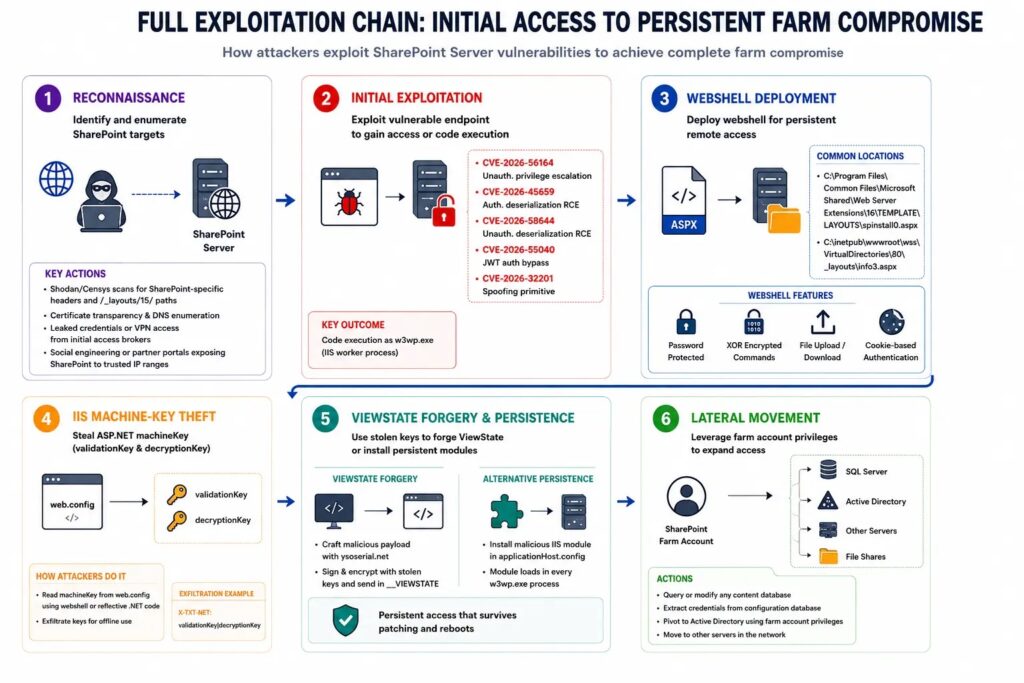
CVE-2026-32201 is an improper input-validation flaw that allows an unauthenticated attacker to perform spoofing over a network. It is not a remote-code-execution vulnerability by itself, but it can help attackers bypass controls or reach functionality required for a larger attack chain.
CVE-2026-56164 allows an unauthenticated attacker to reach a critical SharePoint function without proper authentication. This can provide the access needed to exploit a vulnerability that normally requires an authenticated account.
CVE-2026-45659 and CVE-2026-58644 involve deserialization of untrusted data. Successful exploitation can allow attacker-controlled code to run in a SharePoint IIS worker process.
- An attacker identifies an exposed, unpatched SharePoint server.
- A crafted request exploits a spoofing or authentication weakness.
- The attacker reaches a vulnerable deserialization function.
- Code executes through the SharePoint application process.
- A web shell or another persistence mechanism is installed.
- The attacker searches for configuration files, keys and credentials.
- The compromised server is used to reach databases or other internal resources.
Web Shells Provide Persistent Remote Access
After obtaining code execution, an attacker can place an ASP.NET web shell in a SharePoint application directory. A web shell provides a remote interface for executing commands, uploading files and collecting information from the server.
The Resecurity SharePoint investigation identifies spinstall0.aspx as a web-shell filename used to extract machine-key material from SharePoint configuration files.
Attackers may use different filenames or modify existing application files. The absence of spinstall0.aspx therefore does not prove that a server is clean.
Why IIS Machine-Key Theft Matters
ASP.NET machine keys are used to validate and protect application data, including ViewState and forms-authentication material. SharePoint farm members may share these keys so requests and protected data work consistently across servers.
An attacker who steals the validation and decryption keys can potentially create data that appears to be trusted by the application. This can support continued exploitation even after the original SharePoint vulnerability has been patched.
Patching and key rotation address different parts of the incident. Patching closes the known vulnerability, while key rotation invalidates material copied before the update. Neither action proves that web shells, malicious modules or stolen credentials have been removed.
- Preserve logs and forensic evidence.
- Isolate suspected SharePoint servers.
- Find and remove web shells and other persistence.
- Patch every server in the farm.
- Rotate machine keys after the environment is contained.
- Restart IIS and validate farm operation.
- Reset exposed service-account credentials.
Which SharePoint Versions Need Updates?
The current vulnerabilities affect all supported on-premises SharePoint Server branches. Administrators must update every web front end, application server and other SharePoint node, including systems that are temporarily outside a load-balancer pool.
The Tenable SharePoint vulnerability analysis lists the July fixed builds shown below. Administrators should install the latest applicable updates rather than treating these numbers as a reason to remain on an older package.
Installing the files is only part of a SharePoint update. Teams should complete the SharePoint Products Configuration Wizard or the approved PowerShell configuration process and verify that the farm upgrade finished successfully.
| SharePoint product | July 2026 fixed build | Required validation |
|---|---|---|
| SharePoint Server Subscription Edition | 16.0.19725.20434 | Verify every farm server and database |
| SharePoint Server 2019 | 16.0.10417.20175 | Verify every farm server and database |
| SharePoint Server 2016 | 16.0.5561.1001 | Verify every farm server and database |
Internet-Facing Servers Need Compromise Assessment
An update stops future exploitation of the patched code, but it does not remove access established before the patch. Organizations should investigate any SharePoint server that was reachable from the internet while running a vulnerable build.
The greatest risk applies to public-facing web front ends, partner portals and extranet deployments. Internal SharePoint nodes also require inspection because an attacker may move between farm members after compromising one server.
CISA advises defenders to hunt for intrusion artifacts before rotating IIS machine keys. Its SharePoint hardening guidance warns that key rotation alone is not sufficient if an attacker still has another persistence mechanism.
SharePoint Indicators and Hunting Leads
Security teams should separate confirmed indicators from general behavioral signals. A known filename may provide a high-value lead, while a process such as w3wp.exe is normal unless it performs an unusual action.
Requests to ToolPane endpoints with edit-related parameters and a spoofed SignOut referer have been highlighted as suspicious patterns. Analysts should correlate them with response codes, source addresses, authentication records and subsequent process activity.
The following table distinguishes reported indicators from behaviors that require additional context.
| Type | Indicator or behavior | Assessment |
|---|---|---|
| Web shell | spinstall0.aspx | Reported malicious artifact |
| Endpoint | /_layouts/15/ToolPane.aspx | Investigate unusual POST requests and edit parameters |
| Endpoint | /_layouts/16/ToolPane.aspx | Investigate unusual POST requests and edit parameters |
| Referer path | /_layouts/SignOut.aspx | Suspicious when used with crafted ToolPane requests |
| Process relationship | w3wp.exe spawning cmd.exe | High-priority investigation lead |
| Process relationship | w3wp.exe spawning powershell.exe | High-priority investigation lead |
| Process relationship | w3wp.exe spawning csc.exe | Investigate possible runtime compilation |
| Configuration access | Reading or exporting machineKey values | Potential key theft |
| IIS change | New global module or handler | Potential persistence |
Some Listed Artifacts Were Only Hypothetical
Resecurity included a fictional breach simulation called Operation FarmKey to demonstrate how an attack might progress from SharePoint compromise to broader network access.
The filenames FarmAuthNative.dll, AssetHandler.axd and the FarmAuth cookie appeared inside that notional scenario. They should not be presented as artifacts observed in a real attack.
The Resecurity report explicitly labels the simulation as fictional. Organizations may still hunt for unknown IIS modules and handlers, but they should not build narrow detections around those example names.
Enable and Verify SharePoint AMSI Integration
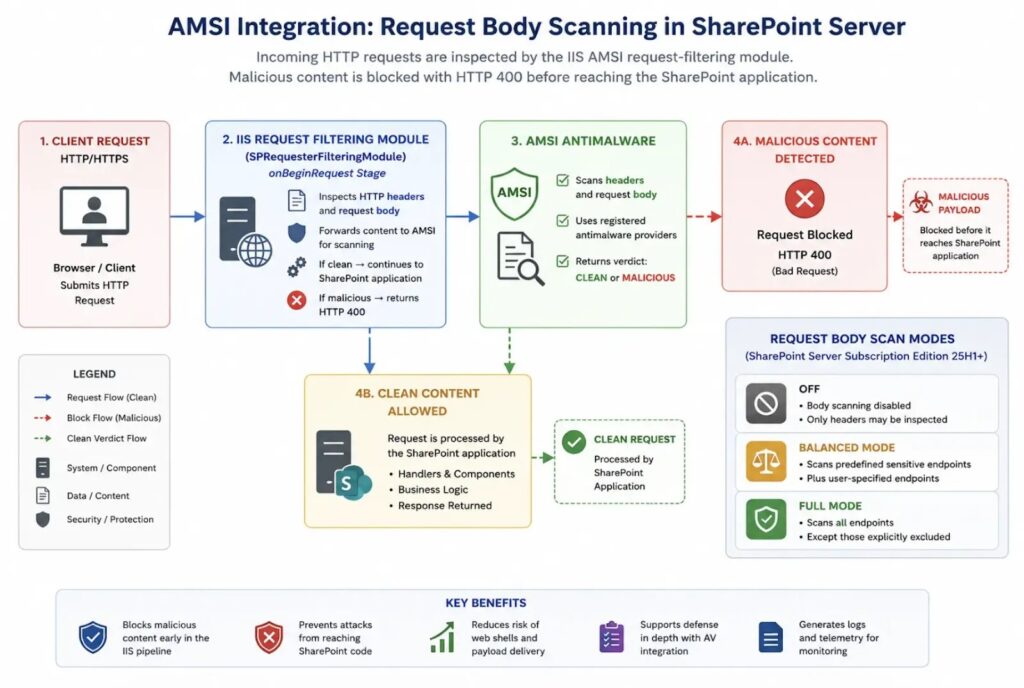
Microsoft recommends enabling Antimalware Scan Interface integration for every SharePoint web application. AMSI allows a compatible antivirus engine to inspect web requests before SharePoint processes them.
Microsoft’s SharePoint AMSI configuration guide says integration became mandatory with the September 2025 public updates. Administrators should still verify that updates, configuration steps and antimalware signatures are current on every server.
Request Body Scan is available only in SharePoint Server Subscription Edition version 25H1 and later. Balanced Mode scans selected sensitive endpoints, while Full Mode scans request bodies for all endpoints except configured exclusions.
- Confirm AMSI is active for every SharePoint web application.
- Update Microsoft Defender or the installed AMSI-compatible engine.
- Use Full Mode on eligible Subscription Edition deployments where performance testing permits.
- Confirm that request-body scanning is not assumed to exist on SharePoint 2016 or 2019.
- Test the integration using Microsoft’s safe AMSI verification procedure.
- Monitor for SharePoint-specific Defender and AMSI detections.
Microsoft Defender Detection Names
Microsoft and CISA have published several detection names associated with the exploitation activity. Security teams should confirm that their detection platform receives current signatures and that alerts are sent to the appropriate incident-response queue.
| Detection | Coverage |
|---|---|
Exploit:Script/SuspSignoutReqBody.A | Suspicious SharePoint request bodies on supported Subscription Edition systems |
Exploit:Script/ToolPaneAuthBypass.A | Suspicious ToolPane authentication-bypass request headers |
Exploit:Script/ToolPaneAuthBypass.C | Remote-code-execution coverage for SharePoint exploitation |
Backdoor:MSIL/LeakFang.A!dha | Post-exploitation activity involving IIS machine-key access |
Incident Response Steps for Suspected Compromise
Organizations that find a web shell, suspicious worker-process activity or machine-key access should begin incident response immediately. The entire farm should be considered in scope, not only the server where the artifact was found.
Responders should preserve volatile data and relevant logs before rebuilding or cleaning systems. IIS logs, SharePoint ULS logs, Windows event logs, EDR telemetry, proxy records and identity logs can help establish the intrusion timeline.
Organizations should follow the deadlines and remediation direction in the CISA KEV catalog. Those deadlines are binding for covered US federal agencies and provide a strong priority signal for every organization operating on-premises SharePoint.
- Remove vulnerable SharePoint servers from external access.
- Preserve logs, memory and suspicious files.
- Investigate every server in the SharePoint farm.
- Remove web shells, malicious handlers and unauthorized IIS modules.
- Install all applicable SharePoint security updates.
- Run the SharePoint configuration upgrade process.
- Verify farm servers, databases and component versions.
- Rotate IIS machine keys after removing key-harvesting artifacts.
- Reset farm, application-pool and other exposed service credentials.
- Review SQL Server and Active Directory activity for lateral movement.
- Rebuild systems whose integrity cannot be established.
Patching Must Cover the Entire SharePoint Farm
Partial patching can leave an organization exposed. A dormant application server, disconnected web front end or unpatched disaster-recovery node can reintroduce vulnerable code when it returns to service.
The latest SharePoint exploitation summary confirms that patches are available for the supported on-premises releases and that four vulnerabilities are now associated with active exploitation.
After patching, administrators should use the Microsoft AMSI guidance to verify request scanning and detection coverage. Internet exposure should remain restricted until teams have completed patch validation and compromise assessment.
FAQ
CISA has confirmed exploitation of CVE-2026-32201, CVE-2026-45659, CVE-2026-56164 and CVE-2026-58644 against on-premises Microsoft SharePoint Server.
No. The current vulnerabilities affect supported on-premises SharePoint Server editions. SharePoint Online in Microsoft 365 is not affected.
No. Patching closes the known vulnerabilities but does not remove web shells, stolen credentials or other persistence established before the update. Exposed servers also require compromise assessment.
Attackers may use stolen machine keys to create trusted-looking ASP.NET data, including signed ViewState or authentication material. This can support further exploitation after the original SharePoint flaw is patched.
Administrators should first hunt for and remove web shells or other key-harvesting persistence. They should then rotate the keys, restart IIS and verify the entire farm.
Full request-body scanning is available in SharePoint Server Subscription Edition version 25H1 and later. SharePoint Server 2016 and 2019 support AMSI integration but not the newer full request-body scanning feature.


Read our disclosure page to find out how can you help VPNCentral sustain the editorial team Read more


Improve this guide




User forum
0 messages