
MicroStealer malware targets telecom and education users through fake installers


 7 min. read
  Published on
A new infostealer called MicroStealer is targeting users through fake software installers, game launcher lures, and malicious downloads that rely on social engineering instead of software exploits.
ANY.RUN researchers found that MicroStealer can steal browser credentials, cookies, session tokens, screenshots, cryptocurrency wallet files, Discord data, Steam account data, and other sensitive information from infected Windows systems.

Access content across the globe at the highest speed rate.
🔥 Save 81% + 2 bonus months! 🔥
70% of our readers choose Private Internet Access
70% of our readers choose Private Internet Access
2
Browse the web from multiple devices with industry-standard security protocols.
🔥 Save 73%! 🔥

Faster dedicated servers for specific actions (currently discounted)
🔥 Save 69%! 🔥
The malware has shown elevated exposure in the telecom and education sectors, with sandbox activity also pointing to notable submissions from the United States and Germany. For organizations, the main risk is not only password theft but the theft of active sessions that can help attackers access cloud apps, VPNs, SaaS tools, and internal portals.
What MicroStealer does
MicroStealer works like a modern access-theft tool. It does not stop at saved passwords. It also collects cookies and session tokens, which can help attackers bypass some normal login alerts.
That makes the malware more useful for follow-on attacks. A stolen browser session can let attackers enter corporate services without immediately triggering a failed login, password spray, or brute-force warning.
The malware also fits a wider criminal pattern where infostealers feed access brokers. Stolen credentials, session cookies, cloud access, and account data can later support fraud, business email compromise, ransomware activity, or deeper network intrusion.
At a glance
| Item | Details |
|---|---|
| Threat name | MicroStealer |
| Malware type | Infostealer |
| Primary platform | Windows |
| Main delivery method | Fake installers and game launcher lures |
| Initial file seen in analysis | RocobeSetup.exe |
| Main payload | soft.jar |
| Disguised Java executable | miicrosoft.exe |
| Main sectors exposed | Telecom and education |
How the infection starts
The attack begins when a victim runs a file named RocobeSetup.exe. ANY.RUN identified it as an NSIS installer that contains the next stages of the malware chain.
The installer drops an Electron application that appears as Game Launcher.exe. The fake launcher presents a Windows UAC prompt and asks the user for administrator privileges.
If the victim approves the prompt, the malware extracts a bundled Java Runtime Environment and a JAR payload. It places the files in the user’s local application data directory and prepares the main stealer for execution.
The four-stage execution chain
| Stage | Component | Purpose |
|---|---|---|
| 1 | RocobeSetup.exe | Runs as an NSIS installer and unpacks the next stage |
| 2 | Game Launcher.exe | Uses Electron and requests administrator privileges |
| 3 | Obfuscated Node.js script | Extracts and launches the Java payload in the background |
| 4 | soft.jar | Performs credential theft, screenshot capture, and data exfiltration |
Why the fake Microsoft name matters
MicroStealer renames the Java executable to miicrosoft.exe. The misspelling is small enough to look familiar during casual inspection, but different enough to avoid matching the real Microsoft process name.
The Node.js launcher starts that renamed Java executable with the soft.jar payload in the background. The Electron process then exits, which helps the main malware continue running without the fake installer staying open on screen.
This design can make the attack harder for a user to notice. It also creates more layers for analysts to unpack because the delivery chain uses NSIS, Electron, Node.js, Java, and a separate JAR file.
What MicroStealer steals
- Saved browser credentials
- Browser cookies and session tokens
- Desktop screenshots
- Cryptocurrency wallet files
- Discord account data
- Steam account data
- System and environment details
- Files that may support account takeover or follow-on attacks
Anti-analysis checks help it avoid detection
Before collecting data, MicroStealer checks whether it is running inside a virtual machine or analysis environment. If it detects known sandbox processes or services, it can stop execution.
This behavior helps the malware avoid some automated security systems. It also gives attackers more time during the early stage of a campaign, especially when antivirus engines have not yet built reliable detections.
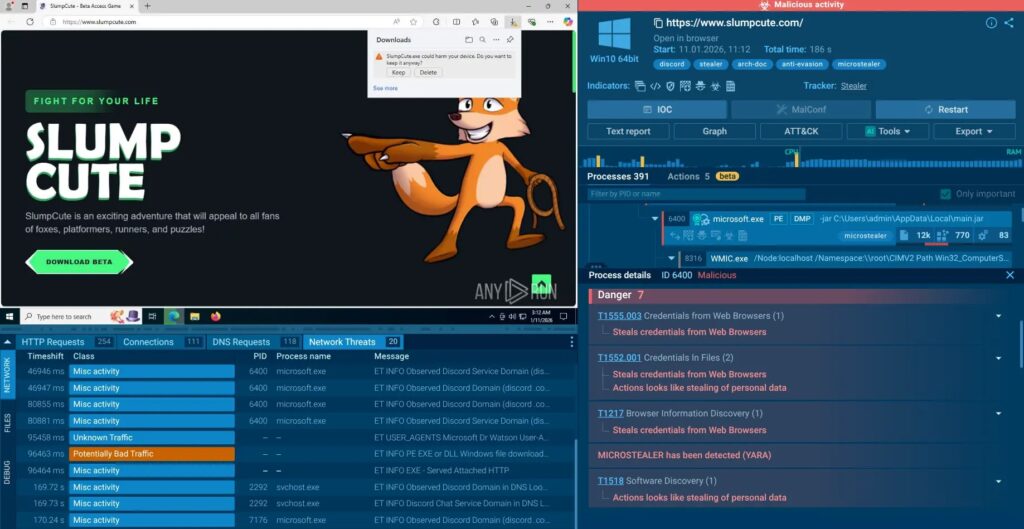
ANY.RUN still detonated the sample in an interactive sandbox, which exposed the full chain from installer execution to exfiltration behavior. Interactive analysis helps researchers trigger malware paths that passive scans may miss.
How stolen data leaves the system
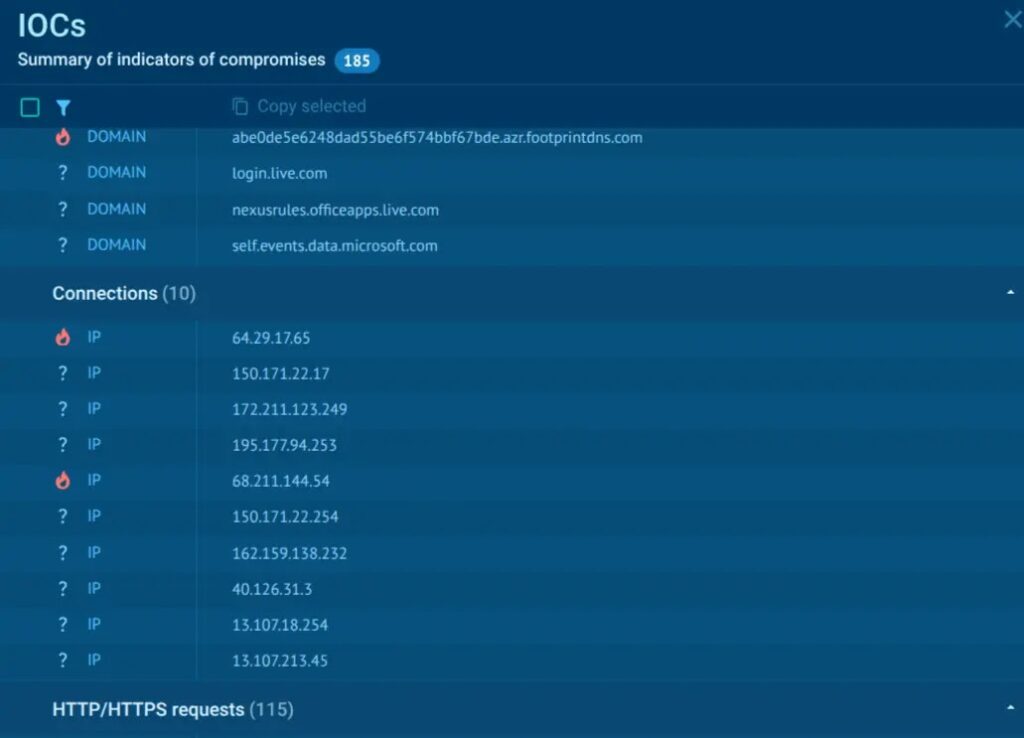
MicroStealer exfiltrates stolen data through two channels. ANY.RUN observed data being sent to a Discord webhook and to an attacker-controlled server.
This gives the attacker redundancy. If the webhook is removed, the custom server may still receive the data. If the server is blocked, the webhook can still work.
The malware also uses newly registered domains for part of its exfiltration flow. That can weaken reputation-based defenses because new domains may have little or no previous threat history.
Why telecom and education are attractive targets
Telecom organizations manage large numbers of users, customer systems, internal support tools, and network access points. A stolen session from one employee can expose sensitive portals or internal services.
Education organizations also hold a wide mix of accounts, including students, staff, researchers, administrators, and contractors. Many schools and universities use cloud apps, remote access tools, learning platforms, and shared devices.
These environments can make infostealer infections valuable to criminals. One stolen account may lead to email compromise, payroll fraud, cloud data access, or a later ransomware attempt.
Detection ideas for security teams
- Watch for RocobeSetup.exe in downloads, temporary folders, or user profile directories.
- Investigate unexpected Game Launcher.exe processes.
- Flag Java execution from %LOCALAPPDATA% paths.
- Look for miicrosoft.exe, especially when launched with the -jar argument.
- Monitor for soft.jar creation or execution.
- Alert on Electron apps launching Java payloads.
- Watch for unexpected outbound traffic to Discord webhook URLs.
- Review connections to newly registered domains after suspicious installer execution.
- Check for unusual access to browser profile directories and wallet files.
What organizations should do now
Organizations should treat a MicroStealer infection as an account compromise risk, not only a malware cleanup task. Removing the malware does not invalidate cookies, tokens, or passwords already stolen from the system.
Security teams should rotate exposed credentials, revoke active sessions, review cloud sign-ins, check VPN logs, and inspect SaaS audit events after suspected infection.
They should also enforce phishing-resistant MFA where possible. Standard MFA helps, but stolen cookies and active sessions can still create risk if applications do not enforce session binding, device checks, or reauthentication for sensitive actions.
Practical response checklist
- Isolate the affected endpoint from the network.
- Collect forensic data before wiping the system.
- Remove the malware and rebuild the machine when practical.
- Reset passwords used on the affected browser profile.
- Revoke browser sessions for corporate apps.
- Rotate VPN, SaaS, cloud, email, and administrator credentials.
- Review Discord webhook traffic and blocked domain logs.
- Check cloud and SaaS audit logs for access from unusual locations.
- Warn users about fake installers, game launchers, and software update lures.
What this means for defenders
MicroStealer shows how modern infostealers have moved beyond simple password grabbing. They now focus on session theft, cloud access, and data that can help attackers move deeper into an organization.
The malware also shows why trusted-looking installers remain dangerous. No vulnerability exploit is required when a user can be convinced to run a fake setup file and approve a UAC prompt.
For telecom and education organizations, the priority is early detection, stronger browser session controls, careful monitoring of Java and Electron behavior, and faster response when credentials may have left the device.
FAQ
MicroStealer is a Windows infostealer that collects browser credentials, cookies, session tokens, screenshots, wallet files, Discord data, and Steam account data.
MicroStealer uses fake installers and game launcher lures. The analyzed chain starts with RocobeSetup.exe, which unpacks an Electron app and launches a Java payload.
Current analysis shows that MicroStealer mainly relies on social engineering. It needs the victim to run the installer and approve the installation flow.
Session theft can let attackers access SaaS apps, cloud portals, VPNs, and corporate tools without needing to know the user’s current password.


Read our disclosure page to find out how can you help VPNCentral sustain the editorial team Read more


Improve this guide




User forum
0 messages