
New CrashStealer Malware Mimics Apple Tool to Steal Mac Passwords and Crypto Wallets


 6 min. read
  Published on
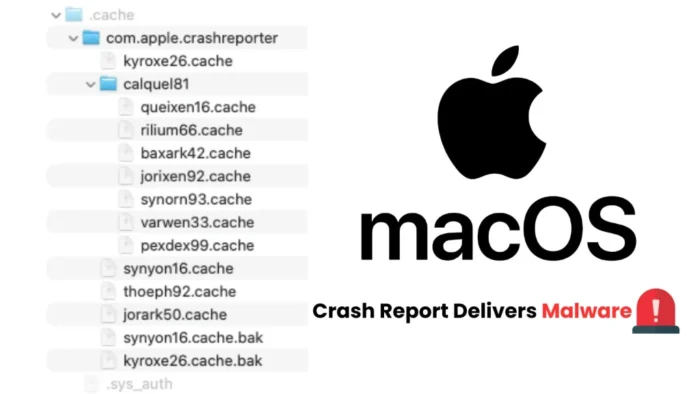
A new macOS information stealer called CrashStealer is targeting browser passwords, cryptocurrency wallets, password managers, and Apple Keychain data.
The malware disguises its payload as Apple’s CrashReporter application and uses the bundle identifier associated with the legitimate system component. Security researchers first found an early version in May 2026 before detecting the completed malware in active attacks in early July.

Access content across the globe at the highest speed rate.
🔥 Save 81% + 2 bonus months! 🔥
70% of our readers choose Private Internet Access
70% of our readers choose ExpressVPN
2
Browse the web from multiple devices with industry-standard security protocols.
🔥 Save 73%! 🔥

Faster dedicated servers for specific actions (currently at summer discounts)
🔥 Save 69%! 🔥
According to an investigation from Jamf Threat Labs, CrashStealer stands out because its developers wrote it primarily in native C++. Many other Mac information stealers rely on AppleScript, Python, or lightweight Objective-C wrappers.
CrashStealer arrives through a notarized Mac installer
The observed infection chain begins with a disk image named “Werkbit Setup.” The image contains an application signed with a valid Apple Developer ID certificate and supplied with a stapled notarization ticket.
That combination allowed the initial app to satisfy Gatekeeper checks when researchers examined it. Apple explains that macOS malware protections combine Gatekeeper, notarization, and XProtect to prevent, block, and remove known malicious software.
However, notarization does not guarantee that an application will remain safe. Apple checks submitted software for known malicious content at the time of review. Attackers can later use an approved application to retrieve a separate malicious payload from remote infrastructure.
| Attack stage | Observed behavior |
|---|---|
| Initial download | A disk image named “Werkbit Setup” delivers the first-stage application. |
| Security checks | The initial app carries a Developer ID signature and stapled notarization ticket. |
| Script retrieval | The dropper downloads an obfuscated shell script from attacker-controlled GitHub infrastructure. |
| Payload installation | The script installs an app named CrashReporter.app that imitates an Apple system component. |
| Data theft | The payload collects credentials, wallets, keychain data, and selected files. |
| Exfiltration | The malware encrypts collected data and sends it to a command-and-control server. |
The malware imitates Apple’s CrashReporter app
The first-stage app retrieves an encoded shell script containing several layers of Base64-obfuscated commands. The script then downloads the main CrashStealer payload and places it on the infected Mac as CrashReporter.app.
The malicious app uses an Apple-style icon and the bundle identifier com.apple.crashreporter. These details make the payload appear connected to a legitimate macOS service, although Apple did not create or distribute the malware.
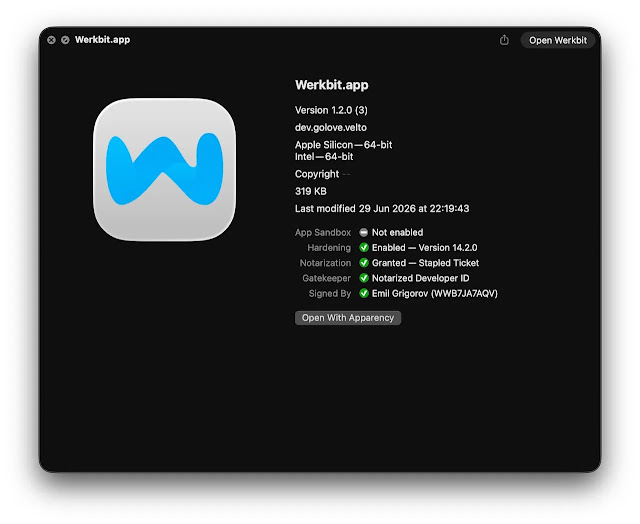
Researchers found that the installed payload had an ad hoc signature rather than the valid Developer ID signature used by the initial Werkbit application. Apple’s guidance on how to safely open Mac apps recommends downloading software only from trusted sources and avoiding security overrides for unfamiliar applications.
What data CrashStealer targets
CrashStealer starts by asking for the user’s Mac login password. It checks the password locally through the macOS Directory Service command-line utility before attempting to unlock the user’s login keychain.
The malware also checks the system for installed security products. It then begins collecting information from browsers, cryptocurrency extensions, password managers, and common user directories.
The targeted data includes:
- Credentials and profile data from Google Chrome, Microsoft Edge, Brave, Opera, Vivaldi, and other Chromium-based browsers.
- Firefox login databases, cookies, and profile information.
- Data linked to approximately 80 cryptocurrency wallet extensions.
- Information from wallets associated with Ethereum, Solana, Cosmos, TON, and other blockchain networks.
- Files associated with password managers such as 1Password, Bitwarden, and LastPass.
- The user’s macOS login keychain.
- Selected files and information from the Documents and Downloads folders.
The malware does not need to break the encryption used by every password manager or browser. Stolen databases, session cookies, extension files, and keychain material can still give attackers valuable information or support later account takeover attempts.
CrashStealer encrypts stolen files before uploading them
CrashStealer stages the collected information locally before preparing it for exfiltration. It uses AES-256-GCM encryption through Apple’s CommonCrypto framework and packages the encrypted material into ZIP archives.
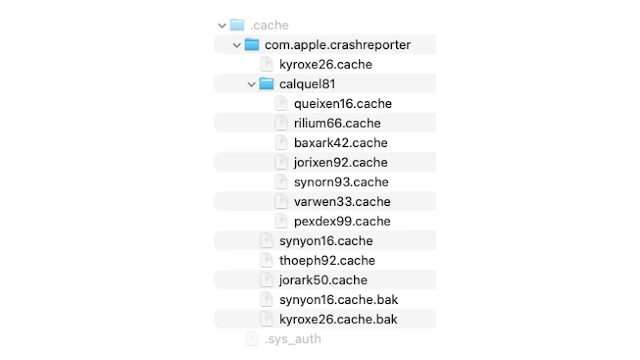
The payload sends the archives to a remote command-and-control server through libcurl. This encryption step can make network inspection and analysis more difficult because security tools cannot easily read the stolen content while it travels from the infected Mac.
The full CrashStealer technical analysis also describes encrypted strings, anti-debugging checks, and control-flow flattening designed to slow malware researchers and automated analysis systems.
The malware uses a LaunchAgent for persistence
CrashStealer attempts to remain active after the Mac restarts. It copies its executable, applies a new ad hoc signature, and creates a LaunchAgent with the label com.apple.crashreporter.helper.
LaunchAgents can automatically start applications or background processes when a user signs in. The Apple-like label helps the malicious entry blend in with legitimate system services during a quick inspection.
Researchers also connected the campaign to an operator panel and additional attacker-controlled domains. These findings suggest that CrashStealer may form part of a broader malware service or multi-platform credential theft operation.
How Mac users can reduce the risk
Users should avoid downloading meeting software, utilities, updates, or installers from advertisements, unsolicited messages, and unfamiliar websites. An app’s professional appearance, valid signature, or previous notarization does not prove that every component it downloads is safe.
Apple recommends using trusted software sources and keeping macOS updated. Its overview of Mac malware defenses explains how Gatekeeper, notarization, and XProtect work together, but users still need to examine unexpected downloads carefully.
Anyone who installed a suspicious application named Werkbit Setup or encountered an unexpected CrashReporter password request should disconnect the Mac from the network and investigate the system.
Recommended response steps include:
- Delete the suspicious installer and application files.
- Check login items and LaunchAgents for unfamiliar entries.
- Run a trusted security scan and install all available macOS updates.
- Change the Mac login password from a clean device.
- Reset passwords for browsers, email accounts, cryptocurrency services, and password managers.
- Revoke active sessions and review accounts for unfamiliar logins.
- Move cryptocurrency funds to new wallets if private keys or wallet files may have been exposed.
Users should not approve password prompts simply because an application displays an Apple-like icon. Apple’s Mac app security guidance notes that macOS can block known malware, but newly discovered threats may remain undetected until security systems receive updated information.
FAQ
CrashStealer is a macOS information stealer that impersonates Apple’s crash-reporting software. It targets browser credentials, cryptocurrency wallets, password manager data, keychain information, and selected files.
The observed campaign used a signed and notarized application distributed in a disk image named Werkbit Setup. That application downloaded an obfuscated script, which installed the CrashStealer payload as CrashReporter.app.
It can collect browser passwords, cookies, cryptocurrency wallet data, password manager files, login keychain contents, and information from the Documents and Downloads folders.
No. Notarization checks submitted software for known malware, but it cannot guarantee that an app will never behave maliciously or download harmful components later.
Users should disconnect the Mac, remove suspicious files, scan the system, change important passwords from a clean device, revoke active sessions, and secure any potentially exposed cryptocurrency wallets.


Read our disclosure page to find out how can you help VPNCentral sustain the editorial team Read more


Improve this guide




User forum
0 messages