
New XWorm RAT Phishing Campaign Exploits CVE-2018-0802 in Excel Attachments


 2 min. read
  Published on

A fresh phishing wave delivers XWorm RAT via business-themed emails with malicious Excel add-ins. Attackers exploit CVE-2018-0802 in Microsoft Equation Editor for initial code execution. This grants full remote control over Windows systems.
XWorm first appeared in 2022. Threat actors sell it on Telegram markets. The new variant uses fileless techniques to dodge antivirus scans. Emails mimic payment reviews, orders, or shipments to lure clicks on .XLAM files.
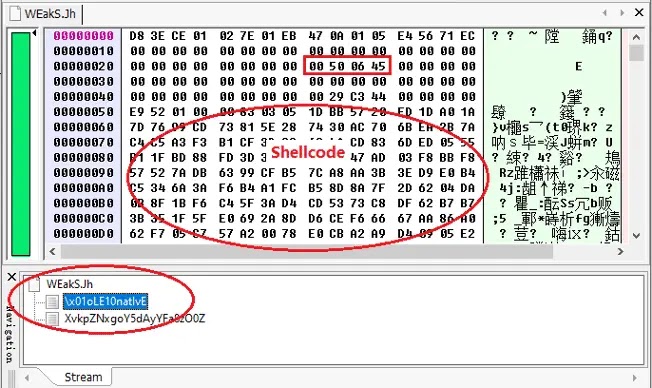
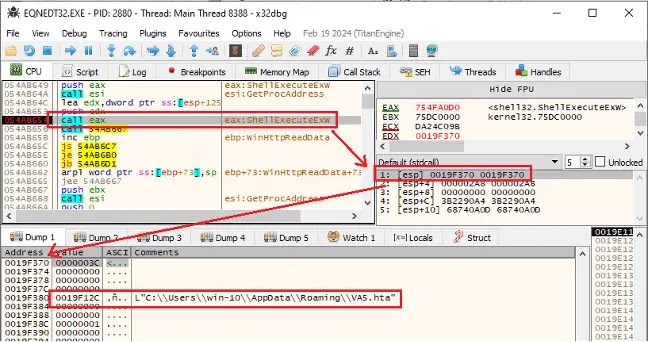
Once opened, an auto-loading OLE object triggers the old Equation Editor flaw. Shellcode downloads an HTA file from retrodayaengineering[.]icu. That HTA runs under mshta.exe and drops Base64 PowerShell code.
PowerShell grabs a JPEG from Cloudinary, extracts a .NET loader between markers, and runs it in memory. The loader fetches wwa.txt from r2.dev, rebuilds XWorm, and injects it into Msbuild.exe via process hollowing. XWorm then phones home to berlin101[.]com:6000 with AES encryption.
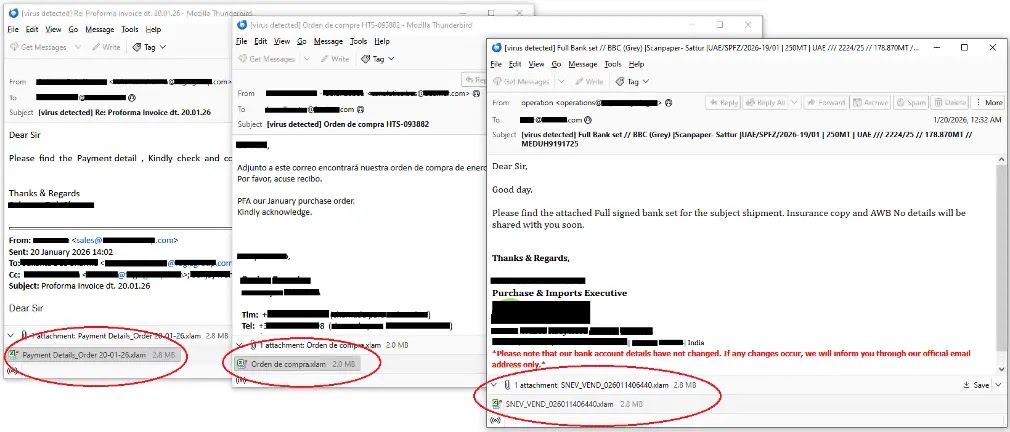
Fortinet researchers state: “XWorm is a multi-functional Remote Access Trojan first identified in 2022 that remains actively distributed, including through Telegram-based marketplaces.” They add: “The campaign relies on business-themed phishing lures and the legacy remote code execution vulnerability in the Microsoft Equation Editor.”
Infection Chain Table
| Stage | Action | Evasion Method |
|---|---|---|
| Phishing Email | .XLAM attachment | Business lures |
| CVE-2018-0802 | OLE shellcode exec | Unpatched systems |
| HTA Download | %APPDATA%\VA5.hta | mshta.exe blend-in |
| PowerShell | Extracts .NET from JPG | Fileless loader |
| Process Hollow | Msbuild.exe injection | Memory-only RAT |
XWorm Capabilities
- System commands: close, uninstall, update.
- File ops: download, execute.
- Plugins for keylog, screenshot, DDoS.
- Credential theft and exfiltration.
Indicators of Compromise
- Domains: retrodayaengineering[.]icu, pub-3bc1de741f8149f49bdbafa703067f24[.]r2[.]dev, berlin101[.]com:6000.
- Files: HGG.hta, VA5.hta, optimized_MSI_lpsd9p.jpg, wwa.txt
- Processes: mshta.exe, Msbuild.exe anomalies.
Defense Measures
Patch CVE-2018-0802 via Microsoft updates. Block .XLAM/HTA in email gateways. Constrain mshta.exe and PowerShell with AppLocker. Monitor for suspicious Cloudinary fetches or Msbuild spawns.
| Priority Defense | Action | Tools |
|---|---|---|
| Patch Equation Editor | Apply MS17-010+ | Windows Update |
| Email Filters | Block .XLAM macros | Mimecast, Proofpoint |
| Process Monitoring | Alert on mshta/PowerShell | EDR like CrowdStrike |
| Network Blocks | IOC domains/ports | Firewall rules |
FAQ
Phishing emails with .XLAM exploiting CVE-2018-0802.
Fileless chain with memory injection and AES C2.
Remote control, plugins for steal/DDoS, file ops.
berlin101[.]com:6000, retrodayaengineering[.]icu.
Patch Office, constrain scripts, monitor Msbuild.exe.


Read our disclosure page to find out how can you help VPNCentral sustain the editorial team Read more


Improve this guide




User forum
0 messages