
NFCShare Android malware spreads through fake banking app updates hosted on GitHub


 9 min. read
  Published on
NFCShare is an Android banking trojan that steals payment card data by abusing a phone’s NFC reader. The malware is spreading through phishing pages and fake banking app updates that impersonate legitimate European financial institutions.
The newer campaign was detailed by D3Lab, which said the activity expanded in mid-May 2026 from earlier Deutsche Bank-themed attacks to a wider set of Italian and European bank lures.

Access content across the globe at the highest speed rate.
🔥 Save 81% + 2 bonus months! 🔥
70% of our readers choose Private Internet Access
70% of our readers choose ExpressVPN
2
Browse the web from multiple devices with industry-standard security protocols.
🔥 Save 73%! 🔥

Faster dedicated servers for specific actions (currently at summer discounts)
🔥 Save 69%! 🔥
BleepingComputer reported that the malware uses fake verification screens to convince victims to place their payment card near the phone, then sends the card number, card type, expiry date, and PIN to an attacker-controlled server.
How NFCShare tricks banking customers
The attack starts with a phishing website that looks like a real online banking portal. In one observed flow, the site impersonated Intesa Sanpaolo at areaclienti-intesa[.]com and asked the victim for home-banking credentials.
After the victim enters details, the site claims that the banking app needs an update. The user is then redirected through a shortened URL to a malicious APK hosted in a public GitHub repository disguised as a school project.
The malware family was first documented in January 2026, when D3Lab’s first NFCShare analysis found a Deutsche Bank-themed phishing campaign that distributed a malicious APK named deutsche.apk and presented itself as “Support Nexi.”
| Campaign detail | What researchers found |
|---|---|
| Malware family | NFCShare |
| Platform | Android |
| Main lure | Fake banking app update |
| Delivery method | Phishing site, shortened URL, and GitHub-hosted APK |
| Data stolen | NFC card data, card expiry date, card type, card label, and PIN |
| Recent targets | Italian and European banking brands |
Fake apps impersonate major European banking brands
The newer NFCShare wave uses APK filenames that mimic real banks and payment brands. D3Lab found names such as Intesa Carte.apk, Sella Carte.apk, Banca Sella Carte.apk, Klirway Carte.apk, BCC Roma Carte.apk, Fideuram Carte.apk, Mooney Carte.apk, Nexi Carte.apk, CaixaBank.apk, CaixaBankNfc.apk, and CaixaReactivaTarjeta.apk.
The operation does not rely on one static brand. The attacker rotates names, rebuilds APKs often, and uses different campaign folders and payload variants. That makes blocking by filename alone unreliable.
The public GitHub repository was named app-scuola, which roughly translates to “school app.” Its README made it look like a homework project, while the commit history showed repeated updates and 56 unique APK payloads by early June 2026.
- Intesa Sanpaolo-themed lures appeared in the recent phishing flow.
- Nexi, Banca Sella, Fideuram, Mooney, BCC Roma, and CaixaBank names appeared in APK filenames.
- The GitHub repository used a school-project theme to look harmless.
- Many later commits used the Italian message “Aggiornato tutto,” meaning “Updated everything.”
How the malware reads a payment card over NFC
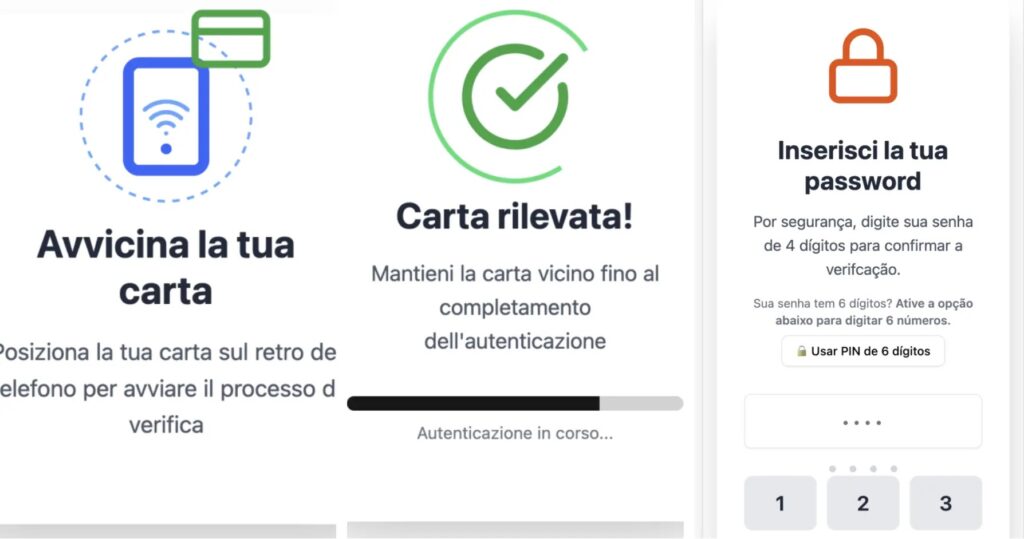
After installation, the malicious app shows a card-verification screen inside a WebView. It tells the victim to bring the payment card close to the phone, then shows progress screens and asks for a four-digit PIN “for security.”
The Android code uses IsoDep, an Android NFC technology interface used for ISO-DEP communication with compatible cards. NFCShare uses that interface to communicate with the card and send a standard EMV PPSE select command.
The malware then builds a card data object containing the card number, card type, label, and expiry date. The PIN is added later through the same model and sent again through the malware’s card-information channel.
| Step | What happens |
|---|---|
| 1 | The victim visits a fake banking portal. |
| 2 | The site asks for login details and claims the bank app needs an update. |
| 3 | The victim downloads and installs a fake APK. |
| 4 | The fake app asks the victim to place a payment card near the phone. |
| 5 | The app reads card data through NFC and asks for the PIN. |
| 6 | The stolen data is sent to the command-and-control server over WebSocket. |
NFCShare sends card data through WebSocket C2
The older NFCShare infrastructure used ws://38[.]47[.]213[.]197:7068/. The newer wave moved to ws://nfck[.]loseyourip[.]com:8001/, according to the updated D3Lab research.
The malware keeps several internal markers across samples, including the package name com.modol.nap, the namespace nfc.share.itnamteis, a CardInfoitmanteis model, and channel names such as CARD_INFO_CHANNEL and CARD_REMOVED.
Those markers matter because filenames, phishing pages, and command-and-control hosts can change quickly. D3Lab says stronger detection opportunities come from the internal NFCShare code markers, the WebView and NFC behavior combination, and the newer malformed APK package structure.
GitHub hosting makes takedown and detection harder
The move to GitHub is one of the most important operational changes in the campaign. Instead of hosting APKs only on a throwaway phishing server, the attacker stored payloads in a public repository that looked like a harmless student project.
BleepingComputer’s coverage notes that victims were redirected from phishing pages to GitHub-hosted APK files after being told to update their banking app. This gives the attack more credibility because many users recognize GitHub as a legitimate service.
The newer APKs also include malformed ZIP paths. These paths can break simple extraction tools and reduce the reliability of automated scanners that expect a normal APK structure.
| Technical marker | Why it matters |
|---|---|
| Package name com.modol.nap | Appears across observed NFCShare samples |
| Namespace nfc.share.itnamteis | Useful family attribution marker |
| WebView card-verification UI | Drives the social engineering flow |
| Android NFC reader logic | Reads card data when the victim taps the card to the phone |
| Malformed ZIP paths | Can disrupt basic APK extraction and automated analysis |
| WebSocket C2 | Receives card data and PIN information |
Why this is different from ordinary banking phishing
Traditional banking phishing often stops at stolen usernames, passwords, one-time codes, or card details typed into a fake page. NFCShare adds another layer by asking the victim to physically tap the payment card against the phone.
That interaction helps the malware collect card data directly over NFC. The app still needs user cooperation, but the fake verification flow is designed to make the request look like a routine banking security check.
The technical abuse depends on NFC communication. The official Android IsoDep documentation describes the interface used to exchange data with ISO-DEP NFC tags, which is the same class D3Lab identified in NFCShare’s card-reading logic.
- Do not install banking APKs from links in SMS messages, email, ads, or phone calls.
- Do not place your payment card against your phone unless your bank clearly explains the process through its official app.
- Download banking apps only from Google Play or the bank’s official website links.
- Contact the bank through the number on your card if a caller asks you to install an update.
- Block or report fake banking sites that ask users to sideload APK files.
How users can reduce the risk
Android users should avoid sideloading banking apps from websites, shortened URLs, messaging apps, or GitHub repositories. A real bank will not normally ask customers to install an Android banking update from a public code-hosting repository.
Google Play Protect checks apps and devices for harmful behavior, including apps from sources outside Google Play. Google says it can warn users, disable harmful apps, or remove them from the device.
Users who think they installed a fake banking app should disconnect from the network, uninstall the app if possible, run a mobile security scan, contact their bank, freeze or replace the card, change online banking credentials from a clean device, and review transactions immediately.
What defenders should monitor
Mobile security teams should look for the NFCShare package name, namespace, internal channel markers, and WebView plus NFC behavior. They should also review any failed APK extraction events, because malformed ZIP paths may signal newer NFCShare packaging rather than a harmless parsing error.
Analysts should use APK parsers that can handle non-standard ZIP structures. D3Lab specifically noted that apkInspector helped recover NFCShare family markers and triage recent samples when simple extraction tools failed.
Enterprise teams should also keep Play Protect enabled and educate users that financial apps should not come from GitHub, URL shorteners, or instructions from callers pretending to work for a bank.
- Search for package name com.modol.nap on managed Android devices.
- Hunt for namespace nfc.share.itnamteis in suspicious APKs.
- Flag APKs with local WebView card-verification screens and NFC reader code.
- Monitor for WebSocket traffic to nfck[.]loseyourip[.]com:8001 and 38[.]47[.]213[.]197:7068.
- Review shortened links tied to fake banking update flows.
- Investigate Android APKs downloaded from GitHub repositories disguised as unrelated projects.
NFCShare shows how mobile banking fraud is moving beyond credential theft. The campaign combines phishing, fake app updates, NFC card reading, PIN harvesting, GitHub-hosted payloads, and anti-analysis packaging to create a more resilient Android banking threat.
FAQ
NFCShare is an Android banking trojan that uses phishing and fake banking app updates to steal payment card data through the phone’s NFC reader. It also tricks victims into entering their card PIN.
Victims are sent to fake banking websites that ask for credentials and then claim the banking app needs an update. The phishing page redirects the victim to a malicious APK, including samples hosted on GitHub.
NFCShare can steal NFC-derived card data, including the card number, card type, label, expiry date, and the PIN entered by the victim during the fake verification flow.
The newer campaign uses names linked to Italian and European banking brands, including Intesa Sanpaolo, Banca Sella, Fideuram, Nexi, Mooney, BCC Roma, and CaixaBank-themed APKs.
Users should install banking apps only from Google Play or official bank links, avoid APKs sent through messages or calls, keep Play Protect enabled, never enter a card PIN into an unofficial app, and contact their bank immediately after suspicious activity.


Read our disclosure page to find out how can you help VPNCentral sustain the editorial team Read more


Improve this guide




User forum
0 messages