
North Korea-linked WaterPlum used new StoatWaffle malware in VSCode supply chain campaign


 6 min. read
  Published on
A North Korea-linked threat cluster known as WaterPlum has started using a new malware family called StoatWaffle in a supply chain-style campaign that abuses Visual Studio Code project workflows. Research published on March 17 says the malware appeared in blockchain-themed repositories rigged to execute automatically when a developer opened the folder in VS Code and granted trust.
The campaign fits the broader “Contagious Interview” playbook, where attackers pose as recruiters, send coding tasks, and trick developers into opening malicious projects or running staged commands. Microsoft said on March 11 that it continues to see this campaign target software developers through fake job interviews and trusted development workflows, including repository task execution inside Visual Studio Code.
According to the NTT Security research cited in the WaterPlum report aggregator, Team 8 within WaterPlum, also tracked as Moralis or Modilus, had mainly used OtterCookie before shifting to StoatWaffle around December 2025. The report describes StoatWaffle as a modular Node.js framework with loader, stealer, and remote-access components.
What happened
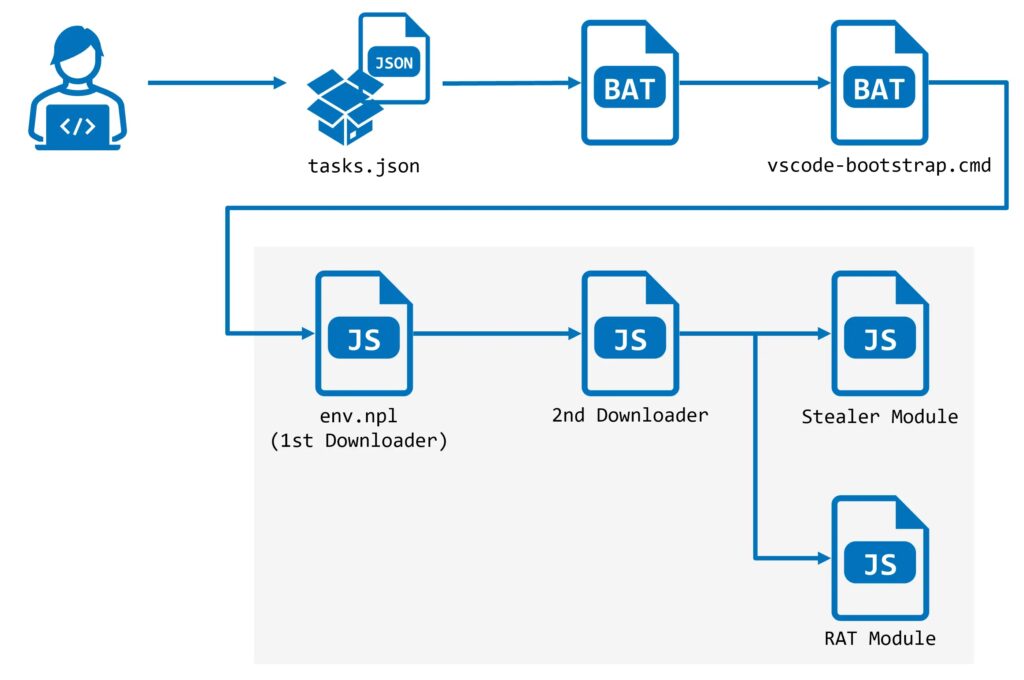
The infection starts with a repository disguised as a legitimate blockchain development project. The malicious repo contains a hidden .vscode directory with a tasks.json file configured to run on folder open. If the victim opens the project in VS Code and clicks to trust the author, VS Code can automatically execute the predefined task. Microsoft independently described the same repository-task technique in its March 11 write-up on Contagious Interview.
That detail matters because the victim does not need to manually run a suspicious script from the terminal. In the observed chain, opening and trusting the repository was enough to trigger the next stage. Microsoft said attackers increasingly embed malware delivery into interview tools, coding exercises, and assessment workflows that developers normally treat as routine.
How StoatWaffle gets installed
The WaterPlum report says the VS Code task reached out to a Vercel-hosted web app and downloaded a batch script named vscode-bootstrap.cmd. That script checked whether Node.js was installed. If it was missing, the script downloaded Node.js from the official Node.js site and then fetched a JavaScript file called env.npl, which acted as the first-stage loader.
From there, the malware reportedly contacted 147.124.202.208 on port 3000 and polled an API endpoint for instructions every five seconds. A second downloader then arrived, followed by the deployment of both the stealer and RAT modules. The public report also listed the following infrastructure among its indicators: 66.235.168.136, 147.124.202.208, 163.245.194.216, 185.163.125.196, and 87.236.177.9.
What StoatWaffle can do
The published analysis says StoatWaffle’s stealer component targets saved browser credentials and cryptocurrency wallet extension data in Chromium-based browsers and Firefox. On macOS, it also collects the Keychain database. The RAT component can list files, execute shell commands, upload directories, and search for files by keyword, which gives the attacker durable control over the system after the initial compromise.
Those capabilities line up with the broader behavior Microsoft described across Contagious Interview operations. Microsoft said WaterPlum-linked developers and subclusters use modular backdoors to collect API tokens, cloud credentials, signing keys, wallet material, password-manager artifacts, environment files, and other high-value secrets from developer machines.
Why this campaign matters
This campaign shows how trusted developer workflows can become the delivery mechanism. A malicious extension is not required. A browser exploit is not required. The attack can begin with a normal-looking code repository and a trust prompt inside the editor. Microsoft warned that recruitment workflows now act as an attack surface because threat actors hide payload delivery inside code tests and take-home assignments that developers expect to open.
The focus on blockchain and crypto projects also fits the long-running pattern around WaterPlum and related clusters. The goal often extends beyond one infected laptop. A compromised developer endpoint can expose code repositories, CI/CD credentials, cloud access, wallet material, and downstream production systems. Microsoft specifically warned that these campaigns target developer endpoints that provide access to source code, build pipelines, and internal infrastructure.
Attack chain at a glance
| Stage | What happens | Why it matters |
|---|---|---|
| Social engineering | Victim receives a fake interview task or repo | Builds trust through a normal hiring workflow |
| Malicious repo | Repo contains .vscode/tasks.json with auto-run behavior | Opening and trusting the folder triggers execution |
| Bootstrap stage | Task downloads vscode-bootstrap.cmd from a Vercel-hosted app | Pulls in the first loader quietly |
| Runtime setup | Script installs Node.js if needed | Removes a barrier that could break the chain |
| Loader stage | env.npl contacts C2 and retrieves more code | Starts modular payload delivery |
| Final payloads | Stealer and RAT deploy together | Enables credential theft and remote control |
The repo-task technique comes from Microsoft’s March 11 blog, while the StoatWaffle-specific staging details come from the March 17 WaterPlum report.
What defenders should do now
- Treat interview repositories and take-home coding tests as untrusted until reviewed. Microsoft recommends isolated environments for these workflows rather than a primary corporate workstation.
- Review VS Code trust decisions and repository task behavior, especially auto-run task configurations tied to folder open events. Microsoft said defenders should hunt for chains that move from VS Code into shells or scripting engines.
- Watch for unexpected Node.js installation, hidden child processes, and download-and-execute patterns involving short links, Vercel-hosted content, or script retrieval from low-reputation hosts.
- Block or investigate the published indicators, including
66.235.168.136,147.124.202.208,163.245.194.216,185.163.125.196, and87.236.177.9. - Rotate credentials and tokens if compromise is suspected, especially source-control, CI/CD, cloud, wallet, and password-manager secrets. Microsoft says these campaigns actively target those artifacts.
FAQ
StoatWaffle is a newly reported modular malware framework used by WaterPlum Team 8. The public report describes it as a Node.js-based loader, stealer, and RAT used in the Contagious Interview campaign.
The attack starts when a victim opens a malicious repository in VS Code and trusts it. The repository contains a task configuration that runs automatically on folder open. Microsoft documented the same technique in recent Contagious Interview activity.
Public reporting ties StoatWaffle to WaterPlum, a North Korea-linked threat cluster associated with the Contagious Interview campaign. Team 8 is also referred to as Moralis or Modilus in the cited report.
The report says StoatWaffle steals saved browser credentials and crypto-wallet extension data, and on macOS also targets Keychain data. Its RAT module can also search files, upload directories, and execute shell commands.


Read our disclosure page to find out how can you help VPNCentral sustain the editorial team Read more


Improve this guide



User forum
0 messages