
Operation Dragon Whistle abuses Visual Studio Code tunnels for stealthy remote access


 10 min. read
  Published on
Operation Dragon Whistle used targeted phishing attachments to turn Visual Studio Code into a remote access channel. The campaign relied on a malicious Word document, a deceptive PDF file, Discord webhooks, and VS Code Remote Tunnels to give attackers quiet access to compromised Windows systems.
The Operation Dragon Whistle report says analysts reviewed sandbox submissions and found two infection paths tied to the same attacker-controlled infrastructure. One path used a macro-enabled Word document, while the other used a PDF lure that pushed a fake Adobe-themed ClickOnce installer.

Access content across the globe at the highest speed rate.
70% of our readers choose Private Internet Access
70% of our readers choose ExpressVPN

Browse the web from multiple devices with industry-standard security protocols.

Faster dedicated servers for specific actions (currently at summer discounts)
The most notable part of the campaign was not a custom backdoor. Attackers abused a trusted developer tool and Microsoft-hosted tunneling infrastructure to make remote access look closer to normal software traffic.
Phishing emails used project-themed lures
The phishing emails were written to resemble internal project communications. They referenced safety-related work, ANPR system designs, and CAD drawings, which made the attachments look relevant to the targeted environment.
The first file, named CAD Reprot.doc, carried a macro that ran after the document opened. The macro downloaded code.exe from an attacker-controlled domain and started Visual Studio Code tunnel commands in the background.
The second file, named ANPR Reprot.pdf, displayed a fake Adobe Reader update message. The document directed users toward a ClickOnce deployment manifest that appeared designed to install a hidden .NET payload.
| Attack path | File used | Main behavior |
|---|---|---|
| Word macro path | CAD Reprot.doc | Downloads code.exe and starts a VS Code tunnel workflow. |
| PDF and ClickOnce path | ANPR Reprot.pdf | Shows a fake Adobe update prompt and points to a deployment manifest. |
| Credential relay | Discord webhook | Sends the captured device authentication code to the attackers. |
| Remote access | VS Code Remote Tunnels | Lets attackers reach the host through trusted tunneling infrastructure. |
How the Word document opened the remote access path
The Word macro downloaded the Visual Studio Code executable and launched tunnel commands without showing an obvious installer to the victim. During the process, a Microsoft device authentication code was generated.
The macro captured that code and sent it to the attackers through a Discord webhook. Once the attackers authenticated the tunnel, they could connect to the victim’s machine through the VS Code remote access channel.
The official Visual Studio Code Remote Tunnels documentation explains that Remote Tunnels let users connect to a remote machine without SSH. That legitimate feature becomes dangerous when attackers enroll a victim device without the user’s informed consent.
Why VS Code tunnels are attractive to attackers
Visual Studio Code is common in many technical environments, and its traffic can look less suspicious than a custom remote access trojan. The tunnel feature also gives remote users access to the terminal, files, and development workspace on the remote machine.
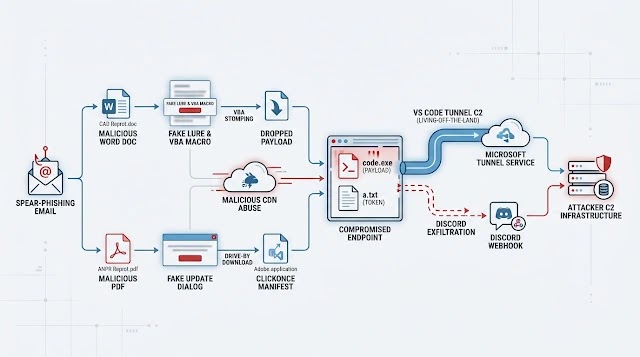
That access is powerful. Once a tunnel is active, an attacker may be able to run commands, inspect files, stage tools, collect data, or deploy additional payloads through an interface that defenders may not immediately treat as malicious.
Security teams should not block Visual Studio Code blindly across every environment. They should instead monitor where the tool runs, which users launch tunnels, and whether developer tools appear on systems where they do not belong.
The PDF path used a fake Adobe update prompt
The PDF lure took a different route. It showed what looked like an Adobe Reader error and encouraged the user to install an update. The button inside the file pointed to a ClickOnce deployment file hosted on the same suspicious infrastructure.
Researchers could not retrieve the final payload because the hosting domain had already been suspended by the time of deeper analysis. However, the manifest structure suggested that the chain was designed to run a .NET application on the victim’s system.
This path matters because many users have learned to expect PDF compatibility warnings or reader update prompts. Attackers can abuse that habit to push a fake software install flow.
Trusted tools make detection harder
Operation Dragon Whistle fits a wider pattern in which threat actors abuse legitimate software rather than relying only on malware families. This approach can bypass simple detection logic that focuses on unknown binaries or suspicious network destinations.
Unit 42 research previously documented Stately Taurus abusing Visual Studio Code in espionage activity and said attackers used the tool’s reverse-shell-like capability to gain a foothold in target networks.
That earlier activity shows why defenders should treat unexpected VS Code tunneling as a high-signal event. The tool is legitimate, but its presence on a non-developer workstation or in an unusual user context can point to compromise.
VS Code tunnel abuse has appeared in other campaigns
Operation Dragon Whistle is not the only example of attackers turning Visual Studio Code into an access mechanism. The technique has appeared in several public reports tied to suspected state-linked or espionage-focused activity.
SentinelOne’s Operation Digital Eye research described suspected China-nexus activity that abused Visual Studio Code and Microsoft Azure infrastructure for command-and-control purposes. The report noted that the technique can make malicious activity appear legitimate.
The common theme is clear. Attackers do not always need a custom RAT when a trusted remote development tool can provide terminal and file access through allowed infrastructure.
What defenders should monitor
Security teams should build detections around behavior, not just file reputation. Visual Studio Code can be expected on developer machines, but it should raise questions when launched from a temp directory, executed by a macro chain, or used on a finance, HR, or administrative workstation.
- Unexpected code.exe execution from temporary or user-writable directories.
- VS Code tunnel commands on systems that do not normally use developer tools.
- Microsoft device authentication prompts generated during document opening.
- Discord webhook traffic from endpoints or Office child processes.
- Word macros downloading executables from external domains.
- ClickOnce deployment files launched from PDF links or unusual domains.
- New registry run keys linked to VS Code or tunnel persistence.
Why device authentication flows need scrutiny
Device authentication flows are useful when a user needs to sign in from a device without a normal browser interface. Attackers can abuse the same workflow if malware captures the code and sends it to an operator.
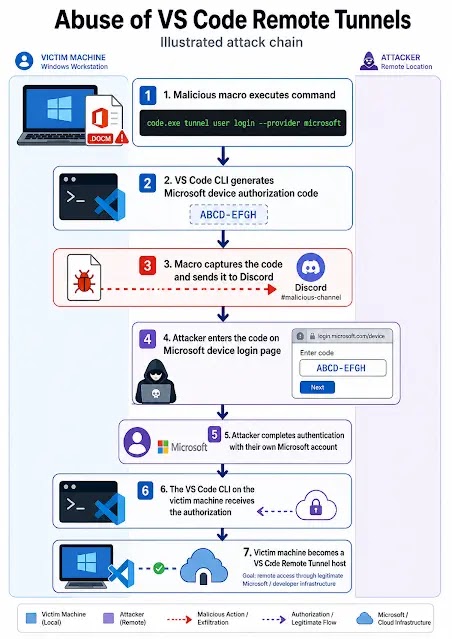
In this campaign, the macro reportedly captured the device code and sent it through Discord. That allowed the attacker to complete the tunnel authentication before the victim understood what happened.
Organizations should educate users to report unexpected device-code prompts. Security teams should also review identity logs for unusual device authentication events tied to suspicious endpoints or document execution.
How to reduce the risk
Defenders should start by limiting risky document execution paths. Macros from the internet should stay blocked by default, and users should not install software from links embedded in PDFs unless the source is verified.
Application control can also help. If Visual Studio Code is not needed on a system, administrators can restrict it. If it is needed, teams can monitor tunnel usage and allow only expected users, directories, and workflows.
| Control | Why it helps |
|---|---|
| Block internet-sourced macros | Reduces execution from weaponized Office documents. |
| Restrict ClickOnce where not needed | Limits fake installer chains from PDF lures. |
| Monitor VS Code tunnel commands | Detects abuse of legitimate remote development tooling. |
| Watch Discord webhook traffic | Finds exfiltration paths used to relay authentication codes. |
| Alert on device-code authentication anomalies | Helps identify suspicious tunnel enrollment attempts. |
Incident response steps for suspected compromise
If a system opened one of the suspicious files, responders should isolate the endpoint and preserve evidence. They should collect Office logs, process trees, registry run keys, browser artifacts, network logs, and identity events before cleanup.
Teams should also check whether VS Code created a tunnel, whether a device-code authentication event occurred, and whether the attacker accessed files or executed commands through the remote session.
- Isolate the endpoint from the network.
- Collect the phishing email, attachments, and process telemetry.
- Review command-line history for code.exe tunnel activity.
- Check registry run keys and startup locations for persistence.
- Search logs for connections to Discord and devtunnels infrastructure.
- Revoke suspicious sessions and review Microsoft account authentication events.
- Check for additional tools staged after the tunnel was created.
Indicators tied to the reported campaign
The reported Operation Dragon Whistle indicators include a malicious Word document, a deceptive PDF, an attacker-hosted VS Code executable, and a ClickOnce manifest hosted on an Adobe-themed domain.
| Indicator type | Indicator | Description |
|---|---|---|
| File name | CAD Reprot.doc | Word document with hidden macro behavior. |
| SHA256 | 49f304eb2772bf194e21c90bf5f1783770020538c80c0ca71afc5f1adcd19e8 | Reported malicious Word document hash. |
| File name | ANPR Reprot.pdf | PDF lure with fake Adobe Reader update message. |
| SHA256 | f3c4a34af566276e95960c156b38aea8a823aa394ed5c43178397be8440b56d | Reported malicious PDF hash. |
| URL | hxxps://adobe-pdfreader[.]b-cdn[.]net/code[.]exe | Attacker-hosted VS Code executable download path. |
| URL | hxxps://adobe-pdfreader[.]b-cdn[.]net/Adobe[.]application | ClickOnce deployment manifest path. |
The bigger lesson from Operation Dragon Whistle
Operation Dragon Whistle shows how attackers can combine familiar phishing lures with legitimate remote access tooling. The campaign did not need to rely only on a noisy malware family because VS Code tunnels could provide interactive access through trusted infrastructure.
The official VS Code Remote Tunnels feature exists for legitimate remote development, but defenders need visibility into where and how it is used. Unexpected tunnel creation can be as serious as a custom backdoor.
The same trend appears in Unit 42’s VS Code abuse research and SentinelOne’s Operation Digital Eye analysis. Attackers are increasingly turning trusted software into access channels because it helps them blend into normal enterprise traffic.
The safest response is to monitor developer tooling like any other remote access technology, restrict it where it does not belong, and investigate unexpected authentication flows before attackers turn them into persistent access.
FAQ
Operation Dragon Whistle is a reported phishing campaign that used a malicious Word document, a deceptive PDF, Discord webhooks, and Visual Studio Code Remote Tunnels to gain stealthy remote access to compromised Windows systems.
The supplied material and public reporting describe a macro-enabled Word document and a deceptive PDF with a ClickOnce payload path. The listed IoCs do not show a separate LNK file, so defenders should focus on the documented Word and PDF artifacts.
The attackers used code.exe to start VS Code tunnel commands. After capturing a device authentication code and relaying it through Discord, they could connect to the victim system through the VS Code remote tunnel.
VS Code tunnels provide terminal and file access through trusted remote development infrastructure. On systems where VS Code is allowed, this can help attackers hide remote access inside legitimate-looking software behavior.
Security teams should monitor unexpected code.exe tunnel commands, VS Code activity on non-developer systems, suspicious Microsoft device-code authentication events, Discord webhook traffic, Office macros downloading executables, and ClickOnce launches from PDFs.


Read our disclosure page to find out how can you help VPNCentral sustain the editorial team Read more


Improve this guide


User forum
0 messages