
Phishers now abuse Safe Links and other URL rewriting tools to hide multi-step Microsoft 365 credential attacks


 6 min. read
  Published on
Phishing gangs are increasingly abusing Safe Links and similar email security features to make malicious URLs look trustworthy. Instead of sending victims directly to a fake login page, attackers now route them through several rewritten links generated by legitimate security vendors, making the chain harder for scanners and users to spot.
LevelBlue said it saw a clear escalation in this tactic between the second and fourth quarters of 2025. The company found that attackers moved from single rewritten links to layered redirect chains that stack multiple trusted services in one path, with activity peaking in January 2026.
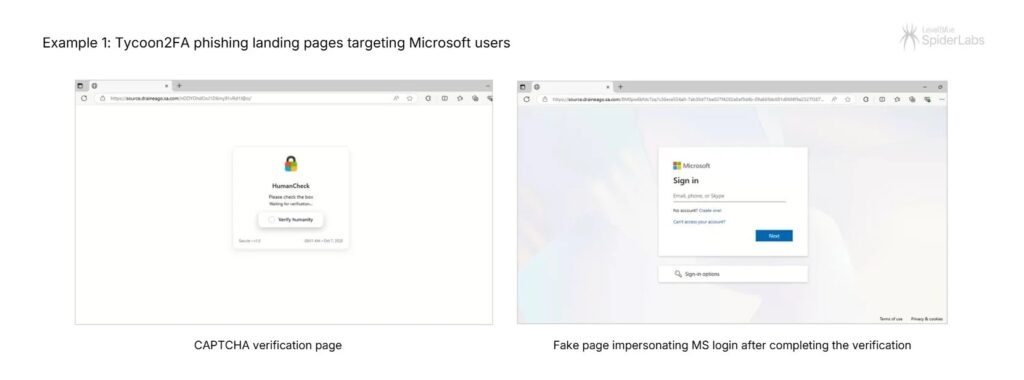
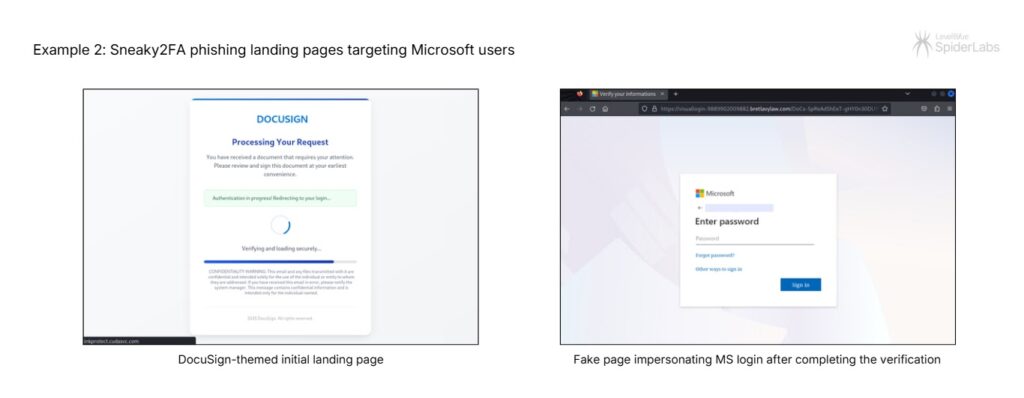
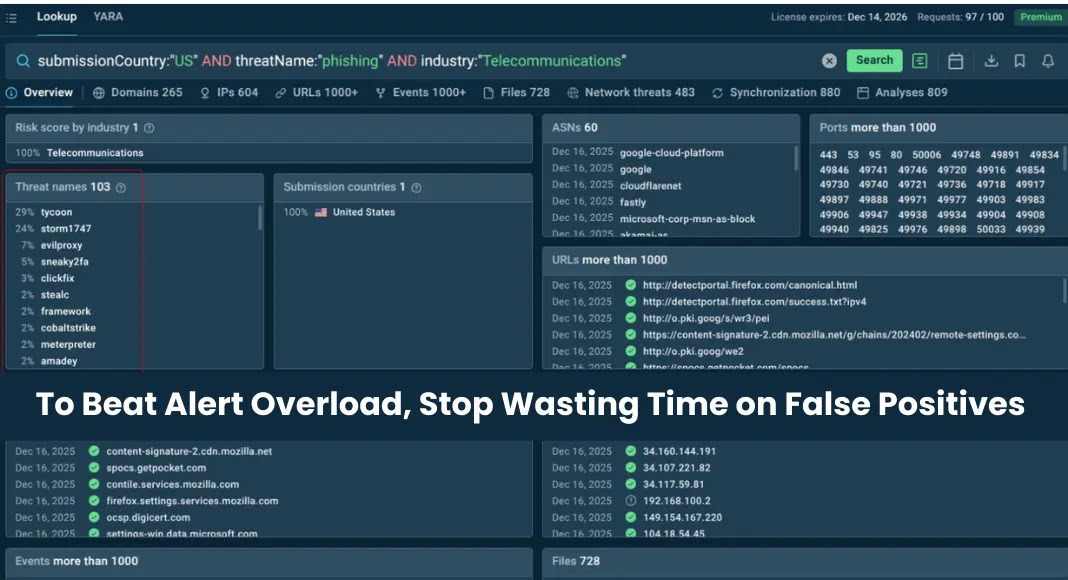
The campaigns highlighted in the report used Tycoon2FA and Sneaky2FA, two phishing-as-a-service operations that target Microsoft 365 accounts. These kits act as adversary-in-the-middle platforms, which means they can capture usernames, passwords, and session cookies in real time after a victim lands on a fake Microsoft sign-in page.
This tactic works because URL rewriting is supposed to help. Microsoft says Safe Links rewrites URLs in email messages when the feature is enabled, and Microsoft’s recommended Defender for Office 365 settings note that URLs are rewritten by default for email link protection. Attackers are taking advantage of that trust signal by hiding behind vendor-generated links that look safer than the destination really is.
How the Safe Links abuse works
In a normal setup, an email security product rewrites a link so the user clicks a vendor-branded URL first. That click passes through security checks before sending the user to the destination page. Microsoft documents this behavior directly in its Safe Links guidance.
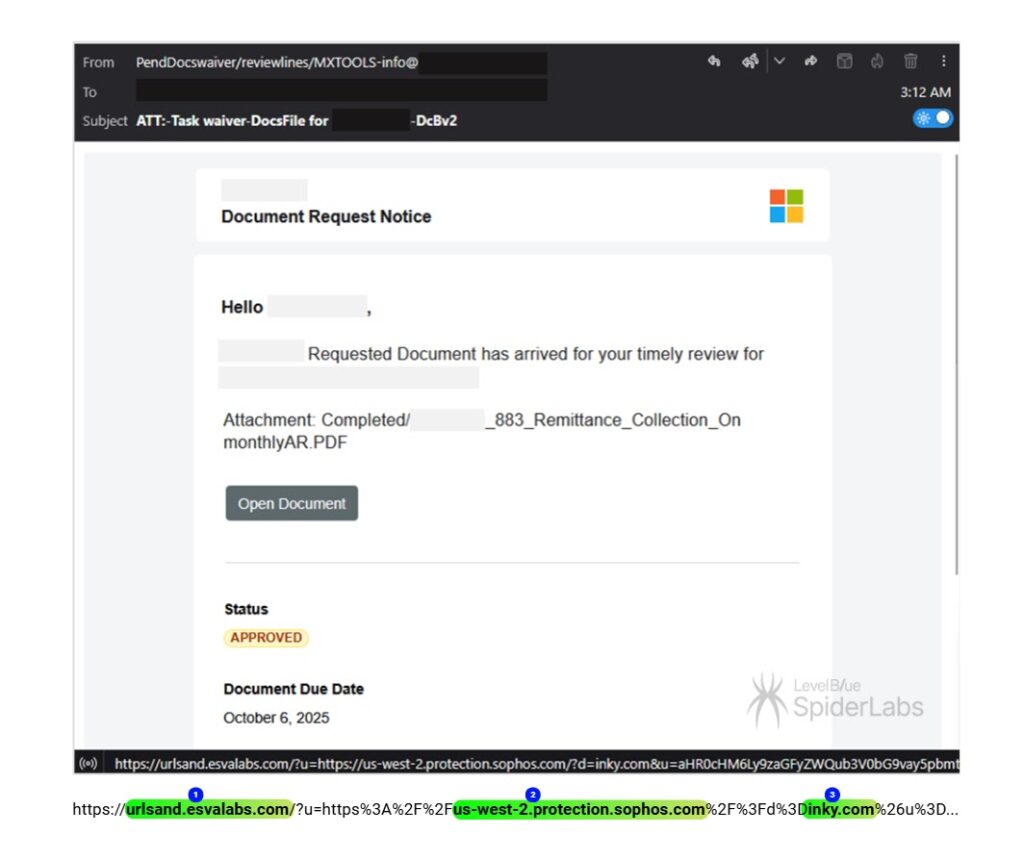
Attackers abuse the same process by sending or relaying messages through environments where rewriting is already active. Once a trusted security product wraps the original link, the attacker can reuse that wrapped URL inside a wider phishing flow. LevelBlue says some campaigns then chain multiple rewritten links together, so automated tools keep seeing known security domains for several hops before the final malicious site appears.
In one example, LevelBlue described a Tycoon2FA campaign using a document-request lure with a URL more than 1,200 characters long. The link reportedly passed through Libraesva, Sophos, Inky, EdgePilot, and Barracuda before reaching a compromised website, which then presented a CAPTCHA and finally a fake Microsoft sign-in page.
A second example involved Sneaky2FA. In that case, researchers said the phishing email used an HTML attachment rather than a normal hyperlink. The file contained a prebuilt redirect sequence through Barracuda, Sophos, and Cisco, then passed through a legitimate marketing platform before resolving to a spoofed domain impersonating the target law firm.
Why this matters for Microsoft 365 users
This trend matters because many users have been taught to trust security-branded links. A URL that contains a well-known vendor domain can look reassuring, especially in fast-moving work environments where employees must review dozens of emails each day. But a trusted wrapper does not guarantee a safe final destination.
It also matters because these phishing kits do more than steal passwords. LevelBlue says Tycoon2FA and Sneaky2FA can capture MFA session cookies, which can let attackers hijack authenticated Microsoft 365 sessions even after a victim completes multi-factor authentication. From there, threat actors can create mailbox rules, move laterally through email, steal data, and sometimes open the door to ransomware or business email compromise.
Multi-layered URL rewriting at a glance
| Element | What researchers found |
|---|---|
| Main tactic | Multiple trusted URL rewriting services chained together to hide the real destination |
| Report source | LevelBlue SpiderLabs |
| Rise in activity | Escalated from Q2 to Q4 2025, peaked in January 2026 |
| Main kits named | Tycoon2FA and Sneaky2FA |
| Main target type | Microsoft 365 users |
| Main risk | Credential theft and session cookie theft through fake Microsoft sign-in pages |
What defenders should do
- Treat vendor-branded rewritten links as inspected links, not automatically safe links.
- Flag emails that chain through multiple rewriting services or contain unusually long redirect URLs.
- Push phishing-resistant MFA, especially hardware security keys and passkey-based sign-in where possible. This reduces the value of stolen credentials and makes session theft harder to turn into full account takeover.
- Review Safe Links configuration. Microsoft documents an option to avoid rewriting URLs while still checking them through the Safe Links API in supported Outlook clients, which may help some organizations reduce wrapper abuse in specific scenarios.
- Use URL block and allow controls in Defender for Office 365 to manage suspicious destinations and review exceptions carefully.
- Train employees to distrust unexpected Microsoft 365 login prompts, even when the surrounding link includes familiar vendor names.
What this says about phishing in 2026
The bigger lesson is simple. Attackers no longer need to beat security tools head-on. In many cases, they only need to route their traffic through trusted infrastructure that security products and users already expect to see. That makes detection slower and investigation harder, especially when every redirect hop looks legitimate at first glance.
This also puts pressure on email defenders to focus less on whether a link contains a known vendor name and more on where the entire chain ends. URL reputation still matters, but chain analysis, behavioral detection, and stronger sign-in protections matter more when phishing kits can hide behind several trusted layers.
FAQ
Safe Links is a Microsoft Defender for Office 365 feature that rewrites email URLs and checks them when users click them. Microsoft says rewriting happens when the feature is enabled.
The current research does not say attackers broke Safe Links itself. Instead, they abuse normal URL rewriting behavior and trusted wrapper domains to disguise phishing chains.
LevelBlue named Tycoon2FA and Sneaky2FA as two phishing-as-a-service platforms using this tactic against Microsoft 365 users.
Because each redirect hop can use a recognized vendor domain. Automated scanners may stop early or give the chain more trust than the final destination deserves.
Microsoft documents a Safe Links option called “Do not rewrite URLs, do checks via SafeLinks API only” for supported scenarios, but organizations need to review compatibility and policy impact before changing that setting.


Read our disclosure page to find out how can you help VPNCentral sustain the editorial team Read more


Improve this guide


User forum
0 messages