
Phishing campaign uses fake ChatGPT and Gemini iPhone apps on Apple’s App Store to steal Facebook logins


 5 min. read
  Published on
A new phishing campaign is using the names ChatGPT and Gemini to trick iPhone users into installing fake apps from Apple’s App Store, then handing over their Facebook credentials inside the app. The strongest public evidence so far comes from Trustwave SpiderLabs, which said it found App Store listings tied to the scam and warned that the apps used trusted AI branding to lure victims.
What makes this campaign more serious than a normal phishing page is the delivery method. Instead of sending users to a fake website, the attackers reportedly pushed them to Apple App Store listings, which added a layer of legitimacy before the credential theft happened. Apple says the App Store is designed to be “a safe and trusted place” and that every app is reviewed by a member of the App Review team, which helps explain why many users would trust the download link.
The brands involved also matter. OpenAI’s official guidance says users should download the ChatGPT iOS app only if it is published by OpenAI, while Google’s official Gemini support page confirms that the legitimate Gemini app is available on iOS. That means users have real, official apps to compare against, but attackers still tried to ride on those brand names with fake alternatives.
What researchers say happened
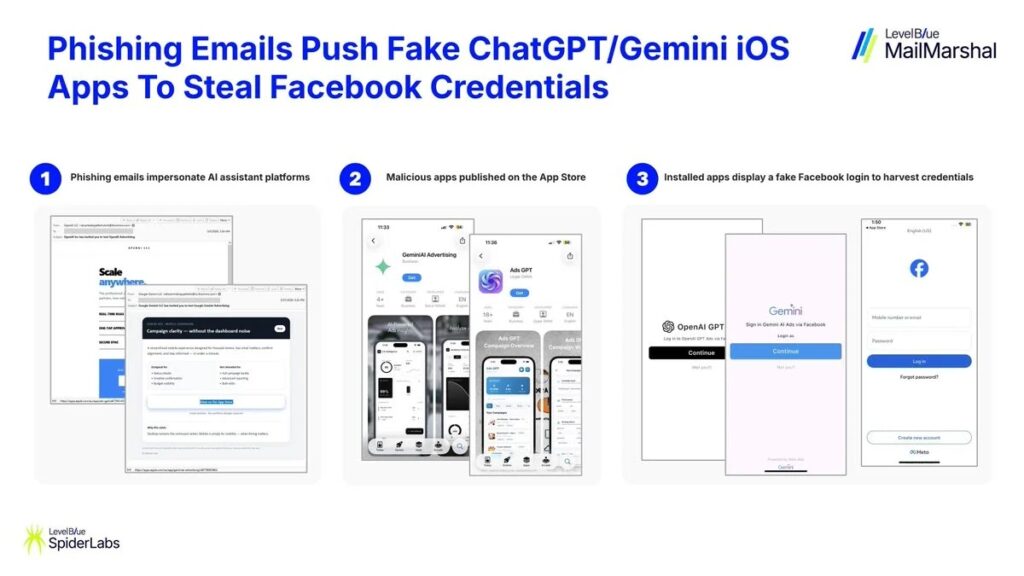
According to the reporting that cites SpiderLabs, the campaign started with phishing emails that impersonated ChatGPT or Gemini and promoted supposed AI or ad-management tools for business users. Victims who clicked were taken to Apple App Store listings, where they could install fake apps instead of being sent to a traditional phishing site.
The two app listings named in the public reporting were:
| Fake app name | Reported App Store ID | Claimed theme |
|---|---|---|
| GeminiAI Advertising | id6759005662 | Gemini-branded business or ad tool |
| Ads GPT | id6759514534 | ChatGPT-branded business or ad tool |
These details come from the campaign reporting and not from an official Apple incident post. I did not verify a live Apple listing for those exact apps in the current search results, so I would treat the named app IDs as part of the researcher-reported evidence rather than as currently active listings.
How the theft worked
The reported flow was simple. A victim received an email using a trusted AI brand, installed an app from the App Store, opened it, and then saw a fake Facebook login screen instead of real AI functionality. Once the victim entered a username and password, the credentials were reportedly sent to attacker-controlled infrastructure.
That setup follows a classic trust-chain model:
- trusted email branding
- trusted app marketplace
- trusted login brand inside the app
By the time the user reaches the fake Facebook screen, the attacker has already used several familiar names to lower suspicion. That is why this campaign stands out even though the final credential theft step looks familiar.
Why this campaign matters
This incident shows that brand impersonation around AI products is moving beyond fake websites. Attackers now understand that users recognize names like ChatGPT and Gemini instantly, and they can use that recognition to push victims into risky downloads. OpenAI explicitly tells users to verify that the iOS app is published by OpenAI, which is exactly the kind of check this campaign tried to bypass through lookalike branding.
It also puts pressure on app-store trust. Apple says every app is reviewed and that the App Store is built to be trusted, yet Apple’s own review rules also make clear that apps cannot impersonate other apps or services and cannot use another developer’s brand or product name without approval. If the reported listings were approved and published, even briefly, they would appear to clash directly with Apple’s own policies.
How users can protect themselves
Apple and OpenAI already publish guidance that fits this situation well.
- Check the developer name before installing any AI app. OpenAI says the official ChatGPT iOS app should be published by OpenAI.
- Be suspicious of unsolicited software-download emails, even when they use familiar brands. Apple says suspicious emails should be reported to [email protected].
- Compare the app against the official listing. OpenAI provides a direct App Store path for ChatGPT, and Google provides official Gemini setup guidance for iPhone and iPad.
- Turn on stronger account protection. Facebook credentials were the reported target here, so two-factor authentication can reduce the damage if a password gets stolen. This is general security advice based on the reported credential-harvesting flow.
Key takeaways
- Researchers say phishing emails promoted fake ChatGPT and Gemini iPhone apps through Apple’s App Store.
- The fake apps reportedly showed Facebook login screens instead of real AI tools.
- Apple says the App Store is designed to be trusted and reviewed, which likely made the scam more convincing.
- Apple’s own rules ban impersonation of other apps and services.
- OpenAI says users should confirm that the ChatGPT iOS app is published by OpenAI.
FAQ
The public reporting says yes, and it names two App Store IDs. I did not independently verify live listings for those apps in the search results I checked, so the safest wording is that researchers reported App Store listings tied to the campaign.
No. The reported target was Facebook login data, not OpenAI or Google account credentials.
OpenAI says the official ChatGPT iOS app should be downloaded from the App Store and must be published by OpenAI.
Yes. Google’s support documentation confirms that the Gemini app is available on iOS.


Read our disclosure page to find out how can you help VPNCentral sustain the editorial team Read more


Improve this guide




User forum
0 messages