
PyrsistenceSniper Detects 117 Offline Windows Persistence Checks for DFIR Teams


 8 min. read
  Published on
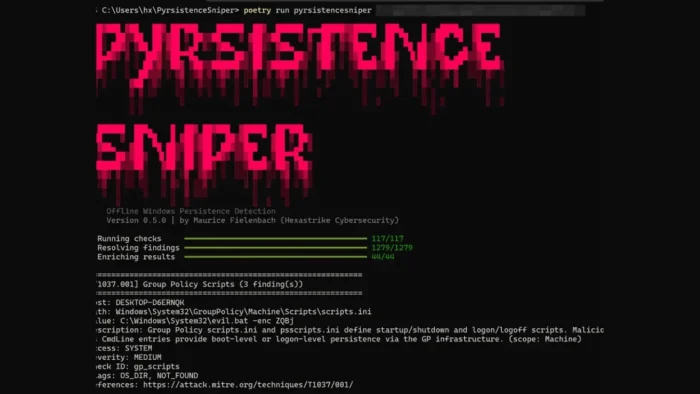
PyrsistenceSniper is an open-source Python tool that helps incident responders and threat hunters find offline Windows persistence mechanisms in forensic collections. The PyrsistenceSniper GitHub repository says the tool can scan KAPE dumps, Velociraptor collections, mounted disk images, and standalone registry hives without requiring access to a live endpoint.
The project currently lists 117 checks across 9 MITRE ATT&CK techniques. It runs on Windows, Linux, and macOS, but its detection coverage focuses on Windows persistence artifacts such as Run keys, services, COM hijacking, scheduled tasks, WMI subscriptions, Office add-ins, IFEO injection, startup folders, and LSA packages.

Access content across the globe at the highest speed rate.
70% of our readers choose Private Internet Access
70% of our readers choose ExpressVPN

Browse the web from multiple devices with industry-standard security protocols.

Faster dedicated servers for specific actions (currently at summer discounts)
That offline approach makes it useful during incident response, where analysts often receive triage collections instead of direct access to an infected machine. It also helps teams review multiple systems from one analysis workstation without relying on PowerShell execution on the original host.
What PyrsistenceSniper does
PyrsistenceSniper scans Windows forensic artifacts for places where malware or attackers may try to survive reboots, user logouts, credential changes, and cleanup attempts. The MITRE ATT&CK Persistence tactic describes this goal as maintaining a foothold after access could otherwise be lost.
The tool parses registry hives offline with libregf, checks file system artifacts, reads scheduled task XML files, and enriches findings with useful context. Each result can include file existence, SHA-256 hash, Authenticode signer information, LOLBin classification, severity, and MITRE technique mapping.
The project is inspired by two well-known Windows persistence tools: Sysinternals Autoruns and the original PersistenceSniper PowerShell module. Unlike those tools, PyrsistenceSniper was built for offline triage workflows and can run from non-Windows analyst systems.
| Feature | Why it matters |
|---|---|
| Offline scanning | Works against forensic collections without touching a live endpoint |
| 117 checks | Covers common and less obvious Windows persistence locations |
| MITRE mapping | Helps teams report findings using a shared threat model |
| Signature filtering | Helps separate likely suspicious entries from normal Windows noise |
| CSV, HTML, and XLSX output | Supports incident response reports and cross-host analysis |
Why offline persistence detection matters
Persistence is one of the most important parts of post-compromise analysis. Attackers often create startup entries, hijack legitimate execution paths, add services, register event-based triggers, or modify authentication-related locations to keep access after the first intrusion.
Microsoft’s Sysinternals Autoruns remains one of the best-known tools for reviewing autostart locations on Windows. It shows configured startup applications and many registry and file system locations used for automatic execution.
PyrsistenceSniper addresses a different workflow. It helps analysts review collected evidence after the fact, especially when they need to process many host images or triage bundles from a separate forensic workstation.
Supported checks and MITRE coverage
The project repository lists 117 supported checks across 9 MITRE ATT&CK techniques. These include boot and logon startup locations, scheduled tasks, account manipulation, Office startup locations, service changes, event-triggered execution, autostart execution, hijacked execution flows, and authentication process changes.
This mapping helps responders connect a suspicious artifact to a known attacker behavior. It also gives teams a clearer structure for reporting findings to customers, executives, or internal security leadership.
The MITRE ATT&CK Persistence page explains that adversaries use these techniques to keep access across interruptions. PyrsistenceSniper uses that language to group findings in a way that fits normal DFIR reporting.
| MITRE ID | Technique group | Example check areas |
|---|---|---|
| T1037 | Boot or logon initialization scripts | Group Policy scripts and logon scripts |
| T1053 | Scheduled task or job | Scheduled task files and ghost tasks |
| T1098 | Account manipulation | RID hijacking and related account changes |
| T1137 | Office application startup | Office add-ins, templates, and Outlook startup paths |
| T1543 | Create or modify system process | Windows services and service failure commands |
| T1546 | Event triggered execution | WMI subscriptions, AppInit DLLs, IFEO debugger keys, and shell hooks |
| T1547 | Boot or logon autostart execution | Run keys, startup folders, Winlogon entries, and LSA-related entries |
| T1556 | Modify authentication process | Authentication package and credential-related persistence locations |
| T1574 | Hijack execution flow | COM hijacking, DLL search order abuse, and path interception |
How it reduces noise during investigations
One of the main challenges with persistence hunting is noise. Windows systems contain many legitimate startup entries, scheduled tasks, services, shell extensions, and signed Microsoft components, so raw output can overwhelm analysts.

PyrsistenceSniper uses signature-based filtering and YAML detection profiles to help teams suppress known-good entries and highlight stronger signals. The tool’s documentation says block rules take priority, while allow rules can reduce low-value findings from normal operating system behavior.
This design matters for consultants and SOC teams that compare evidence across many machines. Clean output makes it easier to find the one host with a suspicious service path, unusual DLL, malicious Run key, or unexpected WMI event subscription.
- Authenticode signer checks help identify trusted and suspicious binaries.
- SHA-256 hashes make findings easier to compare across multiple systems.
- LOLBin classification highlights legitimate binaries attackers may abuse.
- YAML allow and block rules help teams adapt the tool to customer baselines.
- Technique filtering lets analysts focus on specific persistence families.
Installation and reporting options
PyrsistenceSniper is available as a Python package, with version 0.8.0 listed on PyPI as of March 30, 2026. The package requires Python 3.10 or newer and lists Maurice Fielenbach as the author.
The tool can export results to console, CSV, HTML, and XLSX formats. HTML output works well for client delivery, while CSV and XLSX files help responders stack findings across many systems during larger investigations.
The PyPI project page also lists the package under forensics, DFIR, incident response, persistence, Windows, registry, threat hunting, security, and malware analysis tags. That positioning matches the tool’s target audience: analysts who need fast offline triage rather than a live endpoint GUI.
How it compares with Autoruns and PersistenceSniper
Autoruns remains a powerful choice when an analyst has a live Windows system and wants a broad view of configured autostart locations. Microsoft’s Autoruns documentation lists logon entries, Explorer add-ons, AppInit DLLs, image hijacks, Winlogon notification DLLs, Windows services, and many other autostart locations.
The original PersistenceSniper project takes a PowerShell-based approach for blue teams, incident responders, and system administrators hunting persistence on Windows machines. PyrsistenceSniper builds on that idea but shifts the workflow toward offline Python-based analysis.
That makes the new tool especially useful when the analyst works from Linux or macOS, processes KAPE collections, or needs a repeatable command-line workflow for many host collections.
| Tool | Best suited for | Main workflow |
|---|---|---|
| Autoruns | Live Windows autostart review | Interactive review of configured autostart locations |
| PersistenceSniper | Windows persistence hunting with PowerShell | Blue-team module for finding persistence on Windows systems |
| PyrsistenceSniper | Offline DFIR triage from collections and disk images | Python-based scanning of registry hives and forensic artifacts |
Who should use PyrsistenceSniper
The tool is most useful for incident response firms, SOC teams, malware analysts, digital forensics teams, and internal security teams that collect endpoint evidence at scale. It can also help consultants prepare cleaner reports for customers after ransomware, intrusion, or suspicious persistence investigations.
It is less useful as a general desktop scanner for casual users. PyrsistenceSniper expects forensic artifacts, Windows hives, mounted images, or triage output, so it fits trained analysts better than home users looking for one-click malware removal.
Teams already using the original PersistenceSniper may find the Python version helpful when they need cross-platform analyst workstations, offline scanning, structured exports, and custom detection profiles.
What analysts should keep in mind
PyrsistenceSniper can speed up persistence triage, but it should not replace full forensic analysis. A clean scan does not prove that a system is safe, and a suspicious finding still needs analyst review before final conclusions.
The tool’s strongest value comes from repeatability. Analysts can scan many collections with the same profile, compare output across hosts, and focus manual review on entries with stronger evidence.
For teams handling real incidents, PyrsistenceSniper adds a practical offline layer to Windows persistence hunting. It gives responders a faster way to locate likely footholds, document them, and connect them to recognized ATT&CK techniques.
FAQ
PyrsistenceSniper is an open-source Python tool for offline Windows persistence detection. It scans forensic collections, mounted disk images, KAPE output, Velociraptor collections, and standalone registry hives for persistence indicators.
No. PyrsistenceSniper runs on Windows, Linux, and macOS analyst workstations, but its detection focus is offline Windows persistence artifacts.
The current project documentation lists 117 persistence checks across 9 MITRE ATT&CK techniques. These checks cover areas such as Run keys, scheduled tasks, services, WMI subscriptions, COM hijacking, Office startup paths, and authentication-related entries.
PyrsistenceSniper supports console, CSV, HTML, and XLSX output. CSV and XLSX help with cross-host analysis, while HTML reports work well for client-facing incident response deliverables.
No. PyrsistenceSniper helps analysts find likely Windows persistence mechanisms faster, but findings still require review, context, and correlation with other forensic evidence before final conclusions.


Read our disclosure page to find out how can you help VPNCentral sustain the editorial team Read more


Improve this guide




User forum
0 messages