
Rust Clipboard Hijacker Uses Fake GitHub Stars and VirusTotal Votes to Steal Crypto


 9 min. read
  Published on
A Rust-based clipboard hijacker is being spread through fake crypto and gambling tools that look more trustworthy than they really are. The malware targets Windows and macOS users, watches for copied cryptocurrency wallet addresses, and replaces them with attacker-controlled wallets before a victim sends funds.
Check Point Research says the campaign uses a WordPress phishing site, GitHub repositories, SourceForge projects, YouTube videos, and VirusTotal reputation manipulation to make the malware appear safe. The operation targets crypto traders, online gamblers, and users searching for tools that promise fast profits.

Access content across the globe at the highest speed rate.
🔥 Save 81% + 2 bonus months! 🔥
70% of our readers choose Private Internet Access
70% of our readers choose ExpressVPN
2
Browse the web from multiple devices with industry-standard security protocols.
🔥 Save 73%! 🔥

Faster dedicated servers for specific actions (currently at summer discounts)
🔥 Save 69%! 🔥
The campaign is dangerous because the attacker is not only distributing malware. The actor is also building fake credibility around it through inflated stars, downloads, positive comments, and harmless-looking votes on security platforms.
How the crypto clipboard hijacker campaign works
The malicious tools are advertised as Solana sniper bots, Pump.fun bots, Aviator predictors, crash-game predictors, and other apps that claim to give users an unfair trading or gambling advantage. These tools do not deliver what they promise.
Instead, they act as delivery channels for a Rust clipboard hijacker. Once installed, the malware runs quietly in the background and waits for the user to copy a cryptocurrency wallet address.
When the copied text matches a wallet pattern, the malware swaps the real address with one from a large attacker-controlled list. If the victim does not carefully verify the pasted address before confirming the transaction, the funds go to the attacker.
| Campaign element | How it is abused | Why it matters |
|---|---|---|
| WordPress phishing site | Acts as the main landing page for fake tools | Gives the campaign a central hub |
| GitHub repositories | Show inflated stars and forks | Makes malware look like popular software |
| SourceForge projects | Show suspicious download numbers and positive feedback | Adds another layer of fake trust |
| YouTube videos | Use AI-style narrators and suspicious engagement | Helps lure non-technical users |
| VirusTotal comments | Some samples receive benign votes and safe comments | Can mislead users and reputation-based checks |
Fake GitHub stars help the malware look legitimate
The attacker appears to operate several GitHub accounts, including names such as Decryptor-j, crash-predictor1, roblox-script1, hack-scripts, and stake-mines. According to the Check Point report, some repositories showed inflated engagement, including one with 146 stars and 62 forks.
GitHub stars are meant to help users save repositories and show interest in projects. Attackers can abuse that trust signal when they use fake or coordinated accounts to make a malicious project appear active and popular.
This is not a small platform problem. A 2024 academic study on fake GitHub stars found that suspected fake-star activity surged from 2024 and that many fake-starred repositories were short-lived malware projects posing as pirated software, game cheats, or cryptocurrency bots.
SourceForge and YouTube add more social proof
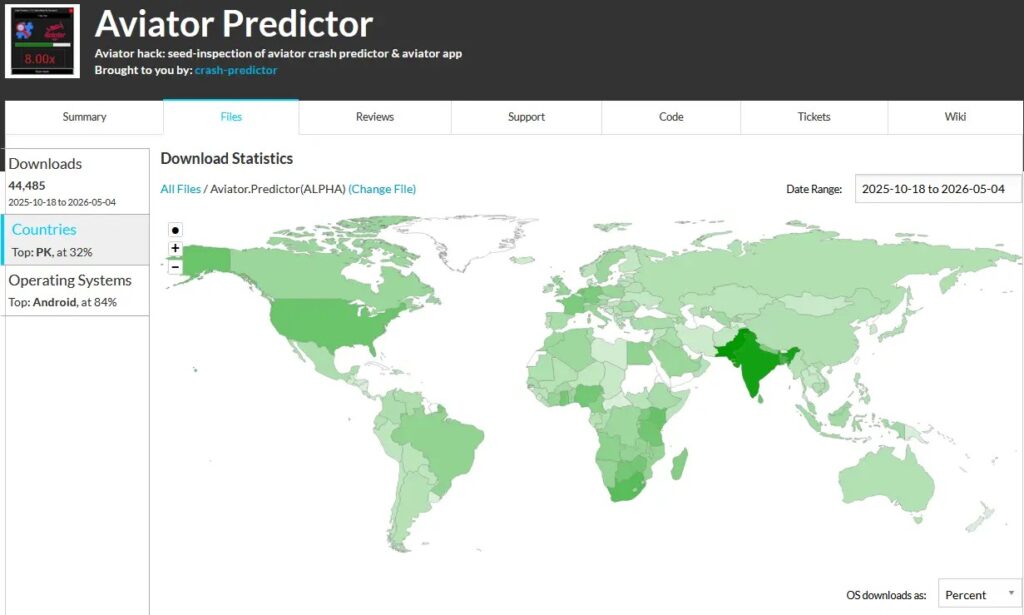
The same campaign also used SourceForge projects to show large download counts. Check Point said one SourceForge page recorded 44,485 downloads, although the pattern looked suspicious because many downloads appeared to come from Android devices even though the tools were offered only for Windows and macOS.
The YouTube side of the campaign added another trust layer. Videos promoted the same fake tools with positive comments, suspicious view spikes, and AI-generated presenters that made the software appear useful and widely tested.
The goal is simple: show the victim the same positive signals across different platforms. By the time the user reaches the download stage, the malware looks less like a random file and more like a tool that many other people have already used.
- High stars do not prove that a GitHub project is safe.
- Download counts can be inflated or manipulated.
- Positive comments can come from fake or coordinated accounts.
- AI-narrated videos can make a scam look like a normal tutorial.
- Crypto tools promising guaranteed gains should be treated as high risk.
VirusTotal comments were also manipulated
The campaign also abused VirusTotal’s community layer. VirusTotal comments allow users to post feedback and vote on whether a file or URL appears harmless or malicious.
That system can help analysts when used honestly, but Check Point found that some samples from this campaign received benign votes and safe-looking comments. This created a false impression that the files were harmless, especially when antivirus detection rates were already low.
Users should not treat community comments as proof of safety. VirusTotal community votes are one signal among many, and attackers can try to influence them with fake accounts or coordinated activity.
What happens on Windows systems
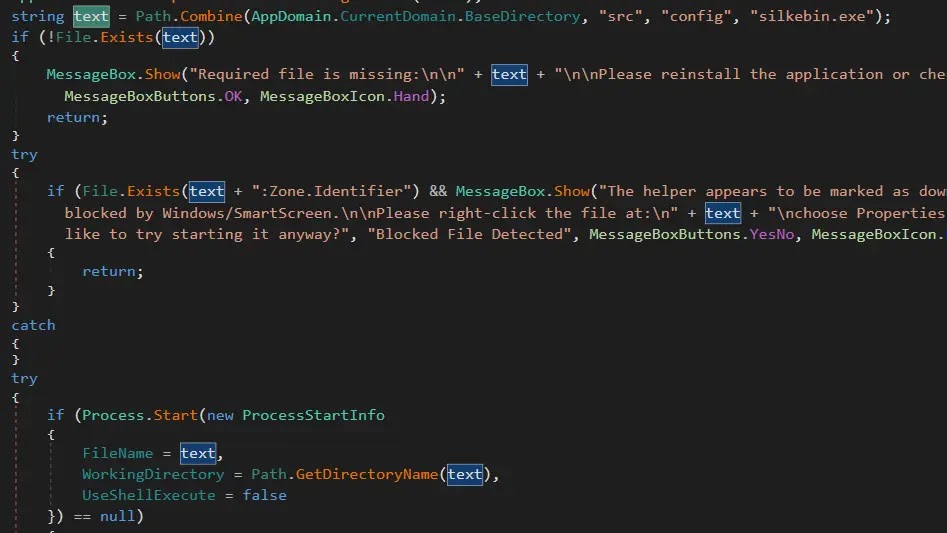
On Windows, victims usually download a ZIP archive and run a file with a name such as SniperBot_Premium(Free).exe. That file acts as a .NET loader and starts the hidden Rust malware from a nested folder.
Once active, the hijacker installs persistence by copying itself into the user’s AppData path and creating a shortcut in the Startup folder. This allows it to run again when the user logs into Windows.
The malware listens for clipboard changes and checks copied text against cryptocurrency address patterns. The supported formats include Bitcoin, Ethereum and other EVM addresses, Litecoin, Tron, XRP, Cardano, Dogecoin, Monero, Bitcoin Cash, Bitcoin Gold, Stellar, Zcash, and Solana.
| Windows component | Role in the attack |
|---|---|
| ZIP archive | Initial download package |
| SniperBot_Premium(Free).exe | .NET loader used to start the hidden payload |
| silkebin.exe | Rust clipboard hijacker |
| %APPDATA%\silke\silke.exe | Persistence copy used by the malware |
| Startup folder shortcut | Runs the malware automatically at logon |
| Embedded wallet list | Contains attacker-controlled replacement addresses |
The malware targets a large list of wallets
The Windows variant contains more than 15,500 attacker-controlled wallet addresses. Most are Bitcoin-related, but the malware also includes Ethereum and several other cryptocurrency formats.
The attacker appears to rotate wallets frequently. Check Point said that in many cases, once a malicious transaction is completed, the attacker swaps the used wallet for a new one.
This makes wallet-blocking harder and also shows why users must verify the full destination address before sending funds. Checking only the first and last few characters may not be enough against well-prepared clipboard hijackers.
macOS users are also targeted
The campaign also includes macOS versions of the fake tools. Victims are told to run an unlocker.command file if the app is blocked, which helps remove macOS quarantine warnings and open the malicious app.
Apple’s Mac app security guidance warns that running software that has not been signed and notarized can expose a computer and personal information to malware. The attacker’s instructions are designed to push users past those protections.
After execution, the macOS malware monitors the pasteboard for wallet-like strings and replaces them with hardcoded attacker wallets. It also installs a LaunchAgent and uses a watchdog loop to recreate persistence files, making manual removal harder unless the active process is stopped first.
Why this campaign matters beyond crypto users
The campaign shows how attackers can manipulate trust signals before the malware ever runs. Fake stars, fake downloads, fake comments, fake videos, and benign-looking votes can all make a dangerous file appear normal.
That issue affects more than crypto traders. Security teams, developers, gamers, and regular users often rely on public reputation signals when deciding whether a file or project looks safe.
The same pattern described in the fake GitHub stars study shows why popularity metrics should not replace security review. A project can look widely supported and still contain malware.
How users can avoid clipboard hijacker attacks
Users should avoid tools that promise guaranteed crypto profits, automatic token sniping, gambling prediction, or trading shortcuts. These offers often target people who are already willing to take risk, which makes them useful lures for malware operators.
Before sending cryptocurrency, users should verify the full address on the destination page, wallet app, or hardware wallet display. A copied address can change between copy and paste if clipboard malware is active.
Defenders can map this behavior to MITRE ATT&CK Clipboard Data, which covers adversaries accessing clipboard content and includes examples of malware that captures or replaces clipboard data.
- Download crypto tools only from trusted official sources.
- Avoid unsigned apps and ZIP packages promoted through forums or Telegram.
- Do not trust GitHub stars, SourceForge downloads, or YouTube comments by themselves.
- Check the complete wallet address before approving a transaction.
- Use hardware wallets and verify recipient addresses on the device screen.
- Review Startup folders, LaunchAgents, and unknown background processes after suspicious downloads.
What security teams should monitor
Security teams should watch for unknown binaries that persist from AppData on Windows or LaunchAgents on macOS. Clipboard-monitoring behavior, suspicious startup shortcuts, and unsigned apps should receive extra attention on systems used for crypto trading or finance work.
The Clipboard Data technique can help analysts classify the behavior and build detections around clipboard access, clipboard replacement, and unusual wallet-related string matching.
On macOS, users should follow the Apple support guidance and avoid overriding security warnings unless they fully trust the developer and source. On Windows and macOS, the safest response to a suspicious crypto tool is to delete it, scan the system, and move funds from any wallet used on the device.
FAQ
A crypto clipboard hijacker is malware that watches the clipboard for cryptocurrency wallet addresses. When it detects one, it replaces the copied address with an attacker-controlled address so the victim may send funds to the wrong wallet.
The malware spread through fake crypto and gambling tools promoted on a WordPress phishing site, GitHub repositories, SourceForge projects, YouTube videos, forums, and Telegram-linked channels. The campaign used fake engagement to make the tools look trustworthy.
No. GitHub stars can be manipulated by fake or coordinated accounts. Users should not treat stars, forks, download counts, or positive comments as proof that a file is safe.
Yes. Check Point Research found macOS versions of the fake tools. The macOS malware uses an unlocker.command file to push users past security warnings and then installs persistence through a LaunchAgent.
Users should avoid unofficial crypto tools, verify the full destination wallet address before sending funds, use hardware wallets when possible, and scan systems after running suspicious downloads. They should also avoid overriding macOS or Windows security warnings for unknown apps.


Read our disclosure page to find out how can you help VPNCentral sustain the editorial team Read more


Improve this guide




User forum
0 messages