
SEO poisoning campaign impersonates 25+ popular apps to spread AsyncRAT


 5 min. read
  Published on
A long-running SEO poisoning campaign has been pushing fake download pages for more than 25 popular apps and tricking Windows users into installing AsyncRAT. Security researchers say the operation has been active since at least October 2025, and in the cases they investigated, attackers used poisoned search results, fake software sites, ScreenConnect remote access, and DLL sideloading to quietly compromise systems.
The campaign matters because it does not rely on flashy malware tricks at the start. Victims often receive a working copy of the software they searched for, which helps the attack stay hidden. Researchers from Fox-IT and NCC Group said the operation impersonated well-known titles including VLC Media Player, OBS Studio, KMS Tools, and CrosshairX, while the final payload included AsyncRAT with a crypto clipper, keylogging features, and a plugin system that can load extra capabilities at runtime.
According to the researchers, their joint investigation started after a rise in ScreenConnect-related alerts across multiple client environments in March 2026. What first looked like scattered activity turned into evidence of a coordinated campaign that had likely remained active for at least five months.
How the attack works
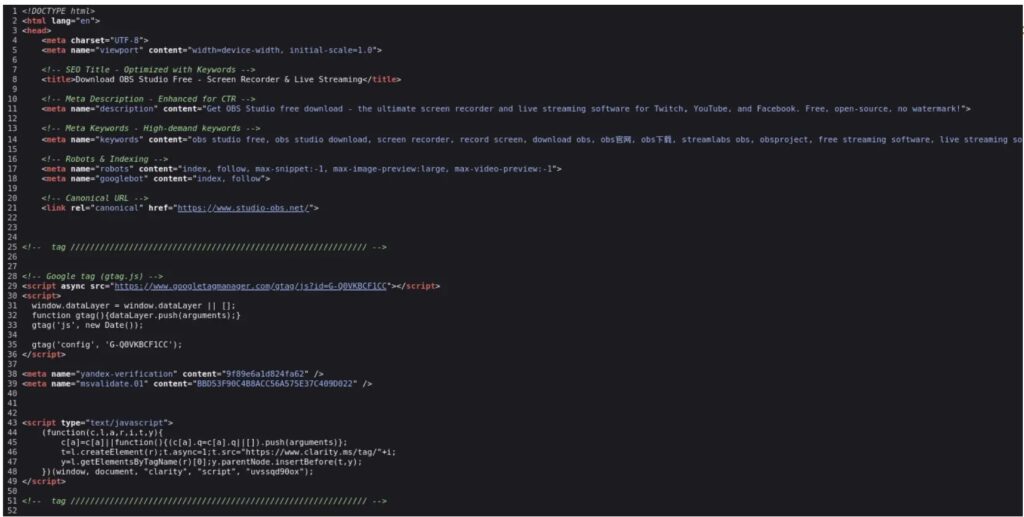
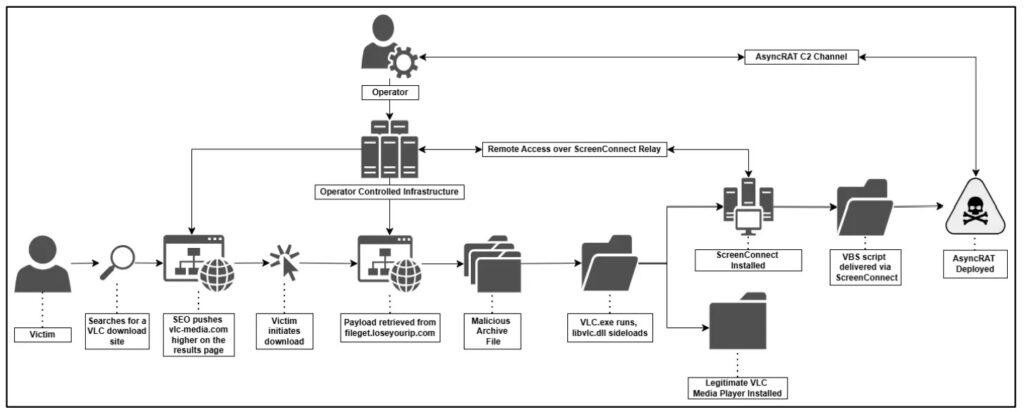
The infection chain starts with search manipulation. Attackers pushed fake software download pages high in search results, then used those pages to deliver ZIP archives that bundled the real software with a hidden malicious component. In one documented case, a user searching for VLC landed on a fake site and downloaded a package that looked legitimate but included a malicious libvlc.dll. When the program launched, Windows loaded that DLL and executed the attacker’s code.
From there, the malware silently unpacked and ran a weaponized ScreenConnect installer. Fox-IT said the installer disguised itself with Microsoft-like metadata and installed a service named Microsoft Update Service, giving the attackers remote access to the victim’s machine. The attackers then used that foothold to deploy scripts and a PowerShell loader that eventually injected AsyncRAT into RegAsm.exe, a legitimate Windows process.
Researchers also said the operator refined the delivery system over time. Early downloads used static links, but later versions switched to randomized token-based URLs, which made simple URL blocking far less effective. At the time of analysis, the infrastructure included at least three ScreenConnect relay hosts, two payload delivery backends, and more than 100 malicious files linked to the campaign on VirusTotal.
Why this campaign stands out
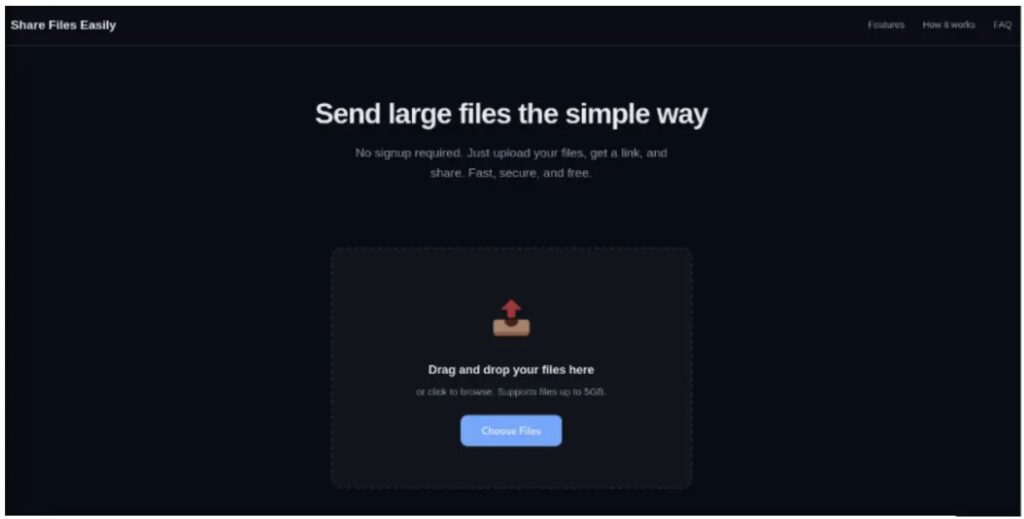
This operation blends search abuse, trusted software, and legitimate admin tooling in a way that can fool both users and defenders. The fake sites used multilingual hreflang tags and fake Schema.org ratings to look credible in search results. Fox-IT also found purpose-built JavaScript that generated unique download links for each click.
The final AsyncRAT build also appears tailored for criminal use rather than simple remote access. The report says it included a cryptocurrency clipper for 16 currencies, a dynamic plugin system, and a geo-fencing rule that deliberately excluded targets across the Middle East, North Africa, and Central Asia.
Microsoft’s own guidance lines up with the risk seen here. The company warns that unwanted software often reaches users when they search for apps online and download them from third-party sites, and it recommends getting software only from official websites or from the Microsoft Store. Microsoft also says Defender SmartScreen can warn users about potentially malicious sites, apps, and downloads.
What users and IT teams should watch for
Users may not notice anything unusual at first because the promised app can still launch normally after the malicious chain begins. That makes search poisoning especially dangerous for common utilities and free software downloads. The FTC similarly warns that users should download software only from websites they know and trust because free downloads can hide malware.
For defenders, the report points to several signs worth watching. These include unexpected ScreenConnect deployments, suspicious use of RegAsm.exe, persistence through services or scheduled tasks, and connections to known lure or relay domains. CISA and NSA also note that SEO poisoning can push victims toward phishing sites, malware downloads, and other cyber threats through manipulated search results.
Quick breakdown
| Item | What researchers found |
|---|---|
| Campaign start | Active since at least October 2025 |
| Main lure | Fake download sites for popular software |
| Known impersonated apps | At least 25 titles, including VLC, OBS Studio, KMS Tools, CrosshairX |
| Initial foothold | ScreenConnect remote access client |
| Final payload | AsyncRAT |
| Notable features | Keylogging, crypto clipper, plugin loading, stealthy process injection |
| Key evasion method | Real software bundled with malicious files |
| Delivery change | Static URLs shifted to randomized token-based links |
What organizations should do now
- Restrict software downloads to approved vendor sites or trusted app stores.
- Turn on Microsoft Defender SmartScreen protections and prevent users from bypassing high-risk warnings where possible.
- Hunt for unauthorized ScreenConnect installations and suspicious services that mimic Microsoft components.
- Monitor for suspicious RegAsm.exe activity, persistence tasks, and abnormal script execution from public folders.
- Block confirmed lure infrastructure at the domain level, not just by individual URLs.
- Train employees to avoid search-result downloads for common utilities unless they verify the vendor domain first.
FAQ
AsyncRAT is an open-source remote administration tool that threat actors often repurpose as a remote access trojan. In this campaign, researchers found a build with extra criminal features such as a keylogger, a crypto clipper, and runtime plugin loading.
Victims searched for popular software, clicked a fake download result, and installed a bundled package that looked real. The app could still open normally, while malicious files installed ScreenConnect and later delivered AsyncRAT in the background.
ScreenConnect is a legitimate remote management platform. In the cases Fox-IT examined, attackers abused a weaponized ScreenConnect installer to gain remote access and move to later stages of the compromise.
Download software only from official vendor sites or trusted stores, keep SmartScreen and antivirus enabled, and treat unexpected admin prompts during installs as a warning sign. Microsoft and the FTC both recommend avoiding third-party download sites for this reason.


Read our disclosure page to find out how can you help VPNCentral sustain the editorial team Read more


Improve this guide


User forum
0 messages