
Shop App Fake Invoice Scam Pushes Fraudulent Orders Into Purchase Histories


 8 min. read
  Published on
Scammers are abusing Shopify’s Shop order-tracking app to place fake invoices inside users’ purchase histories, making fraudulent charges look more believable than a normal phishing email.
The campaign was documented by GenDigital researchers, who found that fake receipts were appearing inside a trusted shopping app environment. The receipts often claim that the user bought a high-value product or renewed an expensive subscription.

Access content across the globe at the highest speed rate.
🔥 Save 81% + 2 bonus months! 🔥
70% of our readers choose Private Internet Access
70% of our readers choose ExpressVPN
2
Browse the web from multiple devices with industry-standard security protocols.
🔥 Save 73%! 🔥

Faster dedicated servers for specific actions (currently at summer discounts)
🔥 Save 69%! 🔥
The fake invoice then pushes the user to call a phone number listed inside the order details. Once the victim calls, the scam moves into a classic callback phishing attempt, where the attacker may ask for payment details, passwords, one-time codes, or remote access to the device.
How the Shop App Fake Invoice Scam Works
The Shop app is a legitimate order-tracking app from Shopify. Users rely on it to track packages, view receipts, receive delivery updates, and manage purchases from different online stores.
That trust makes the scam more effective. A fake invoice inside a shopping app can feel more credible because it appears next to real orders and delivery updates.
According to BleepingComputer, scammers are adding fake purchase receipts to users’ order histories and impersonating brands such as Norton, McAfee, Apple, and PayPal. The fake orders usually include a support number that the user is told to call if they did not make the purchase.
| Scam Element | How It Appears | Purpose |
|---|---|---|
| Fake receipt | Appears inside the Shop app order history | Makes the charge look more believable |
| High-value item | Security subscription, iPhone, Apple gift card, or PayPal-style charge | Creates panic and urgency |
| Phone number | Placed in the product description, receipt text, or shipping fields | Moves the victim to a scam call |
| Fake support agent | Claims to handle billing, refunds, or cancellations | Tries to steal money, credentials, or access |
Why Fake Orders Inside Shop Are More Convincing
Most users know that email inboxes contain spam and phishing messages. Shopping apps feel different because they exist mainly for real purchases, receipts, and shipping updates.
The Shop Help Center says the app can track orders from multiple sources, including the email address connected to a user’s Shop account, Shop Pay orders, and connected Gmail or Outlook inboxes.
When Gmail or Outlook is connected, Shop scans recent emails for delivery-related terms such as “tracking number” and “track your package.” This automatic tracking feature helps users, but it also means order information can come from more than one source.
The Abuse Route Has Not Been Confirmed
GenDigital said the exact path used to place the fake receipts remains unclear. The fraudulent content may be entering through a merchant workflow, email parsing, account association, or another legitimate mechanism being misused by scammers.
The key point is narrower but important: fake purchase claims are reaching a place where users expect legitimate order information. That makes the social engineering more powerful.
GenDigital’s report also said there is no evidence that the impersonated brands were compromised. The scam is based on abuse of order-notification trust, not confirmed account breaches at those companies.
- The fake receipts may appear under generic seller names such as “My Store.”
- The wording may include awkward phrases or grammar mistakes.
- The order may show no matching charge in the user’s bank or card account.
- The listed support number is the main trap.
- The attacker’s goal is to get the victim on a phone call.
What Happens If a Victim Calls the Number
If the user calls the number in the fake receipt, the person answering may claim to represent billing support, Norton support, PayPal support, or a cancellation department.
The scammer may then ask the victim to confirm personal details, provide payment card information, share one-time codes, or install remote access software. In some cases, that can give the attacker direct access to the victim’s device.
Norton’s scam guidance now warns that scammers may abuse Android and iOS shopping platforms to generate fake order notifications that look like Norton purchases. Norton tells users not to call phone numbers listed in those notifications.
Shopify Says It Added New Controls
Shopify told BleepingComputer that it identified bad actors misusing the platform to generate fake order notifications. The company said it rolled out new controls that significantly reduced the activity and improved detection going forward.
The BleepingComputer report also noted that users should avoid calling any phone number inside a suspicious notification and report the store directly in the Shop app.
This response matters because the scam uses a trusted user experience instead of a traditional phishing link. Even when the text looks suspicious, the app notification can make the warning feel more urgent.
How to Check a Suspicious Shop App Order
If a suspicious order appears in the Shop app, do not use the phone number, email address, or contact details inside the receipt. Open your banking app or card account directly and check whether the charge exists.
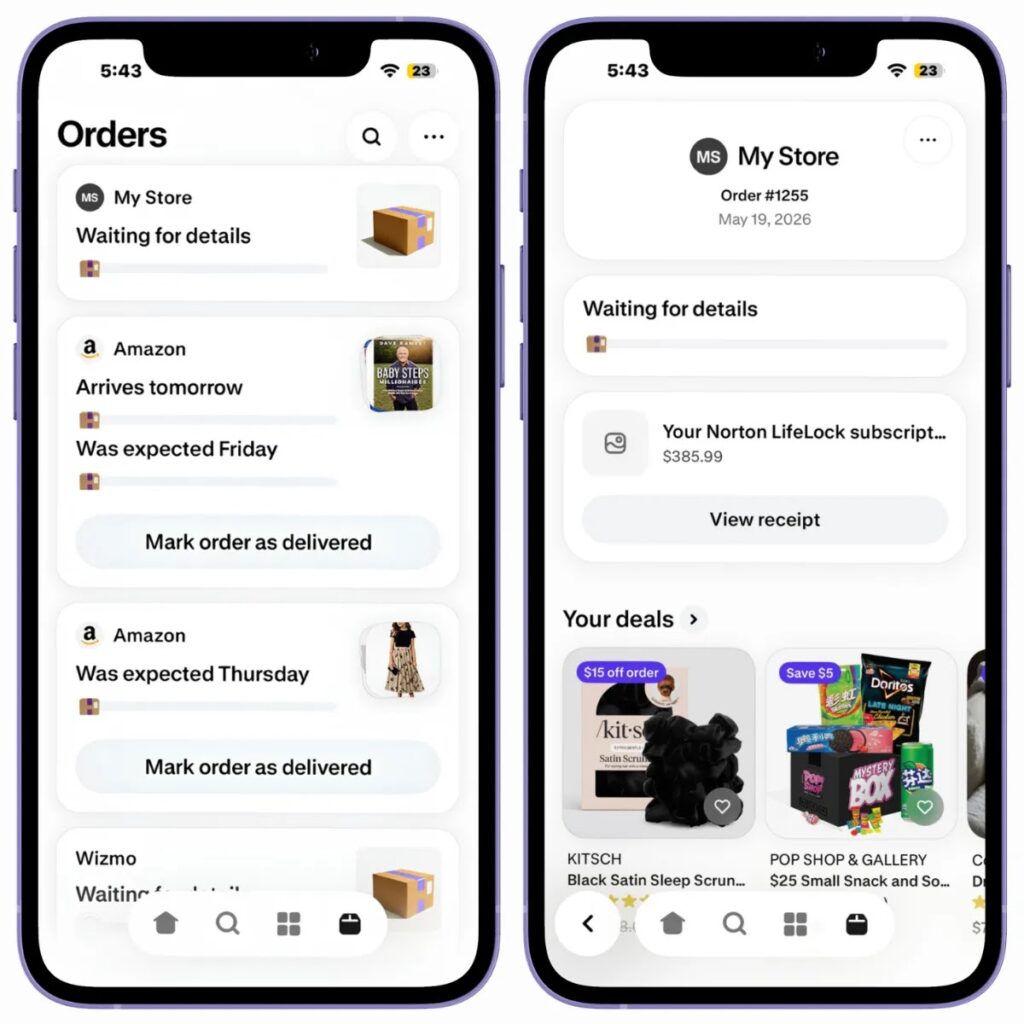
You should also open the official account for the brand being impersonated. For example, if the receipt claims to be from Norton, sign in through Norton’s official site or app instead of using the details listed in the order.
The Shop order help page explains how users can report issues through the app. Shopify also says users can report an order issue from the Orders tab when the reporting option is available.
| If You See a Fake Shop Order | What to Do |
|---|---|
| There is no matching bank charge | Treat the receipt as suspicious and do not call the listed number |
| The receipt lists a phone number in odd fields | Do not call it, even if the message claims to offer cancellation support |
| The order uses a generic seller name | Verify through official accounts and report the store if possible |
| You already called the number | End the call, change affected passwords, and contact your bank if needed |
What to Do If You Already Shared Information
If you shared payment details with someone on the call, contact your bank or card issuer immediately using the number on your card or inside your banking app.
If you shared a password, change it from another device if possible. Start with email, banking, Apple ID, Google account, PayPal, and any account connected to the fake invoice.
If you installed remote access software, disconnect the device from the internet, remove the software, and run a security scan before using the device again for banking or shopping.
- Do not call the support number shown in a suspicious receipt.
- Check your bank, card, PayPal, or store account directly.
- Report suspicious stores or orders through the Shop app when possible.
- Change passwords if you spoke to the scammer and shared account details.
- Contact your bank immediately if you shared card or payment information.
How Users Can Report the Scam
Shop’s support documentation says users can report an issue with an order from the Orders tab, then use the available reporting option for that order. The exact steps may depend on the order status and app version.
The Shop reporting instructions say users can also contact the store, report order issues, or contact Shop support for technical issues. For suspicious fake invoices, users should avoid using any contact detail placed inside the fake receipt itself.
Norton’s support page says users can forward suspicious messages to Norton and should verify unexpected charges only through official Norton channels. The same rule applies to other impersonated brands: go directly to the official account, not to the number inside the alert.
Why This Scam Is Harder to Spot
The scam works because it changes the delivery channel. Fake invoices have existed for years in email, but a fake receipt inside an order-tracking app feels closer to a real purchase.
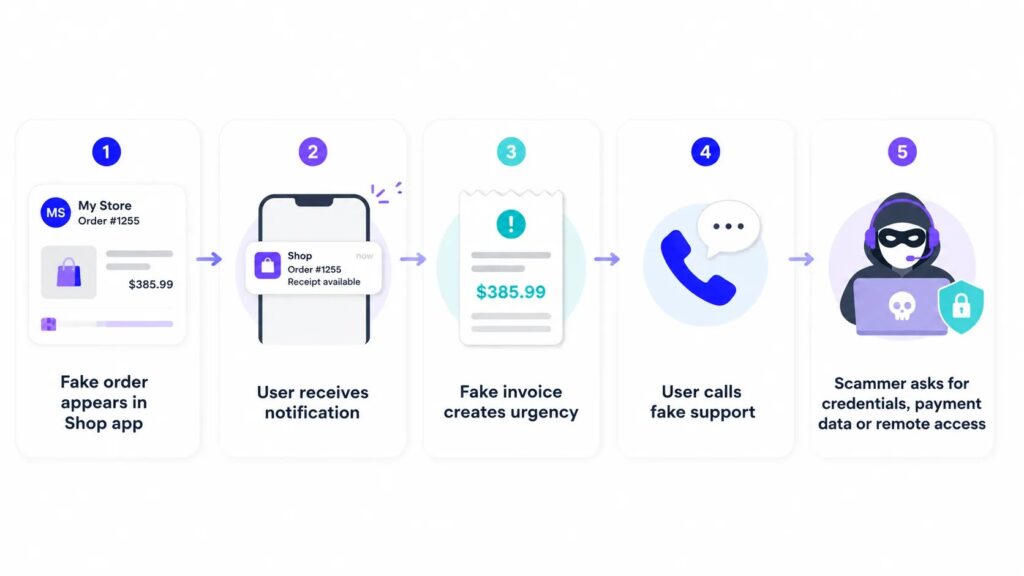
Attackers use that trust to create panic. They do not need the fake order to be perfect. They only need the user to worry enough to call the number.
The Shop tracking documentation shows why users treat the app as a reliable purchase hub. It collects order and delivery information in one place, which is exactly why scammers want their fake receipts to appear there.
FAQ
The Shop app fake invoice scam is a callback phishing campaign where scammers place fake purchase receipts inside users’ Shop app order histories and push them to call a fake support number.
There is no public evidence that Shopify, the Shop app, or the impersonated brands were breached. Researchers say the exact abuse route remains unconfirmed, and Shopify says it added controls to reduce the activity.
Researchers have not confirmed the exact route. The fake receipts may enter through a merchant workflow, email parsing, account association, or another legitimate mechanism that scammers have found a way to misuse.
Do not call the phone number in the receipt. Check your bank, card, PayPal, or brand account directly, then report the suspicious order or store through the Shop app when the option is available.
End the call immediately. If you shared payment details, contact your bank or card issuer. If you shared passwords or one-time codes, change the affected passwords and review recent account activity.


Read our disclosure page to find out how can you help VPNCentral sustain the editorial team Read more


Improve this guide




User forum
0 messages