
Signed fake Teams and Zoom apps used to plant remote access backdoors


 5 min. read
  Published on
A new phishing campaign is pushing signed malware disguised as Microsoft Teams, Zoom, Adobe Reader, and other familiar workplace apps. Microsoft says the attackers used an Extended Validation certificate issued to TrustConnect Software PTY LTD, which made the files look more trustworthy and helped them slip past user suspicion.
Microsoft Defender Experts said it spotted multiple phishing waves in February 2026. The emails used meeting invites, invoices, financial documents, and fake workplace notices to push victims toward malicious downloads that looked like routine software updates.
Once launched, the fake apps installed legitimate remote monitoring and management tools such as ScreenConnect, Tactical RMM, and MeshAgent. That gave the attacker persistent access to compromised machines and a cleaner path for lateral movement inside enterprise networks.
This campaign matters because it combines three things users often trust: familiar brands, signed executables, and real remote administration tools. In practice, that mix can make the initial infection look like a normal install instead of an intrusion.
How the attack works
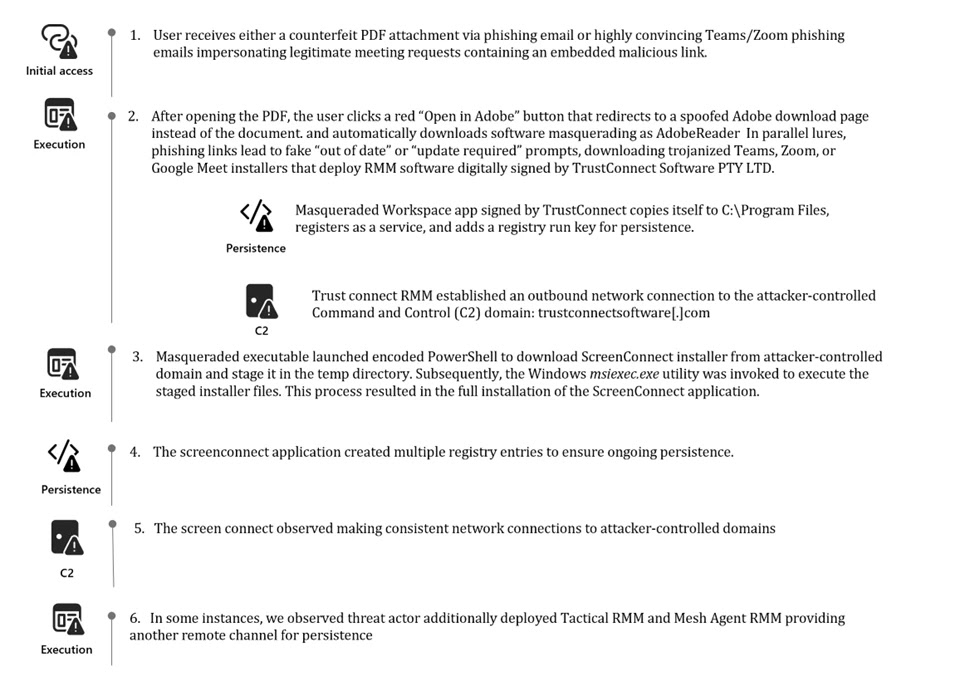
Microsoft’s research says victims received phishing emails with fake PDF attachments or links that looked like meeting requests, bids, invoices, or internal notices. In one chain, the PDF displayed a blurred document and an “Open in Adobe” button. Clicking it did not open a document. It redirected the victim to a spoofed download page that looked like Adobe’s official site and then pushed a malicious file.
In other cases, the attackers used fake Teams, Zoom, or Google Meet pages that showed “out of date” or “update required” prompts. Those pages then downloaded files such as msteams.exe, trustconnectagent.exe, adobereader.exe, zoomworkspace.clientsetup.exe, and invite.exe. Microsoft says these samples carried the TrustConnect certificate.
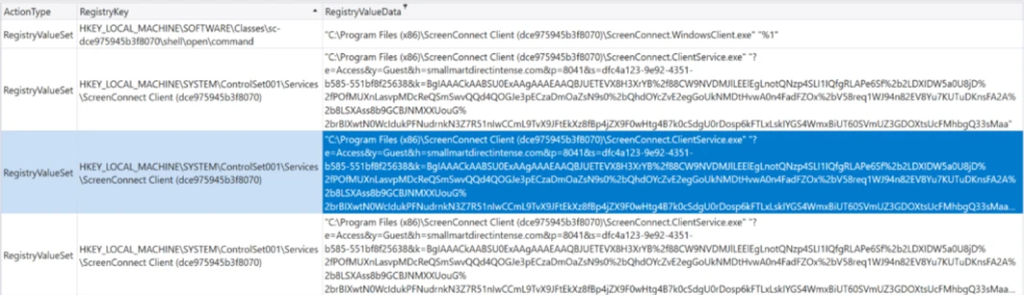
After execution, the malware copied itself into Program Files, registered itself as a Windows service, and created a Run key under HKEY_LOCAL_MACHINE\SOFTWARE\Microsoft\Windows\CurrentVersion\Run using the value name TrustConnectAgent. Microsoft also said the malware reached out to the attacker-controlled domain trustconnectsoftware[.]com before pulling down ScreenConnect and other tooling.
The attackers did not rely on one backdoor alone. Microsoft’s analysis says they used encoded PowerShell commands to install ScreenConnect, then deployed Tactical RMM, which in turn installed MeshAgent as another access channel. That redundancy lets an attacker keep access even if defenders remove one tool.
Why signed malware makes this campaign harder to catch
A digital signature does not make software safe on its own, but many users and some defenses still treat signed files as lower risk. In this case, Microsoft says the threat actor abused an EV certificate, while the phishing pages copied the look of trusted download centers to reduce suspicion at the point of click.
The use of legitimate RMM software also complicates detection. ScreenConnect, Tactical RMM, and MeshAgent all have valid administrative use cases, so defenders often need policy controls and behavioral detection rather than simple signature-based blocking. Microsoft’s own mitigation guidance focuses on allowlisting, attack surface reduction, and mail protections instead of relying on one control.

Key details at a glance
| Item | What Microsoft reported |
|---|---|
| Initial lure | Phishing emails with fake meeting invites, invoices, PDFs, and workplace notices |
| Masqueraded apps | Teams, Zoom, Adobe Reader, Google Meet, and TrustConnect-branded files |
| Certificate used | EV certificate issued to TrustConnect Software PTY LTD |
| Post-infection tools | ScreenConnect, Tactical RMM, MeshAgent |
| Persistence | Windows service, Run key, repeated RMM deployment |
| Reported start | February 2026 |
What organizations should do now
Microsoft recommends blocking unauthorized RMM tools with Windows Defender Application Control or AppLocker. It also advises organizations to use protections in Microsoft 365 such as Safe Links, Safe Attachments, and Zero-hour Auto Purge to reduce the chance that phishing messages reach users in the first place.
The company also recommends attack surface reduction rules that target untrusted executables and suspicious process creation activity. Keeping cloud-delivered protection enabled in endpoint security products can also improve detection of fast-moving malware variants.
What stands out from Microsoft’s official findings
According to Microsoft, “the files were digitally signed using an Extended Validation (EV) certificate issued to TrustConnect Software PTY LTD.” The company also said the malware “installed remote monitoring and management (RMM) tools that enabled the attacker to establish persistent access on compromised systems.”
Microsoft further warned that the campaign shows how “familiar branding and trusted digital signatures can be abused to bypass user suspicion and gain an initial foothold in enterprise environments.” That is the main lesson here: trusted appearance now plays a direct role in the infection chain.
Defensive checklist
- Block unapproved RMM tools with WDAC or AppLocker.
- Turn on Safe Links, Safe Attachments, and Zero-hour Auto Purge in Microsoft 365.
- Enforce multifactor authentication on approved remote access tools.
- Deploy attack surface reduction rules for suspicious executables and remote execution behavior.
- Train staff to avoid software updates delivered through email attachments or unexpected meeting notices. This last point is an inference based on Microsoft’s described phishing chain.
FAQ
Attackers send phishing emails that look like meeting invites, invoices, or PDF notices. The links or attachments lead victims to fake download pages for apps like Teams, Zoom, or Adobe Reader, where signed malware gets installed.
Microsoft says the malicious files were signed with an EV certificate issued to TrustConnect Software PTY LTD. Signed files often look more legitimate to users and can lower suspicion during installation.
Microsoft says the payload installs legitimate remote administration tools including ScreenConnect, Tactical RMM, and MeshAgent. Attackers then use those tools as backdoors for persistence and remote control.
Microsoft recommends blocking unauthorized RMM software, enabling Microsoft 365 mail protections, using attack surface reduction rules, and reviewing deployment status through security recommendations.


Read our disclosure page to find out how can you help VPNCentral sustain the editorial team Read more


Improve this guide


User forum
0 messages