
Single Alert Exposes 1,048-File WebDAV Malware Lab With GenAI-Assisted Lures


 11 min. read
  Published on
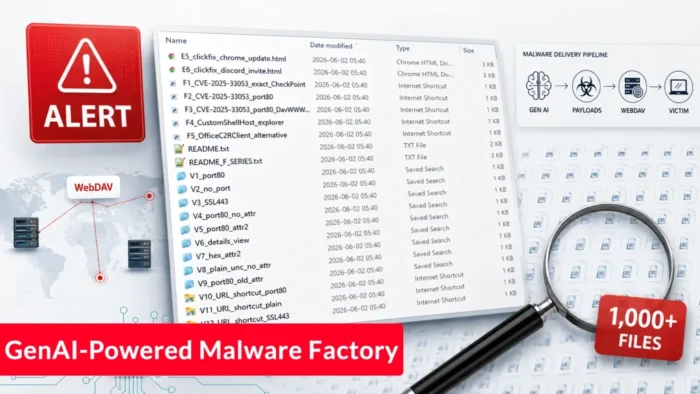
A single managed detection and response alert led Rapid7 researchers to an exposed WebDAV server containing 1,048 malicious and testing files. The infrastructure operated as a development, quality-assurance, and delivery environment for Windows malware campaigns.
The server contained hundreds of shortcut launchers, filename-spoofing tests, encrypted droppers, ClickFix pages, WebDAV scripts, payloads, and operator notes. It also exposed how the attacker tested delivery methods before using them against potential victims.

Access content across the globe at the highest speed rate.
🔥 Save 81% + 2 bonus months! 🔥
70% of our readers choose Private Internet Access
70% of our readers choose ExpressVPN
2
Browse the web from multiple devices with industry-standard security protocols.
🔥 Save 73%! 🔥

Faster dedicated servers for specific actions (currently at summer discounts)
🔥 Save 69%! 🔥
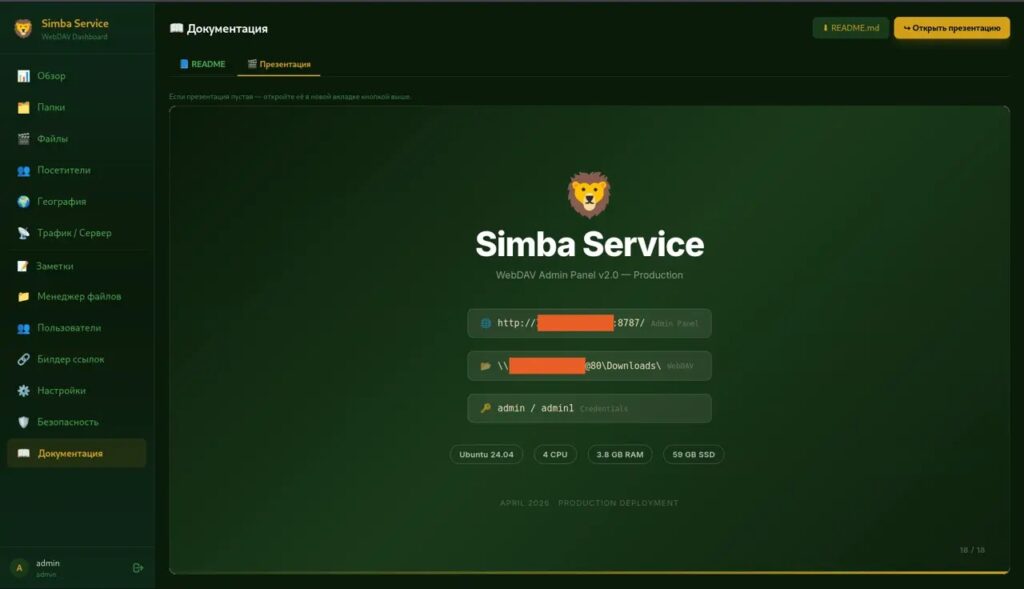
According to Rapid7’s investigation, several README files, lure variants, JavaScript comments, and parts of the management panel showed signs of generative AI assistance. The evidence indicates that large language models helped the operator work faster, rather than independently creating the complete malware operation.
What the Exposed WebDAV Server Contained
The investigation began when Rapid7 detected a user executing content retrieved from a WebDAV server through rundll32.exe. Endpoint telemetry showed the Windows WebClient service starting before davclnt.dll contacted a remote host.
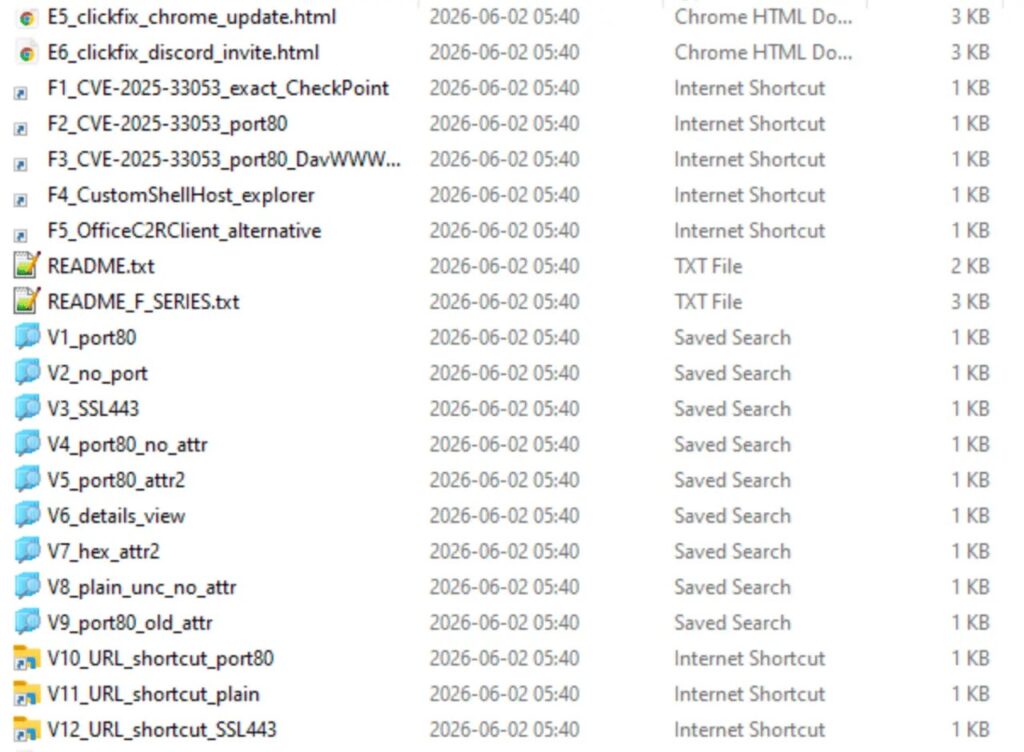
Further analysis uncovered an exposed directory organized like a malware-development workspace. Separate folders covered shortcut delivery, remote working directories, filename deception, ClickFix social engineering, trusted Windows utilities, and payload testing.
The collection also showed repeated attempts to determine how malicious files appeared in browsers and Windows File Explorer. These tests used fake document icons, Unicode characters, right-to-left override characters, double extensions, and whitespace padding.
| Artifact category | Files | Purpose |
|---|---|---|
| LNK delivery launchers | 453 | Shortcut lures using document themes, fake icons, and multiple execution paths |
| Filename-spoofing tests | 236 | Unicode, double-extension, padding, and rendering experiments |
| URL and trusted-tool tests | 146 | WebDAV execution and remote working-directory experiments |
| Encrypted droppers | 89 | Staged payloads and installer-style packages |
| Alternative execution containers | 24 | Search-ms, library-ms, and Control Panel file tests |
| Payload stubs and spoofed executables | 21 | Loaders, decoys, and renamed binaries |
| WebDAV scripts | 17 | Scripts intended to improve Windows WebDAV delivery |
| Builder and operator notes | 10 | README files, test reports, mappings, and generation scripts |
| ClickFix HTML pages | 9 | Pages instructing users to copy and execute commands |
| Miscellaneous files | 6 | Documentation related to the delivery and administration panel |
How Generative AI Supported the Malware Operation
Rapid7 assessed that the operator used large language models to generate or refine phishing text, testing instructions, structured documentation, JavaScript comments, and numerous lure variations. Some README files closely described previously published attack techniques.
The evidence does not establish that an AI model wrote the final malware binaries. Instead, generative AI appears to have reduced the time required to document techniques, produce social-engineering content, and test many variations of the same delivery method.
This distinction matters because the operation’s main advantage came from scale. The attacker could rapidly build new lures, record whether an approach worked, and move to another Windows utility or delivery format when a test failed.
- Generate phishing and document themes in bulk
- Create detailed instructions for reproducing public attack techniques
- Document test requirements and expected results
- Produce multiple shortcut and filename variations
- Add comments and structure to malicious web pages
- Accelerate development of the WebDAV management panel
Attackers Tested a Patched Windows WebDAV Vulnerability
The most developed vulnerability test set focused on CVE-2025-33053. The flaw involves external control of a filename or path in Windows Internet Shortcut files and can allow an unauthenticated attacker to execute code over a network after user interaction.
The official Microsoft CVE-2025-33053 advisory covers the vulnerability and its Windows security updates. Microsoft fixed the flaw on June 10, 2025, meaning fully updated Windows systems should not remain vulnerable to this specific technique.
Rapid7 found 11 CVE-2025-33053 test samples. The attacker’s instructions noted that the technique required a system without the relevant Microsoft update and the presence of iediagcmd.exe, an Internet Explorer diagnostic utility.
How the CVE-2025-33053 Tests Worked
The technique used a malicious Internet Shortcut file to start a legitimate Windows binary while setting its working directory to an attacker-controlled WebDAV share. The trusted application could then search the remote directory for a child executable before checking the expected Windows location.
This approach was originally documented by Check Point Research during its investigation of Stealth Falcon. The exposed README files copied important elements from that public research, including the preferred Windows binary and WebDAV path structure.
The attacker also tested fallback programs for computers without iediagcmd.exe. Other experiments involved CustomShellHost.exe, Office Click-to-Run components, bitsadmin, certutil, mshta, PowerShell, and Windows Explorer containers.
| Delivery method | Observed use |
|---|---|
| Internet Shortcut files | Set an attacker-controlled WebDAV location as the working directory |
| LNK files | Started commands or trusted Windows utilities while imitating documents |
| Search-ms links | Displayed remote payloads inside a Windows Explorer search window |
| Library-ms files | Presented remote content through a familiar Explorer interface |
| ClickFix pages | Persuaded users to copy and execute attacker-provided commands |
| Trusted Windows tools | Downloaded, launched, or proxied execution of malicious content |
Fake CURP Website Targeted Users in Mexico
One active campaign impersonated Mexico’s official CURP national identity lookup service. Victims who visited the fraudulent gobf[.]mx website were asked to enter identity information and download what appeared to be an official record.
Clicking the download option triggered a search-ms request instead of delivering a legitimate PDF. Windows Explorer then displayed an attacker-controlled WebDAV share containing a malicious screen-saver executable disguised as a PDF document.
The fraudulent site copied the purpose of the legitimate Mexican government service. Users should retrieve CURP records only through the government’s official portal and avoid document downloads opened through unfamiliar Explorer searches or remote shares.
CURP Campaign Generated More Than 77,000 Requests
Rapid7 analyzed approximately five and a half days of WebDAV telemetry from June 20 through June 26, 2026. During that period, the server recorded 77,098 requests from 3,892 unique client IP addresses across 101 countries and transferred about 45.9 GB of data.
Mexico generated 63,622 requests, representing 82.5% of the total. It also accounted for 2,365 of the 2,441 observed executable launch events, or about 96.9%.
The CURP-themed file accounted for 2,384 apparent launch events and was accessed from 1,869 unique client IP addresses. Rapid7 defined a launch event as a request for an executable that appeared consistent with an attempted run. The figure does not confirm that execution or infection succeeded.
| Campaign measurement | Recorded total |
|---|---|
| Observation period | Approximately 5.5 days |
| WebDAV requests | 77,098 |
| Unique client IP addresses | 3,892 |
| Countries represented | 101 |
| Data transferred | Approximately 45.9 GB |
| Observed executable launch events | 2,441 |
| CURP lure launch events | 2,384 |
| Requests from Mexico | 63,622 |
CURP Malware Chain Delivered PureRAT
The CURP lure appeared to have a PDF filename because it used a right-to-left override character. In reality, the downloaded file was a Delphi and Inno Setup-based .scr executable.
Running the file extracted a loader named Fo-Binary.exe. Additional stages decrypted a .NET payload with AES and GZip before loading it directly into memory through Assembly.Load.
The malware then used process hollowing to execute inside an EV-signed Qihoo 360 process. Rapid7 identified the final payload as PureRAT version 4.4.3, which combined information-stealing and remote-access capabilities.
- Saved browser usernames and passwords
- Browser cookies and active session tokens
- Desktop and browser cryptocurrency wallets
- Telegram session information
- Foxmail application data
- Desktop screenshots
- Local application and system information
DlrtyGames Used DLL Sideloading and Process Hollowing
A second campaign folder named DlrtyGames contained a different infection chain. Its self-extracting archive placed a legitimate, signed Ubisoft executable beside a malicious discord-rpc.x64.dll file.
The signed program loaded the malicious DLL through DLL sideloading. Later stages manually loaded profiler16.dll and read encrypted modules stored inside the IDAT sections of a PNG file named loader-pool.db.
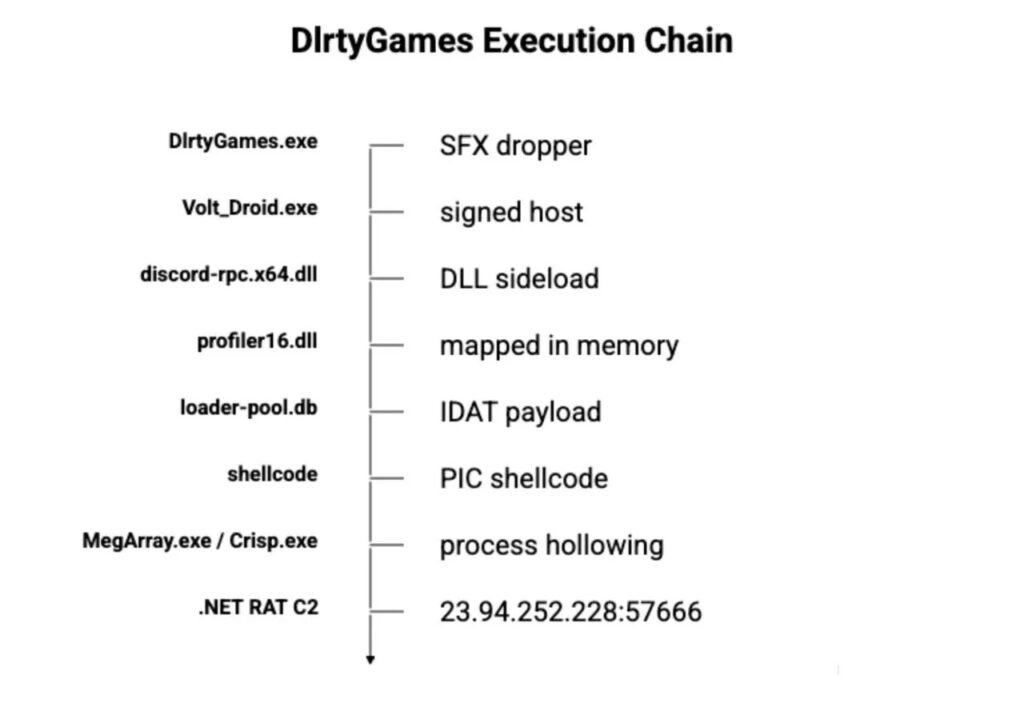
After a 45-second delay, the loader decrypted the modules, created persistence, attempted COM-based elevation, and used process hollowing to place a modular .NET RAT inside another signed process. Rapid7 also identified this final payload as PureRAT.
| Chain | Key delivery or execution methods | Final payload |
|---|---|---|
| CURP | Search-ms, RTLO filename spoofing, reflective loading, process hollowing | PureRAT 4.4.3 |
| DlrtyGames | 7-Zip SFX, DLL sideloading, PNG-carried modules, COM elevation, process hollowing | Modular .NET PureRAT |
ClickFix Pages Expanded the Delivery Options
The exposed server contained nine ClickFix pages designed to make users execute malicious commands themselves. The pages imitated Cloudflare checks, Microsoft login screens, Chrome updates, Adobe and Word errors, Discord notices, and secure-document portals.
The commands commonly started PowerShell, Command Prompt, rundll32, or mshta. They retrieved content from WebDAV or UNC locations and often used hidden windows, encoded arguments, or temporary directories.
The CISA advisory covering ClickFix activity similarly warns that fake verification pages can persuade users to run malicious commands. The technique succeeds through social engineering and does not require an unpatched software vulnerability.
Indicators of Compromise
The following indicators come from the two analyzed campaigns. Domains and IP addresses are defanged where appropriate to reduce accidental access.
| Type | Indicator | Description |
|---|---|---|
| Phishing domain | gobf[.]mx | Fake CURP lookup website |
| WebDAV server | onedrive[.]cv | Malware testing and delivery infrastructure |
| SHA-256 | 04a8018191f2e9e76072d072a933371d9d669a42de2b2a087541cd3a653b0ba7c2 | CURP RTLO-spoofed screen-saver executable |
| C2 address | 77[.]110[.]127[.]205 | CURP PureRAT infrastructure |
| C2 domain | google[.]services[.]ug | CURP campaign C2 alias |
| Scheduled tasks | brokerhost, net_queue_32 | CURP persistence indicators |
| Staging paths | %AppData%\Roaming\inttracer_i686_prod\, C:\ProgramData\inttracer_i686_prod\ | CURP malware staging locations |
| C2 endpoint | 23[.]94[.]252[.]228:57666 | DlrtyGames infrastructure |
| JA3 fingerprint | fc54e0d16d9764783542f0146a98b300 | DlrtyGames TLS client fingerprint |
| SHA-256 | e8be17a7fbef48b45f1e958b3ae5ebdfcad58808969982c431a905eefcae5268 | DlrtyGames executable |
| SHA-256 | 449d1121fa275879af22a20407aa7253ac750ac8fa7ff5691101752600d645df | Malicious discord-rpc.x64.dll |
| SHA-256 | a88f5ee748e60f889d046718bfe3ddcf1c5f3cba2001cad587e8953a76bf7aa9 | profiler16.dll loader |
| SHA-256 | 51a02eccdcae0483c7cbb9796738eee6c2a13b740d30e5417cda09bf418ea93b | loader-pool.db module container |
| SHA-256 | 82e67735cf822db8f2f759e742e5bf8c54fdbd01a4170619b9e0916e1b3f5923 | DlrtyGames .NET RAT payload |
| Staging paths | C:\ProgramData\basenet\, %APPDATA%\basenet\ | DlrtyGames staging directories |
How Organizations Can Detect the WebDAV Campaigns
Security teams should prioritize unusual WebDAV activity when it follows a phishing message, browser redirect, identity-record request, or fake document download. Connections to remote shares from Windows Explorer can make malicious content appear more familiar than a browser download.
Organizations should also check whether devices have the Microsoft security update for CVE-2025-33053. The attacker’s own testing documentation indicated that the vulnerability-based technique failed after installation of the relevant June 2025 update.
Reviewing process relationships is particularly important. Activity involving the WebClient service, davclnt.dll, rundll32.exe, mshta.exe, PowerShell, search-ms, or trusted applications running files from remote directories warrants investigation.
- Restrict outbound WebDAV access where the service has no business purpose.
- Alert when executable files are accessed from remote WebDAV or UNC locations.
- Monitor
rundll32.execommands involvingdavclnt.dll. - Investigate search-ms links that reference remote hosts.
- Detect right-to-left override characters and misleading double extensions.
- Block known campaign domains, IP addresses, and file hashes.
- Review scheduled tasks and Run keys for the published persistence indicators.
- Hunt for DLL sideloading beside signed third-party applications.
- Train users not to paste commands from verification or document-access pages.
Why Patching Alone Does Not Stop Every Delivery Method
Installing current Windows security updates blocks the known CVE-2025-33053 exploitation path. It does not prevent every delivery option found inside the exposed server.
The operator also tested social engineering, ClickFix instructions, deceptive filenames, malicious shortcut files, DLL sideloading, and trusted Windows utilities. Several of these methods depend on convincing the user to open a file or run a command rather than exploiting an unpatched vulnerability.
The original CVE-2025-33053 research and the newer WebDAV operation both show how attackers can combine legitimate Windows components with remote content. Application controls, network monitoring, endpoint telemetry, and user training remain necessary alongside patching.
GenAI Gives Attackers More Speed and Scale
The exposed server offers a practical example of how threat actors can use generative AI without creating a new class of malware. Many of the underlying techniques, including WebDAV delivery, ClickFix, shortcut abuse, and process injection, were already established.
Generative AI appears to have helped the attacker organize research, produce documentation, create lure variants, and test more combinations. This can shorten the time between copying a published technique and deploying a working campaign.
Rapid7’s full WebDAV malware lab report shows that one operational mistake exposed far more than a collection of payloads. It revealed the attacker’s workflow, quality-assurance process, delivery infrastructure, victim tracking, and campaign-development methods.
Organizations should incorporate this risk into phishing simulations and incident-response exercises. The latest CISA ClickFix guidance can also help defenders prepare users for pages that imitate verification checks and instruct them to execute commands.
FAQ
Rapid7 found 1,048 files, including shortcut launchers, filename-spoofing tests, encrypted droppers, WebDAV scripts, ClickFix pages, payloads, and internal operator documentation.
Rapid7 found evidence suggesting that large language models assisted lure creation, documentation, testing, and panel development. The researchers did not conclude that AI independently created all the malware binaries.
The campaign used a fraudulent website that impersonated Mexico’s CURP identity-record service. Its download button opened an attacker-controlled WebDAV share containing a screen-saver executable disguised as a PDF.
Rapid7 identified the final .NET payloads in both analyzed chains as PureRAT. The malware supported credential theft, browser data collection, screenshots, keylogging, remote access, and other surveillance capabilities.
Organizations should install current Windows updates, restrict unnecessary WebDAV access, monitor remote executable launches, detect deceptive filenames, investigate suspicious Windows utilities, and train users not to run commands supplied by untrusted web pages.


Read our disclosure page to find out how can you help VPNCentral sustain the editorial team Read more


Improve this guide




User forum
0 messages