
The Gentlemen Ransomware Uses SYSTEM Scheduled Tasks to Encrypt Windows Drives


 8 min. read
  Published on
The Gentlemen ransomware is using Windows scheduled tasks to relaunch itself with SYSTEM privileges, giving attackers a stronger position before encrypting local drives and spreading across business networks.
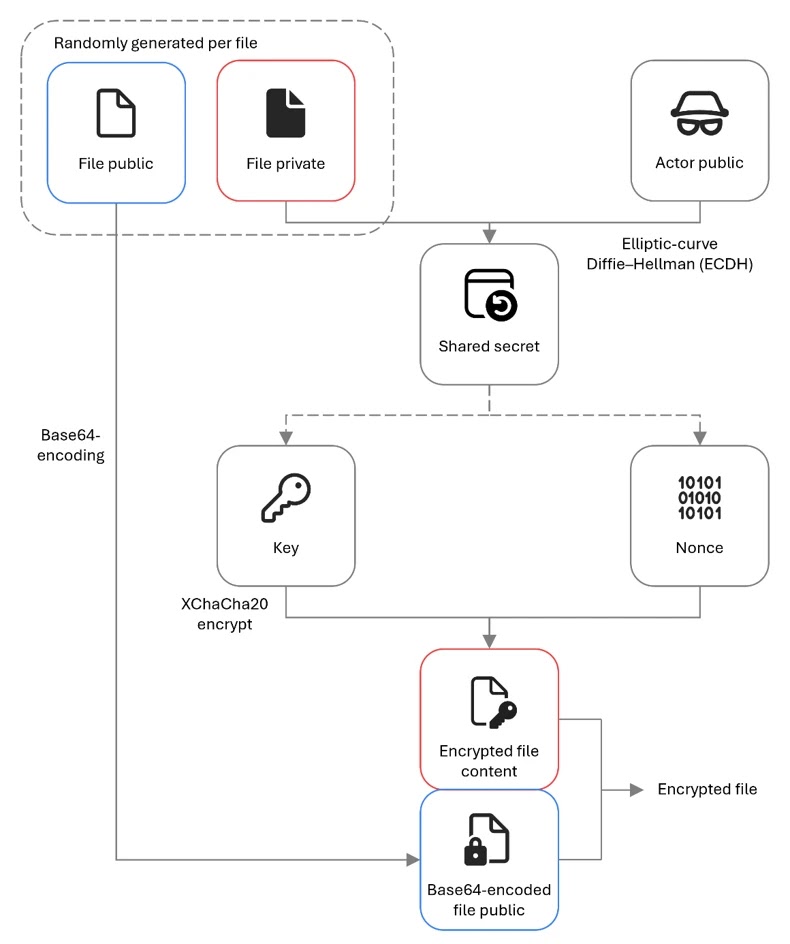
Microsoft Threat Intelligence tracks the operators behind the ransomware-as-a-service platform as Storm-2697. The group’s malware is written in Go, obfuscated with Garble, and designed to combine strong file encryption with rapid self-propagation.

Access content across the globe at the highest speed rate.
🔥 Save 81% + 2 bonus months! 🔥
70% of our readers choose Private Internet Access
70% of our readers choose Private Internet Access
2
Browse the web from multiple devices with industry-standard security protocols.
🔥 Save 73%! 🔥

Faster dedicated servers for specific actions (currently discounted)
🔥 Save 69%! 🔥
The threat is dangerous because it does not behave like a simple file locker. It can disable defenses, delete backups and logs, wipe forensic traces, and attempt multiple lateral movement methods once attackers gain access to a network.
Why The Gentlemen Ransomware Stands Out
The Gentlemen emerged in 2025 and later expanded into a ransomware-as-a-service operation. Under that model, core operators maintain the platform while affiliates carry out intrusions, steal data, and deploy the encryptor.
S-RM reported that the group uses double extortion, meaning victims face both file encryption and the threat of leaked stolen data. The firm said The Gentlemen had become one of the more visible ransomware groups by April 2026, with a strong focus on small and medium-sized organizations.
The ransomware also gives operators command-line control over how the attack runs. They can set encryption scope, target local drives, target network shares, enable spreading, delay execution, or run in a quieter mode that avoids some visible post-encryption actions.
| Capability | What it does | Why defenders should care |
| SYSTEM scheduled task | Relaunches the encryptor under the Windows SYSTEM account | Gives the malware broader access to local files |
| Self-propagation | Copies and runs itself across reachable hosts | Can turn one compromise into a wider network incident |
| Defense evasion | Disables protections, clears logs, and removes forensic artifacts | Makes detection and investigation harder |
| Double extortion | Combines data theft with encryption | Pressures victims through outage risk and data-leak threats |
How the SYSTEM Scheduled Task Works
The most notable Windows behavior involves a scheduled task named gentlemen_system. When the operator runs the malware with the right option, the ransomware deletes any existing task with that name, creates a fresh one-time task, and triggers it immediately.
The new task runs the ransomware binary as SYSTEM. That matters because SYSTEM is a highly privileged Windows account that can access files and system areas that a regular user account may not reach.
Microsoft notes one important limitation: the malware can create this scheduled task only if it already runs from an account with administrator privileges. In other words, the scheduled task helps the malware elevate its execution context during an attack, but it does not remove the attacker’s need for privileged access.
The Malware Marks Its Elevated Encryption Process
Once the scheduled task launches, The Gentlemen sets an internal environment variable called LOCKER_BACKGROUND=1. That flag tells the malware it is running as a background encryption worker rather than the original operator-launched process.
This design helps the ransomware separate operator control from the privileged encryption process. It also gives the malware a cleaner way to run local-drive encryption after creating the scheduled task.
The result can be severe. If the attacker already has administrative access, the scheduled task gives the encryptor the permissions it needs to reach more files and complete local encryption with fewer access errors.
Defense Evasion Happens Before Encryption
The Gentlemen does not wait until after encryption to disrupt defenses. Microsoft’s analysis shows that the malware runs commands to disable Microsoft Defender real-time monitoring, add exclusions, and exclude the C drive from scanning.
Huntress also investigated incidents involving The Gentlemen in April and May 2026, finding scheduled tasks, PowerShell usage, and defense evasion. In both cases it reviewed, Security, System, and Application event logs were cleared.
The ransomware also deletes Volume Shadow Copies, clears Windows event logs, removes Defender logs, deletes RDP logs, and wipes PowerShell command history. These steps aim to block recovery and reduce the evidence available to responders.
- Disables Microsoft Defender real-time monitoring.
- Adds malware-related Defender exclusions.
- Deletes Volume Shadow Copies.
- Clears Security, System, and Application event logs.
- Removes RDP and Defender forensic artifacts.
- Deletes PowerShell command history across user profiles.
Self-Propagation Can Push the Attack Across a Network
The Gentlemen can spread beyond the first infected machine when its propagation feature is enabled. The malware stages its binary in a share, copies itself to remote hosts, and attempts to run it through several Windows administration paths.
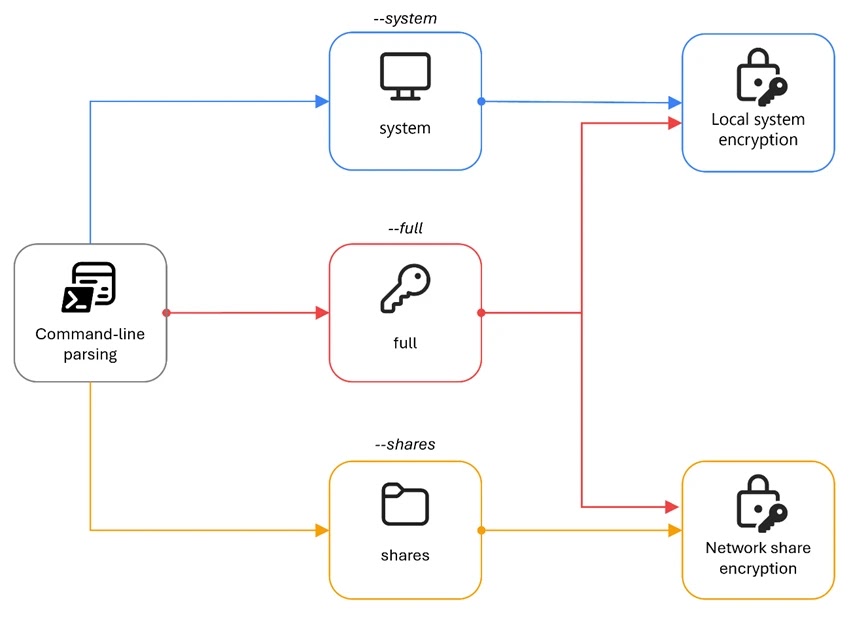
Microsoft says the ransomware can try 21 remote execution operations per target host. These attempts span different execution methods, privilege levels, and paths, increasing the chance that one method succeeds even if others fail.
The spreading logic includes PsExec, WMI, scheduled tasks, services, and PowerShell-based execution methods. This does not mean every attack will spread automatically, but it gives affiliates a built-in way to scale ransomware deployment after they obtain valid access.
How Attackers Commonly Get In
The Gentlemen attacks still need initial access before the encryptor can run. S-RM’s ransomware profile reported that the group often infiltrates networks through FortiGate VPN exposure, valid credentials, vulnerabilities, or access obtained from initial access brokers.
The same report described follow-on activity such as internal discovery, use of tools like Advanced IP Scanner and Nmap, credential dumping, RDP-based movement, and data exfiltration before encryption.
This pattern fits modern ransomware operations. The encryptor may get the headlines, but the earlier stages often involve weak remote access, missing MFA, exposed edge devices, stolen credentials, and insufficient segmentation.
What Defenders Should Watch For
Defenders should treat the gentlemen_system task name as an urgent investigation signal. The same applies to unexpected scheduled tasks running unknown binaries as SYSTEM, especially from temporary folders, user profile paths, or unusual shares.
The Huntress incidents also show why teams should monitor PowerShell activity, Defender tampering, event-log clearing, and suspicious task creation together rather than as separate alerts.
Other indicators include ransom notes named README-GENTLEMEN.txt, encrypted files with unusual extensions, dropped PsExec binaries, wallpaper changes, and file hashes linked to known samples.
| Signal | Why it matters |
| gentlemen_system scheduled task | May indicate SYSTEM-level ransomware execution |
| UpdateSystem or UpdateUser tasks | May indicate persistence attempts |
| Defender exclusions added suddenly | May signal defense evasion before encryption |
| Event logs cleared | Often appears during post-compromise cleanup |
| PsExec or WMI process creation | May indicate lateral movement |
| README-GENTLEMEN.txt | Known ransom note name |
How Organizations Can Reduce the Risk
Microsoft recommends several hardening steps against this threat, including cloud-delivered protection, tamper protection, controlled folder access, EDR in block mode, automated investigation and remediation, and attack surface reduction rules.
The most relevant attack surface reduction rule for this ransomware is blocking process creations from PsExec and WMI commands. That control can disrupt common lateral movement paths that The Gentlemen and many other ransomware groups use.
Microsoft’s technical analysis also provides IOCs and hunting guidance, including the SHA-256 hash for a known encryptor sample and detection ideas for Microsoft Defender and Microsoft Sentinel environments.
- Require MFA for VPN, RDP, privileged accounts, and remote access.
- Patch internet-facing VPNs, firewalls, and remote access systems quickly.
- Enable tamper protection and cloud-delivered antivirus protection.
- Turn on EDR in block mode where available.
- Use attack surface reduction rules for PsExec and WMI process creation.
- Limit administrative shares and restrict lateral movement paths.
- Segment backup systems and protect them from domain-wide compromise.
- Monitor scheduled task creation, Defender exclusions, and event-log clearing.
Why Backups Alone Are Not Enough
Backups remain essential, but The Gentlemen shows why recovery planning must include more than file restoration. The ransomware deletes shadow copies, targets backup-related services, clears logs, and supports double extortion through data theft.
That means organizations need offline or immutable backups, tested restoration procedures, and separate controls to detect exfiltration before encryption starts. If attackers steal sensitive files first, restoring encrypted systems does not remove the data-leak risk.
The better strategy combines prevention, segmentation, detection, containment, and recovery. Ransomware operators now expect victims to have backups, so defenders need controls that stop attackers before they reach backup infrastructure or domain-wide privileges.
The Bottom Line
The Gentlemen ransomware stands out because it combines operator control, SYSTEM-level scheduled task execution, defense evasion, and self-propagation in one Go-based encryptor. That mix can turn a single privileged foothold into a fast-moving business disruption.
The most important lesson is practical. Organizations should not wait for encryption alerts before acting. They should detect the earlier signs: VPN abuse, suspicious admin activity, scheduled task creation, Defender tampering, PsExec or WMI execution, and log clearing.
Once ransomware has created a SYSTEM task and started encrypting drives, defenders have already lost critical time. The safer approach is to block the path before the task ever gets created.
FAQ
The Gentlemen is a ransomware-as-a-service operation tracked by Microsoft as Storm-2697. Its encryptor is written in Go, uses strong per-file encryption, and includes features for defense evasion, privilege escalation through scheduled tasks, and network propagation.
gentlemen_system is the scheduled task The Gentlemen ransomware creates to relaunch itself under the Windows SYSTEM account. Microsoft says the malware can create this task only when it already runs from an account with administrator privileges.
When its spreading feature is enabled, The Gentlemen stages its binary, copies it to remote hosts, and attempts execution through methods such as PsExec, WMI, scheduled tasks, Windows services, and PowerShell remoting.
Organizations should enforce MFA, patch exposed VPN and firewall systems, enable tamper protection, use EDR in block mode, restrict PsExec and WMI abuse, segment networks, protect backups, and monitor for scheduled task creation, Defender tampering, and event-log clearing.


Read our disclosure page to find out how can you help VPNCentral sustain the editorial team Read more


Improve this guide




User forum
0 messages