
VS Code Remote-SSH Attack Path Lets Compromised Developer Machines Reach Cloud Servers


 9 min. read
  Published on
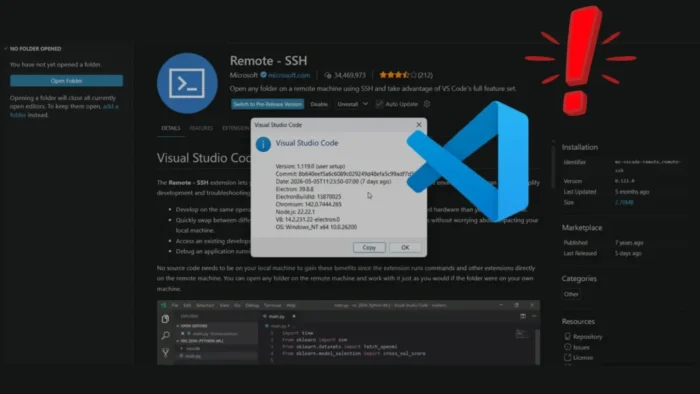
A newly disclosed Visual Studio Code Remote-SSH attack path shows how a compromised developer machine can become a bridge into cloud servers and production infrastructure. Security researcher Suman Kumar Chakraborty described the issue in a technical disclosure, calling it a post-compromise remote code execution vector rather than a traditional pre-authentication flaw.
The issue centers on the way Remote-SSH prepares a local bootstrap shell script before sending it to a remote machine. If an attacker already has access to the developer workstation, they may be able to tamper with that script before VS Code transfers and executes it on the target server.

Access content across the globe at the highest speed rate.
70% of our readers choose Private Internet Access
70% of our readers choose ExpressVPN

Browse the web from multiple devices with industry-standard security protocols.

Faster dedicated servers for specific actions (currently at summer discounts)
The risk is high because developers often use Remote-SSH to connect to AWS EC2 instances, Azure virtual machines, internal Linux servers, and other sensitive environments. A local endpoint compromise can therefore turn into code execution on infrastructure that the developer is trusted to access.
What the Researcher Found
The researcher says VS Code creates a temporary shell script during a Remote-SSH connection and stores it in a user-writable temporary directory. The script is then sent to the remote host and executed as part of the setup flow.
The disclosure says the process lacks integrity validation, file locking, and signature verification before execution. That creates a time-of-check to time-of-use race condition where local malware can change the script during the short window before it runs remotely.
This does not bypass SSH authentication. The user still signs in with their password, key, or MFA. The attack works after authentication because the tampered setup script runs as part of the trusted connection workflow.
| Issue | What It Means |
|---|---|
| Attack type | Post-compromise remote code execution path |
| Required access | Control of the developer workstation or user context |
| Target | Remote servers reached through VS Code Remote-SSH |
| Authentication impact | MFA still works, but execution happens after login |
| Patch status | No public CVE or Microsoft patch advisory confirmed for this report |
Why Remote-SSH Creates a Strong Trust Bridge
Microsoft’s official Remote Development using SSH documentation says the extension lets users open folders on any remote machine, virtual machine, or container with an SSH server and use the full VS Code feature set.
The same documentation says VS Code installs a VS Code Server component on the remote operating system and runs commands and extensions directly on the remote host. That is what makes Remote-SSH powerful for development, but it also explains why a compromised local setup can create serious risk.
The marketplace page for Remote-SSH says the extension lets users use any remote machine with an SSH server as a development environment and open remote folders as if they were local.
How the Attack Path Works
The reported attack starts after the local developer machine is already compromised. Local malware watches the temporary folder where VS Code creates the Remote-SSH bootstrap script.
When the developer starts a Remote-SSH session, the attacker modifies the script before it is transferred. VS Code then sends the changed script to the remote server as part of the normal session setup.
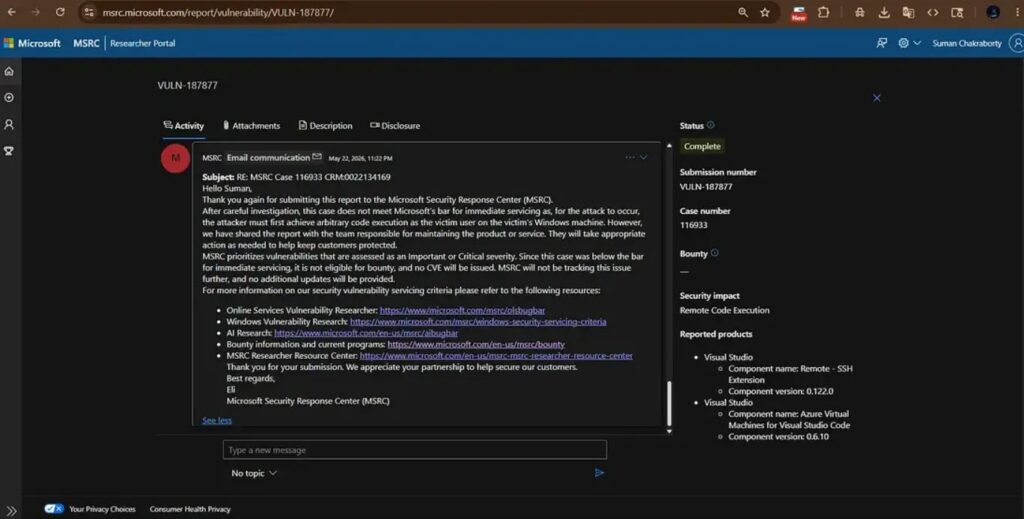
The remote host executes the modified script after the user authenticates. This is why MFA does not stop the technique. MFA protects the login step, but it does not verify the integrity of the local script being sent into the remote environment.
| Step | What Happens | Security Impact |
|---|---|---|
| Local compromise | Attacker gains access to the developer workstation | The attacker can watch user-writable local paths |
| Remote-SSH session starts | VS Code creates a temporary setup script | The script becomes the attack target |
| Script tampering | Malicious code is added before transfer | The remote server receives attacker-controlled setup content |
| Remote execution | The user authenticates and the script runs remotely | The attacker gains a path into the connected system |
Why This Matters for Cloud Security
Developer laptops often hold the keys to cloud environments. They store SSH keys, cloud profiles, deployment tools, source code access, and identity sessions. Even when production access is gated by MFA, the workstation remains a trusted control point.
The researcher’s disclosure says the technique was demonstrated against local servers, Azure virtual machines, AWS EC2 systems, and Cursor-based workflows that rely on similar remote connection behavior.
In practical terms, this gives attackers a lateral movement route. They do not need to steal a second set of cloud credentials if they can wait for the developer to connect to a remote host through a trusted tool.
Microsoft Treats Remote Trust as Part of the Model
The Remote-SSH marketplace page includes a security note telling users to connect only to secure remote machines they trust. It warns that a compromised remote could use the VS Code Remote connection to execute code on the local machine.
This newly reported technique highlights the reverse side of that trust model. A compromised local machine can also affect what gets executed on the remote side when the local environment prepares setup commands.
The official Visual Studio Marketplace listing shows more than 34 million installs for Remote-SSH, which makes even a post-compromise technique relevant for enterprises with large developer teams.
Why This Is Not a Normal RCE Vulnerability
This issue should not be described as a wormable or pre-authentication Remote-SSH exploit. An attacker needs access to the developer machine first, which means the attack fits later in the intrusion chain.
That distinction matters for defenders. The problem does not start with an exposed SSH server. It starts with a compromised endpoint that later receives trusted access to remote infrastructure.
MITRE ATT&CK tracks this kind of movement under Remote Services, a technique category that covers adversaries using valid remote access channels to move between systems inside a target environment.
Who Is Most Exposed
The highest-risk environments are those where developers connect directly from laptops to production systems, cloud hosts, jump boxes, build servers, or privileged administrative networks.
Risk also increases when one local account can access many remote systems. A single infected workstation can become a launch point into multiple servers as the developer switches between projects.
- Developers with direct SSH access to production systems
- Administrators using VS Code to manage cloud servers
- Engineering teams with broad AWS EC2 or Azure VM access
- Organizations that allow unmanaged personal devices for remote development
- Teams without endpoint detection on developer workstations
- Teams that do not separate development, staging, and production access
Mitigations for Security Teams
The first mitigation is endpoint trust. Remote-SSH should only run from managed, monitored, and patched developer machines. If a workstation cannot be trusted, it should not have direct access to cloud or production servers.
Organizations should route privileged access through hardened jump hosts, remote development environments, or virtual workstations. This reduces the chance that malware on a normal laptop can directly influence server-side execution.
Teams should also apply least privilege to SSH access. Developers should not have broad shell access to production systems unless their role requires it, and temporary privileged sessions should replace long-lived standing access where possible.
| Control | Purpose |
|---|---|
| Managed developer devices | Reduces the chance of local tampering before Remote-SSH starts |
| Jump hosts | Separates developer laptops from production systems |
| Least-privilege SSH | Limits damage if a session is abused |
| Endpoint detection | Finds suspicious file monitoring and process activity |
| Server-side logging | Detects unexpected shell commands during remote setup |
| Network segmentation | Prevents one developer account from reaching too many systems |
What to Monitor
Security teams should monitor user-writable temporary directories for suspicious modification of Remote-SSH setup scripts. They should also watch for unusual command execution shortly after a VS Code Remote-SSH login.
Server-side logs can help identify unexpected shell commands, outbound connections, new files, and changes to startup scripts after a developer opens a remote session. This type of monitoring matters because the malicious action may look like it came from the developer’s authenticated account.
MITRE’s Remote Services technique page can help defenders map this behavior into detection engineering and incident response workflows.
What Developers Should Do
Developers should avoid using Remote-SSH from untrusted machines, shared computers, or personal laptops that lack enterprise endpoint protection. They should also treat any unexplained local compromise as a possible cloud access incident.
Microsoft’s Remote-SSH documentation explains that the extension runs commands and extensions directly on the remote machine. That makes local device hygiene important whenever the remote host contains sensitive workloads or credentials.
If a developer suspects local malware, they should stop using SSH from that machine, revoke affected SSH keys, rotate cloud credentials, and ask security teams to review recent remote sessions for suspicious activity.
The Bottom Line
The reported VS Code Remote-SSH issue is best understood as a post-compromise cloud pivot technique. It does not let an outsider break into a server without first compromising the developer machine, but it can turn that first compromise into a path toward remote infrastructure.
Enterprises should treat developer endpoints as part of the cloud security perimeter. Remote development tools are powerful because they extend local workflows into remote systems, but that same trust can create exposure when the local machine is no longer clean.
FAQ
It is a reported post-compromise attack path where an attacker with access to a developer machine can tamper with a temporary Remote-SSH bootstrap script before VS Code sends and runs it on a remote server.
No. The attack happens after the user authenticates. MFA can still protect the login step, but it does not verify whether the locally generated setup script was changed before remote execution.
At the time of writing, I found no public CVE or Microsoft patch advisory for this specific report. The researcher says Microsoft closed the report as consistent with product behavior.
Organizations are most exposed when developers use Remote-SSH from normal laptops to access production servers, cloud VMs, build hosts, or privileged administrative environments.
They should use managed developer devices, route privileged access through jump hosts or hardened remote workstations, limit SSH permissions, monitor temporary directories, and review server logs for unusual commands after Remote-SSH sessions start.


Read our disclosure page to find out how can you help VPNCentral sustain the editorial team Read more


Improve this guide



User forum
0 messages