
287 Chrome Extensions Exfiltrate Browsing History from 37.4 Million Users


 5 min. read
  Updated on

A security researcher has found 287 Chrome extensions that quietly send users’ browsing history to remote servers. The extensions together have about 37.4 million installations, meaning roughly one percent of Chrome users may be affected. The findings come from a public research repository and report published by the researcher Q Continuum.
The disclosure shows a large, ongoing privacy problem. Some of the affected extensions are widely used and appear to ship URL data to third parties. In several cases the researcher linked the leaking behavior to known data brokers and aggregators.

Access content across the globe at the highest speed rate.
70% of our readers choose Private Internet Access
70% of our readers choose ExpressVPN

Browse the web from multiple devices with industry-standard security protocols.

Faster dedicated servers for specific actions (currently at summer discounts)
Key findingsHow the researcher detected the leaks
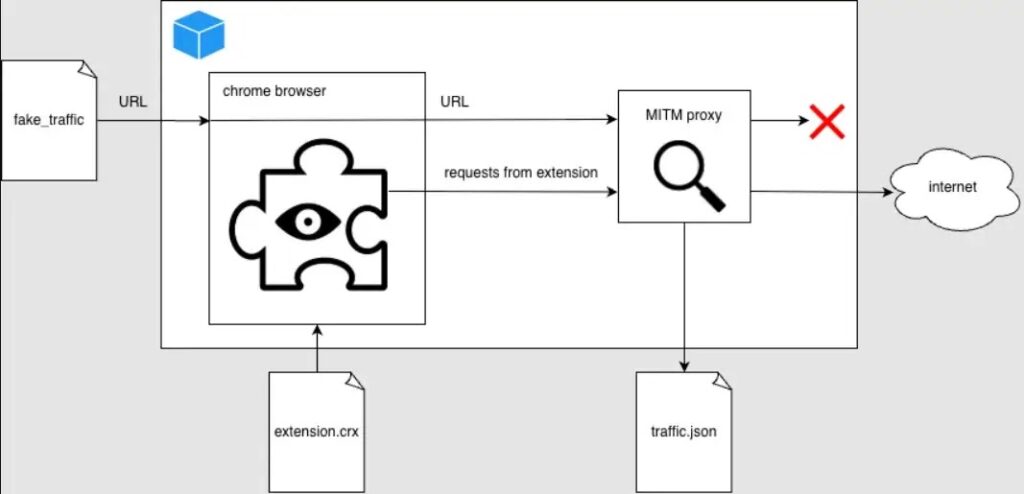
Q Continuum built an automated testing pipeline that runs Chrome inside a Docker container and routes all traffic through a man-in-the-middle proxy. The test system visits synthetic URLs of varying lengths and measures whether outbound bytes grow proportionally to URL length. If outbound traffic scales with URL length, the extension is flagged as likely sending full URLs or browsing history.
From the report: “Using a leakage metric we flagged 287 Chrome extensions that exfiltrate browsing history.” Q Continuum, Spying Chrome Extensions: 287 Extensions spying on 37M users.
The repo includes examples of captured requests and a list of flagged extensions. The team also ran honeypots to see which third parties collected the leaked data.
Examples and technical details
The report includes concrete examples of requests observed going out from extensions. Two notable examples:
- Poper Blocker (Pop up blocker for Chrome): captured POSTs to
api2.poperblocker.com/view/updatecontaining obfuscated URL payloads. (See report lines showing example request and decoded payload.) - Stylish: observed sending encrypted payloads; the researcher shows AES-256 + RSA key wrapping in the outbound flow.
Q Continuum explains the detection logic and presents proof-of-concept request samples in the repository. The researcher deliberately withheld exact scanning code to avoid enabling attackers to adapt quickly, while publishing enough data for independent verification. Report and sample data:
Who is collecting the data?
The report links leaked flows to a mix of actors:
- Known analytics and traffic companies (evidence links to Similarweb artifacts).
- Smaller data brokers and entities labeled in the report as “Curly Doggo,” “Offidocs,” and a group the researcher calls “Big Star Labs,” which the researcher suspects is connected to Similarweb.
- Multiple IPs hitting the honeypot were associated with scrapers and third-party services. The repo lists IP ranges and observed scraper hosts in the honeypot section.
Scale and impact
The researcher tallied user counts reported in the Chrome Web Store for the flagged extensions and summed them to reach the ~37.4 million figure. The report notes that not every flagged extension is necessarily malicious by design; some may collect history for functional reasons, while others clearly exfiltrate more than required.
Why this matters:
- Browsing history often contains personal identifiers, session links, and internal corporate URLs. That makes the dataset valuable for targeted advertising, profiling, credential harvesting, and corporate espionage.
- Extensions with large install bases can leak millions of URLs daily.
- Removal from the Chrome Web Store does not uninstall the extension from users’ browsers, so affected users must remove extensions themselves.
What users should do now
- Audit your browser extensions. Remove any extension you do not actively use.
- Check permissions before installing extensions. Avoid extensions that request broad host or history access unless strictly needed.
- Prefer open source extensions or those from trusted publishers where code and privacy practices can be reviewed.
- Clear synced browsing data and consider resetting sync if you removed an extension that used chrome.storage.sync.
- If you manage corporate devices, restrict extension installation via group policy or enterprise controls and monitor for unusual outbound traffic.
How to respond
| Audience | Immediate steps |
|---|---|
| Individual users | Remove flagged extensions; review Chrome extensions page; clear sync data; change passwords if you suspect session theft. |
| IT / Admins | Enforce extension whitelists; audit extension installs; monitor outbound traffic for unexpected destinations. |
| Developers | Publish privacy policies; minimize data collection; follow extension store best practices. |
| Researchers | Cross-check results; run controlled scans with honey URLs; report confirmed abuse to Chrome Web Store and CERTs. |
Frequently Asked Questions (FAQ)
A: The report lists some popular extensions among the flagged set. Examples in the report include extensions tied to traffic analytics and theme management. The researcher also lists widely installed extensions in the data table.
A: No. The researcher intentionally withheld the exact scanning scripts to avoid helping attackers adapt the technique. The repo still contains detailed findings, samples, and IoCs. See the README and REPORT files on GitHub.
A: Google reviews abuse reports and may remove or require changes to extensions found violating policies. Users and researchers should report confirmed abuse to the Chrome Web Store team and to local CERTs as needed.
A: Yes. Browsing history and internal URLs can reveal sensitive corporate systems. Extensions installed on corporate devices are a clear risk vector.


Read our disclosure page to find out how can you help VPNCentral sustain the editorial team Read more


Improve this guide




User forum
0 messages