
IGMP Proxy: What It Is, How It Works, and How to Set It Up


 9 min. read
  Updated on
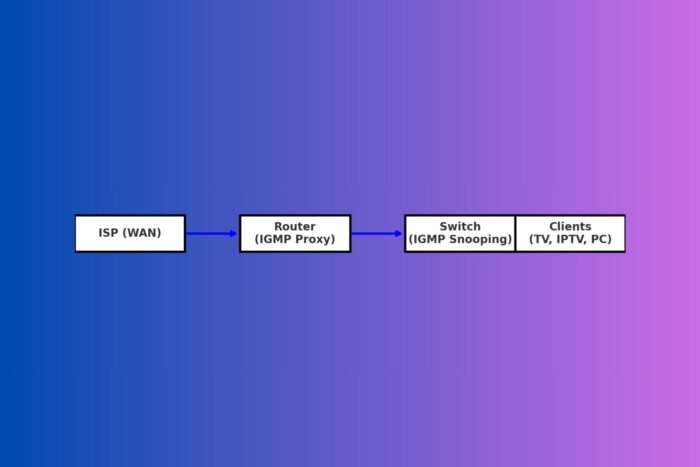
If you stream IPTV or live sports and the channel refuses to load, you probably need IGMP proxy. This small router feature decides whether multicast traffic reaches your devices. Without it, your TV box can sit on a black screen and your app can fail to find channels. With it enabled, streams start fast and your network stays lean and responsive.
Table of contents
What is IGMP proxy?
An IGMP proxy, short for Internet Group Management Protocol proxy, acts like a lightweight bridge between your network and your ISP for multicast streams. Multicast sends one video feed to many viewers at once, which saves bandwidth and reduces waste. Your ISP broadcasts a single channel feed. Your router, using the proxy, decides who inside your home can tune in.

Access content across the globe at the highest speed rate.
🔥 Save 81% + 2 bonus months! 🔥
70% of our readers choose Private Internet Access
70% of our readers choose ExpressVPN
2
Browse the web from multiple devices with industry-standard security protocols.
🔥 Save 73%! 🔥

Faster dedicated servers for specific actions (currently at summer discounts)
🔥 Save 69%! 🔥
Picture your IPTV box asking for a channel. The proxy relays that request upstream. The ISP sends the stream back. When you switch away or power off, the proxy sends a leave message and the stream stops. You get quick channel changes, your other devices avoid unnecessary traffic, and your connection feels steady even during prime time.
How IGMP proxy works
IGMP proxy organizes two clear roles inside your router and your LAN.
- Upstream interface (WAN): The side that talks to your ISP and receives multicast traffic.
- Downstream interface (LAN or VLANs): The side that serves your TVs, set-top boxes, and PCs.
When a device sends an IGMP Join, the proxy forwards that upstream. The ISP begins delivering the specific multicast stream. The router forwards it only to the LAN segment that requested it. When you leave the channel, the proxy forwards a Leave and the stream shuts down. Think of it like a doorman who checks the order, directs the delivery to the right apartment, and closes the door when the meal ends. Clean and efficient.
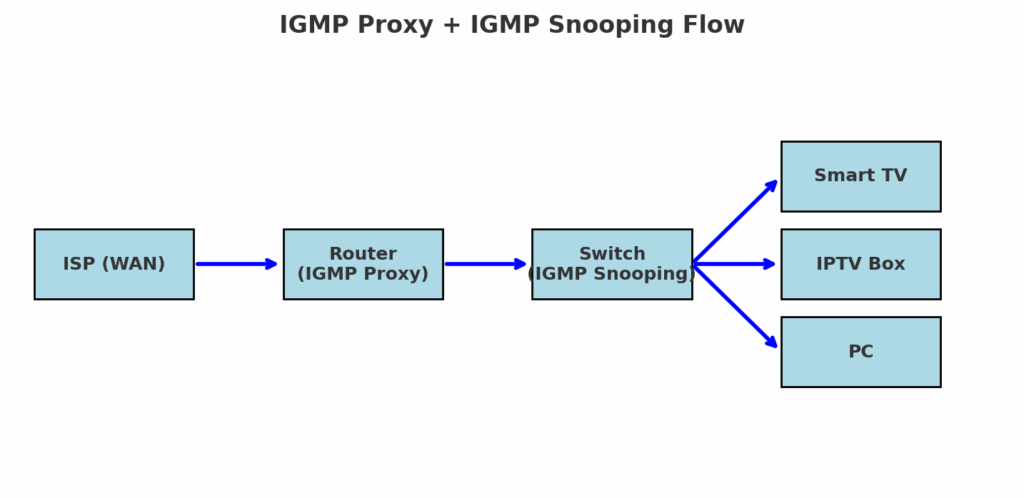
Diagram: How IGMP Proxy and Snooping work together
Flow: ISP (WAN) → Router with IGMP Proxy → Switch with IGMP Snooping → Smart TV or IPTV Box or PC. The router pulls only the requested streams. The switch delivers them only to ports that asked. Everything else stays quiet and happy.
IGMP proxy vs IGMP snooping
These two tools complement each other. The proxy moves multicast between networks. Snooping controls multicast inside your network.
IGMP Proxy
The proxy sits at the edge between WAN and LAN and handles the conversation with your ISP. If your provider delivers TV over multicast, this is the feature that makes the channels show up.
- Pros: Simple to enable, saves bandwidth by sending only requested streams, supports multiple viewers without duplicate WAN traffic.
- Cons: It does not control flooding inside the LAN and it does not scale for complex multi-router designs.
IGMP Snooping
Snooping runs on managed switches. It prevents multicast from blasting every port by forwarding it only to ports that joined the group.
- Pros: Stops multicast floods, improves LAN efficiency, keeps non-TV devices free of noise.
- Cons: Requires managed switches and careful configuration to avoid accidental blocking.
If you also face regional blocks or app limitations, you can add privacy tools on top. Some users prefer a carefully tuned undetectable proxy for region control. Others choose the best residential proxies to blend with normal user traffic or the best SOCKS5 proxies for apps that do not support VPNs natively.
IGMP proxy vs PIM (Protocol Independent Multicast)
People sometimes ask why they should not run a full multicast routing protocol instead. PIM handles large, multi-hop multicast networks. IGMP proxy fits small networks and single-router setups.
| Feature | IGMP Proxy | PIM |
|---|---|---|
| Purpose | Simple forwarding from WAN to LAN | Full multicast routing across complex topologies |
| Setup | Single toggle on most routers | Advanced routing knowledge required |
| Ideal for | Home IPTV and small offices | ISPs, data centers, enterprises |
| Scalability | Limited to one upstream and a few downstreams | Highly scalable |
| Resource use | Light on CPU and memory | Heavier CPU and memory usage |
You ride a commuter bike to the store because it gets the job done. You do not take a freight truck unless you haul cargo across the country. Same idea here.
Why use IGMP proxy
- Multicast forwarding: The router forwards only streams that your devices request. No extra noise, no wasted bandwidth.
- Bandwidth optimization: One channel feed serves many TVs at once. If you want smoother playback, read tips for IPTV with no buffering.
- Clear upstream and downstream separation: Keep entertainment in one VLAN and workstations in another.
- Fast Leave mode: The router stops a stream as soon as the last viewer leaves.
- Multiple downstreams: Serve IPTV across VLANs or subnets when your design calls for isolation.
- Firewall awareness: Allow multicast only where you want it and block it everywhere else.
In day to day use, this balance matters. Your kids can watch cartoons in the living room, your partner can stream a show in the bedroom, and you can run a video call in the office. Nobody fights for bandwidth. Everyone finishes their stream or meeting without stutter.
Pros and cons of IGMP proxy
Pros
- Turn it on quickly in most consumer router interfaces.
- Save bandwidth by forwarding only requested traffic.
- Support multiple viewers of the same channel without duplicate WAN streams.
- Work nicely with VLAN designs and managed switches.
Cons
- Not built for enterprise-scale routing across many hops.
- Limited features compared to full multicast protocols.
- Some ISPs require specific IGMP versions or VLAN tags that you must match.
- Troubleshooting frozen or stalled streams can feel tricky at first.
How to use IGMP proxy
Generic steps
- Connect your router WAN to the ISP and confirm that basic Internet access works.
- Log in to the router admin panel.
- Open the IPTV, Multicast, or Advanced settings page.
- Enable IGMP Proxy.
- Set Upstream to WAN and Downstream to LAN or the VLANs that hold IPTV clients.
- Start with IGMP v3. If channels do not load, switch to v2 and test again.
- Add the IPTV VLAN on WAN if your ISP requires it, then bind the TV service to that VLAN.
- Save the changes and reboot the router to apply the configuration.
Brand specific examples
- TP Link Archer or Deco: Advanced → Network → IPTV or Multicast. Enable IGMP Proxy and IGMP Snooping. If your ISP appears in a profile list, select it. If not, choose Custom and enter the IPTV VLAN ID they provided.
- ASUSWRT: LAN → IPTV. Enable IGMP Proxy and IGMP Snooping. Pick your ISP profile if available. Otherwise select Manual and enter VLAN details.
- MikroTik RouterOS v7: Routing → IGMP Proxy. Set your WAN as the upstream interface and your bridge or VLAN as downstream. In Bridge → IGMP Snooping, enable snooping on the bridge that carries IPTV.
- OpenWrt: Install
igmpproxy. Edit/etc/config/igmpproxyto setwanas upstream andlanas downstream. Restart the service withservice igmpproxy restart. - UniFi UDM or USG: Settings → Networks. Enable IGMP Proxy on the WAN network. Enable IGMP Snooping on the LAN or on the VLAN that carries IPTV. If your ISP uses a TV VLAN, create a separate Internet network with that tag and mark it as the upstream for the proxy.
Combine IGMP Proxy with IGMP Snooping
Turn on snooping on every managed switch in the path. This stops multicast from flooding all ports. Only the TV or app that joined the channel receives the stream. Your PCs and consoles stay untouched. Your Wi Fi stays clean and fast.
Troubleshooting
- No video or audio: Switch the IGMP version from v3 to v2 and retry. Some providers still expect v2.
- Stream stops when a second device joins: Disable Fast Leave on the switch. Fast Leave assumes one client per port and can cut the stream early.
- Choppy or pixelated video: Use wired Ethernet for IPTV boxes. Enable IGMP Snooping. Avoid daisy chaining unmanaged switches.
- Flooding across the LAN: Snooping is off or misconfigured. Enable it globally and on the VLAN that carries IPTV.
- Nothing joins at all: Confirm the IPTV VLAN on WAN and make sure you set the correct interface as Upstream.
- Double NAT issues: If your ISP modem and your router both run routing mode, bridge the modem or place your router in access point mode to remove the extra NAT layer.
Some ISPs also restrict multicast by region. Many users combine IGMP Proxy with a VPN in those cases. Learn when it makes sense in do you need a VPN for IPTV and choose a location from the best VPN country for IPTV streaming to balance speed and access. If you want to extend flexibility even further, check out this guide on how to use Luna Proxy for advanced routing and privacy options.
Common use cases
- IPTV from your ISP: Most providers deliver live TV over multicast. Without IGMP Proxy, channels often fail to load. Power users who manage many accounts sometimes operate through an IPTV reseller panel to organize access, billing, and quality of service.
- Campus or business multicast: Schools and offices multicast lectures or training. IGMP Proxy extends those streams across subnets without deploying heavy routing protocols.
- Bandwidth savings at home: Three TVs can watch the same match while the ISP sends a single stream. Your WAN link stays under control and your Wi Fi remains usable for everything else.
Conclusion
IGMP Proxy solves a very real problem for IPTV and other multicast use cases. It pulls in the right streams, sends them only where requested, and keeps your network from turning into a firehose. Pair it with IGMP Snooping on your switches. Use proper VLANs where required. Test with one device, then two, then your full household. You will get smooth channels and a calmer LAN without fuss.
FAQ
It forwards multicast traffic from your ISP to the right places inside your LAN. Your TV boxes and apps receive the streams they ask for and the rest of your devices stay clear of extra traffic.
Yes if your ISP uses multicast for TV. Without it, channels often fail to appear or they stutter badly.
For small networks, yes. IGMP Proxy gets the job done with almost no complexity. PIM fits large multi router networks that need full multicast routing features.
No. Games use unicast. The proxy focuses on video streams and similar multicast traffic.
Yes. It forwards one stream from your ISP and serves many viewers inside your network without duplicating WAN traffic.


Read our disclosure page to find out how can you help VPNCentral sustain the editorial team Read more


Improve this guide


User forum
0 messages