
Hackers Abuse MSHTA to Deliver LummaStealer and Amatera Malware


 8 min. read
  Published on
Attackers are increasingly abusing MSHTA, a legacy Windows utility, to deliver malware such as LummaStealer, Amatera, CountLoader, Emmenhtal Loader, ClipBanker, and PurpleFox. The tool remains available by default on Windows, making it useful for threat actors who want to run scripts through a trusted Microsoft-signed binary.
MSHTA, short for Microsoft HTML Application Host, can execute HTML Application files and scripts from local or remote locations. That legitimate function has made it a long-running favorite in living-off-the-land attacks, where criminals use built-in tools instead of dropping obvious malware at the first stage.

Access content across the globe at the highest speed rate.
70% of our readers choose Private Internet Access
70% of our readers choose ExpressVPN

Browse the web from multiple devices with industry-standard security protocols.

Faster dedicated servers for specific actions (currently at summer discounts)
Bitdefender researchers reported a rise in malicious MSHTA activity since the beginning of 2026. The campaigns range from commodity infostealer delivery to more persistent compromise chains that rely on phishing, fake software downloads, fileless execution, and ClickFix-style social engineering.
Why MSHTA is still useful to attackers
MSHTA is trusted because it comes with Windows. Security tools and administrators may see mshta.exe in logs and treat it as a legitimate system process unless they inspect the command line, parent process, network destination, and child processes.
That makes the tool attractive to attackers. It can fetch remote HTA scripts, run JavaScript or VBScript, and hand off execution to PowerShell or other payload stages.
MITRE ATT&CK tracks MSHTA abuse under System Binary Proxy Execution. The technique describes how attackers use mshta.exe to proxy malicious scripts through a trusted Windows utility.
MSHTA malware abuse at a glance
| Detail | Information |
|---|---|
| Windows tool abused | MSHTA, also known as Microsoft HTML Application Host |
| Executable | mshta.exe |
| Main use in attacks | Running remote or local HTA, JavaScript, and VBScript payloads |
| Malware families observed | LummaStealer, Amatera, CountLoader, Emmenhtal Loader, ClipBanker, and PurpleFox |
| Common lures | Fake software downloads, pirated apps, phishing pages, Discord links, and fake verification prompts |
| Main risk | Credential theft, browser data theft, wallet theft, loader execution, and longer-term compromise |
How the CountLoader chain delivers LummaStealer and Amatera
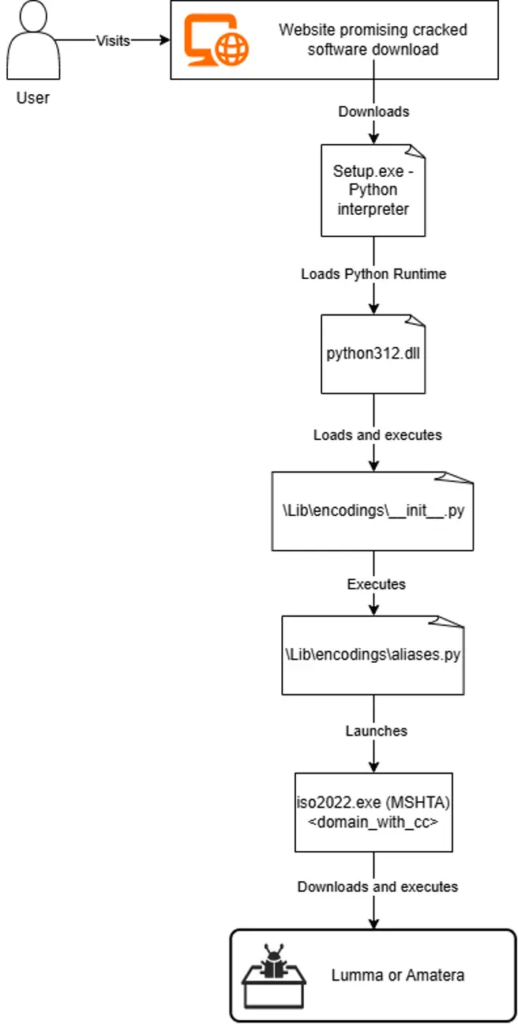
One of the most active clusters reported by Bitdefender uses CountLoader to deliver LummaStealer and Amatera. The attack often starts with fake or cracked software downloads.
The victim downloads an archive that appears to contain a normal installer. Inside, a file named Setup.exe may actually be a legitimate Python interpreter bundled with malicious scripts.
Once the script runs, it launches a renamed MSHTA copy disguised as iso2022.exe. That renamed binary contacts attacker-controlled infrastructure and retrieves the next stage of the attack.
Domains mimic trusted services
The CountLoader infrastructure used domains that looked like legitimate services. Examples included names such as google-services, memory-scanner, system-monitor, and network-defender.
Bitdefender observed heavy use of the .cc top-level domain earlier in the campaign. Later, the attackers shifted to other domains using .vg and .gl, including explorer.vg and ccleaner.gl.
This naming pattern matters because users and even some defenders may overlook domains that appear to reference security, cloud, update, or system services.
What LummaStealer and Amatera can steal
- Browser-saved passwords and login data.
- Session cookies that can help bypass normal logins.
- Cryptocurrency wallet data.
- Autofill information and stored browser profiles.
- Tokens and other local secrets available to the infected user.
Infostealers can create damage quickly. Stolen cookies and passwords may give criminals access to email, social media, banking, work apps, crypto wallets, and cloud dashboards.
ClickFix attacks push users to run MSHTA themselves
Another campaign uses ClickFix-style social engineering. Attackers send phishing messages, including Discord links, that lead users to fake verification or fake reCAPTCHA pages.
These pages tell the victim to press Windows + R, paste a copied command, and press Enter. The page may secretly place the command on the clipboard first, so the victim believes they are completing a normal verification step.
That command starts MSHTA and pulls a remote script from attacker infrastructure. The chain then uses encoded layers and PowerShell to load malware, often without dropping every stage to disk.
Why fileless stages complicate detection
MSHTA-based attacks often use fileless or semi-fileless execution. Instead of saving every payload as a normal executable, the chain can fetch scripts, decode commands in memory, and pass execution to PowerShell.
This reduces the number of files that traditional antivirus tools can scan. It also makes forensic reconstruction harder when logs do not capture command lines, script content, and network connections.
Defenders should therefore focus on behavior. MSHTA launching from browsers, archive tools, chat apps, Office apps, or temporary folders deserves investigation.
Other malware families using MSHTA
| Malware or loader | Role in observed campaigns |
|---|---|
| LummaStealer | Steals browser credentials, cookies, and wallet-related data |
| Amatera | Targets similar credential and browser data |
| CountLoader | Uses MSHTA during staged malware delivery |
| Emmenhtal Loader | Uses HTA and PowerShell layers in ClickFix-style chains |
| ClipBanker | Targets clipboard and payment-related activity |
| PurpleFox | Represents more persistent malware activity linked to MSHTA abuse |
Why this does not mean MSHTA is always malicious
MSHTA can still support older administrative workflows and legacy enterprise tools. That is why defenders should not block it blindly without checking business impact.
However, legitimate use has declined in many environments. When a legacy utility becomes rare in normal operations but common in malware chains, its execution becomes a strong signal for review.
Organizations should inventory whether they still need mshta.exe. If they do not, blocking or restricting it can reduce the attack surface.
What security teams should monitor
- mshta.exe launching with URLs or remote HTA files in the command line.
- mshta.exe launched by browsers, archive utilities, Office apps, Teams, Discord, or email clients.
- mshta.exe spawning powershell.exe, cmd.exe, wscript.exe, cscript.exe, rundll32.exe, or regsvr32.exe.
- Renamed copies of mshta.exe running from temporary or user-writable folders.
- Outbound connections from mshta.exe to newly registered or unusual domains.
- Fake CAPTCHA pages instructing users to paste commands into the Run dialog.
- HTA files downloaded from unknown domains or hidden inside software archives.
How organizations can reduce the risk
Bitdefender recommends moving away from MSHTA in administrative workflows where possible. Teams can replace old HTA-based workflows with modern, managed tools that support stronger logging and access controls.
Application control can also help. Microsoft Defender Application Control, AppLocker, or similar controls can block mshta.exe on systems where the tool has no business purpose.
Security teams should also improve script logging, PowerShell monitoring, DNS inspection, and endpoint behavior detection. These controls help catch the chain even when the first stage uses a trusted Windows binary.
Recommended defense checklist
| Control | Action |
|---|---|
| Application control | Block or restrict mshta.exe where no approved business need exists. |
| Command-line logging | Capture full command lines for mshta.exe, PowerShell, cmd.exe, and script hosts. |
| User training | Warn users never to paste commands from websites into the Windows Run dialog. |
| Email and chat protection | Inspect links to fake verification pages and suspicious archive downloads. |
| Network controls | Block known malicious domains and alert on mshta.exe outbound connections. |
| Endpoint detection | Alert when MSHTA spawns PowerShell or downloads remote scripts. |
What users should remember
Users should treat any website instruction to open Windows Run and paste a command as suspicious. Legitimate CAPTCHA or verification pages do not need users to run Windows commands.
They should also avoid cracked software, fake installers, and download sites that package applications inside unusual archives. These are common entry points for loader and stealer infections.
If a user already ran a suspicious command, the system should be disconnected from the network and reported to IT immediately. Passwords and session tokens may need rotation if an infostealer executed.
Why MSHTA remains a defender priority
Microsoft is already phasing out VBScript, but that does not fully remove the MSHTA risk today. Attackers can still abuse MSHTA while it remains available on Windows systems.
The latest campaigns show that legacy utilities can stay useful to criminals long after their normal administrative use declines. They offer trust, availability, and compatibility that attackers can turn against defenders.
The best response combines policy, monitoring, and user education. Blocking MSHTA where possible helps, but organizations also need to detect suspicious script chains and stop users from running copied commands from fake verification pages.
FAQ
MSHTA is Microsoft HTML Application Host, a Windows utility that executes HTML Application files and scripts. Attackers abuse it because it is a trusted Microsoft-signed binary present on Windows systems.
Attackers use MSHTA because it can run remote scripts through a legitimate Windows process. This helps malware chains blend into normal system activity and evade simple file-based detection.
Bitdefender linked recent MSHTA abuse to LummaStealer, Amatera, CountLoader, Emmenhtal Loader, ClipBanker, and PurpleFox campaigns.
A ClickFix attack tricks users into copying and running a command, often through a fake verification or CAPTCHA page. In these campaigns, the command can launch MSHTA and retrieve malware from attacker infrastructure.
Organizations can restrict mshta.exe where it is not needed, monitor command-line activity, detect MSHTA spawning PowerShell or script hosts, block known malicious domains, and train users not to paste commands from websites into Windows Run.


Read our disclosure page to find out how can you help VPNCentral sustain the editorial team Read more


Improve this guide




User forum
0 messages