
Microsoft warns fake AI browser extensions exposed chat data across 20,000+ enterprise tenants


 5 min. read
  Published on

Microsoft has warned that malicious AI-themed browser extensions compromised enterprise users and exposed sensitive chat histories across more than 20,000 organizational tenants. The fake extensions, disguised as productivity tools for AI assistants such as ChatGPT and DeepSeek, reportedly reached nearly 900,000 installs before the activity was detected by Microsoft Defender telemetry.
Security analysts say the campaign highlights a growing threat around browser extensions that impersonate legitimate AI tools while secretly collecting user data. Once installed, the extensions harvested AI chat transcripts, browsing activity, internal application URLs, and session identifiers directly from users’ browsers.

Access content across the globe at the highest speed rate.
70% of our readers choose Private Internet Access
70% of our readers choose ExpressVPN

Browse the web from multiple devices with industry-standard security protocols.

Faster dedicated servers for specific actions (currently at summer discounts)
Microsoft’s security researchers detected the activity after unusual outbound traffic patterns appeared across enterprise environments. The telemetry pointed to installed browser extensions sending encoded data to attacker-controlled infrastructure.
What happened
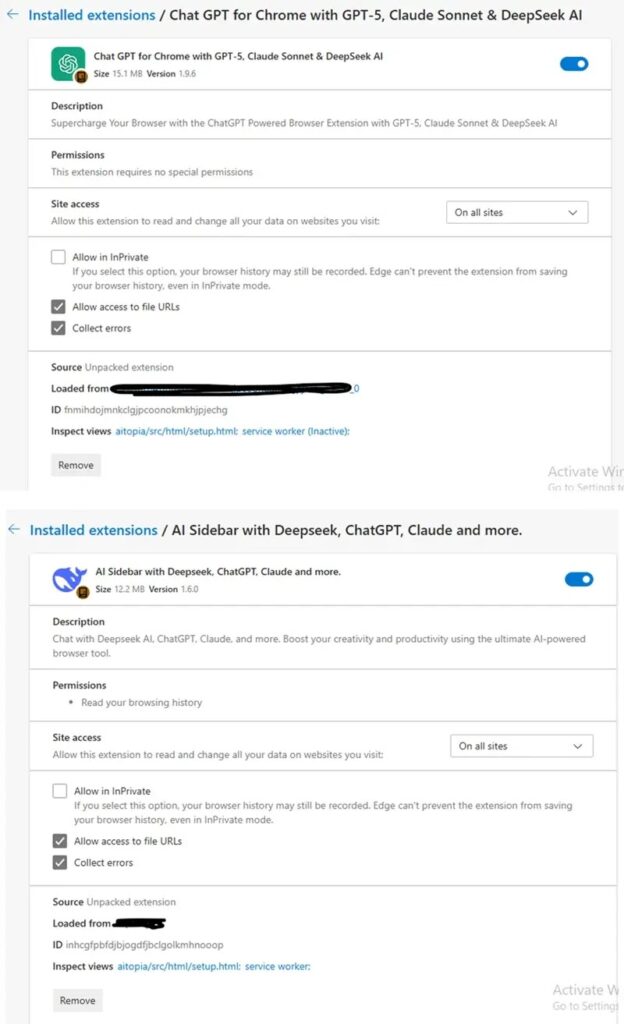
The malicious extensions appeared to be legitimate AI productivity tools designed to improve interactions with AI platforms. Researchers say the attackers copied branding, interface layouts, and permission prompts from a legitimate extension known as AITOPIA.
Because the extensions looked authentic, they passed basic scrutiny and were distributed through the Chrome Web Store. Since Microsoft Edge supports Chromium extensions from the same ecosystem, the same listings also reached Edge users.
Security teams say this allowed the campaign to spread widely across corporate environments where employees regularly use AI assistants for coding, research, and documentation.
Many employees unknowingly exposed internal information during AI conversations, including code snippets, product plans, and operational details.
How the attack worked
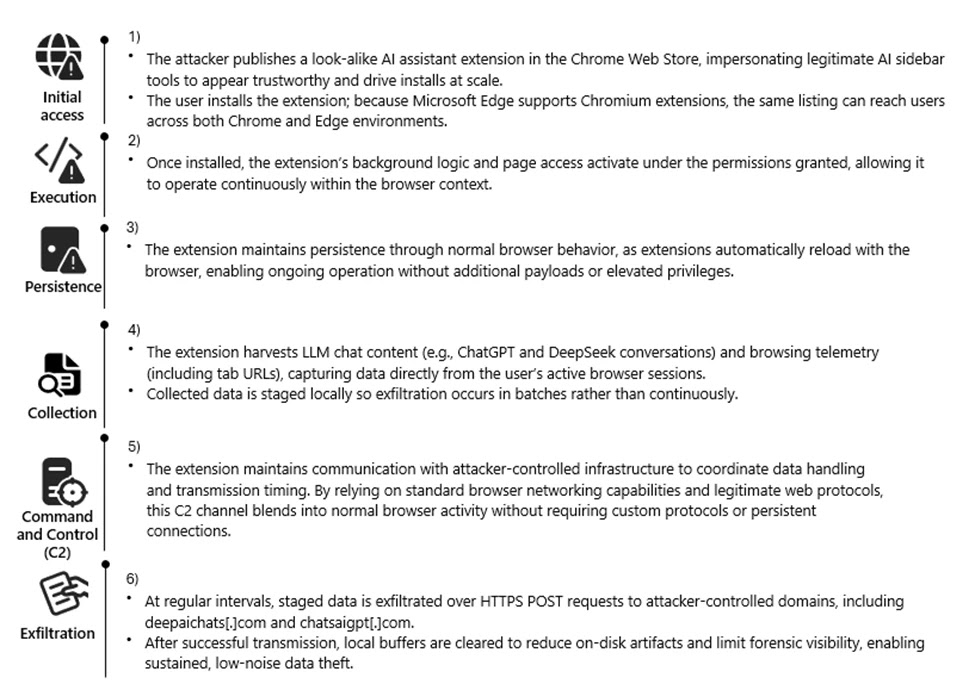
Once installed, the extension activated a background script that monitored browser activity and AI chat sessions.
The Chromium extension permission model allowed the malicious add-on to access data across nearly every website opened in the browser, including internal corporate systems and AI chat interfaces.
The attack chain generally followed this pattern:
| Stage | Description |
|---|---|
| Distribution | Fake AI assistant extensions uploaded to the Chrome Web Store |
| Installation | Users install the extensions or they are automatically added by agentic browsers |
| Data capture | Scripts collect chat transcripts, visited URLs, and browsing telemetry |
| Data storage | Information stored locally in Base64-encoded JSON files |
| Exfiltration | Data sent via HTTPS POST requests to attacker-controlled domains |
| Cleanup | Local logs cleared after transmission to reduce forensic traces |
This design helped attackers avoid triggering traditional security alerts.
Instead of constantly sending data, the extension stored information locally and transmitted it in scheduled bursts. That approach reduced suspicious network activity and helped the malware stay below many monitoring thresholds.
Data that attackers collected
Researchers say the extensions harvested several types of information from compromised browsers.
| Data category | Examples |
|---|---|
| AI conversation history | ChatGPT and DeepSeek chat transcripts |
| Browsing activity | Visited URLs and navigation data |
| Internal systems | Corporate application URLs |
| User telemetry | Session tokens and identifiers |
| AI usage patterns | Model names and interaction history |
Because AI tools are often used to process internal documents and code, the attackers potentially gained access to proprietary corporate information.
Command and control infrastructure
The stolen data was sent to several attacker-controlled domains observed during the campaign.
| Domain | Role |
|---|---|
| deepaichats[.]com | Primary data collection endpoint |
| chatsaigpt[.]com | Data exfiltration infrastructure |
| chataigpt[.]pro | Secondary C2 server |
| chatgptsidebar[.]pro | Extension communication endpoint |
Traffic was sent over encrypted HTTPS connections to resemble normal browser web requests.
After data was successfully transmitted, the extension deleted its local storage buffers to limit evidence left on disk.
Researchers also observed a mechanism that reactivated data collection whenever the extension received an update, overriding previous user privacy settings.
Why enterprises are vulnerable
Browser extensions represent one of the most overlooked attack surfaces in corporate environments.
Many organizations allow employees to install productivity tools freely, especially those designed to integrate with AI platforms. Attackers increasingly exploit this trust by publishing extensions that look useful but function as surveillance tools.
Because extensions operate inside the browser, they often gain access to:
- corporate SaaS applications
- internal dashboards
- AI chat interfaces
- authentication tokens
- browsing sessions
That level of access makes them attractive for espionage and data-theft campaigns.
Security measures organizations should take
Security teams should treat browser extensions as potential data-exfiltration vectors.
Recommended steps include:
- Audit all browser extensions installed across corporate devices
- Remove extensions with unknown publishers or suspicious IDs
- Monitor outbound traffic to domains linked to the campaign
- Enforce browser extension allow-listing policies
- Block connections to known command-and-control infrastructure
- Restrict installation of extensions outside approved enterprise stores
Employees should also review their Chrome and Edge extension lists and remove unfamiliar AI tools or productivity add-ons.
Indicators of compromise
Organizations investigating possible exposure should look for connections to the following domains:
- *.deepaichats.com
- *.chatsaigpt.com
- *.chataigpt.pro
- *.chatgptsidebar.pro
Unusual HTTPS POST requests to these domains may indicate active data exfiltration.
FAQ
Microsoft telemetry suggests the malicious extensions impacted users across more than 20,000 enterprise tenants.
They were distributed through the Chrome Web Store and were compatible with Microsoft Edge, allowing them to reach users on both browsers.
The extensions captured AI chat histories, browsing activity, corporate URLs, and session identifiers from active browser sessions.
They often require broad permissions that allow access to nearly every webpage opened in the browser, including internal systems and AI chat interfaces.


Read our disclosure page to find out how can you help VPNCentral sustain the editorial team Read more


Improve this guide




User forum
0 messages