
BoryptGrab Stealer Spreads via Fake GitHub Repositories, Stealing Browser and Crypto Wallet Data


 5 min. read
  Published on
A data-stealing malware called BoryptGrab is spreading through fake GitHub repositories that impersonate legitimate software downloads. Security researchers warn that the campaign targets Windows users searching online for free tools, cracked software, or gaming utilities.
The operation relies on search engine manipulation to push malicious repositories near the top of search results. Unsuspecting users who click the links are redirected through several stages before downloading an infected ZIP archive.

Access content across the globe at the highest speed rate.
70% of our readers choose Private Internet Access
70% of our readers choose ExpressVPN

Browse the web from multiple devices with industry-standard security protocols.

Faster dedicated servers for specific actions (currently at summer discounts)
Once executed, the malware collects browser credentials, cryptocurrency wallet data, and system information, then sends the stolen data to attacker-controlled servers. Researchers say the campaign has been active since at least April 2025 and continues to evolve.
Security analysts from Trend Micro traced suspicious ZIP files back to a large network of malicious repositories hosted on GitHub. The investigation revealed more than one hundred repositories that appear to distribute free software but actually deliver malware.
Each repository uses keyword-rich README files to appear legitimate and improve search rankings. Victims often encounter these pages when searching for game cheats, cracked applications, or productivity tools.
How the fake GitHub repositories infect victims
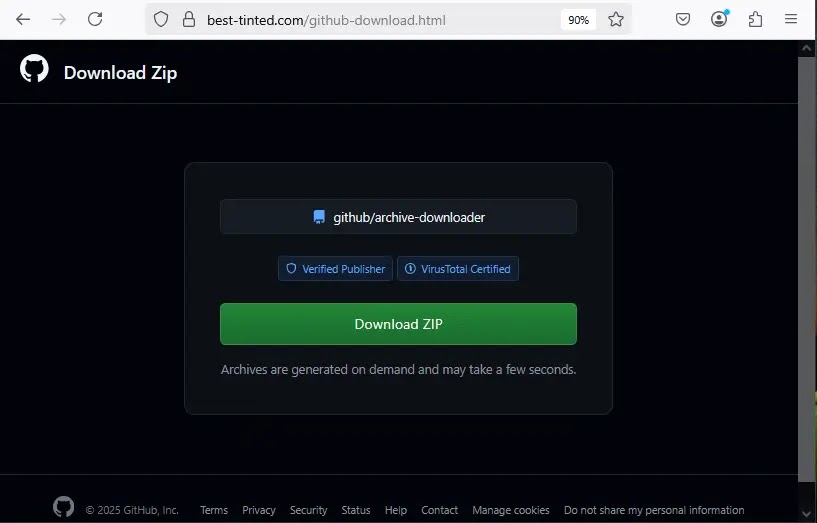
The attack begins when a user visits one of the fake repositories and clicks the download link provided on the page.
Instead of downloading software directly, the victim is redirected through several obfuscated URLs that conceal the real malware source.
The redirection chain includes base64-encoded and AES-encrypted links that eventually lead to a fake download page.
From there, the site generates a ZIP file containing malicious components that launch the infection chain.
Typical BoryptGrab infection process
• User searches online for free tools or cracked software
• Search results show a malicious GitHub repository
• Victim clicks the repository download link
• Multiple hidden redirects send the user to a fake download page
• A ZIP file containing malware is downloaded
• The malware installs and begins collecting sensitive data
Trend Micro researchers say the operation includes multiple payload variants with internal names such as Shrek, Sonic, Yaropolk, and CryptoByte. These labels suggest the malware is actively maintained and developed.
Sensitive data targeted by the stealer
Once running on a victim’s system, BoryptGrab collects a large range of sensitive information.
The malware primarily targets browsers and cryptocurrency wallets where credentials and financial data are stored.
| Target type | Examples | Data collected |
|---|---|---|
| Web browsers | Chrome, Firefox, Edge, Opera, Brave, Yandex | Passwords, cookies, browsing data |
| Crypto wallets | Exodus, Electrum, Ledger Live, Atomic, Trezor Suite | Wallet data and keys |
| Messaging apps | Telegram, Discord | Files and account tokens |
| System data | Windows user folders and configuration files | Personal files and system information |
| Screen capture | Desktop screenshots | Visual information from the system |
The malware archives the collected data and transmits it to attacker infrastructure without alerting the user.
Backdoor capability increases the threat
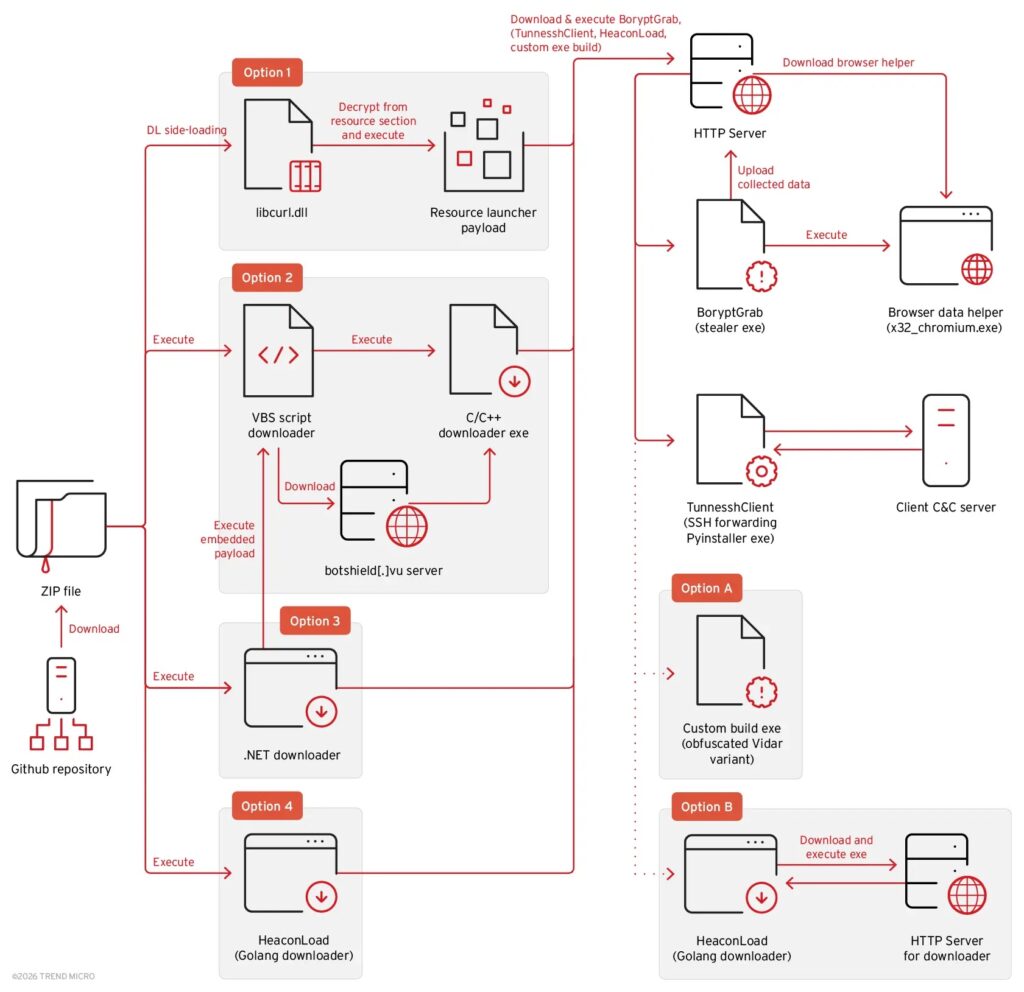
Researchers also identified a backdoor component called TunnesshClient associated with the campaign.
TunnesshClient establishes a reverse SSH tunnel between the victim’s machine and the attacker’s server. This connection allows attackers to remotely control the infected system.
With the tunnel active, attackers can run commands, transfer files, and route internet traffic through the compromised device using a SOCKS5 proxy.
This capability effectively turns infected machines into remote access points for the attacker.

Inside the BoryptGrab infection mechanism
The malicious ZIP files delivered in the campaign contain several types of droppers that launch the final payload.
One common variant uses DLL sideloading. A legitimate executable loads a malicious file named libcurl.dll, which decrypts and launches the stealer component.
Another variant relies on a VBS script that executes obfuscated PowerShell commands to download the malware.
The script also attempts to disable Windows Defender protections by adding exclusion paths to the security software.
Before collecting data, the malware performs checks to detect virtual machine environments. This technique helps the malware avoid running in security research sandboxes.
The stealer also includes code designed to bypass Chrome’s App Bound Encryption protections. This allows it to extract stored browser credentials that would normally remain protected.
Warning signs organizations should monitor
Security teams should monitor systems for suspicious activity linked to malware campaigns using fake repositories.
• Unexpected ZIP downloads from unknown GitHub repositories
• Scheduled tasks or scripts appearing without administrator approval
• Changes to Windows Defender exclusion settings
• Suspicious PowerShell activity
• Outbound connections to unknown remote servers
These indicators may suggest malware attempting to exfiltrate data from compromised systems.
Security measures to prevent infection
Cybersecurity experts recommend several best practices to reduce exposure to this type of attack.
• Download software only from official vendor websites
• Avoid downloading cracked tools or game cheats
• Verify GitHub repositories before downloading files
• Use updated endpoint protection and threat detection tools
• Monitor network traffic for unusual outbound connections
Organizations should also train employees to recognize suspicious downloads and verify the authenticity of online repositories.
FAQ
BoryptGrab is a data-stealing malware designed to collect browser credentials, cryptocurrency wallet data, and system information from infected computers.
It spreads through fake GitHub repositories that appear to host free software downloads but actually deliver malicious files.
The malware steals passwords, cookies, wallet information, messaging tokens, screenshots, and system files.
Yes. The campaign includes a backdoor component called TunnesshClient that allows remote access through a reverse SSH tunnel.
Users should download software only from official sources and avoid suspicious repositories offering cracked or free tools.


Read our disclosure page to find out how can you help VPNCentral sustain the editorial team Read more


Improve this guide


User forum
0 messages