
Microsoft investigates classic Outlook sync and connection bugs, offers temporary workarounds


 5 min. read
  Published on

Microsoft is investigating several issues affecting the classic Outlook desktop app, including group creation failures, Gmail and Yahoo sync errors, and a separate mouse pointer bug that also affects some Microsoft 365 apps. The company has published support articles for each problem and says fixes are still in progress.
One of the newly acknowledged issues breaks Microsoft 365 Group creation in classic Outlook. Microsoft says users may see a “Can’t connect to the server” error when they try to create groups in tenants where Exchange Web Services, or EWS, is enabled. The company traced the issue to a failing ValidateUnifiedGroupProperties call tied to legacy directory graph behavior.

Access content across the globe at the highest speed rate.
70% of our readers choose Private Internet Access
70% of our readers choose ExpressVPN

Browse the web from multiple devices with industry-standard security protocols.

Faster dedicated servers for specific actions (currently at summer discounts)
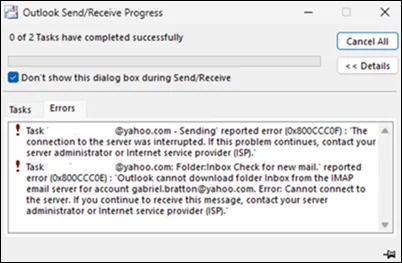
A second issue affects Gmail and Yahoo accounts in classic Outlook. Microsoft says some users are not prompted to sign in again after changing their Gmail or Yahoo password, which can then trigger sync failures and errors such as 0x800CCC0E and 0x800CCC0F. The company says it is still investigating the root cause and notes that other situations may also trigger the same behavior.
These bugs come as Microsoft continues supporting classic Outlook while extending the broader transition timeline to the new Outlook for Windows for enterprise users. That makes the current issues more important for organizations that still depend on the legacy client in daily workflows.
Group creation bug hits classic Outlook tenants using EWS
Microsoft says the group creation issue shows up after users open the Create Group window, enter the required information, and then see a red “Can’t connect to the server” message below the Name field. According to the company, the underlying failure happens because the AD Graph call for ValidateUnifiedGroupProperties returns an internal server error.
Microsoft says the Outlook team is working on updated group functionality that will use REST APIs instead. That change is expected to address the issue, though the company has not yet shared a release date for the fix. Until then, Microsoft recommends creating and editing groups through the new Outlook client or Outlook on the web.
Gmail and Yahoo sync bug throws Outlook errors after password changes
The second newly documented issue affects Gmail and Yahoo accounts in classic Outlook after a password change. Microsoft says users are not prompted to sign in again, which leaves Outlook unable to reconnect properly and can trigger errors including 0x800CCC0E and 0x800CCC0F.
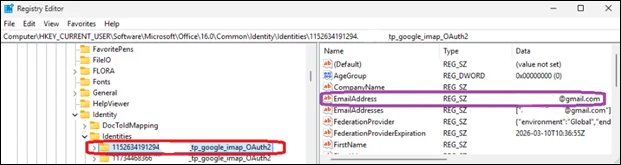
Microsoft’s support article says the current workaround involves deleting registry entries for the affected email address under the Outlook Identities key in the Windows Registry. The company says this forces Outlook to prompt for sign-in again, which can restore synchronization. Microsoft adds that the Outlook team is still working to identify the full root cause.
The cursor bug is still under investigation too
Microsoft is also investigating a separate classic Outlook issue where the mouse pointer disappears while hovering over the Outlook interface. The company says the issue has also been reported in OneNote and, to a lesser extent, in other Microsoft 365 apps. The support page for that bug was last updated on February 27, 2026.
For that problem, Microsoft asks affected customers to open a support case through their Microsoft 365 admin and submit diagnostic logs. The temporary workarounds are awkward but simple: click an email in the message list, switch to PowerPoint and click an editable area before returning to Outlook, or restart the PC if the first two steps fail.
Outlook issues at a glance
| Issue | Symptoms | Microsoft status | Current workaround |
|---|---|---|---|
| Group creation in classic Outlook | “Can’t connect to the server” | Investigating | Use new Outlook or Outlook on the web |
| Gmail/Yahoo sync | 0x800CCC0E, 0x800CCC0F, no sign-in prompt after password change | Investigating | Remove affected registry identity entries |
| Disappearing mouse pointer | Cursor vanishes over Outlook UI | Investigating | Click a message, switch briefly to PowerPoint, or restart |
Source: Microsoft support articles.
Why these Outlook bugs matter
None of the three issues sound catastrophic on paper, but together they hit core parts of the Outlook experience. One breaks collaboration features, another disrupts personal email sync, and the third affects basic navigation inside the app. For businesses still using classic Outlook, that combination can create real productivity problems while Microsoft works on longer-term fixes. This is an inference based on the scope of the affected features and Microsoft’s support guidance.
The group creation issue also shows Microsoft’s continued shift away from older backend methods. The company’s decision to replace the affected group functionality with REST-based APIs suggests that some classic Outlook pain points now stem from older service dependencies that no longer fit Microsoft’s modern cloud stack as cleanly. This is an inference based on Microsoft’s stated plan to move the feature to REST APIs.
What users should do now
- Use the new Outlook app or Outlook on the web for Microsoft 365 Group creation until Microsoft ships the REST-based fix.
- If Gmail or Yahoo mail stops syncing after a password change, follow Microsoft’s registry-based workaround to force Outlook to prompt for sign-in again.
- If the mouse pointer disappears in classic Outlook, try Microsoft’s temporary steps and submit a support case if the issue keeps returning.
- Watch Microsoft’s classic Outlook issues page for updated fixes and workarounds.
FAQ
Yes. Microsoft says the Outlook team is working on updated group functionality that uses REST APIs, but it has not yet published a release schedule.
Microsoft says one known trigger is changing the Gmail or Yahoo password in classic Outlook and then not being prompted to sign in again. The company is still investigating whether other triggers exist.
Microsoft’s support article lists 0x800CCC0E and 0x800CCC0F among the errors tied to the sync problem.
No. Microsoft says the issue has also been reported in OneNote and, to a lesser extent, in other Microsoft 365 apps.


Read our disclosure page to find out how can you help VPNCentral sustain the editorial team Read more


Improve this guide




User forum
0 messages