
LinkedIn faces privacy backlash over hidden browser extension checks


 5 min. read
  Published on

LinkedIn appears to scan Chrome-based browsers for installed extensions when users load its site, and that claim now has support beyond the original BrowserGate report. BleepingComputer independently confirmed the presence of a JavaScript-based extension detection routine, while LinkedIn told reporters that it looks for extensions that scrape data or violate its terms of service.
The issue matters because LinkedIn accounts tie activity to real identities, employers, and job roles. Researchers and follow-up reports say the code checks for thousands of extension IDs and also gathers device details such as memory, screen size, language settings, time zone, and battery information, which can strengthen browser fingerprinting.

Access content across the globe at the highest speed rate.
70% of our readers choose Private Internet Access
70% of our readers choose ExpressVPN

Browse the web from multiple devices with industry-standard security protocols.

Faster dedicated servers for specific actions (currently at summer discounts)
LinkedIn rejects the most serious inferences made by critics. The company said the scanning helps protect member privacy, member data, and site stability by identifying scraping extensions, and it said it does not use the data to infer sensitive information about members.
What LinkedIn appears to be doing
Reports published over the past few days say LinkedIn checks for more than 6,000 browser extensions on Chromium-based browsers such as Chrome, Edge, Brave, Opera, and Arc. The reporting says the technique works by trying to load resources tied to known extension IDs, which reveals whether a matching extension is installed.
That detection method is plausible because Chrome extensions can expose files through the web_accessible_resources manifest setting. Google’s developer documentation says those resources can be accessed by first-party or third-party scripts running on the same site when the extension exposes them, which creates the technical opening for this kind of detection.
What remains less certain is how LinkedIn uses the data after collection. Public reporting supports the existence of the scan itself and LinkedIn’s explanation that it targets scraping extensions, but broader allegations about unlawful profiling, special-category inference, or third-party sharing still need regulator findings or stronger public evidence before they can be stated as settled fact.
Why the controversy is growing
Privacy critics argue that users were never clearly told that LinkedIn might inspect installed browser add-ons at this scale. LinkedIn’s public privacy policy says it collects network and device information, including browser and add-ons, but the policy excerpt surfaced in search results does not clearly spell out a routine that checks thousands of extension IDs during page loads.
That gap between broad disclosure and specific behavior fuels the backlash. Even if LinkedIn uses the technique for anti-abuse and anti-scraping enforcement, many users will see silent extension checks as intrusive because they reveal software choices that can hint at work habits, security tools, or competing business platforms.
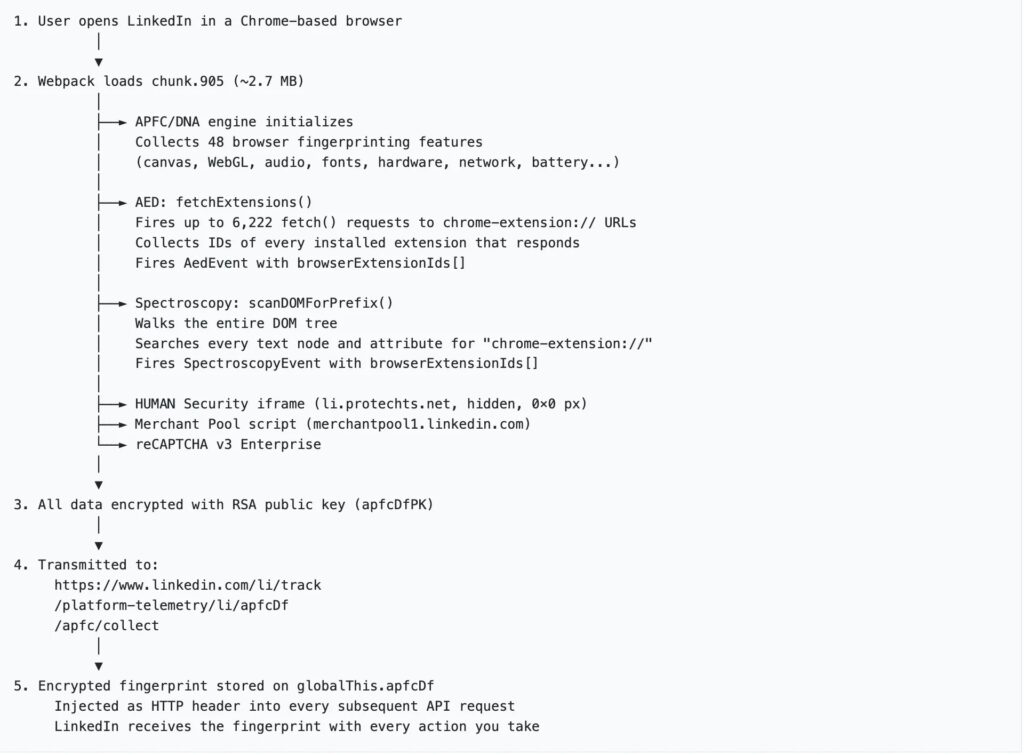
The story also lands at a time when browser fingerprinting faces heavier scrutiny across the web. Security reporting around this case frames LinkedIn’s approach as part of a wider pattern in which major platforms collect enough device and browser signals to identify users far beyond ordinary cookies.
What we know so far
| Point | What is supported |
|---|---|
| Extension scanning | Multiple reports say LinkedIn checks for over 6,000 extensions, and BleepingComputer independently confirmed the code exists. |
| Browsers affected | Reports say the checks target Chromium-based browsers, not Firefox or Safari. |
| Extra device data | Follow-up reporting says the script also gathers hardware and software signals such as memory, screen data, language, and battery status. |
| LinkedIn’s explanation | LinkedIn says it looks for scraping extensions to protect members, data, and site stability. |
| Sensitive inference claims | Critics raise these concerns, but no regulator ruling has publicly confirmed them yet. |
What users can do right now
If you use LinkedIn often and want to limit this kind of detection, the simplest move is to open LinkedIn in a separate browser profile with no extensions installed. Reports on this issue say the scan depends on discovering extensions that expose accessible resources, so a clean profile reduces what can be detected.
Another option is to use Firefox for LinkedIn sessions until the issue becomes clearer. Current reporting says the observed checks focus on Chromium-based browsers, which means Firefox users may avoid this specific detection path.
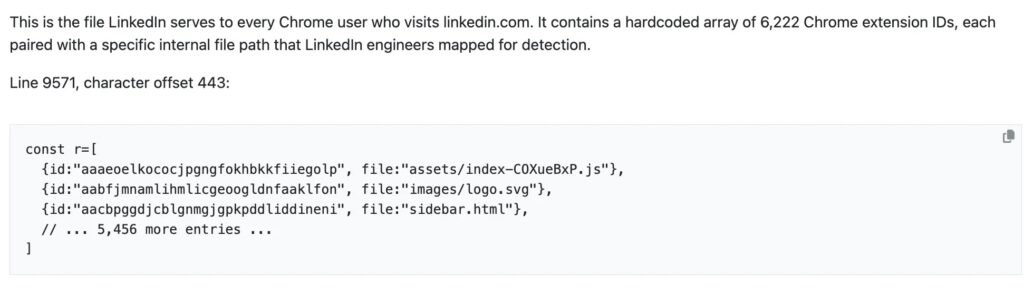
Users should also review which browser extensions they really need. Any extension that exposes resources broadly can create privacy or security tradeoffs beyond LinkedIn, especially on sites that run aggressive fingerprinting or anti-abuse scripts.
Quick takeaways
- LinkedIn appears to run code that detects installed extensions in Chromium-based browsers.
- The practice has drawn backlash because it goes beyond what many users would expect from a social platform.
- LinkedIn says the goal is anti-scraping and site protection, not sensitive profiling.
- The strongest accusations against LinkedIn still need official regulatory findings.
FAQ
Current reporting says yes. BleepingComputer said it independently confirmed LinkedIn loads code that checks for thousands of installed Chrome extensions.
The reports point to Chromium-based browsers such as Chrome, Edge, Brave, Opera, and Arc. The same reporting says Firefox and Safari were not affected by this specific method.
Yes. LinkedIn told reporters it looks for extensions that scrape data without member consent and said it does not use the data to infer sensitive information about members.
That is not settled in public yet. Critics say the behavior raises serious privacy questions, but a final legal answer will depend on regulators, courts, and the exact way the data was processed and disclosed.


Read our disclosure page to find out how can you help VPNCentral sustain the editorial team Read more


Improve this guide




User forum
0 messages