
Fake Microsoft Teams meeting pages are now being used to deliver malware


 4 min. read
  Published on
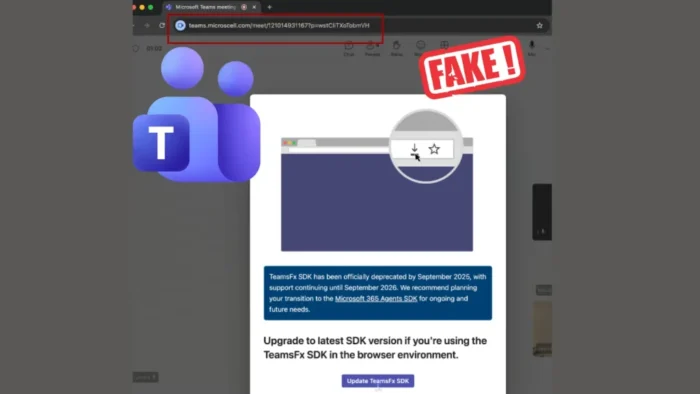
Security researchers are warning about a fresh phishing campaign that uses fake Microsoft Teams meeting pages to trick users into installing malware. The reported lure copies the Teams join screen, then pushes a fake update or plugin download instead of a real meeting flow.
The campaign appears targeted, not random. Security Alliance flagged a malicious lookalike domain, onlivemeet[.]com, while follow-on reporting said the activity was linked to UNC1069, a North Korea-linked threat group known for social engineering against professionals in technology, finance, and consulting.

Access content across the globe at the highest speed rate.
70% of our readers choose Private Internet Access
70% of our readers choose ExpressVPN

Browse the web from multiple devices with industry-standard security protocols.

Faster dedicated servers for specific actions (currently at summer discounts)
The basic trick is simple. A victim receives what looks like a legitimate meeting invite through email, Telegram, Slack, LinkedIn, or another trusted channel, lands on a fake Teams page, sees a message claiming a required Teams-related component needs an update, and downloads malware instead of joining a call.
How the attack works
Researchers say the fake meeting pages look convincing enough to fool even experienced users. In one reported example, the spoofed page claimed that a “TeamsFx SDK” component had been deprecated and needed an immediate update before the meeting could continue.
That matters because Microsoft’s own guidance says Teams updates come through the app itself. Microsoft Support states that “Teams auto-updates when an update is available and the app is idle,” and Microsoft Learn says the desktop client automatically installs updates as they become available. A random meeting page asking for a manual Teams update should raise suspicion immediately.
Microsoft has also warned that Teams remains a prime target for attackers. Microsoft Threat Intelligence said the platform’s broad adoption and collaboration features make it “a high-value target for both cybercriminals and state-sponsored actors,” while the Teams security guide notes that phishing in Teams often relies on fake website links and attachments that download dangerous software when clicked.
Why this campaign is dangerous
Once the victim downloads and runs the file, the attack can shift from phishing to full compromise. Reporting on this campaign says the payload can install a remote access trojan or info-stealer that grabs credentials, browser cookies, documents, and other sensitive data.
The targeting also looks deliberate. Researchers said the attackers often use revived conversations from compromised accounts, fake Slack channels, and legitimate scheduling tools like Calendly to make the outreach feel normal and urgent. That makes the lure harder to spot because it arrives inside familiar work routines instead of an obvious spam blast.
For companies, the risk goes beyond one infected laptop. Remote access malware can open the door to lateral movement, further data theft, and follow-on attacks. Rapid7 separately warned that Teams-based social engineering is rising and said attackers often try to push victims into remote support flows such as Quick Assist after the initial contact.
At-a-glance summary
| Item | Details |
|---|---|
| Main lure | Fake Microsoft Teams meeting page |
| Reported malicious domain | onlivemeet[.]com |
| Suspected actor | UNC1069, according to researcher-linked reporting |
| Delivery channels | Email, Telegram, Slack, LinkedIn, fake meeting invites |
| Fake prompt | Urgent update, plugin, or Teams-related fix |
| Likely payloads | Info-stealer or remote access trojan |
| Main targets | Professionals in tech, finance, and consulting |
What users and admins should do now
- Do not install any Teams update offered by a meeting page or external download prompt. Microsoft says Teams updates come through the app.
- Hover over meeting links and check the real destination before clicking. Microsoft says suspicious links and attachments in Teams messages should not be opened.
- Verify any unexpected meeting invite or urgent software request through a second channel, such as a direct call or a known corporate contact.
- Restrict external Teams communication where possible. Rapid7 recommends allowing only approved domains and tightening external chat settings.
- Review whether Quick Assist is necessary in your environment. Rapid7 recommends hardening or removing it if your organization does not need it.
- Train staff to treat cold “IT support” messages and urgent update prompts as suspicious by default.
FAQ
Attackers send users to a fake Microsoft Teams meeting page, then push a malware download disguised as an update or plugin.
Current reporting points to spoofed domains and social engineering, not a breach of Microsoft Teams itself. The danger comes from fake links, fake pages, and malicious downloads.
Microsoft says Teams auto-updates in the app when updates become available, and the desktop client installs updates automatically.
Close the page, do not download anything, and verify the meeting or request through an official channel. Microsoft explicitly advises users to avoid suspicious links or attachments in Teams messages.


Read our disclosure page to find out how can you help VPNCentral sustain the editorial team Read more


Improve this guide




User forum
0 messages