
Hackers impersonate Linux Foundation leader in Slack to target open source developers


 5 min. read
  Published on
Open source developers are facing a new Slack phishing campaign that abuses trust instead of software flaws. Attackers posed as a known Linux Foundation community figure, sent direct messages inside the TODO Group Slack workspace, and pushed victims to a fake Google Sites page that stole credentials and then tried to install a malicious root certificate.
The attack matters because it targets the relationships that keep open source communities running. In these spaces, developers often receive outreach from maintainers, foundation staff, and community leaders, so a convincing impersonation can get much further than a generic phishing email. Socket says the latest case was serious enough that OpenSSF’s Siren mailing list issued a high-severity advisory on April 7, 2026.

Access content across the globe at the highest speed rate.
70% of our readers choose Private Internet Access
70% of our readers choose ExpressVPN

Browse the web from multiple devices with industry-standard security protocols.

Faster dedicated servers for specific actions (currently at summer discounts)
The first answer for developers is simple. Do not trust a Slack message because the display name looks familiar, and never install a root certificate from a chat link. Socket’s write-up says the fake page harvested an email address and verification code before moving the victim toward certificate installation and malware delivery.
How the Slack attack worked
According to Socket, the attacker targeted the TODO Group, a Linux Foundation working group for open source program office practitioners, and related communities. The phishing page used Google Sites infrastructure, which helped the link look legitimate at a glance and made the lure harder to dismiss immediately.
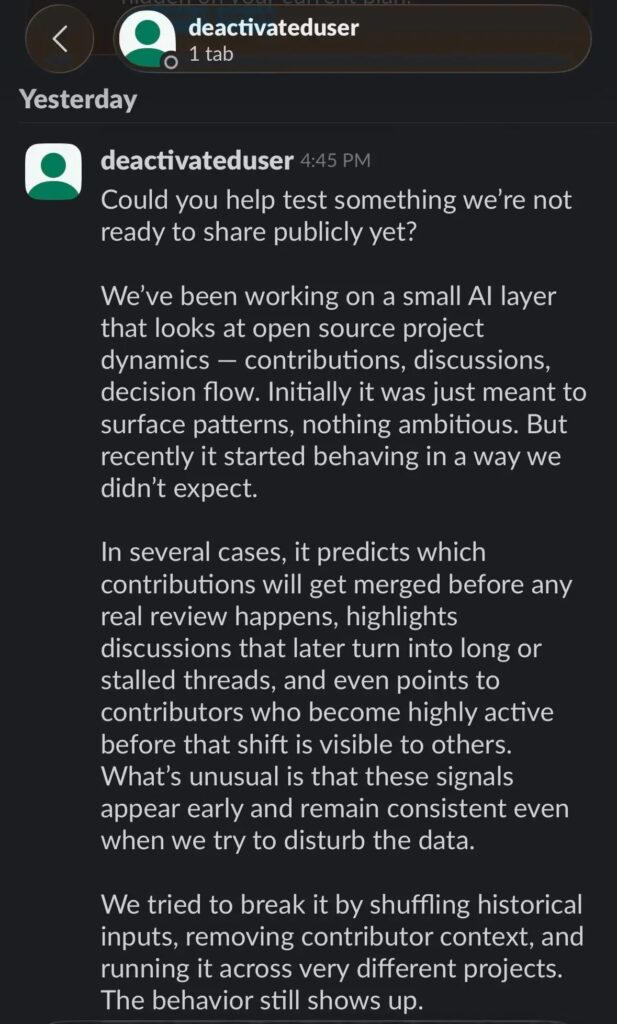
The direct message pitch was crafted to feel exclusive and credible. Socket says the attacker promoted a supposed private AI tool that could analyze open source project dynamics and predict which code contributions would get merged, then told targets the tool was only being shared with a small group.
The message also included details meant to reduce suspicion, including a fake email address and an access key. The reported phishing URL was a Google Sites page, the fake email was [email protected], and the access key was CDRX-NM71E8T.
What happened after the click
Socket says the phishing flow did not stop at credential theft. After collecting the victim’s email address and verification code, the fake site instructed them to install what it described as a “Google certificate,” which was actually a malicious root certificate.
That step is especially dangerous because root certificates can undermine the trust model browsers use for encrypted traffic. On Windows, Microsoft explains that the Trusted Root Certification Authorities store contains certificates from authorities the system and browser already trust. If an attacker gets a malicious root certificate installed, they can create a much more dangerous position for traffic interception and spoofed trust.
Socket says the attack then split by platform. On macOS, a script downloaded and executed a binary named gapi from the IP address 2.26.97.61. On Windows, the victim received a browser trust prompt for the same malicious certificate, which could enable interception of encrypted traffic.
Why this campaign stands out
This was not a spray-and-pray phish. The attacker chose a real community, copied a trusted identity, used a legitimate Google domain for hosting, and wrapped the lure in a topic that would interest developers. That combination made the campaign more dangerous than a routine credential harvest.
It also fits a broader pattern. Socket notes that open source maintainers and contributors have faced increasingly tailored social engineering campaigns in recent months, with attackers focusing on the collaboration channels and trust networks developers rely on every day.
For teams that build or maintain open source software, the lesson is clear. The next serious compromise may begin with a direct message from someone who looks familiar, not with an exploit or package vulnerability.
Attack chain at a glance
| Stage | What researchers reported |
|---|---|
| 1. Impersonation | Attacker posed as a known Linux Foundation community leader in Slack |
| 2. Phishing | Victim received a Google Sites link that looked legitimate |
| 3. Credential theft | Fake flow collected email address and verification code |
| 4. Trust abuse | Victim was told to install a malicious root certificate |
| 5. Malware delivery | On macOS, a script downloaded gapi; on Windows, traffic interception became possible |
Indicators tied to the campaign
- Phishing URL:
https://sites.google.com/view/workspace-business/join - Fake email:
[email protected] - Access key:
CDRX-NM71E8T - Remote IP:
2.26.97.61 - Reported macOS binary:
gapi
What developers should do now
- Verify unusual Slack requests through a separate, known channel before acting. Socket says this campaign succeeded by abusing a trusted identity inside a real developer community.
- Never install a root certificate from a chat message or website prompt unless your IT team explicitly directed you to do it.
- Treat exclusive invitations, private tools, and urgent access requests as suspicious, especially when they come through direct messages.
- If you interacted with the lure, disconnect the machine, remove newly installed certificates, rotate credentials, revoke tokens and sessions, and scan the system. Socket says OpenSSF’s advisory recommended these steps for potentially affected users.
- Turn on multi-factor authentication across collaboration and development accounts. It will not stop impersonation, but it can limit the damage after credential theft.
FAQ
Socket says the campaign targeted members of the TODO Group Slack workspace and related open source communities. The impersonation focused on a known Linux Foundation community figure to make the messages look trustworthy.
A root certificate can change what a system trusts. Once installed, it can help an attacker intercept encrypted traffic or make malicious connections appear legitimate to the victim’s device or browser.
No. Socket says the campaign moved beyond credential theft into malware delivery and traffic interception, with a platform-specific path for macOS and Windows victims.
Disconnect the device, remove any certificate you installed, rotate passwords, revoke active sessions and tokens, and run security scans. Also warn your team, because trust-based attacks often move laterally through the same community.


Read our disclosure page to find out how can you help VPNCentral sustain the editorial team Read more


Improve this guide


User forum
0 messages