
Google Chrome’s Device-Bound Session Credentials Are Now GA to Block Account Takeovers


 8 min. read
  Published on
Google has made Device Bound Session Credentials generally available in Chrome on Windows, giving users and Workspace admins a stronger defense against session cookie theft. The Google Workspace Updates post says DBSC is now generally available and enabled by default for Google Workspace users.
DBSC helps protect accounts after login by binding a session cookie to the device where the user authenticated. If malware steals the cookie and sends it to another machine, the attacker should not be able to reuse it in the same way because the session depends on a device-held cryptographic key.

Access content across the globe at the highest speed rate.
70% of our readers choose Private Internet Access
70% of our readers choose ExpressVPN

Browse the web from multiple devices with industry-standard security protocols.

Faster dedicated servers for specific actions (currently at summer discounts)
This targets one of the most common account takeover paths used by infostealer malware. Attackers often steal browser cookies to bypass passwords and multi-factor authentication, then replay those cookies from their own systems.
What Device Bound Session Credentials Do
Device Bound Session Credentials add hardware-backed session protection to Chrome. The Chrome DBSC documentation says the feature creates a cryptographic key pair tied to the user’s device and stores the private key in secure hardware when available.
Chrome then uses short-lived cookies. When a cookie needs to refresh, Chrome proves that it still has the private key for that device. This links session continuity to the original machine instead of trusting the cookie alone.
Google says this reduces the value of stolen cookies. Attackers may still steal data from an infected endpoint, but they have a harder time replaying a protected session from another device.
| Feature | What it does | Security impact |
|---|---|---|
| Device binding | Ties the session to the device used at login | Limits cookie replay from attacker-controlled systems |
| Hardware-backed key | Stores a private key in secure hardware when available | Makes the key harder to export from the device |
| Short-lived cookies | Requires proof of key possession during refresh | Reduces the useful lifetime of stolen cookies |
| Admin visibility | Adds DBSC binding events in investigation tools | Helps teams monitor session protection behavior |
Why Cookie Theft Is Such a Serious Problem
Session cookies let websites remember that a user has already signed in. That convenience also makes them valuable to attackers because a stolen cookie can sometimes provide access without the password or MFA prompt.
The Google Security Blog explains that session theft often starts when a user downloads malware. Once active, infostealers can extract existing cookies or wait for the user to sign in to new accounts.
This is why post-authentication protection matters. MFA helps at login, but it cannot fully stop an attacker who steals a valid session after the login has already happened.
Availability and Rollout Timeline
Google began the gradual rollout on May 25, 2026, for Rapid Release and Scheduled Release domains. Full feature visibility may take up to 60 days.
The May 2026 Workspace rollout note says DBSC is available to all Google Workspace customers, Workspace Individual subscribers, and users with personal Google accounts.
Workspace admins do not need to enable the feature manually. Google says there is no administrator control to disable it in the Admin console, and end users do not have a separate setting for it.
| Area | Status |
|---|---|
| Browser | Chrome on Windows |
| Rollout start | May 25, 2026 |
| Rollout pace | Gradual rollout, up to 60 days for full visibility |
| Workspace admin action | No action required |
| Availability | Google Workspace, Workspace Individual, and personal Google accounts |
How DBSC Works Under the Hood
DBSC changes the session model from a bearer-token approach to a proof-of-possession approach. A normal cookie can act like a pass if it gets stolen. A DBSC-protected session also requires the browser to prove that it has the private key created on the original device.
The developer guidance for DBSC says websites can integrate the feature by adding a session registration endpoint, serving session configuration, and using a refresh endpoint to validate key possession.
Google says the feature falls back gracefully when a device does not support secure key storage. That helps avoid breaking the authentication flow while still improving security for devices that support stronger protection.
Workspace Admins Can Enforce DBSC With Context-Aware Access
Google Workspace admins can go further by requiring DBSC-bound sessions for selected Workspace apps through Context-Aware Access. The Workspace Help page on session binding says admins can create custom access levels and apply them in monitor mode before moving to active enforcement.
This gives organizations a way to test the impact before blocking access. If the system detects that a user’s session is not properly bound, it can prompt the user to sign in again so a new secure binding can be attempted.
Google notes that DBSC enforcement applies to desktop web apps and does not apply to mobile apps or APIs. Admins should plan policies carefully so they do not disrupt legitimate users on unsupported platforms.
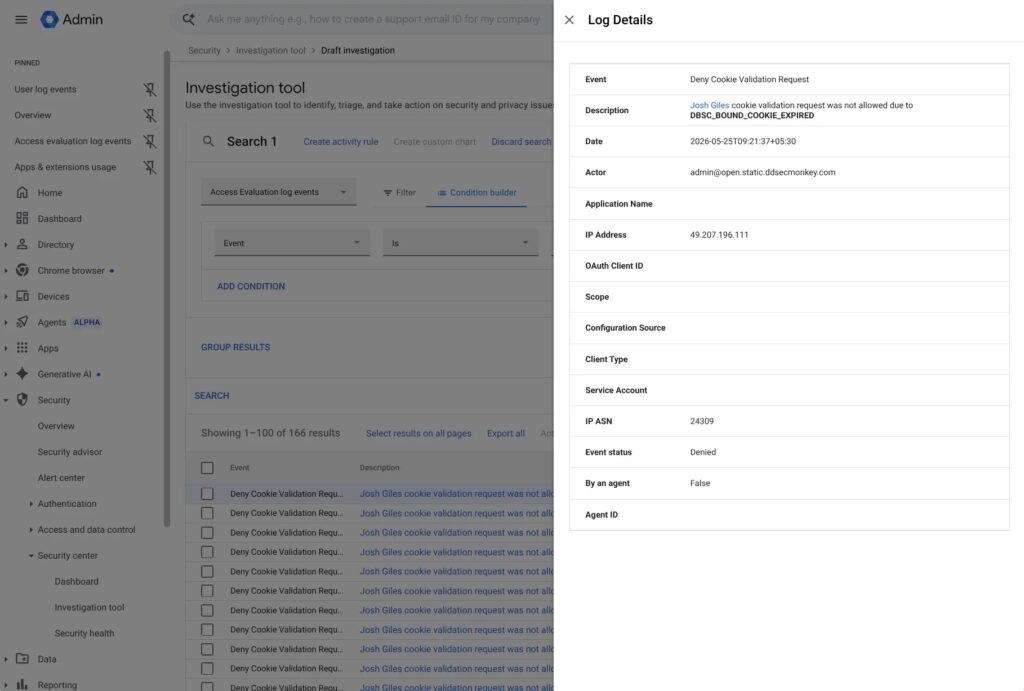
Audit Logs Help Teams Monitor Session Binding
Admins can use the security investigation tool to review DBSC activity and troubleshoot session issues. Google says DBSC activity appears in user log events and access evaluation log events.
The Context-Aware Access log events guide explains that admins can search access evaluation data in the Admin console and review whether users were granted or denied access based on applied access levels.
This visibility matters because DBSC is not only a prevention feature. It can also help security teams understand whether session binding works as expected across their environment.
- Review DBSC binding events for high-risk users.
- Monitor access evaluation results before enforcing new policies.
- Compare denied access events with device state and user reports.
- Check whether unsupported devices create access friction.
- Baseline normal DBSC behavior before writing alerts.
- Combine DBSC data with endpoint and identity signals during investigations.
What DBSC Can and Cannot Stop
DBSC makes stolen session cookies harder to use on another device, but it does not make an infected computer safe. Malware running on the same device may still capture keystrokes, steal files, read clipboard data, or interact with the user’s active browser session.
The cookie theft explanation from Google says software alone cannot reliably prevent cookie exfiltration once malware controls a machine, which is why DBSC shifts protection toward hardware-backed proof of possession.
Security teams should treat DBSC as a strong layer, not a full replacement for endpoint protection, phishing defense, passkeys, malware detection, and user training.
Recommended Actions for Security Teams
Organizations should review their Chrome and Google Workspace environments to confirm where DBSC is visible and where enforcement makes sense. High-risk groups, such as administrators, finance teams, executives, and security staff, should receive priority review.
The Google Workspace session binding documentation recommends using monitor mode first when enforcing DBSC through Context-Aware Access. This helps admins evaluate user impact before blocking access.
Security teams should also review Context-Aware Access logs for denied access events, device state issues, and unusual access patterns that may point to unsupported devices, session problems, or possible account takeover attempts.
| Task | Why it matters |
|---|---|
| Confirm Chrome on Windows coverage | DBSC currently focuses on Chrome on Windows for this rollout |
| Review high-risk user groups | Privileged accounts benefit most from stronger session protection |
| Use monitor mode before enforcement | Prevents sudden access issues for unsupported workflows |
| Review DBSC audit events | Helps teams confirm binding behavior and troubleshoot problems |
| Keep endpoint security active | DBSC reduces cookie replay risk but does not remove malware risk |
The Bottom Line
DBSC is a meaningful upgrade for Chrome session security because it reduces the value of stolen cookies, one of the most common tools in modern account takeover attacks.
For Google Workspace admins, the feature adds default protection without a manual rollout step and provides stronger enforcement options through Context-Aware Access. The next priority is monitoring, policy testing, and making sure endpoint security still catches the malware that tries to steal sessions in the first place.
FAQ
Device Bound Session Credentials, or DBSC, are a Chrome security feature that helps bind a user’s authenticated session to the device where the sign-in happened. This makes stolen session cookies harder to reuse on another machine.
Yes. Google says DBSC is now generally available in Chrome on Windows. It is enabled by default for Google Workspace users and available to Google Workspace customers, Workspace Individual subscribers, and personal Google account users.
No. DBSC helps stop stolen session cookies from being reused on another device, but it does not remove the risk from malware running on the original device. Endpoint protection, phishing defense, passkeys, and monitoring are still needed.
No. Google says DBSC is on by default for all Google Workspace customers, and admins do not need to enable it manually in the Admin console.
Yes. Admins can enforce DBSC-bound sessions for selected desktop web apps through Context-Aware Access. Google recommends testing with monitor mode before moving policies into active enforcement.


Read our disclosure page to find out how can you help VPNCentral sustain the editorial team Read more


Improve this guide




User forum
0 messages