
CPUID hack turns CPU-Z and HWMonitor downloads into a malware risk


 4 min. read
  Published on
Anyone who downloaded CPU-Z or HWMonitor from CPUID around April 9 to April 10, 2026 should treat that installer as suspicious. CPUID now says attackers compromised a secondary API for about six hours and used it to show malicious download links, while the company’s original signed files remained untouched.
The incident matters because CPU-Z and HWMonitor rank among the most trusted Windows hardware tools. Users first noticed something was wrong when the expected HWMonitor installer did not arrive. Instead, some people received a file named “HWiNFO_Monitor_Setup.exe,” which triggered antivirus alerts and raised immediate supply chain concerns.

Access content across the globe at the highest speed rate.
70% of our readers choose Private Internet Access
70% of our readers choose ExpressVPN

Browse the web from multiple devices with industry-standard security protocols.

Faster dedicated servers for specific actions (currently at summer discounts)
CPUID says the breach did not hit its build pipeline. According to a statement attributed to Samuel Demeulemeester, a compromised “side API” caused the main site to randomly show malicious links for roughly six hours between April 9 and April 10, and the company says it has fixed the issue.
What researchers have confirmed so far
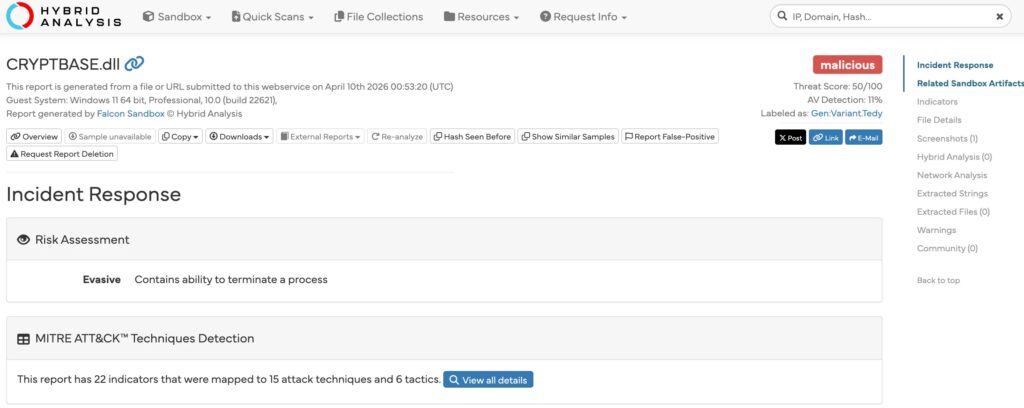
Security researchers who examined the bad downloads say this was not a simple fake installer. Analysis cited by BleepingComputer and The Register describes a multi-stage malware chain that tried to stay in memory, used file masquerading, and dropped a fake CRYPTBASE.dll as part of the attack flow. Some analysis also points to browser credential theft behavior.
At this stage, the strongest confirmed point is the poisoned distribution path, not a compromise of CPUID’s signed binaries themselves. BleepingComputer reported that some users could still fetch the clean hwmonitor_1.63.exe from the direct URL, which lines up with CPUID’s claim that the original files stayed intact and the attackers tampered with delivery instead.
CPUID’s live product pages currently list HWMonitor 1.63 and CPU-Z 2.19 again, which suggests normal downloads have resumed. CPU-Z’s current release notes also include a line about fixing a DLL hijacking vulnerability, an unfortunate detail given the way this incident unfolded.
What users should do now
If you downloaded either tool during the affected window, do not trust that file just because it came from the official site. Delete the installer, run a full security scan, and check for signs of follow-on activity. For anyone who needs a hardware monitor right now, HWiNFO’s official site lists version 8.44, released on March 4, 2026.
Incident snapshot
| Item | What we know |
|---|---|
| Affected software | CPU-Z and HWMonitor downloads from CPUID |
| Confirmed cause | CPUID says attackers compromised a secondary API |
| Exposure window | About six hours between April 9 and April 10, 2026 |
| File integrity | CPUID says original signed files were not compromised |
| Malicious behavior reported | Multi-stage loader, fake CRYPTBASE.dll, in-memory execution, possible credential theft |
| Current status | CPUID says it fixed the breach and restored clean downloads |
Recommended actions
- Delete any CPU-Z or HWMonitor installer downloaded during the suspected window.
- Run a full antivirus and antimalware scan.
- Check for unusual DLL files in the program folder, especially
CRYPTBASE.dll. - Change important passwords if you executed the installer and store credentials in your browser.
- Download fresh copies only after verifying the source and filename.
- Use HWiNFO’s official download page if you need an alternative right away.
FAQ
CPUID says attackers did not alter its signed original files. The company says the attackers compromised a side API and swapped some download links instead.
Reports centered on HWMonitor 1.63 and CPU-Z 2.19 downloads served through CPUID during the incident window. CPUID’s official pages still list those as the current Windows versions.
Users reported receiving “HWiNFO_Monitor_Setup.exe” when they expected a CPUID download. That mismatch became one of the earliest public warning signs.
CPUID says it fixed the breach. Even so, anyone who downloaded or ran the installer during the affected period should still treat that system as potentially exposed until scans come back clean.


Read our disclosure page to find out how can you help VPNCentral sustain the editorial team Read more


Improve this guide


User forum
0 messages