
Attackers are skipping phishing emails and going straight after Okta access


 5 min. read
  Published on
Attackers are changing their playbook. Instead of sending phishing emails and waiting for someone to click, many now go after the identity layer directly. New research from LevelBlue says one of the fastest-growing initial access techniques it is seeing is “Okta vishing,” where attackers use phone calls and social engineering to manipulate users or help desks into changing account access and MFA settings.
This approach works because Okta often sits in front of a company’s most important cloud services. If an attacker gets control of an Okta account or its authentication methods, they can often move into connected apps through single sign-on, turning one identity compromise into a much broader cloud incident.

Access content across the globe at the highest speed rate.
70% of our readers choose Private Internet Access
70% of our readers choose ExpressVPN

Browse the web from multiple devices with industry-standard security protocols.

Faster dedicated servers for specific actions (currently at summer discounts)
LevelBlue says the shift reflects a larger change in initial access. Email defenses have improved, so attackers increasingly look for lower-friction ways in. A convincing phone call to a help desk or employee can sometimes achieve more than a phishing campaign, especially when the caller creates urgency around MFA resets, new device enrollment, or password recovery.
Why Okta has become the new target
According to LevelBlue, attackers target Okta because it acts as the authentication gateway for many organizations. Once inside, they can inherit trusted access across services linked through SSO, including collaboration tools, cloud storage, CRM platforms, and VPN portals.
That changes the impact of the intrusion. What starts as a fake help desk call can quickly turn into a data theft event. LevelBlue says post-compromise activity often includes downloading SharePoint content, exporting mail data, accessing OneDrive storage, creating OAuth applications, and adding secondary MFA methods to keep the real user locked out.
The sample you shared captured that broad shift well, especially the move from inbox-focused attacks to identity-focused access abuse. This rewrite keeps that core angle, but anchors it more closely to the original LevelBlue research and official security guidance.
How the vishing chain works
LevelBlue says the attack starts before the phone call. Threat actors gather names, job titles, help desk details, and tenant patterns from public sources and previously compromised data, then use that information to sound credible when they contact the target or the service desk.
The next step is persuasion, not malware. The caller may pretend to be an employee locked out while traveling, someone who just changed phones, or an executive facing an urgent deadline. The goal is to pressure support staff or the user into resetting MFA, enrolling a new device, approving a push notification, or sharing a one-time code.
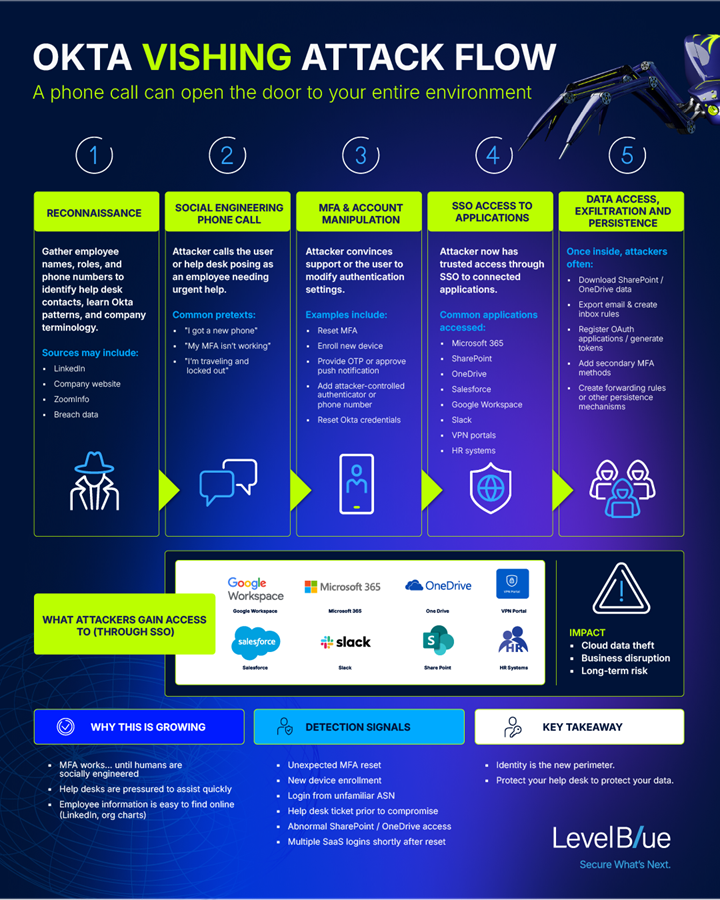
Once that happens, the attacker does not need to breach every application one by one. Control over the identity provider can open a path into many connected services at once. That is why these attacks now look less like a classic phishing intrusion and more like identity-led cloud compromise.
Why normal MFA may not be enough
This trend also shows the limits of weaker MFA methods. CISA says organizations should move toward phishing-resistant MFA, and its guidance specifically notes that if an organization cannot yet implement phishing-resistant MFA, it should at least use protections such as number matching to reduce abuse of push-based authentication.
Okta makes a similar point in its own security materials. The company says phishing-resistant authentication should extend through onboarding, login, and recovery, and it highlights stronger methods such as FastPass and WebAuthn. Okta has also warned customers to employ MFA for administrators and to consider phishing-resistant authenticators to improve protection against social engineering and credential attacks.
The help desk now sits on the front line of identity defense. If support teams can reset MFA or enroll new authenticators without strict validation, attackers will keep targeting them because the method is cheap, scalable, and often more effective than malware. This is an inference based on LevelBlue’s incident findings and the official guidance on phishing-resistant authentication.
At-a-glance breakdown
| Item | What the research shows |
|---|---|
| Main technique | Voice phishing aimed at Okta users or help desks |
| Primary goal | MFA reset, new authenticator enrollment, or credential recovery |
| Why Okta matters | It often controls access to many SSO-connected apps |
| Post-access activity | Cloud data theft, OAuth abuse, secondary MFA changes |
| Best defensive direction | Phishing-resistant MFA plus strict help desk verification |
Sources: LevelBlue, Okta, and CISA.
What organizations should do now
- Require strong identity verification before any MFA reset or new device enrollment.
- Move high-risk users and admins to phishing-resistant MFA such as WebAuthn, FIDO2 security keys, or equivalent Okta-supported methods.
- Reduce reliance on SMS, voice OTP, and easily manipulated push flows where possible.
- Feed Okta logs into a SIEM and correlate them with cloud app activity to catch suspicious resets, enrollments, and rapid follow-on access. This response step follows LevelBlue’s detection guidance.
- Train help desk staff to slow down urgent callers and follow fixed verification steps, even for executives.
FAQ
It is a voice-based social engineering technique where attackers impersonate IT support or employees to manipulate MFA settings, device enrollment, or password recovery in Okta.
LevelBlue says stronger email defenses are pushing attackers toward identity-focused methods that can deliver broader access with less effort if the help desk or user can be manipulated.
Because Okta often controls access to many connected services through SSO. One successful identity compromise can open the door to email, documents, cloud apps, and admin workflows.
CISA and Okta both point toward phishing-resistant MFA, stronger recovery controls, and better verification around help desk actions.


Read our disclosure page to find out how can you help VPNCentral sustain the editorial team Read more


Improve this guide


User forum
0 messages