
Fake Proxifier installer on GitHub spreads ClipBanker malware that hijacks crypto transfers


 5 min. read
  Published on

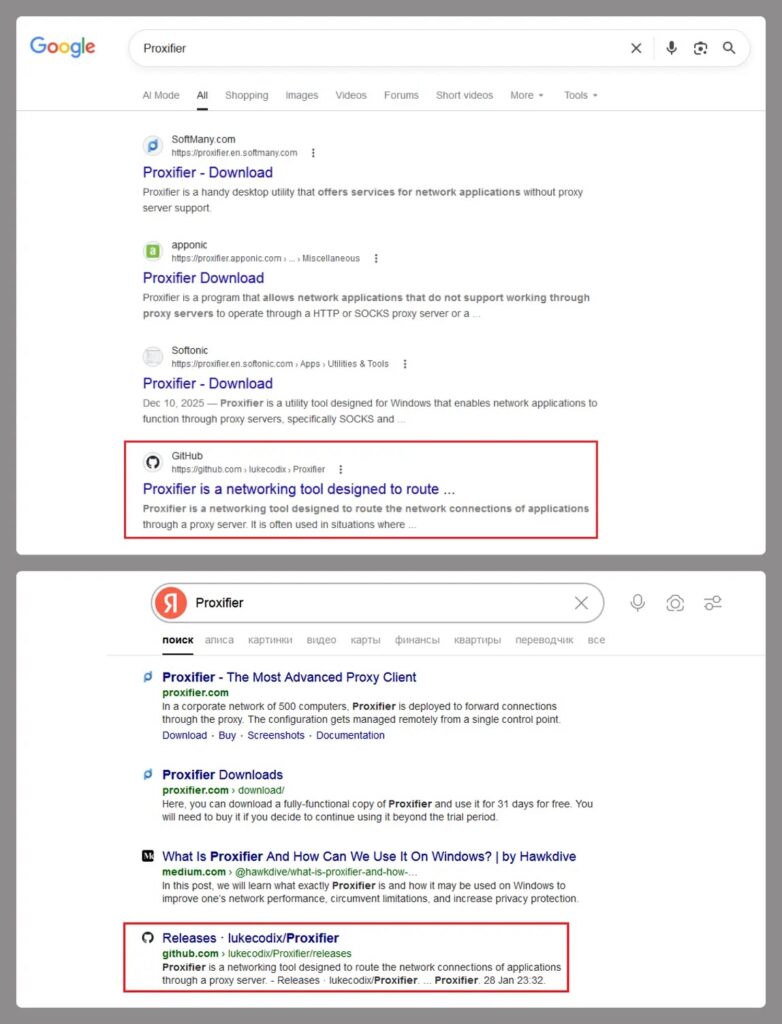
A new malware campaign is using a fake Proxifier installer hosted through GitHub to infect users with ClipBanker, a clipboard-hijacking trojan built to steal cryptocurrency. Kaspersky says the operation starts with a search for “Proxifier,” where victims land on a malicious GitHub repository that looks legitimate, download a trojanized installer, and end up running malware alongside the real software.
The threat is serious because it targets the exact moment a user copies a wallet address to make a payment. Kaspersky says ClipBanker monitors the clipboard and silently swaps crypto wallet addresses with attacker-controlled ones, which can redirect funds without obvious warning. The campaign has affected more than 2,000 Kaspersky users since early 2025, with most detections in India and Vietnam.

Access content across the globe at the highest speed rate.
70% of our readers choose Private Internet Access
70% of our readers choose ExpressVPN

Browse the web from multiple devices with industry-standard security protocols.

Faster dedicated servers for specific actions (currently at summer discounts)
This is not a simple fake installer scam. Kaspersky describes a long, layered infection chain that uses multiple stages to hide the final payload, keep the victim calm by showing the real Proxifier installer in the foreground, and push the malware deeper into memory and the registry in the background.
How the fake installer attack works
According to Kaspersky, the malicious GitHub page includes what looks like a believable Proxifier-related project, complete with source code and a release archive. Inside that archive, victims find an executable and a text file with activation keys, which helps make the package look authentic. Once launched, the file acts as a malicious wrapper around the genuine Proxifier installer.
Kaspersky says the infection chain creates a small stub file in the temp folder, injects a .NET component, and abuses PowerShell to add Microsoft Defender exclusions. It then continues the chain by injecting code into trusted Windows processes such as conhost.exe, storing encoded script content in the registry, creating persistence through a scheduled task, and eventually injecting shellcode into fontdrvhost.exe, where ClipBanker begins watching the clipboard.
The design gives the attackers two major advantages. First, the real Proxifier installer appears in front of the user, which lowers suspicion. Second, much of the malicious activity happens in memory or through trusted processes, which can make traditional file-based detection slower or less reliable. That is an inference based on Kaspersky’s description of reflective, fileless, and process-injection behavior.
Why this campaign is effective
The social-engineering part is simple and effective. Users search for a known tool, find a repository that appears helpful, and see extra signs of legitimacy such as code, release files, and activation keys. GitHub’s own documentation shows that repositories can be reported directly for abuse or malware, but that still depends on someone identifying and flagging the content first.
The malware also targets a type of user who may move quickly and check less carefully. Crypto users often copy and paste long wallet addresses, and they may not manually compare every character before confirming a transaction. If malware changes that address in the clipboard, a payment can go to the attacker instead of the intended recipient. Kaspersky says this campaign supports more than 26 blockchain networks, which broadens the pool of possible victims.
Another important detail is the abuse of Microsoft Defender exclusions. Microsoft documents both Defender tampering protections and attack surface reduction capabilities designed to reduce script-based and app-based malware activity. If malware successfully adds exclusions for temp paths, PowerShell, or trusted processes, it can make the rest of the attack chain easier to hide.
What users and defenders should do now
Users should avoid downloading security-sensitive software from search results or lookalike repositories when an official vendor site exists. Kaspersky’s reporting makes clear that this campaign relied on victims finding the fake Proxifier download through ordinary search behavior.
Security teams should also treat Defender exclusion changes as a potential incident signal, especially when those changes happen through scripts or unexpected processes. Microsoft says attack surface reduction rules can help stop apps and scripts from being used to infect devices with malware, and tamper-related protections exist to reduce attempts to weaken Defender.
If a malicious repository is found, GitHub says users can report it directly from the repository page through its abuse-reporting flow. That matters here because quick takedown action can reduce the number of additional victims who find the fake installer through search or shared links.
Attack snapshot
| Item | Confirmed detail |
|---|---|
| Malware | ClipBanker |
| Disguise | Fake Proxifier installer on GitHub |
| Main target | Cryptocurrency users |
| Main technique | Clipboard hijacking |
| Delivery path | Search results to malicious GitHub repo |
| Known impact | 2,000+ Kaspersky users encountered it since early 2025 |
| Main affected countries in Kaspersky telemetry | India and Vietnam |
What to do right now
- Download Proxifier and similar tools only from the official vendor site.
- Check pasted crypto wallet addresses carefully before sending funds. This advice follows directly from the clipboard-hijacking behavior Kaspersky described.
- Investigate unexpected Microsoft Defender exclusion changes, especially those tied to PowerShell or temp paths.
- Use Microsoft Defender attack surface reduction where possible to reduce script-based infection risk.
- Report malicious GitHub repositories through GitHub’s abuse-reporting flow.
FAQ
ClipBanker is a malware family that watches the clipboard and replaces copied cryptocurrency wallet addresses with attacker-controlled ones. Kaspersky says this campaign used it through a fake Proxifier installer hosted on GitHub.
Kaspersky says victims usually search for “Proxifier,” land on a malicious GitHub repository, download a trojanized release archive, and run an executable that launches both the real installer and the malware chain.
Because the attack uses multiple stages, process injection, registry storage, scheduled tasks, and in-memory execution while also showing the real installer to the user.
Yes. GitHub’s documentation says users can report abusive or malicious repositories directly from the repository page.


Read our disclosure page to find out how can you help VPNCentral sustain the editorial team Read more


Improve this guide

User forum
0 messages