
Hackers Use Microsoft Teams Helpdesk Chats to Breach Organizations


 9 min. read
  Published on

A newly tracked threat group, UNC6692, is using Microsoft Teams chats, fake IT helpdesk support, and a custom malware suite to break into enterprise networks. Google Threat Intelligence Group says the campaign does not rely on a software vulnerability. It relies on employees trusting an attacker who appears during a moment of inbox chaos.
The attack starts with email bombing. UNC6692 floods a victim’s inbox with a large volume of messages, then contacts the same user through Microsoft Teams while pretending to be helpdesk staff. The attacker offers to “fix” the problem and persuades the victim to accept an external Teams chat invitation.

Access content across the globe at the highest speed rate.
70% of our readers choose Private Internet Access
70% of our readers choose ExpressVPN

Browse the web from multiple devices with industry-standard security protocols.

Faster dedicated servers for specific actions (currently at summer discounts)
Google says the campaign shows how threat actors can combine social engineering, trusted enterprise platforms, cloud hosting, and custom malware to reach deep inside corporate environments. In the observed intrusion, the attackers moved from a Teams message to browser extension malware, tunneling, credential theft, lateral movement, and domain controller compromise.
The attack starts with email bombing and Teams impersonation
UNC6692 first creates pressure by overwhelming the target’s inbox. That makes the fake support message more believable because the victim already sees a real problem and wants immediate help.
The attacker then sends a Microsoft Teams message from outside the victim’s organization. Google says the attacker poses as helpdesk personnel and convinces the user to click a link for a supposed local patch that will stop the spam.
That link leads to a phishing page hosted on an attacker-controlled AWS S3 bucket. The page presents itself as “Mailbox Repair and Sync Utility v2.1.5,” giving the attack a familiar IT support theme.
How the phishing page infects the victim
| Attack step | What happens |
|---|---|
| Email bombing | The attacker floods the victim’s inbox to create urgency |
| Teams message | The attacker impersonates IT helpdesk staff |
| External chat invite | The victim accepts a Teams chat from outside the organization |
| Fake repair page | The victim opens a link to a fake mailbox utility |
| Credential theft | The page captures login details through a fake health check |
| Malware staging | AutoHotkey payloads install the SNOW malware ecosystem |
| Persistence | Malware uses scheduled tasks, startup shortcuts, and headless Edge |
The phishing page uses a gatekeeper script to check whether the link contains a required email parameter. It also forces the victim toward Microsoft Edge through the microsoft-edge: URI scheme, according to Google’s analysis.
The fake page then asks the victim to run a “Health Check.” Google says the page rejects the first two password attempts by design, which helps the attacker capture the password more reliably by forcing the victim to type it multiple times.
While the page displays fake progress messages, the attack downloads an AutoHotkey binary and script from AWS S3. That script installs SNOWBELT, a malicious Chromium extension that masquerades as “MS Heartbeat” or “System Heartbeat.”
The SNOW malware suite gives attackers control
Google calls the attacker’s malware framework the SNOW ecosystem. It includes SNOWBELT, SNOWGLAZE, and SNOWBASIN, with each component serving a different role in the intrusion.
| Malware component | Type | Role |
|---|---|---|
| SNOWBELT | Malicious Chromium browser extension | Provides initial foothold and command relay |
| SNOWGLAZE | Python WebSocket tunneler | Routes traffic through the victim system |
| SNOWBASIN | Python local HTTP server | Runs commands, captures screenshots, and exfiltrates files |
SNOWBELT runs as a browser extension loaded through a headless Microsoft Edge process. Google says it persists through a Windows Startup folder shortcut and scheduled tasks, which helps it survive restarts.
SNOWGLAZE creates a SOCKS proxy through WebSockets and sends data in Base64-encoded JSON objects. This helps malicious traffic resemble normal encrypted web activity.
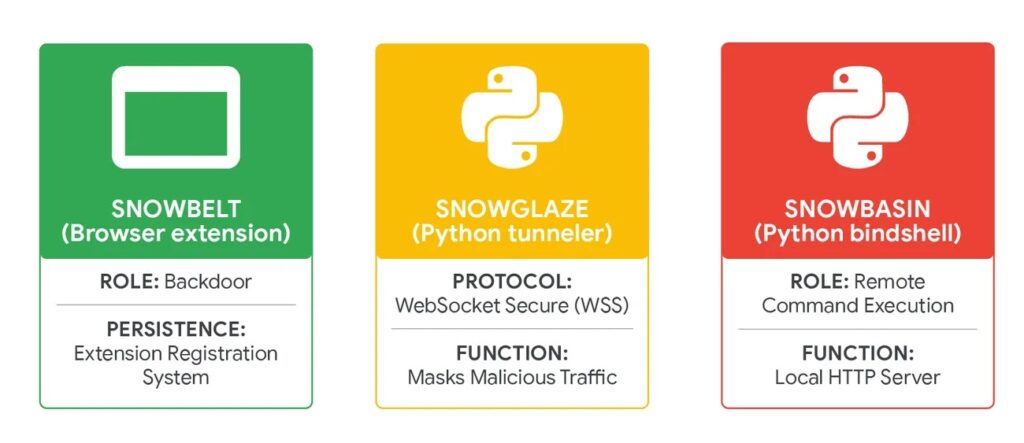
SNOWBASIN acts as a local HTTP server that can execute shell commands, capture screenshots, and move files out of the victim environment. It gave UNC6692 a hands-on control layer after the initial Teams-based deception worked.
UNC6692 moved from one user to domain-level access
After gaining the first foothold, UNC6692 scanned the local network for common Windows administration and remote access ports, including 135, 445, and 3389. Google says the attackers then used the SNOWGLAZE tunnel to support deeper movement inside the victim network.
The attackers used PsExec and RDP during lateral movement. On a backup server, they used Windows Task Manager to dump LSASS process memory, which can expose password hashes and other authentication material.
With stolen hashes, the attackers performed offline credential extraction and then used pass-the-hash techniques to authenticate to domain controllers. That moved the intrusion from a social engineering incident to a full enterprise compromise.
What attackers stole from the domain controller
| Targeted asset | Why it matters |
|---|---|
| NTDS.dit | Contains Active Directory account data and password hashes |
| SAM hive | Stores local account password hashes |
| SYSTEM hive | Helps decrypt protected credential material |
| SECURITY hive | Contains local security policy and secrets |
| LSASS memory dump | Can expose credentials and session material |
| Screenshots | Confirms activity and helps operators track progress |
On the domain controller, the attacker downloaded FTK Imager and used it to mount the local drive. Google says the attacker then extracted NTDS.dit and registry hives, which are among the most sensitive assets in a Windows domain.
The stolen files were exfiltrated through LimeWire, and endpoint telemetry showed targeted screenshots of FTK Imager and Edge windows. That suggests the attacker documented progress and confirmed that key tasks succeeded.
This makes the UNC6692 campaign more dangerous than a simple Teams phishing case. The attack chain shows how one accepted external chat can lead to credential theft, Active Directory compromise, and data exfiltration if defenders miss the early signals.
Why Teams became the delivery channel
Microsoft Teams gives employees a sense of workplace trust. A chat that appears during a stressful inbox flooding incident may feel more believable than a random email. That is exactly what UNC6692 exploited.
The campaign also abuses external collaboration. Microsoft’s Teams documentation allows admins to control whether users communicate with people from outside the organization, including through allow lists and blocked domains.
Microsoft also documents trust indicators that identify people from outside the organization or from organizations that are not on a trusted list. Those warnings matter because attacks like UNC6692 depend on users ignoring or misunderstanding external identity prompts.
Cloud services helped the attack blend in
UNC6692 relied on cloud platforms at several stages of the attack. Google says the campaign used AWS S3 for payload hosting and credential exfiltration, Heroku for command and control, and LimeWire for exfiltrating sensitive files.
This matters because many companies allow traffic to major cloud providers. A simple reputation blocklist may not flag AWS, Heroku, or other widely used platforms without stronger context.
Security teams need to watch behavior, not only domains. Suspicious browser extensions, unexpected headless Edge processes, strange outbound S3 paths, and new WebSocket tunnels should all trigger investigation.
Key indicators from the campaign
| Indicator type | Value or pattern |
|---|---|
| Phishing URL pattern | https://service-page-[ID]-outlook.s3.us-west-2.amazonaws.com/update.html?email= |
| C2 server | wss://sad4w7h913-b4a57f9c36eb[.]herokuapp[.]com:443/ws |
| SNOWBELT C2 pattern | https://[a-f0-9]{24}-[0-9]{6,7}-[0-9]{1}.s3.us-east-2.amazonaws[.]com |
| SNOWBELT VAPID key | BJkWCT45mL0uvV3AssRaq9Gn7iE2N7Lx38ZmWDFCjwhz0zv0QSVhKuZBLTTgAijB12cgzMzqyiJZr5tokRzSJu0 |
| Masquerading files | RegSrvc.exe, Protected.ahk, SysEvents |
Google also published YARA rules for SNOWBELT, SNOWGLAZE, and SNOWBASIN. Security teams can use those rules alongside endpoint telemetry and network monitoring to hunt for the malware components.
Defenders should not rely only on IOC matching. The stronger signals include external Teams contact, suspicious Edge launch flags, AutoHotkey execution from unusual folders, new scheduled tasks, WebSocket tunneling, and sensitive file access on domain controllers.
Organizations should also review helpdesk procedures. Employees need a clear way to confirm whether a Teams message from “IT” is legitimate before accepting external chats or running any repair tool.
What organizations should do now
Admins should tighten Microsoft Teams external access settings. Microsoft’s documentation says admins can block all external Teams and Skype for Business users, allow only specific external domains, or block specific domains in the Teams admin center.
Organizations should also train employees to treat unexpected Teams support messages as suspicious, especially after email bombing. A real helpdesk should use known internal channels, ticket numbers, identity verification, and approved remote support processes.
Security teams should monitor for headless Edge processes loading extensions, unexpected AutoHotkey execution, suspicious AWS S3 downloads, Heroku WebSocket traffic, and LimeWire uploads from enterprise systems.
Defensive checklist
- Restrict Microsoft Teams external access to trusted domains.
- Block external Teams chats from unknown tenants where possible.
- Train employees to verify helpdesk requests through known internal channels.
- Alert on email bombing followed by Teams contact.
- Monitor for AutoHotkey binaries and scripts from unusual locations.
- Hunt for headless Microsoft Edge processes using
--load-extension. - Review browser extensions installed outside approved channels.
- Monitor outbound AWS S3, Heroku WebSocket, and LimeWire activity.
- Alert on PsExec, RDP, and unusual port scanning from workstations.
- Protect LSASS from memory dumping.
- Monitor for FTK Imager use on servers and domain controllers.
- Detect access to NTDS.dit and registry hives.
- Require phishing-resistant MFA for privileged accounts.
Why this attack matters
UNC6692 shows that attackers do not always need a zero-day vulnerability to compromise an enterprise. They can use normal business tools, believable support stories, trusted cloud services, and custom malware to reach the same result.
The Teams message works because employees already expect IT support to contact them during technical problems. The email bombing creates the problem, and the fake helpdesk chat offers the “solution.”
For defenders, the main lesson is to treat collaboration platforms as security surfaces. Teams, Slack, email, browser extensions, and cloud storage all need monitoring because attackers use the same tools employees use every day.
FAQ
UNC6692 is a newly tracked threat group identified by Google Threat Intelligence Group. It used Microsoft Teams impersonation, email bombing, phishing pages, and custom malware to compromise enterprise networks.
No. Google’s report describes a social engineering campaign that abused legitimate Teams external collaboration features and user trust. It did not describe a Teams software vulnerability.
The SNOW ecosystem includes SNOWBELT, SNOWGLAZE, and SNOWBASIN. Together, they provide browser extension access, tunneling, command execution, screenshots, and file exfiltration.
They flooded the victim’s inbox, then posed as IT helpdesk staff through Microsoft Teams. The victim was directed to a fake repair page that installed malware.
Organizations should restrict Teams external access, train users to verify helpdesk messages, monitor browser extension activity, and alert on suspicious cloud traffic, AutoHotkey execution, and headless Edge processes.


Read our disclosure page to find out how can you help VPNCentral sustain the editorial team Read more


Improve this guide




User forum
0 messages