
New Windows RPC Vulnerability Lets Attackers Escalate Privileges to SYSTEM


 6 min. read
  Published on

A newly disclosed Windows RPC vulnerability called PhantomRPC can let attackers escalate privileges from low-privileged service accounts to SYSTEM or Administrator-level access. Kaspersky presented the research at Black Hat Asia 2026 and said Microsoft has not issued a patch or CVE for the issue.
PhantomRPC affects how Windows Remote Procedure Call handles connections when a legitimate RPC server is unavailable. Instead of exploiting a memory corruption bug, the attack abuses Windows RPC architecture and allows a malicious local process to impersonate a fake server endpoint.

Access content across the globe at the highest speed rate.
70% of our readers choose Private Internet Access
70% of our readers choose ExpressVPN

Browse the web from multiple devices with industry-standard security protocols.

Faster dedicated servers for specific actions (currently at summer discounts)
Kaspersky researcher Haidar Kabibo said the technique likely applies to all Windows versions, since it targets architectural behavior in RPC rather than a single vulnerable component. The attack still requires the compromised process to hold impersonation rights, such as SeImpersonatePrivilege.
How PhantomRPC works
Windows RPC lets one process call functions exposed by another process, even when both run in different security contexts. Microsoft describes RPC as a technology for building client and server programs, while Kaspersky notes that Windows uses it heavily across system DLLs and services.
PhantomRPC appears when a privileged Windows process tries to contact an RPC server that is offline, disabled, or unavailable. Kaspersky found that an attacker who already controls a process running as Network Service or Local Service can create a fake RPC server that exposes the expected interface and endpoint.
When the privileged client connects to the fake endpoint, the attacker’s server can call RpcImpersonateClient. Microsoft’s documentation says an RPC server thread can use this function to impersonate the active client. In PhantomRPC scenarios, that client can run as SYSTEM or as an administrator.
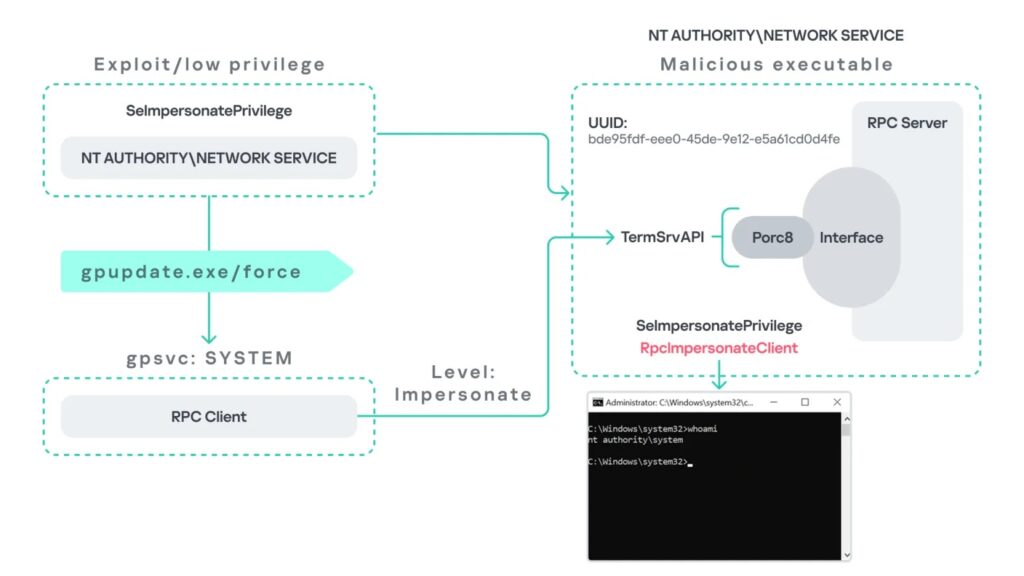
Five attack paths shown by Kaspersky
Kaspersky demonstrated five exploitation paths. Some require a trigger, some wait for user activity, and one relies on background service behavior.
| Attack path | Trigger | Result described by Kaspersky |
|---|---|---|
| Group Policy Client | gpupdate.exe /force | Network Service to SYSTEM |
| Microsoft Edge startup | Administrator launches Edge | Network Service to Administrator |
| WDI background service | Automatic polling every 5 to 15 minutes | Network Service to SYSTEM |
ipconfig.exe and DHCP Client | Administrator runs ipconfig.exe | Local Service to Administrator |
w32tm.exe and Windows Time | Administrator runs w32tm.exe | Local Service to Administrator |
The Group Policy path abuses calls to TermService, the Remote Desktop service. If TermService is unavailable, a fake RPC server can mimic the TermService endpoint and impersonate the SYSTEM-level Group Policy Client after gpupdate.exe /force runs.
The Edge path needs a high-privileged user to launch msedge.exe. Kaspersky found that Edge startup can trigger an RPC call to TermService with a high impersonation level, which lets the fake server impersonate the administrator-level client.
Background services increase the risk
The WDI scenario raises concern because it does not require user interaction. Kaspersky found that the Diagnostic System Host service periodically makes RPC calls to TermService every 5 to 15 minutes, and those calls can allow escalation to SYSTEM when the attacker’s fake endpoint receives them.
The DHCP and Windows Time scenarios show that PhantomRPC does not only affect TermService. In the DHCP case, ipconfig.exe can trigger an internal RPC request when the DHCP Client service is unavailable. In the Windows Time case, w32tm.exe first tries to connect to a nonexistent named pipe, \PIPE\W32TIME, which an attacker can expose through a malicious RPC server.
That pattern matters for defenders. Kaspersky warned that many more paths may exist because Windows services and DLLs rely on RPC across the operating system.
Microsoft classified the issue as moderate
Kaspersky said it reported the issue to the Microsoft Security Response Center on September 19, 2025. Microsoft responded 20 days later and classified the issue as moderate severity because exploitation requires the originating process to already have SeImpersonatePrivilege.
Kaspersky said Microsoft did not assign a CVE and closed the case without immediate tracking or a scheduled patch. The security firm published the research after the disclosure embargo ended and said it would avoid releasing instructions that could enable mass exploitation.
The decision may frustrate defenders because Network Service and Local Service commonly hold impersonation-related capabilities in Windows environments. Attackers who compromise a service running under those identities may use PhantomRPC as a post-exploitation escalation route.
What defenders should monitor
Kaspersky recommends ETW-based RPC monitoring to detect suspicious failures when privileged clients attempt to contact unavailable RPC servers. The research focuses on RPC stop events, especially cases involving RPC_S_SERVER_UNAVAILABLE, high-privileged client processes, and high impersonation levels.
Security teams should also reduce unnecessary use of SeImpersonatePrivilege. Kaspersky warns that organizations sometimes grant it to custom or third-party services that do not strictly need it, which increases the local privilege escalation risk.
Recommended actions include:
- Enable ETW-based RPC monitoring.
- Watch for
RPC_S_SERVER_UNAVAILABLEevents from privileged processes. - Identify services that expose unavailable RPC endpoints.
- Enable legitimate services where feasible, so attackers cannot hijack expected endpoints.
- Restrict
SeImpersonatePrivilegeto processes that truly require it. - Review custom services running as Network Service or Local Service.
- Test exposure with Kaspersky’s PhantomRPC research tools in controlled environments.
Why PhantomRPC matters
PhantomRPC gives attackers a way to turn limited local compromise into SYSTEM-level access under specific conditions. That makes it useful after an attacker already lands on a machine through another bug, weak service configuration, exposed web application, or compromised third-party process.
The issue also shows why architectural bugs can create long-term risk. A single patch may not close every possible abuse path if the weakness appears across many RPC-dependent services and DLLs.
For enterprises, the practical response starts with visibility. Teams should know which services run with impersonation rights, which RPC endpoints regularly fail, and which disabled services create endpoint gaps attackers can imitate.
Summary
- Kaspersky disclosed PhantomRPC at Black Hat Asia 2026.
- The issue affects Windows RPC architecture and can enable local privilege escalation.
- Attackers need control of a process with impersonation rights, such as Network Service or Local Service.
- Kaspersky demonstrated five attack paths involving Group Policy, Edge, WDI, DHCP, and Windows Time.
- Microsoft classified the issue as moderate, assigned no CVE, and did not issue an immediate patch.
FAQ
PhantomRPC is a Windows RPC privilege escalation technique disclosed by Kaspersky. It abuses RPC behavior when legitimate servers are unavailable and lets a fake RPC server impersonate privileged clients.
No. Kaspersky describes PhantomRPC as a local privilege escalation technique. Attackers first need control of a local process with impersonation rights.
Kaspersky said the technique likely affects all Windows versions because it stems from RPC architecture rather than one vulnerable component.
Microsoft has not issued a patch or CVE, according to Kaspersky. Microsoft classified the issue as moderate because exploitation requires SeImpersonatePrivilege.


Read our disclosure page to find out how can you help VPNCentral sustain the editorial team Read more


Improve this guide



User forum
0 messages