
KYCShadow Android malware uses fake KYC updates on WhatsApp to steal banking data


 7 min. read
  Published on
A new Android banking malware campaign called KYCShadow is targeting users in India through fake bank KYC verification messages shared on WhatsApp. The malware tricks victims into installing a malicious APK that looks like a banking compliance update, then steals sensitive financial and identity data.
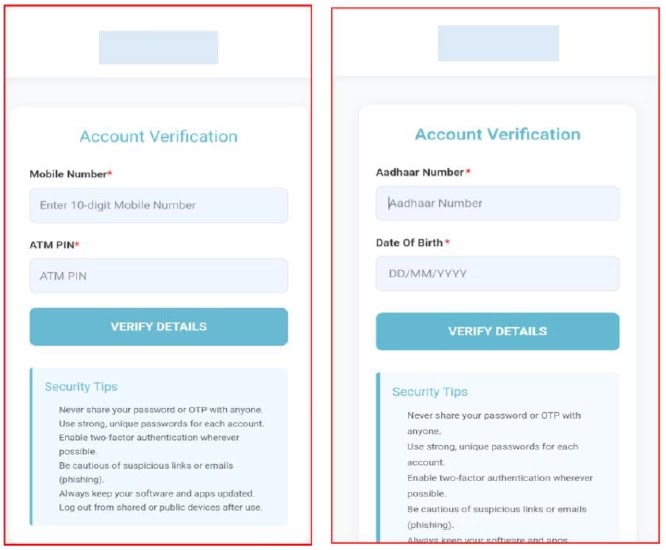
CYFIRMA says the malware works as a multi-stage dropper. The first app acts as a loader, while a hidden second payload handles SMS interception, call control, USSD execution, credential theft, and remote command activity.

Access content across the globe at the highest speed rate.
🔥 Save 81% + 2 bonus months! 🔥
70% of our readers choose Private Internet Access
70% of our readers choose ExpressVPN
2
Browse the web from multiple devices with industry-standard security protocols.
🔥 Save 73%! 🔥

Faster dedicated servers for specific actions (currently at summer discounts)
🔥 Save 69%! 🔥
The campaign is dangerous because it abuses a routine banking process that Indian users already recognize. KYC updates are common, so attackers use urgency and fake compliance screens to make the request look believable.
How the fake KYC scam works
The attack starts when a victim receives an APK file through WhatsApp or another messaging channel. The app presents itself as a “Banking KYC” verification service and claims the user must complete an update.
Once opened, the app shows an “Update Required” screen with an “Install Update” button. Tapping it triggers a VPN permission request and then asks the user to allow app installation from unknown sources.
After those permissions are granted, the dropper decrypts and installs a hidden second APK in the background. The secondary payload has been identified as com.am5maw3.android, and it removes itself from the launcher so users do not see a normal app icon.
| Attack stage | What happens |
|---|---|
| Delivery | APK is shared through WhatsApp as a fake KYC app |
| First screen | User sees a fake “Update Required” prompt |
| Permission abuse | App asks for VPN and unknown app install access |
| Payload install | Dropper decrypts and installs a hidden second APK |
| Stealth | Payload hides from the app launcher |
| Data theft | Phishing screens collect banking and identity details |
| Remote control | Firebase messages deliver attacker commands |
What KYCShadow steals from victims
The malware uses a WebView-based phishing flow to collect data step by step. CYFIRMA says it asks for a mobile number, ATM PIN, Aadhaar number, date of birth, and full card details, including card number, expiry date, CVV, and PIN.
After the victim completes the fake process, the app shows a confirmation message saying verification is in progress. In reality, the stolen data has already been encrypted locally and sent to the attacker’s backend at jsonapi[.]biz.
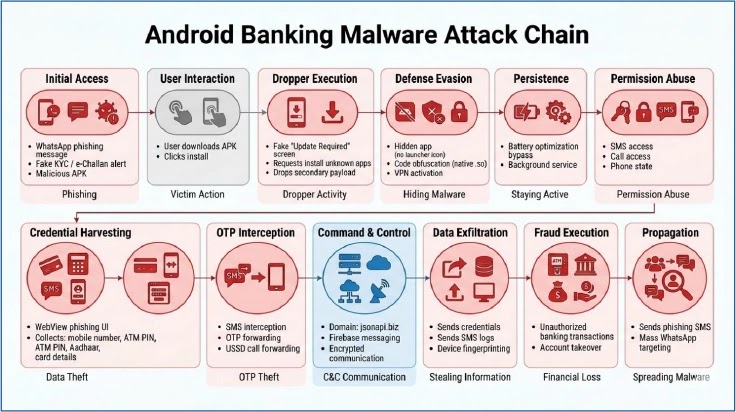
The fake flow gives attackers enough information to attempt account takeover, card fraud, OTP abuse, and follow-up social engineering. It also gives them time because the final screen tells the victim to wait.
SMS, calls, VPN and Firebase make the malware harder to spot
KYCShadow does more than steal typed information. Once active, the secondary payload can intercept SMS messages, extract the full SMS inbox, send SMS messages, place calls, run USSD codes, and manipulate call forwarding.
This is especially risky in banking fraud because OTPs often arrive by SMS. If malware can read or forward those messages, attackers may complete unauthorized transactions before the victim notices.
The malware also registers with Firebase Cloud Messaging, which gives attackers a push-based command channel. CYFIRMA says supported commands include SET_SMS_FORWARD, GET_SMS_LOGS, MAKE_CALL, RUN_USSD, SEND_SMS, PING, and SYNC_STATUS.
| Capability | Risk |
|---|---|
| SMS interception | OTP theft and account takeover |
| Bulk inbox extraction | Theft of previous banking messages |
| Remote SMS sending | Fraud messages sent from victim’s phone |
| Call placement | Abuse of phone services without user action |
| USSD execution | Call forwarding or telecom account manipulation |
| Hidden launcher icon | User may not know the app exists |
| Full-tunnel VPN | Device traffic can be monitored or disrupted |
| Firebase C2 | Commands can reach the device in real time |
Why the VPN request is a major warning sign
The malware asks the victim to approve a VPN connection. CYFIRMA says the app configures a full-tunnel VPN using a local address and routes device traffic through an app-controlled layer.
This can help the malware inspect, filter, or disrupt outbound traffic. It may also make it harder for the phone to contact security services or reputation systems.
For normal banking apps, a sudden VPN approval prompt during KYC verification should raise suspicion. Users should stop immediately if a bank update asks them to install an APK, enable unknown app installs, or approve a VPN connection.
The campaign may link to earlier Indian APK fraud operations
CYFIRMA says KYCShadow shows strong links to earlier mobile financial fraud campaigns involving fake RTO e-Challan apps. The connection comes from similar infrastructure, similar malware design patterns, and related operating methods.
The infrastructure pattern also stands out. CYFIRMA lists jsonapi[.]biz as the current C2 endpoint and says related campaigns used jsonserv[.]xyz and jsonserv[.]biz.
This suggests the operators may be rotating domains while keeping the same general fraud model. The goal stays the same: trick users into installing APKs, capture banking data, intercept OTPs, and control parts of the infected device.
Indicators from the KYCShadow campaign
| Indicator | Detail |
|---|---|
| Malware name | KYCShadow |
| Target region | India |
| Delivery method | WhatsApp APK sharing |
| Fake theme | Banking KYC verification |
| Primary C2 | jsonapi[.]biz |
| Related domains | jsonserv[.]biz, jsonserv[.]xyz |
| Secondary payload | com.am5maw3.android |
| Remote control | Firebase Cloud Messaging |
| Stolen data | ATM PIN, Aadhaar details, card data, OTPs |
| Reported dropper hash | 34479b18597f1a0deb5d55b8450bc21af1d1f638c4ceca1ee19e6f5ac89d6be2 |
| Reported dropped APK hash | 1d261b45e73b5b712becb12ed182ec89d3dd0d73143a2dd8ff5512da489a50eb |
What Android users should do now
Users should never install banking apps or KYC tools received through WhatsApp, SMS, Telegram, or random links. Banking apps should only come from official app stores or verified bank websites.
Google says Play Protect scans apps during installation and periodically checks devices for harmful apps. Users should keep Play Protect enabled and avoid approving unknown app installs unless they fully trust the source.
Anyone who already installed a suspicious KYC APK should disconnect from the internet, uninstall the app if visible, contact the bank, block affected cards or UPI services, change banking passwords from another clean device, and report financial fraud quickly.
What banks and security teams should monitor
Banks and fraud teams should watch for unusual OTP requests, sudden transaction attempts, new device activity, SIM or call-forwarding changes, and suspicious traffic to known domains from Android devices.
Security teams should block or monitor jsonapi[.]biz, jsonserv[.]biz, and jsonserv[.]xyz across DNS, firewall, and secure web gateway controls. CYFIRMA also recommends detection for fake update prompts, VPN activation requests, silent APK installation, and WebView phishing interfaces.
In India, victims of online financial fraud can report incidents through the National Cyber Crime Reporting Portal or call the 1930 cyber fraud helpline. The Ministry of Home Affairs says 1930 helps citizens report financial cyber fraud quickly through the national reporting system.
Quick safety checklist
- Do not install APK files received through WhatsApp or SMS.
- Do not trust messages claiming urgent KYC failure or account blocking.
- Keep “Install unknown apps” disabled.
- Keep Google Play Protect turned on.
- Do not enter ATM PIN, CVV, Aadhaar, or OTP details into unknown apps.
- Treat unexpected VPN prompts as suspicious.
- Check for unknown apps that do not appear normally in the launcher.
- Contact your bank immediately if you entered card or KYC details.
- Report online financial fraud through 1930 or the cybercrime portal in India.
FAQ
KYCShadow is an Android banking malware campaign that uses fake KYC verification apps to steal financial and identity data from Indian users.
It spreads through APK files shared on WhatsApp or similar messaging platforms. The app pretends to be a banking KYC verification tool.
It can collect mobile numbers, ATM PINs, Aadhaar details, date of birth, card numbers, expiry dates, CVV codes, PINs, OTPs, SMS messages, and device logs.
The VPN permission lets the malware route device traffic through an app-controlled layer. This can help it monitor, filter, or disrupt traffic from the infected phone.


Read our disclosure page to find out how can you help VPNCentral sustain the editorial team Read more


Improve this guide




User forum
0 messages