
OilRig hides C2 configuration inside Google Drive image using steganography


 6 min. read
  Published on
OilRig has been linked to a new multi-stage phishing campaign that hides command-and-control configuration inside a normal-looking PNG image hosted on Google Drive. The campaign uses LSB steganography, cloud service abuse, macro execution, and in-memory module loading to make the attack chain harder to detect.
The Iranian threat group, also tracked as APT34 and Helix Kitten, used a malicious Excel file as the entry point. Once the victim enabled macros, the malware pulled data from GitHub, fetched an image from Google Drive, extracted hidden configuration from that image, and then used Telegram Bot API for C2 communication.

Access content across the globe at the highest speed rate.
70% of our readers choose Private Internet Access
70% of our readers choose ExpressVPN

Browse the web from multiple devices with industry-standard security protocols.

Faster dedicated servers for specific actions (currently at summer discounts)
The campaign matters because it shows how attackers continue to hide malicious infrastructure behind trusted services. GitHub, Google Drive, and Telegram are common business or consumer platforms, which can make suspicious activity harder to separate from normal traffic.
How the OilRig attack starts
The campaign begins with a malicious Excel macro document tied to Iran-related social unrest themes. According to 360 Advanced Threat Research Institute, the lure used filenames related to a “final list” for Tehran and referenced the Iranian calendar year 1404, which maps to late 2025 and early 2026.
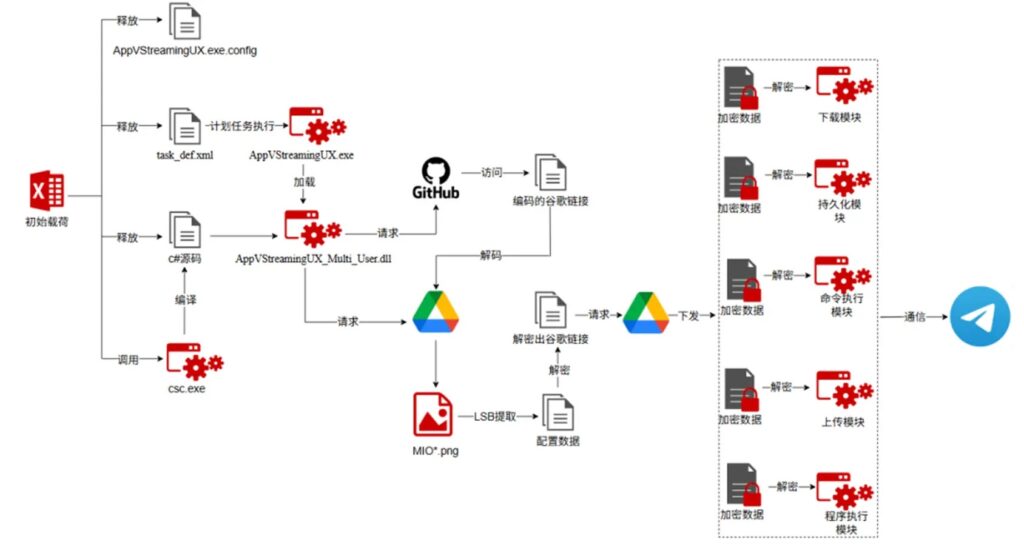
When the victim opens the file and enables macros, the VBA code extracts encoded C# source code from the document’s CustomXMLParts section. It then uses the legitimate Windows C# compiler, csc.exe, to build a malicious loader on the victim’s machine.
That loader is saved as AppVStreamingUX_Multi_User.dll, giving the malware a way to continue the next stage without dropping a simple, obvious executable payload.
| Stage | What happens |
|---|---|
| Initial lure | Victim receives a malicious Excel macro file |
| Macro execution | VBA extracts encoded C# code from CustomXMLParts |
| Local compilation | csc.exe builds the malicious loader |
| GitHub access | Loader downloads encoded configuration data |
| Google Drive access | Loader retrieves a PNG image named MIO9.png |
| Steganography | Hidden C2 data is extracted from the image |
| Telegram C2 | Malware communicates through Telegram Bot API |
Why the Google Drive image matters
The most notable part of the campaign is the use of an image file named MIO9.png. The image looked harmless, but it contained encrypted C2 configuration hidden inside the least significant bits of its pixels.
This method is known as LSB steganography. It changes tiny parts of image data in a way that usually does not visibly alter the picture, but still lets attackers store hidden information inside the file.
After downloading the image, the loader used a custom LSB extraction routine, then decoded the data with Base64 and XOR. The recovered configuration included a Telegram bot token, a chat ID, and five module download links labeled m1 through m5.
What the hidden modules can do
The modules gave the attackers several remote-control functions. The configuration pointed to modules for persistence, file upload, file download, command execution, and application launch.
The modules were loaded directly into memory, which reduces the number of obvious files left on disk. This technique can make endpoint detection harder, especially when defenders rely heavily on static file scanning.
The malware also used scheduled tasks to maintain persistence after reboot. Every time the malware activated, it sent an “is online” heartbeat through Telegram, confirming that the infected system remained available to the attacker.
| Module label | Function |
|---|---|
pr | Persistence |
up | File upload |
do | File download |
cm | Command execution |
runApp | Application launch |
OilRig’s wider threat profile
MITRE tracks OilRig as group G0049 and lists several associated names, including APT34, Helix Kitten, Evasive Serpens, Hazel Sandstorm, EUROPIUM, Earth Simnavaz, Crambus, and TA452.
360 describes APT-C-49, or OilRig, as an advanced persistent threat group linked to Iranian intelligence interests. Its reported targets include government, finance, energy, telecom, and chemical sectors across the Middle East, the United States, Europe, and parts of Asia.
This latest campaign fits OilRig’s known pattern of using phishing, cloud infrastructure, and custom malware to support intelligence collection. The difference here is the layered use of cloud services and image steganography to hide configuration delivery.
What makes this campaign harder to detect
The attack avoids relying on one obvious malicious server. It uses GitHub to host encoded configuration, Google Drive to store the steganographic image, and Telegram to handle command communication.
That creates a detection challenge. Blocking all access to these services may not work for many organizations because employees may use them for legitimate reasons.
The better approach is to look for suspicious combinations. For example, an Excel process launching macro activity, compiling C# code with csc.exe, reaching GitHub and Google Drive, then communicating with Telegram should raise immediate concern.

Key indicators from the campaign
| Indicator | Detail |
|---|---|
| Threat actor | OilRig, also known as APT34 and Helix Kitten |
| Tracked by 360 as | APT-C-49 |
| Initial file type | Excel macro document |
| Lure theme | Iran-related social unrest |
| Loader name | AppVStreamingUX_Multi_User.dll |
| GitHub account mentioned | johnpeterson1304 |
| GitHub file | tamiManager.txt |
| Google Drive image | MIO9.png |
| Technique | LSB steganography |
| C2 channel | Telegram Bot API |
| Persistence | Windows scheduled tasks |
How security teams can reduce the risk
Organizations should start by tightening macro controls. Office macros from untrusted sources remain one of the easiest ways for attackers to trigger complex malware chains.
Security teams should also monitor unusual child processes from Office applications. Excel launching csc.exe, writing source code to temporary folders, or creating scheduled tasks should trigger investigation.
Network teams should review outbound traffic patterns involving GitHub, Google Drive, and Telegram. The goal is not to block trusted services blindly, but to detect suspicious access from unexpected processes or endpoints.
- Disable macros from untrusted documents.
- Block Office apps from launching compilers and scripting tools where possible.
- Monitor
csc.exeexecution from user directories and Office-related process trees. - Detect scheduled task creation after Office document execution.
- Inspect unusual Google Drive downloads triggered by non-browser processes.
- Review Telegram Bot API traffic from corporate endpoints.
- Hunt for unknown DLLs loaded from local app data or temp paths.
- Add in-memory module loading and DLL side-loading detections to EDR rules.
Why defenders should watch cloud service abuse
Cloud service abuse remains attractive because attackers can blend malicious traffic with normal platform usage. GitHub, Google Drive, and Telegram all support legitimate workflows, but they can also help attackers distribute payloads, hide configuration, and keep C2 traffic moving.
This campaign shows how one attack chain can split the workload across multiple trusted services. One service stores encoded data, another hosts the hidden configuration, and another handles communication.
That split makes traditional domain blocklists less useful. Defenders need process-aware monitoring, behavioral rules, and stronger inspection of suspicious automation from Office documents.
FAQ
OilRig is an Iranian cyberespionage group also tracked as APT34 and Helix Kitten. MITRE tracks it as group G0049 and lists several related aliases used by security vendors
LSB steganography hides data inside the least significant bits of an image or other media file. The image can still look normal to a user while carrying hidden information for malware.
The malware downloaded a PNG image named MIO9.png from Google Drive. The image contained encrypted C2 configuration data hidden through LSB steganography.
The loader contacted a GitHub account and downloaded a text file named tamiManager.txt. After Base64 decoding, that file led the malware to the Google Drive image containing the hidden configuration.


Read our disclosure page to find out how can you help VPNCentral sustain the editorial team Read more


Improve this guide

User forum
0 messages