
Cursor extension flaw can expose developer API keys and session tokens


 6 min. read
  Published on

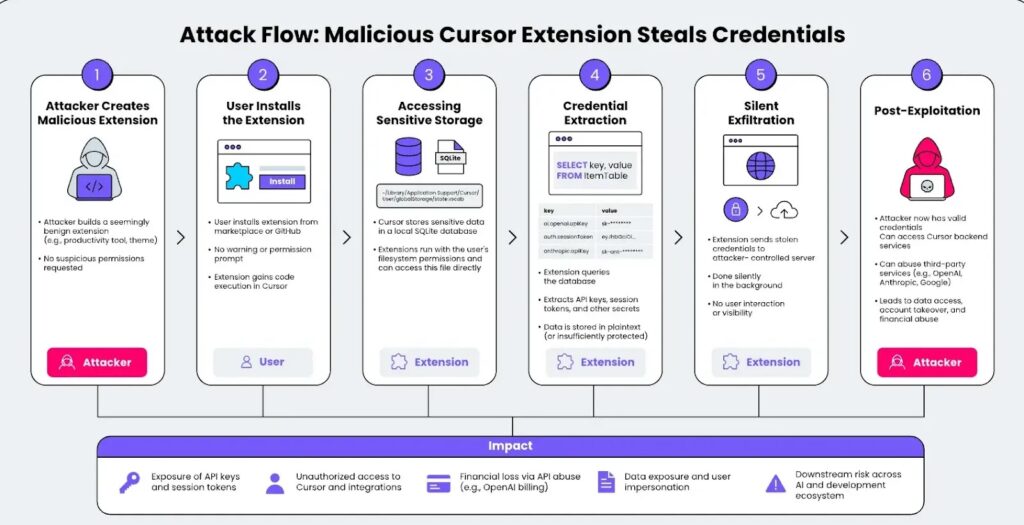
A newly disclosed Cursor security issue can let any installed extension access developer API keys and session tokens stored on the local machine. Researchers at LayerX call the issue CursorJacking and rate it as high severity with a CVSS score of 8.2.
The risk comes from how Cursor stores sensitive credentials. LayerX says Cursor keeps API keys and session tokens in a local SQLite database instead of protected system storage such as macOS Keychain or Windows Credential Manager.

Access content across the globe at the highest speed rate.
70% of our readers choose Private Internet Access
70% of our readers choose ExpressVPN

Browse the web from multiple devices with industry-standard security protocols.

Faster dedicated servers for specific actions (currently at summer discounts)
The issue matters because developers often connect Cursor to powerful AI and cloud services. If a malicious extension steals those credentials, attackers may gain access to accounts, prompts, metadata, backend services, and billable API usage.
At a glance
| Item | Details |
|---|---|
| Issue name | CursorJacking |
| Affected product | Cursor |
| Reported by | LayerX |
| Severity | High, CVSS 8.2 |
| Main weakness | Missing access control between extensions and local credential storage |
| Credential location reported by LayerX | ~/Library/Application Support/Cursor/User/globalStorage/state.vscdb |
| Reported fix status | LayerX says the issue remained unfixed as of April 28, 2026 |
How the Cursor credential exposure works
Cursor supports extensions, which makes the editor more useful for developers who want themes, language tools, productivity helpers, and workflow integrations. That same extension model can become dangerous if a malicious extension gains access to sensitive local files.
LayerX says Cursor does not enforce a strict boundary between installed extensions and the SQLite database where sensitive credentials are stored. As a result, a rogue extension can read the database without asking for special permission.
The attack does not require the user to click through a second warning after installation. Once the extension runs, it can query the database, extract credentials, and send them to an attacker-controlled server in the background.
What a malicious extension could steal
- Cursor session tokens
- OpenAI API keys
- Anthropic API keys
- Google AI or cloud-related tokens
- Cached authentication artifacts
- Configuration data linked to connected services
- Metadata tied to developer workflows
The impact depends on what the developer stored inside Cursor and which services those credentials can access. A stolen AI API key may allow attackers to run expensive automated requests, while a stolen session token may support impersonation.
For teams using Cursor in enterprise environments, the risk can extend beyond one developer workstation. A single compromised extension could expose secrets tied to internal tools, model providers, source code workflows, or shared team accounts.
Why extension trust matters
Cursor’s official documentation says the editor lets users install and manage VS Code extensions. This compatibility gives developers flexibility, but it also means extension security becomes part of the overall threat model.
A harmless-looking theme or productivity add-on can still run code inside the editor environment. If the editor does not isolate sensitive storage, that extension may become a credential theft channel.
LayerX reported the issue to Cursor on February 1, 2026. The vendor response, quoted by LayerX, said extensions operate within the same local trust boundary as the user and that local applications with file system access could read application data stores.
Potential impact for developers and teams
| Risk | What it means |
|---|---|
| API billing abuse | Attackers may use stolen AI keys to generate large usage charges. |
| Account takeover | Session tokens may allow attackers to impersonate the developer. |
| Data exposure | Prompts, completions, metadata, or connected service data may become exposed. |
| Third-party service compromise | Keys for OpenAI, Anthropic, Google, or other services may give attackers broader access. |
| Supply-chain risk | A rogue extension can affect developer machines used to build, test, or deploy software. |
What developers should do now
- Review every installed Cursor extension and remove anything unnecessary.
- Install extensions only from trusted publishers and official project pages.
- Rotate AI provider API keys if an untrusted extension was installed.
- Revoke old session tokens where possible.
- Check cloud and AI billing dashboards for unexpected usage spikes.
- Review network logs for unusual outbound traffic from Cursor or extension processes.
- Avoid storing broad, long-lived API keys in local tools when scoped or temporary keys can work.
Teams should also create an approved extension list for developers. That gives security teams a clear way to control which plugins can run in sensitive coding environments.
Organizations that use endpoint detection tools should monitor for extensions reading Cursor’s global storage database or sending credential-like data to unknown destinations. This can help detect abuse even before a vendor-side fix becomes available.
What Cursor should change
LayerX recommends stronger isolation between extensions and sensitive credential storage. Sensitive keys should not sit in a normal local database that any extension can read directly.
A safer model would store credentials in encrypted system-level services, such as macOS Keychain or Windows Credential Manager. Cursor could also enforce a permission model that prevents extensions from reaching credential storage unless the user explicitly approves that access.
Cursor’s own security page says potential vulnerabilities should be reported to its security team and that the company assesses upstream security patches based on risk and impact. The extension credential issue shows why local client security now matters as much as cloud-side AI privacy controls.
Why this matters for AI coding tools
AI coding environments sit close to sensitive development data. They can connect to source code, internal documentation, secrets, cloud APIs, model providers, and deployment workflows.
That makes them attractive targets for attackers. Instead of attacking a production server directly, a malicious actor can target the developer toolchain and look for tokens that unlock other systems.
For developers, the practical lesson is clear. Treat coding extensions like software with real access, not like simple visual add-ons. Every plugin can become part of the security boundary.
FAQ
CursorJacking is the name LayerX gave to a Cursor security issue that may allow installed extensions to access locally stored API keys and session tokens.
The public reports reviewed here describe the issue with a CVSS score of 8.2, but they do not list a CVE identifier for this specific extension credential exposure.
LayerX says Cursor stores sensitive credentials in a local SQLite database at ~/Library/Application Support/Cursor/User/globalStorage/state.vscdb on macOS.
LayerX says any installed Cursor extension can read the local database because Cursor does not enforce access control boundaries between extensions and that credential store.


Read our disclosure page to find out how can you help VPNCentral sustain the editorial team Read more


Improve this guide

User forum
0 messages