
How Top SOCs and MSSPs Stop Phishing Incidents Missed by Email Filters


 9 min. read
  Published on
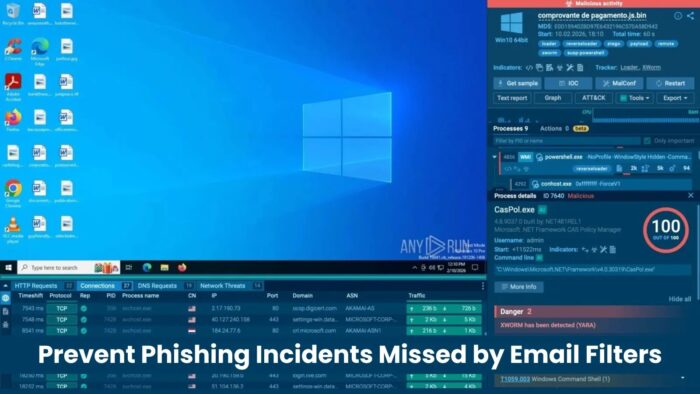
Email filters remain a critical layer of defense, but they cannot stop every phishing attack. Modern campaigns often reveal the real threat only after a user clicks, passes a CAPTCHA, follows redirects, or lands on a fake login page built to steal credentials and one-time passcodes.
For SOCs and MSSPs, the main challenge is no longer only blocking suspicious emails at delivery. Teams also need to understand what happened after the message reached the inbox, whether the user interacted with it, and whether accounts or devices now require containment.

Access content across the globe at the highest speed rate.
70% of our readers choose Private Internet Access
70% of our readers choose ExpressVPN

Browse the web from multiple devices with industry-standard security protocols.

Faster dedicated servers for specific actions (currently at summer discounts)
Top-performing teams close that gap with behavior-based phishing analysis. They inspect the full attack chain in a safe environment, confirm the threat quickly, and use clear evidence to decide whether to block domains, reset credentials, isolate endpoints, or escalate the case.
Why phishing still gets past email filters
Email security tools usually make a decision at the moment of delivery. They evaluate the sender, message content, headers, links, attachments, and known indicators. That works well against many commodity threats, but it struggles when attackers delay the malicious behavior.
Phishing kits now use fresh domains, redirect chains, CAPTCHA checks, geofencing, device fingerprinting, and legitimate cloud or remote access services. The email may look harmless at first because the dangerous page appears later in the browser.
This creates a visibility gap. The filter sees one part of the campaign, while the SOC needs to understand the whole journey from email click to credential theft, OTP capture, file download, or remote management tool installation.
| Phishing tactic | Why email filters may miss it | What SOCs need to inspect |
|---|---|---|
| Fresh domains | The domain may not have enough reputation history at delivery time. | Redirects, final landing pages, domain age, and related infrastructure. |
| CAPTCHA gates | Automated scanners may not reach the phishing page. | Post-CAPTCHA behavior and credential prompts. |
| Redirect chains | The first URL may look clean or generic. | Every hop between the email link and the final destination. |
| OTP theft | The email contains no malware attachment. | Fake login flows, MFA prompts, and session theft indicators. |
| RMM abuse | The downloaded tool may be legitimate software. | Context, delivery method, command activity, and remote access behavior. |
Real phishing campaigns unfold after the click
Recent phishing campaigns show why post-delivery analysis matters. ANY.RUN researchers documented fake event invitation attacks that start with a simple lure link, move through a CAPTCHA page, and then present an event-themed website.
From there, the attack can branch into credential theft, one-time password interception, or delivery of legitimate remote monitoring and management tools. This kind of campaign creates problems for filters because the first visible email does not always contain an obvious malicious file.
The risk appears through behavior. The user moves through several browser steps, enters credentials, confirms an OTP, or installs software that gives attackers remote access. SOC teams need that sequence in front of them before they can make a confident decision.
How mature SOCs investigate missed phishing
Mature SOCs do not treat a missed phishing email as a single artifact. They treat it as an attack path. Analysts safely open the link, follow the redirects, observe page changes, capture network traffic, identify dropped files, and document every stage.
This helps teams decide whether the alert needs user outreach, credential reset, mailbox search, endpoint isolation, domain blocking, or identity provider investigation. It also gives MSSPs stronger evidence when they need to explain risk to clients.
Behavior-based analysis gives analysts a faster answer to the most important questions: Did the user reach a fake login page? Was an OTP requested? Did the page download a file? Did it attempt to launch a remote access tool? Did it contact known malicious infrastructure?
- Confirm whether the email is phishing or only suspicious.
- Reveal redirects and final landing pages.
- Identify credential harvesting pages.
- Detect OTP capture attempts.
- Inspect downloads and remote access tool delivery.
- Collect IOCs for SIEM, EDR, firewall, and email security tools.
- Give leadership clear evidence for containment decisions.
Why interactive sandboxing improves phishing response
Interactive sandboxing lets analysts detonate suspicious links and files in a safe cloud environment. Instead of guessing based on email metadata alone, teams can interact with the page and observe what the campaign does in real time.
ANY.RUN’s interactive sandbox supports this type of phishing analysis by showing redirects, network requests, dropped files, page behavior, and related indicators. This helps analysts move from uncertainty to a decision faster.
For SOCs and MSSPs, that speed matters. ANY.RUN reports measurable workflow improvements, including a 21-minute reduction in MTTR per case, faster triage for most users, and fewer unnecessary Tier 1 to Tier 2 escalations.
| SOC problem | Behavior-based analysis outcome |
|---|---|
| Unclear phishing verdicts | Analysts can observe the actual landing page and attack flow. |
| Slow triage | Teams can validate suspicious links in a controlled environment. |
| Excessive escalations | Tier 1 analysts receive clearer evidence for initial decisions. |
| Missed post-click behavior | Redirects, downloads, fake forms, and network traffic become visible. |
| Weak incident evidence | Teams can export IOCs, screenshots, behavior logs, and network details. |
What top SOCs do after confirming phishing
Once analysts confirm phishing, the next step is containment. The team should search for similar emails across mailboxes, block related URLs and domains, check identity logs, and determine whether any user entered credentials.
If the campaign targeted OTPs or session access, teams should move quickly. Password resets alone may not be enough if attackers captured tokens or created persistence through cloud apps, inbox rules, OAuth grants, or remote access tools.
For MSSPs, the response also needs strong communication. Clients need to know what happened, what got blocked, which users interacted with the lure, and what actions reduce future exposure.
- Confirm the phishing flow in a safe analysis environment.
- Extract domains, URLs, IPs, file hashes, and related indicators.
- Search all mailboxes for matching subject lines, senders, and URLs.
- Block malicious infrastructure across email, DNS, proxy, and firewall controls.
- Check identity logs for suspicious sign-ins, MFA prompts, and token activity.
- Reset exposed credentials and revoke active sessions where needed.
- Investigate endpoints if the campaign delivered RMM tools or files.
- Update detections and share findings with the client or internal response team.
Why phishing response needs identity context
Many phishing attacks now target access rather than malware execution. Attackers want passwords, OTPs, session tokens, OAuth grants, or remote access approval. That means email, identity, endpoint, and network teams need to work from the same evidence.
Top SOCs connect phishing triage with identity monitoring. They check whether the user entered credentials, whether MFA prompts appeared, whether impossible travel occurred, and whether new inbox rules or suspicious OAuth apps appeared after the click.

This approach reduces business exposure. Instead of closing an alert after blocking a URL, the team checks whether the user’s account, endpoint, or session state changed.
What security leaders should measure
Security leaders should measure phishing response by outcomes, not only by how many emails the filter blocks. Missed messages will happen. The stronger question is how quickly the team detects exposure and how confidently it contains the incident.
Useful metrics include mean time to triage, mean time to contain, percentage of phishing alerts resolved at Tier 1, number of user-reported emails confirmed as malicious, and time from click to credential reset.
For MSSPs, these metrics also support service quality. Faster phishing validation means better SLAs, fewer noisy escalations, and clearer reporting for customers who need proof of action.
| Metric | Why it matters |
|---|---|
| Mean time to triage | Shows how quickly analysts confirm whether a suspicious email is malicious. |
| Mean time to contain | Shows how fast the team reduces business exposure after confirmation. |
| Tier 1 resolution rate | Shows whether junior analysts have enough evidence to close cases safely. |
| Post-click visibility | Shows whether the team can inspect redirects, fake pages, downloads, and traffic. |
| Credential exposure time | Shows how long compromised accounts remain usable after a phishing event. |
Building a stronger phishing response workflow
Email filters should remain the first line of defense, but SOCs and MSSPs need a second layer for the threats that get through. That second layer should focus on behavior, identity impact, endpoint risk, and fast containment.
ANY.RUN helps teams analyze suspicious links and files in a live sandbox, capture IOCs, and understand the full phishing path before making response decisions. That gives analysts the context they need to stop missed emails from becoming wider incidents.
The strongest phishing programs combine prevention, user reporting, sandbox analysis, identity checks, and rapid containment. Filters reduce volume, but behavior-based investigation helps teams close the cases that filters miss.
FAQ
Phishing emails can bypass filters because attackers use fresh domains, redirects, CAPTCHA checks, delayed payloads, fake login pages, and legitimate remote access tools. The dangerous behavior often appears after the user clicks, not at the moment of email delivery.
SOCs investigate phishing links by opening them in controlled analysis environments such as interactive sandboxes. This lets analysts observe redirects, fake login pages, OTP prompts, downloads, and network traffic without exposing real users or production systems.
Teams should inspect the full attack path, check whether credentials or OTPs were entered, review identity logs, revoke sessions, reset passwords where needed, block related infrastructure, and search mailboxes for similar messages.
ANY.RUN lets analysts open suspicious links and files in an interactive sandbox, observe post-click behavior, collect IOCs, and confirm whether a campaign involves credential theft, OTP capture, downloads, or remote access tool delivery.
Behavior-based phishing analysis helps MSSPs validate alerts faster, reduce unnecessary escalations, collect clear evidence for clients, and contain account or endpoint exposure before a missed email becomes a larger incident.


Read our disclosure page to find out how can you help VPNCentral sustain the editorial team Read more


Improve this guide




User forum
0 messages