
Kimsuky hackers use LNK and JSE lures to target recruiters, crypto users, and defense officials


 8 min. read
  Published on
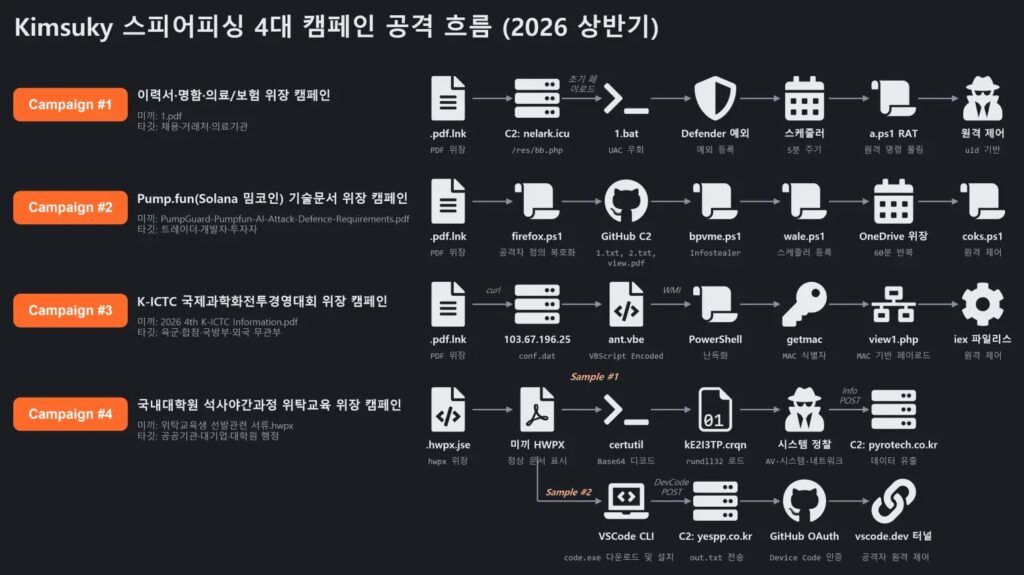
North Korea-linked Kimsuky hackers ran four spear-phishing campaigns in the first half of 2026, using LNK and JSE files to target recruiters, cryptocurrency users, developers, defense officials, and graduate school administrators.
The campaigns used different themes, but the attack flow stayed similar. Victims opened a fake document, saw a decoy file, and the malware quietly dropped payloads, created persistence, and connected to attacker-controlled infrastructure.

Access content across the globe at the highest speed rate.
70% of our readers choose Private Internet Access
70% of our readers choose ExpressVPN

Browse the web from multiple devices with industry-standard security protocols.

Faster dedicated servers for specific actions (currently at summer discounts)
LogPresso’s analysis shows the group abusing both dedicated servers and trusted platforms, including GitHub, Microsoft CDN, and VSCode tunnels. This helped the attackers make malicious traffic look closer to normal business or developer activity.
Four campaigns used different lures
Kimsuky tailored each lure to the target. Recruiters received fake resumes, business cards, or medical and insurance documents. Crypto users and developers saw material tied to a fake Solana meme coin security project.
Defense-linked targets received files related to the K-ICTC International Scientific Combat Management Competition. A separate campaign used Korean graduate school training documents to target public-sector employees and academic administrators.
The targeting pattern fits Kimsuky’s long-running focus on intelligence collection, especially around South Korea, defense, foreign policy, and strategically useful organizations.
| Campaign | Lure theme | Main targets | Initial file type | C2 method |
|---|---|---|---|---|
| Campaign 1 | Resume, business card, medical and insurance documents | Recruiters, business contacts, medical and insurance workers | LNK disguised as PDF | nelark.icu |
| Campaign 2 | Pump.fun and Solana meme coin security material | Crypto traders, developers, and investors | LNK disguised as PDF | GitHub repository abuse |
| Campaign 3 | K-ICTC military competition document | Defense officials and foreign military attachés | LNK disguised as PDF | 103.67.196.25 |
| Campaign 4 | Graduate school training documents | Public-sector employees and graduate school administrators | JSE disguised as HWPX | yespp.co.kr and VSCode tunnel |
LNK files hid decoys and payloads
Three campaigns used Windows LNK shortcut files disguised as PDF documents. When opened, the files displayed a normal-looking decoy document while extracting hidden payload data from inside the same shortcut file.
That technique works because attackers can append extra data to a shortcut file while keeping it executable. The decoy keeps the victim from becoming suspicious, while the malware moves to the next stage.
In one campaign, the LNK file dropped a decoy PDF into the Temp folder and placed a secondary OneDrive.lnk file in the Startup folder. This gave the malware a way to return after reboot.
JSE lure abused hidden file extensions
The fourth campaign used a JSE file with a double extension ending in .hwpx.jse. Since Windows hides known file extensions by default, the victim could see the file as a Korean HWPX document instead of a script.
Once opened, the JSE script used certutil to decode a hidden DLL and rundll32.exe to load it. Both tools are legitimate Windows components, which helps the activity blend into normal system behavior.
This campaign also used VSCode tunnels for persistent remote access. The attackers relied on GitHub OAuth and Microsoft infrastructure rather than only using a custom malware server.
Defense evasion started quickly
LogPresso found that the campaigns moved fast after execution. In some cases, the malware disabled Windows User Account Control, added Microsoft Defender exclusions, and registered scheduled tasks within five minutes.
The scheduled tasks used names that looked like legitimate services, including OneDrive or Intel-related entries. This reduced the chance that a casual user or administrator would notice them.
The attackers also used different victim identifiers across campaigns. Some payloads used unique IDs, while others used IP addresses, time-based filenames, or MAC addresses to track infected machines.
- Fake document opens and displays a decoy file.
- Hidden payloads are extracted or downloaded.
- PowerShell or script components run in the background.
- UAC and Defender settings may be weakened.
- Persistence is created through Startup folder entries, scheduled tasks, or VSCode tunnels.
- Victim systems communicate with attacker-controlled or abused legitimate infrastructure.
Trusted services helped hide command-and-control traffic
A key feature across the campaigns was the abuse of legitimate services. GitHub hosted payloads and supported data collection in one campaign. Microsoft CDN helped deliver files in another.
VSCode tunnels gave the attackers a remote access path through trusted Microsoft and GitHub-related infrastructure. This can make domain reputation checks less effective because the network path does not always look obviously malicious.
That shift makes behavior-based detection more important. Blocking one domain or one hash may miss the next campaign if the group changes infrastructure but keeps the same attack pattern.
Indicators of compromise
Security teams can use these selected indicators to support hunting and triage. Network indicators are defanged to prevent accidental access.
| Type | Indicator | Description |
|---|---|---|
| Domain | nelark[.]icu | C2 domain used in Campaign 1 |
| IP address | 103[.]67[.]196[.]25 | C2 server used in Campaign 3 |
| Domain | yespp[.]co[.]kr | C2 or exfiltration domain used in Campaign 4 |
| VSCode tunnel | vscode[.]dev/tunnel/bizeugene | Remote access tunnel used for persistence |
| URL | hxxps://raw.githubusercontent[.]com/brandonleeodd93-blip/doc7/main/1.txt | GitHub-hosted payload in Campaign 2 |
| URL | hxxp://103[.]67[.]196[.]25/payload.dat | Payload URL used in Campaign 3 |
File indicators defenders should review
Several file names and hashes can help identify related activity. These indicators should be combined with behavior because Kimsuky can change file names and infrastructure between campaigns.
| Type | Indicator | Campaign |
|---|---|---|
| MD5 | 80088af673b0117dbd5cf528021dd970 | 1.pdf.lnk, Campaign 1 |
| MD5 | 0331a83b58231cb0cd3bfe319003ed1a | OneDrive.lnk, Campaign 1 |
| MD5 | a9d5dd632bb90addca480eaa5ff4382 | PumpGuard PDF LNK, Campaign 2 |
| MD5 | b3c90f52e4b86a94ec637fee4354bb84 | 2026 4th K-ICTC Information PDF LNK, Campaign 3 |
| MD5 | 9fe43e08c8f446554340f972dac8a68c | HWPX JSE lure, Campaign 4 |
| MD5 | bb9e9c893b170b3774c150b1d0b93a73 | Encoded payload, Campaign 4 |
Detection should focus on the full behavior chain
LogPresso warned that IOC-only blocking has clear limits. The four campaigns used different lures and infrastructure, but the sequence of behavior remained consistent.
Defenders should watch for LNK files that are unusually large, double-extension files, suspicious PowerShell execution, unexpected Defender exclusions, and UAC being disabled outside normal administrative work.
Scheduled tasks deserve special attention. Kimsuky used task names that looked like normal services, but the commands pulled scripts from remote servers or ran hidden PowerShell.
- Alert on LNK files disguised as PDFs, especially if they exceed normal shortcut size.
- Flag double-extension files such as .hwpx.jse.
- Monitor certutil and rundll32 execution shortly after a script file opens.
- Watch for PowerShell downloading scripts from external infrastructure.
- Investigate new scheduled tasks with OneDrive or Intel-style names.
- Detect UAC registry changes and Defender exclusion additions.
- Review VSCode tunnel activity on systems that do not normally use VSCode remote access.
Why Kimsuky’s latest activity matters
The campaigns show how Kimsuky continues to adapt social engineering to specific communities. Recruiters, crypto users, defense officials, and academic administrators all received lures that matched their work or interests.
The group also continues to rely on legitimate tools and services. That approach helps it bypass simple security filters and makes response harder for teams that depend mostly on domain blocklists.
The safest defense is layered detection. Organizations need user training, attachment controls, PowerShell monitoring, scheduled task review, endpoint telemetry, and cloud-service abuse detection working together.
What organizations should do now
Organizations with exposure to defense, crypto, research, recruitment, public administration, or Korea-related policy work should review these campaigns and hunt for matching behaviors.
Security teams should also check whether users received suspicious ZIP archives, fake PDFs, HWPX-themed files, or messages tied to resumes, Solana tools, K-ICTC documents, and graduate school training.
If activity matches the chain, teams should isolate the host, preserve forensic evidence, reset credentials, review cloud sessions, and check for lateral movement or data collection.
- Search endpoints for suspicious LNK and JSE files.
- Review recent scheduled tasks created under user or SYSTEM context.
- Check for Defender exclusions added without approval.
- Look for UAC being disabled through registry changes.
- Review GitHub, Microsoft CDN, and VSCode tunnel traffic from unusual hosts.
- Hunt for connections to nelark.icu, 103.67.196.25, and yespp.co.kr.
- Reset credentials for affected users and review mailbox activity.
- Block repeat execution paths while preserving evidence for investigation.
FAQ
Kimsuky targeted recruiters, cryptocurrency users and developers, defense officials, foreign military attachés, public-sector employees, and graduate school administrators with tailored spear-phishing lures.
The LNK files were disguised as PDF documents. When opened, they displayed a decoy document while extracting hidden payloads, creating persistence, and downloading additional PowerShell scripts.
The attackers abused trusted services to make command-and-control traffic blend in with normal activity. This can help bypass reputation-based network defenses that focus only on suspicious domains.
Defenders should monitor oversized LNK files, double-extension JSE files, PowerShell download behavior, certutil and rundll32 use after script execution, unexpected scheduled tasks, UAC changes, Defender exclusions, and suspicious VSCode tunnel activity.


Read our disclosure page to find out how can you help VPNCentral sustain the editorial team Read more


Improve this guide
User forum
0 messages